In normal crawl mode – add homepage URL to the main bar
In the top menu:
Click Configuration > Include and add folder with * at the end
E.g. to crawl just the cricket folder on a sports website add:
https://www.example.com/cricket.*


In normal crawl mode – add homepage URL to the main bar
In the top menu:
Click Configuration > Include and add folder with * at the end
E.g. to crawl just the cricket folder on a sports website add:
https://www.example.com/cricket.*
You will need:
At the time of writing, this feature is only available in EU countries.
Create a summary page that lists multiple products, each linking to a detailed product page.
For example, a category page that lists “Top 5 Winter Coats.”
Add the ItemList structured data to your summary page. Here’s an example in JSON-LD format:
<html>
  <head>
    <title>Top 5 Winter Coats</title>
    <script type="application/ld+json">
      {
        "@context": "https://schema.org",
        "@type": "ItemList",
        "itemListElement": [
          {
            "@type": "ListItem",
            "position": 1,
            "item": {
              "@type": "Product",
              "name": "Puffy Coat Series by Goat Coat",
              "image": [
                "https://example.com/photos/1x1/photo.jpg",
                "https://example.com/photos/4x3/photo.jpg",
                "https://example.com/photos/16x9/photo.jpg"
              ],
              "offers": {
                "@type": "AggregateOffer",
                "lowPrice": 45.00,
                "highPrice": 60.00,
                "priceCurrency": "USD"
              },
              "aggregateRating": {
                "@type": "AggregateRating",
                "ratingValue": 4.9,
                "reviewCount": 50
              },
              "url": "https://www.example.com/puffy-coats"
            }
          },
          {
            "@type": "ListItem",
            "position": 2,
            "item": {
              "@type": "Product",
              "name": "Wool Coat Series by Best Coats Around",
              "image": [
                "https://example.com/photos/1x1/photo.jpg",
                "https://example.com/photos/4x3/photo.jpg",
                "https://example.com/photos/16x9/photo.jpg"
              ],
              "offers": {
                "@type": "AggregateOffer",
                "lowPrice": 189.00,
                "highPrice": 200.00,
                "priceCurrency": "USD"
              },
              "aggregateRating": {
                "@type": "AggregateRating",
                "ratingValue": 4.7,
                "reviewCount": 827
              },
              "url": "https://www.example.com/wool-coats"
            }
          },
          {
            "@type": "ListItem",
            "position": 3,
            "item": {
              "@type": "Product",
              "name": "Antarctic Coat by Cold Coats",
              "image": [
                "https://example.com/photos/1x1/photo.jpg",
                "https://example.com/photos/4x3/photo.jpg",
                "https://example.com/photos/16x9/photo.jpg"
              ],
              "offers": {
                "@type": "Offer",
                "price": 45.00,
                "priceCurrency": "USD"
              },
              "aggregateRating": {
                "@type": "AggregateRating",
                "ratingValue": 4.9,
                "reviewCount": 1290
              },
              "url": "https://www.example.com/antarctic-coat"
            }
          }
        ]
      }
    </script>
  </head>
  <body>
  </body>
</html>robots.txt or noindex tags.Each product linked from the summary page should have its own detail page with structured data. For example:
<html>
  <head>
    <title>Puffy Coat Series by Goat Coat</title>
    <script type="application/ld+json">
      {
        "@context": "https://schema.org",
        "@type": "Product",
        "name": "Puffy Coat Series by Goat Coat",
        "image": [
          "https://example.com/photos/1x1/photo.jpg",
          "https://example.com/photos/4x3/photo.jpg",
          "https://example.com/photos/16x9/photo.jpg"
        ],
        "description": "A stylish and warm puffy coat perfect for winter.",
        "offers": {
          "@type": "Offer",
          "price": 45.00,
          "priceCurrency": "USD",
          "url": "https://www.example.com/puffy-coats"
        },
        "aggregateRating": {
          "@type": "AggregateRating",
          "ratingValue": 4.9,
          "reviewCount": 50
        }
      }
    </script>
  </head>
  <body>
  </body>
</html>
That should be it!
Had to categorise some keywords, if there’s a quicker way of doing it – please let me know
=IF(SUMPRODUCT(--ISNUMBER(SEARCH($D$1:$D$19,A2)))>0, "Contains value from range", "Does not contain value from range")
Add another list of relevant words – for example, above I have added sports, to highlight sports netting keywords.
Drag formula down and repeat
I found a quicker way – use Chat GPT and the prompt:
“please can you group these keywords by theme or words containing – e.g. keywords containing “golf”.
Please include the search volume.
The list is set out with a keyword – then a comma, – then the search volume for the keyword, – then a second comma – before the next keyword is listed
funny polo shirts , 170 ,
funny polo shirt , 30 ,
“
replace “funny polo shirts” with a list of your own keywords.
Handy if you have loads of custom extractions set up etc.
Under the Configuration Menu – go to – Profiles>Save As
Configuration > Profiles > Load…


Which can be a nice time saver too!
I pretty much always add the following to the excludes ‘file’, so it’s easier to keep it in the default setup:
^https?://[^/]+/customer/account/.*
^https?://[^/]+/checkout/cart/.*

^.\?.

.js$

.css$
If you work in SEO –
Walk into the developers office/pit/den
Say the following:
“Look, it’s not my fault you were bullied in school for being a bunch of gimps, and if I get another passive-aggressive comment or tut from you bunch of pizza-munching wankers, I’ll drag each of you outside one by one and beat the fuck out of you using my own technical skillset. Now stop being finger-pointing, arrogant pricks and start communicating properly”
Job done

Core Update and Helpful Content System:
Actionable To-Do List:
It generally helps, in theory, to write from experience rather than just giving an overview that anyone could scrape and rewrite from the internet. Include your own images, videos etc.
I don’t have any images of Google updates, see here’s a pic of my dog:

Big brands will still probably have a massive advantage regardless of what they do.
Spam Updates:
General Recommendations:
Hi, this schema is supposed to inform Google who you are targeting with your products and services.
In theory, this could mean that people who fit within your target audience, are more likely to see your website in the search results.
Here’s an example for an ecommerce football website, selling to parents and clubs:
<script type="application/ld+json">
{
  "@context": "http://schema.org",
  "@type": "Store",
  "name": "Ultimate Football Gear",
  "url": "https://www.ultimatefootballgear.com",
  "audience": [
    {
      "@type": "BusinessAudience",
      "audienceType": "Parents",
      "geographicArea": {
        "@type": "AdministrativeArea",
        "name": "Nationwide"
      },
      "suggestedMinIncome": 30000,
      "suggestedMaxIncome": 100000,
      "description": "Middle-class and working-class parents looking for affordable football gear for their children."
    },
    {
      "@type": "BusinessAudience",
      "audienceType": "Sports Clubs",
      "geographicArea": {
        "@type": "AdministrativeArea",
        "name": "Nationwide"
      },
      "description": "Local sports clubs seeking quality football equipment for team use."
    }
  ],
  "offers": {
    "@type": "Offer",
    "itemOffered": {
      "@type": "Product",
      "name": "Youth Football Kit",
      "description": "A complete football kit for young players, perfect for training and matches.",
      "category": "Sporting Goods > Team Sports > Football",
      "sku": "YFK123",
      "brand": {
        "@type": "Brand",
        "name": "Ultimate Football"
      }
    },
    "price": "49.99",
    "priceCurrency": "USD"
  }
}
</script>
^As you can see above, you can combine with product/offers schema.
Here’s a normal example:
<script type="application/ld+json">
{
  "@context": "http://schema.org",
  "@type": "Store",
  "name": "Ultimate Football Gear",
  "url": "https://www.ultimatefootballgear.com",
  "audience": [
    {
      "@type": "BusinessAudience",
      "audienceType": "Parents",
      "geographicArea": {
        "@type": "AdministrativeArea",
        "name": "Nationwide"
      },
      "suggestedMinIncome": 30000,
      "suggestedMaxIncome": 100000,
      "description": "Middle-class and working-class parents looking for affordable football gear for their children."
    },
    {
      "@type": "BusinessAudience",
      "audienceType": "Sports Clubs",
      "geographicArea": {
        "@type": "AdministrativeArea",
        "name": "Nationwide"
      },
      "description": "Local sports clubs seeking quality football equipment for team use."
    }
  ]
}
</script>
Over the past week, the SEO and PPC landscape has seen several significant updates and insights:
*Google Search Suggestions Update:

Based on the recent SEO news, here are some actionable recommendations:
For advanced video SEO, focus on:
Becoming a Full Stack Developer:
Tech SEO Audit and Site Migration Checklist:
These prompts are designed to guide AI in producing detailed, valuable content that addresses specific user needs and adheres to SEO best practices.
Last Updated – a few days ago (probably)
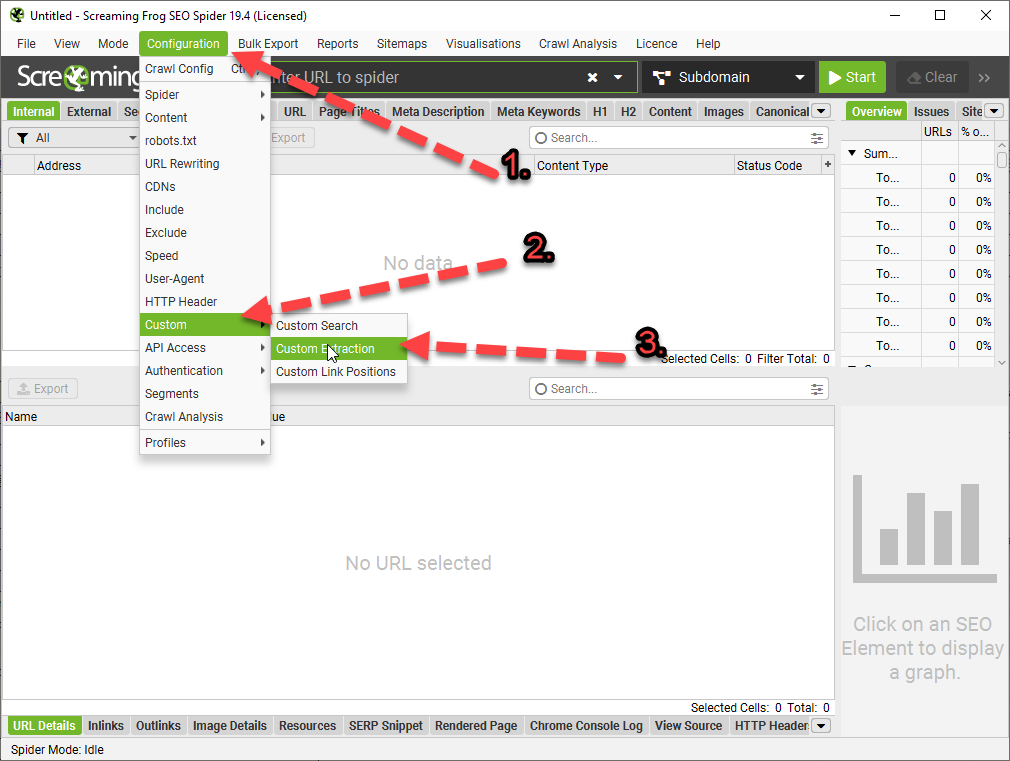


*Click Image to enlarge^
Once you are in the Custom Extraction Window – Choose:
//div[@class='prose']^Enter the above into the 3rd 'box' in the custom extraction window/tab. Replace "prose" with the name of the div you want to scrape.
If you copy the Xpath using Inspect Element – select the exact element you want. For example, don’t select the Div that contains text you want to scrape – select the text itself:

Here are some more examples:
(Please Note – the formatting changes the single quote marks ‘ ‘ – you may need to override them manually with single quotes using your keyboard, before adding to Screaming Frog. For example
//div[@class=’read-more’]
Should be:
//div[@class='read-more']
| XPath | Output |
|---|---|
| //h1 | Extract all H1 tags |
| //h3[1] | Extract the first H3 tag |
| //h3[2] | Extract the second H3 tag |
| //div/p | Extract any <p> contained within a <div> |
| //div[@class=’author’] | Extract any <div> with class “author” (remember to check ‘ quote marks are correct) |
| //p[@class=’bio’] | Extract any <p> with class “bio” |
| //*[@class=’bio’] | Extract any element with class “bio” |
| //ul/li[last()] | Extract the last <li> in a <ul> |
| //ol[@class=’cat’]/li[1] | Extract the first <li> in a <ol> with class “cat” |
| count(//h2) | Count the number of H2’s (set extraction filter to “Function Value”) |
| //a[contains(.,’click here’)] | Extract any link with anchor text containing “click here” |
| //a[starts-with(@title,’Written by’)] | Extract any link with a title starting with “Written by” |
| XPath | Output |
|---|---|
| //@href | Extract all links |
| //a[starts-with(@href,’mailto’)]/@href | Extract link that starts with “mailto” (email address) |
| //img/@src | Extract all image source URLs |
| //img[contains(@class,’aligncenter’)]/@src | Extract all image source URLs for images with the class name containing “aligncenter” |
| //link[@rel=’alternate’] | Extract elements with the rel attribute set to “alternate” |
| //@hreflang | Extract all hreflang values |
I recommend setting the extraction filter to “Extract Inner HTML” for these ones.
Extract Meta Tags:
| XPath | Output |
|---|---|
| //meta[@property=’article:published_time’]/@content | Extract the article publish date (commonly-found meta tag on WordPress websites) |
Extract Open Graph:
| XPath | Output |
|---|---|
| //meta[@property=’og:type’]/@content | Extract the Open Graph type object |
| //meta[@property=’og:image’]/@content | Extract the Open Graph featured image URL |
| //meta[@property=’og:updated_time’]/@content | Extract the Open Graph updated time |
Extract Twitter Cards:
| XPath | Output |
|---|---|
| //meta[@name=’twitter:card’]/@content | Extract the Twitter Card type |
| //meta[@name=’twitter:title’]/@content | Extract the Twitter Card title |
| //meta[@name=’twitter:site’]/@content | Extract the Twitter Card site object (Twitter handle) |
How to Extract Schema Markup in Microdata Format
If it’s in JSON-LD format, then jump to the section on how to extract schema markup with regex.
Extract Schema Types:
| XPath | Output |
|---|---|
| //*[@itemtype]/@itemtype | Extract all of the types of schema markup on a page |
References:
Update:
If the ‘shorter code’ in the tables above doesn’t work for some reason, you may have to right click – inspect and copy the full Xpath code to be more specific with what you want to extract:

For sections of text like paragraphs and on page descriptions, select the actual text in the inspect window before copying the Xpath.
Update 2
We wanted to compare the copy and internal links before and after a site-migration to a new CMS.
To see the links in HTML format – you just need to check “Extract Text” to “Extract Inner HTML” in the final drop down:
(click image to enlarge)

On the new CMS, it was easier to just copy the XPath

I’m glad you asked.
We used it to check that page copy had migrated properly to a new CMS.
We also extracted the HTML within the copy, to check the internal links were still present.
One cool thing you can do – is scrape reviews and then analyse the reviews to see key feedback/pain points that could inform superior design.
Here’s a good way to use custom extraction/search to find text that you want to use for anchor text for internal links:

I’m still looking into how to analyse the reviews – but this tool is a good starting point: https://seoscout.com/tools/text-analyzer
Throw the reviews in and see what words are repeated etc
This tool is also very good:
Or – just paste into Chat GPT and ask for insights and pain-points to help develop a better product.
I asked Chat GPT and Google Gemini why I would want to scrape copy from sites and got these responses:
Monitoring Competitors
Content Strategy Insights: Gather headings, titles, and meta descriptions from competitor websites to gain insights into their content strategies and how they optimize for search engines.
Pricing Information: For e-commerce platforms, you can use custom extraction to keep an eye on competitors’ pricing strategies by pulling prices for similar products.
Promotional Strategies: Collect details on promotions, discounts, or special offers from competitors’ sites to evaluate how they stack up against your own promotional efforts.
Keyword Usage: Identify specific keywords from competitors’ content to understand how they are targeting particular topics or niches.
Backlink Analysis: While Screaming Frog isn’t primarily a backlink tool, you can utilize custom extraction to pinpoint external links on a page, providing insights into a competitor’s backlink strategy.
Optimizing Your Own Website
Content Optimization: Employ custom extraction to review your own site’s headings, titles, meta descriptions, and keyword usage to spot areas that need improvement.
Structural Data: Extract and assess structured data (like Schema markup) across your site to ensure proper implementation and identify potential enhancement opportunities.
Internal Linking: Analyze internal linking structures to understand the flow of page authority throughout your site and to find orphan pages or those with insufficient internal link support.
Audit Forms and Calls to Action (CTAs): Extract form action URLs and CTA links to verify they are working correctly and to optimize their placement and wording.
Identify Outdated Content: Use custom extraction to locate dates and timestamps on your content, which can help you identify articles or pages that may require updates.
Gemini said:
The custom extraction feature in Screaming Frog provides numerous advantages for website analysis and data collection. Here are some important reasons to utilize it:
Go beyond basic SEO metrics: While Screaming Frog offers valuable insights, custom extraction enables you to focus on specific data points that may not be easily accessible, such as product prices, article publish dates, or user reviews.
Gain deeper competitor insights: Extract information on competitor pricing strategies, product descriptions, or content structures to compare with your own website.
Gather information for internal analysis: Monitor specific elements on your site, like call to action (CTA) button text or internal linking structures, to observe changes and assess their impact.
Save time and effort: Collecting data manually can be labor-intensive and prone to errors. Custom extraction streamlines the process, allowing you to efficiently gather information across numerous pages.
Maintain consistent data: By setting up automated data extraction, you ensure uniform data collection over time, which facilitates better trend analysis and comparisons.
Combine extracted data with existing Screaming Frog metrics: Merge the extracted data with other SEO parameters such as page titles, meta descriptions, and internal links for a more thorough analysis.
Create custom reports: Use the extracted data to generate tailored reports for specific purposes, like competitor pricing comparisons or evaluations of content performance.
Monitoring Competitors:
Custom extraction serves as a valuable tool for competitor monitoring in various ways:
Extract competitor pricing data: Keep track of competitor pricing trends, identify potential gaps in your own pricing strategy, and make informed pricing decisions.
Analyze competitor content structure and keywords: Learn how competitors format their content, pinpoint their targeted keywords, and gain insights to enhance your own strategy.
Note for self – for Magento 2, Hyva theme Sub-category page copy – scrape using:
//div[@id='descriptionDiv']Product page descriptions upper and lower divs -//div[@class="product-description"]//*[@id="specifications"]/div/div[2]/div/div/div/div/div//*[@id="description"]/div/div[2]
For personal reference –
//div[@class=’product-description’]
//div[@class=’prose’]
/html/body/div[1]/div[3]/main/div[4]/div/div
//div[@class=’category-description read-more’]
Configuration → Custom → Extraction → Add (one per row). All extract as Extract Text unless noted.
| Name | Type | Selector | Extractor |
|---|---|---|---|
| Meta Description | XPath | //meta[@name='description']/@content | Extract Text |
| Meta Keywords | XPath | //meta[@name='keywords']/@content | Extract Text |
| OG Title | XPath | //meta[@property='og:title']/@content | Extract Text |
| OG Description | XPath | //meta[@property='og:description']/@content | Extract Text |
| H1 Full | CSSPath | h1 | Extract Text |
| All H2s | XPath | //h2 | Extract Text |
| All H3s | XPath | //h3 | Extract Text |
| Product Description Body | CSSPath | .product-description | Extract Text |
| USP / Special Feature Blocks | CSSPath | .special-feature-item | Extract Text |
| Review Titles | CSSPath | [itemprop='name'] | Extract Text |
| Review Bodies | CSSPath | [itemprop='reviewBody'] | Extract Text |
| Breadcrumbs | CSSPath | nav.breadcrumbs | Extract Text |
| Image Alts | XPath | //img/@alt | Extract Text |
| Image Titles | XPath | //img/@title | Extract Text |
| Schema.org description | XPath | //script[@type='application/ld+json'] | Extract Inner HTML |
These use XPath’s contains() to return a value only when specific English words appear in body text. Handy for flagging pages fast:
| Name | Type | Selector |
|---|---|---|
| Has “the “ | XPath | //body[contains(., ' the ')]/@class |
| Has “and “ | XPath | //body[contains(., ' and ')]/@class |
| Has “with “ | XPath | //body[contains(., ' with ')]/@class |
| Has “made “ | XPath | //body[contains(., ' made ')]/@class |
| Has “quality “ | XPath | //body[contains(., ' quality ')]/@class |
| Has “features “ | XPath | //body[contains(., ' features ')]/@class |
| Has “delivery “ | XPath | //body[contains(., ' delivery ')]/@class |
Great for your About Pages
<script type="application/ld+json">{ "@context": "http://schema.org", "@type": "AboutPage", "name": "Business Dad", "url": "https://businessdaduk.com/", "description": "a blog for the people by the people", "mainEntityOfPage": { "@type": "WebPage", "@id": "https://businessdaduk.com/" }, "sameAs": [ "https://twitter.com/baddadbusiness", ], "potentialAction": { "@type": "SearchAction", "target": "https://businessdaduk.com/search?query={search_term_string}", "query-input": "required name=search_term_string" }}</script>
You can also add:
– An about page image URL
– Read action – instead of search
– Publisher
<script type="application/ld+json">{ "@context": "http://schema.org", "@type": "AboutPage", "name": "Business Dad", "url": "https://businessdaduk.com/", "description": "a blog for the people by the people", "mainEntityOfPage": { "@type": "WebPage", "@id": "https://businessdaduk.com/", "image": "https://businessdaduk.com/images/about-page-image.jpg" }, "sameAs": [ "https://twitter.com/baddadbusiness" ], "potentialAction": { "@type": "ReadAction", "target": "https://businessdaduk.com/about-us" }, "publisher": { "@type": "Organization", "name": "Business Dad", "logo": { "@type": "ImageObject", "url": "https://businessdaduk.com/logo.jpg" } } }, </script>

