
Basic SEMRush Keyword Research Guide –
Step by step
- Write down lots of variations first.
For a product range, this means collecting close variants like basketball ball rack, basketball rack, basketball storage rack, basketball cupboard, basketball organiser, basketball holder, basketball ball storage, basketball equipment storage, basketball cart, ball storage rack and other similar phrasing. - Use Google predictive search.
Type the keyword into Google and note autocomplete suggestions – it helps reveal what real users search for. - Ask AI for more variations. Use it to generate broader synonym and phrase ideas, then sort them into product-style terms, problem-based terms, and buyer-intent terms. They usually provide way too many – ask for “seed keywords” and seperate results into 2 and 3 word keywords.
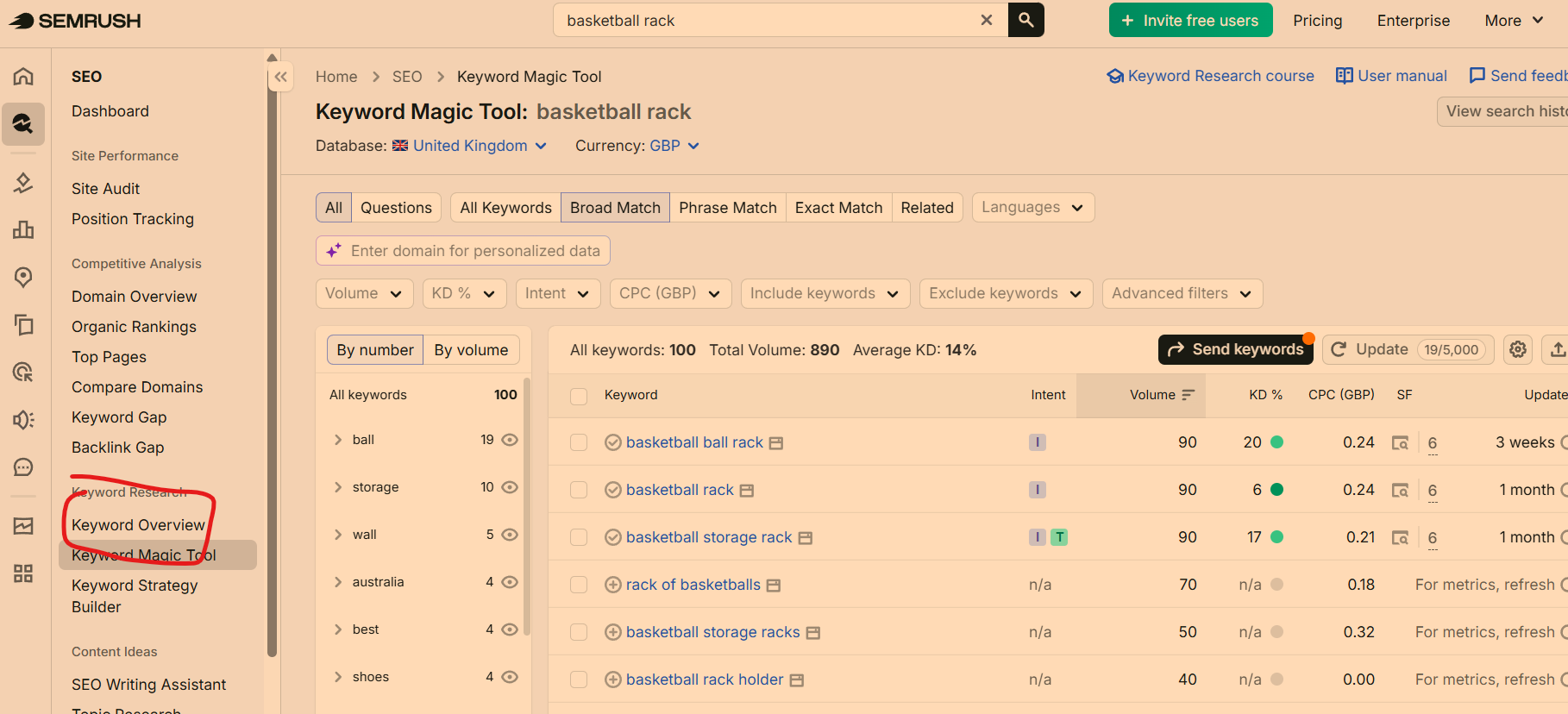
- In Semrush, open Keyword Magic Tool – enter first “See keyword” e.g. “basketball rack”
Filter by broad match first to get the widest list, then narrow by keyword difficulty and volume. Semrush guidance and tutorials show this as a standard way to find related keywords and easier long-tail phrases. –
Click the checkbox and use CTRL + C or copy button on SEMRush interface – paste into Excel – delete unwanted columns – you’ll probably just want the keyword and the volume. - Click “Keyword Overview”
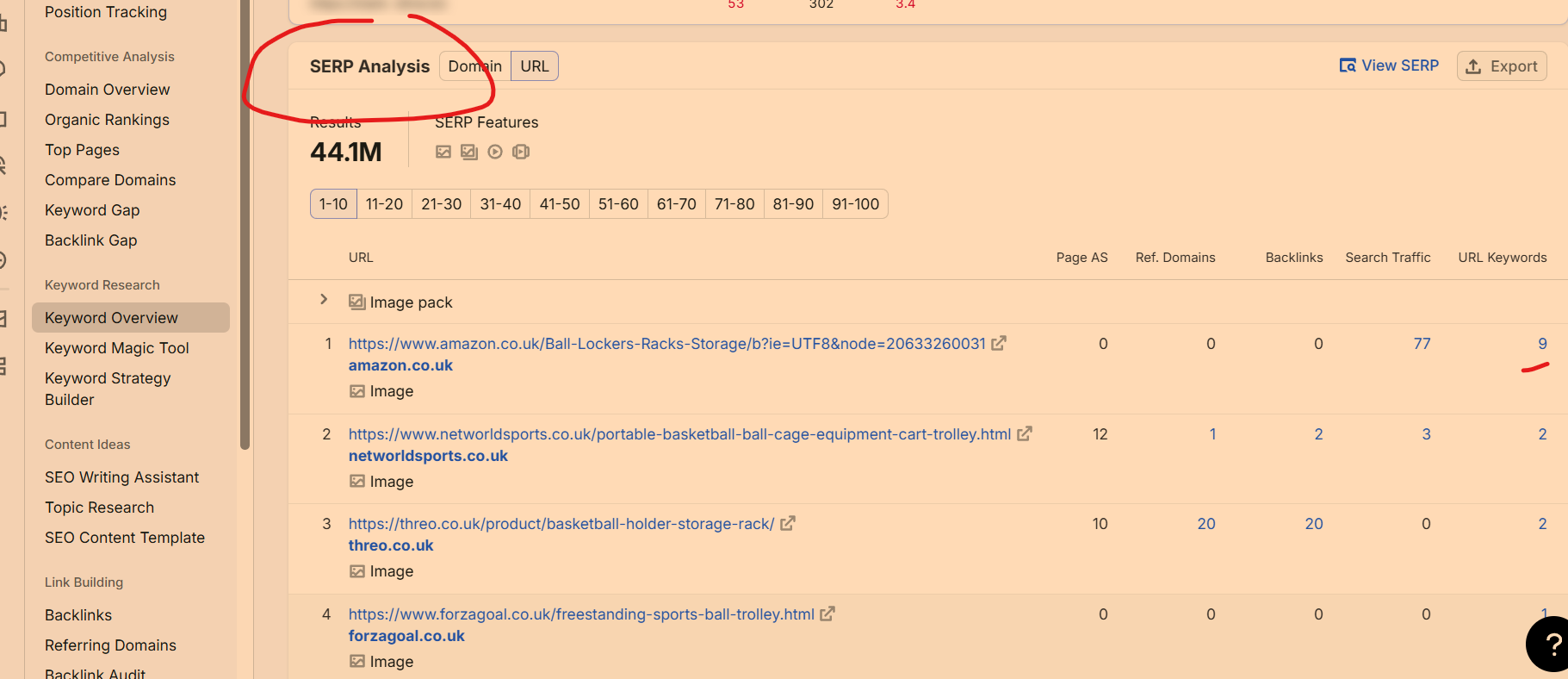
In Semrush, check organic competitors and look for pages with a specific basketball storage URL, not a generic “basketball equipment” page, because a focused page usually gives cleaner keyword data. Semrush competitor research is commonly used to see what phrases a rival page ranks for. - Move onto next keyword in your seed keyword list/ list of variations – using the same process. Repeat pasting into Excel – order by volume or relevance once done.
4. – Keyword Magic Tool – click Magnifying Glass Icon on Left Sidebar – “Keyword Magic Tool” is about half way down the list that opens

5. Click “Keyword Overview” – then scroll to SERP Analysis – click a relevant result URL with higher number of keywords
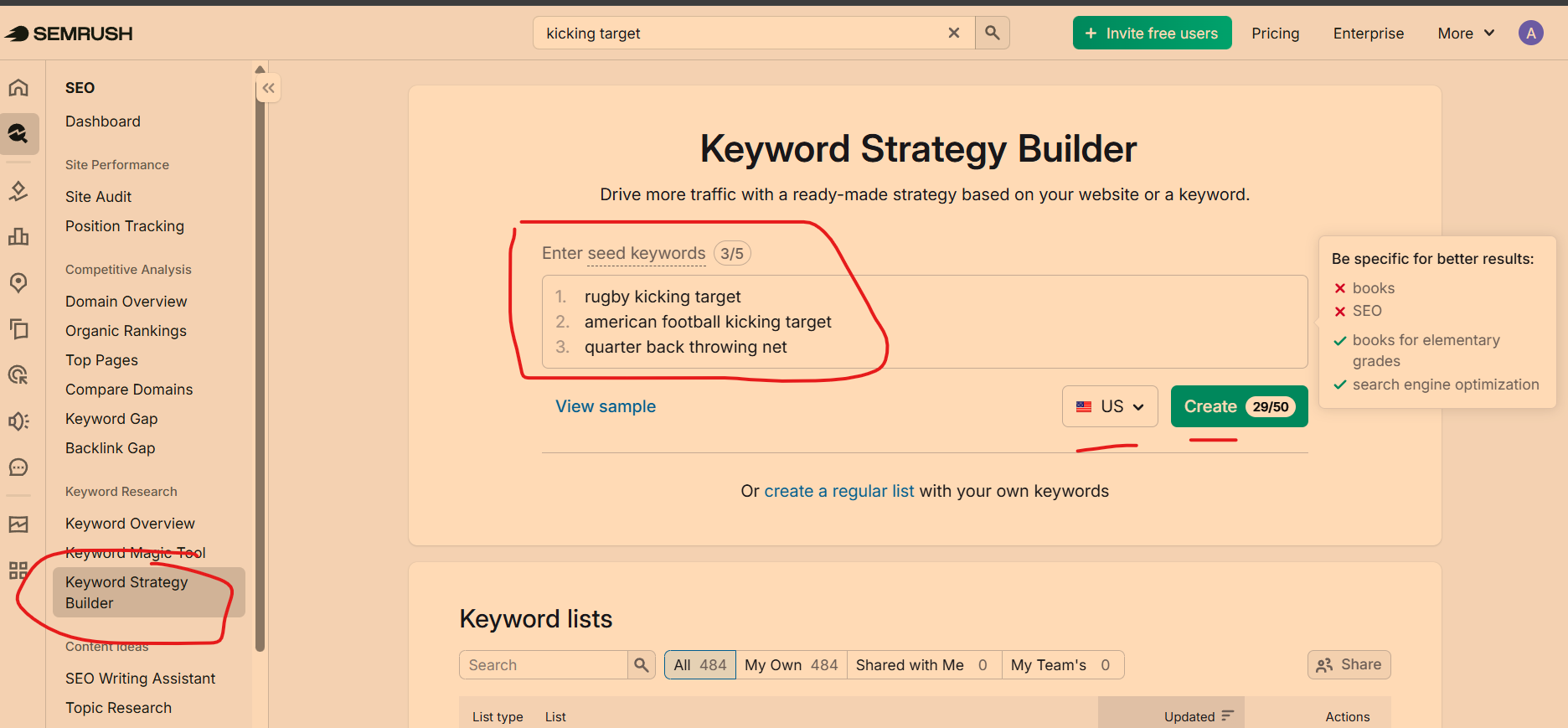
To make sure you have everything covered – you can use the Keyword Strategy Builder – Add a few specific (long tail) keywords, select country and click “create”
What to do for product pages
For lots of similar products, group keywords by page type, not just by individual word. For example: one page might target basketball storage rack, another basketball ball rack, another basketball cupboard, and another basketball storage organiser if the products are genuinely different. That keeps each page focused and avoids making every page target the same broad keyword set.
Easy rule
If a keyword sounds like a buyer would type it while shopping, keep it. If it is too broad, vague, or better suited to a blog post, move it out of your product-page list. A good next step is to build a spreadsheet with columns for keyword, intent, volume, KD, page type, and notes.
I start off by getting a list of keywords from Google-predictive search and suggested search at the bottom of the results page.

Use Google Suggest!
Say your KW is [Football Boots]
Type in football boots a
football boots b
football boots c
football boots d
etc
I then input the keywords into the sites below (or at least 2 of them!):
and then just use the ones with the most search volume, that aren’t being ranked for by sites we can’t compete with.
Quora.com & SEMRush
Requires Paid Version of SEMRush
You can also use Quora.com and SEMRush for KW research, specifically for longer tailed KWs.
For example, if you have a law site
Go to quora.com
Put quora.com into SEMRush
Click “Organic Research” on the left-side-bar, then – “Positions”

Filter by keyword (near the bottom)
Advanced filter – containing “Law”

This gives a list of FAQs for Law.
SEMRush.com & Your KW Opportunities
Put your domain in the search bar & look at organic research
Download all your KWs that you rank for
Order by Search volume
Conditionally format the rank position so that between 10 and 30ish are yellow
Make a note of those that are worth ‘going after’.
Do same thing with competitors.
SEMRUSH and Competitors
Ann easy and effective way to get more keyword ideas, is to search your keyword(s), go to the keyword overview tool and see who is ranking for it.
You can then choose to look at what other keywords they rank for.
– Amazon KW Research
Find most popular book in your niche and look at the chapter titles for KW ideas.
Put chapter titles into KW Research tool
– Reddit KW Research
Search KW in Reddit.
Find questions and threads that are common – add to KW Planner
– Wikipedia – search and look at page contents and link anchor text
Check High Ranking Pages for Your Main Keyword
Get the URLs of the top 5 pages for your main keyword.
In SEMRush for example, you’ll see these listed near the bottom when you add a keyword
See what keywords the top URLs / your competitors rank for – they’re sometimes a few random or different keywords in there that are golden.
Use Search Console
Find keywords that you rank for, but don’t have a specific post or page about.
For example, if you have a football blog and rank 35th for “best football goal posts” but don’t have a post specifically about that topic – then you might want to make one, as you’re very likely to rank in the top 10 for it.
If you are looking to optimise an existing page – check what KWs it currently ranks for in Search Console.
- remember keyword volumes aren’t that accurate. There are loads of blog posts about “0 volume keywords” generating decent traffic. If auto-suggest is suggesting a keyword, it probably has a fair amount of queries each day.

