Just use SEMRush – Organic Research – Positions tab and download and pivot the pages data – no need for advanced filter
Once you’ve found the blog posts with the most traffic, you can analyse the “Exact URL” in SEMRush
This analysis, should show you the keywords on the page that generate most of the search traffic
I personally like to go after KWs with a Keyword Difficulty score of less than 20 for my personal blog and under 30 for my employer’s blog
You can also use Reddit & Quora for Content Ideas
Unsolicited #SEO tip: You can get great ideas for specific content ahead of features like PAAs being generated by using Google site operators with specific sites. For instance, I can use the command:
site:reddit[dot]com/r/amateur_boxing “how do i”
or
site:reddit.com/r/bootroom “how do i”
To search just the amateur boxing subreddit for questions starting with “how do I?” You can apply this on any niche or on other sites like Quora to get up to the minute questions people are asking.
I only want the URLs that reside at the third level – i.e. /productpage/
Go to your XML sitemap – usually at Myshop.com/sitemap.xml
Right click and “save as” – save on your computer
Open Excel
Go to the Developer Tab (you might need to add this as it’s not there by default)
Click “Import”
Browse to find your sitemap.xml and import it into Excel
This usually pulls all your URLs into column 1 and other info like priority into separate columns
Delete all the columns except the first one with your URLs in it
Remove the https:// from the URLs with “find and replace” – On “Home” tab under “Find & Select” on the right
In cell B2 add the function: (change A2 – to the cell you have put the first URL in)
=LEN(A2)-LEN(SUBSTITUTE(A2,"/",""))
11. Drag the formula down the rest of column B
12. You can now order column B by the number of “/” found in each URL
If different categories have different folder structures then you can conditionally format and use different colours for different categories and then do a multiple criteria sort – by colour, then folder depth (column B)
You can download an example spreadsheet with the formula in here
The idea of technical SEO is to minimise the work of bots when they come to your website to index it on Google and Bing. Look at the build, the crawl and the rendering of the site.
To get started:
Crawl with Screaming Frog with “Text” Rendering – check all the structured data options so you can check schema (under Configuration – Spider – Extraction)
Crawl site with Screaming Frog with “JavaScript” rendering also in a separate or second crawl
Don’t crawl the sitemap.xml
This allows you to compare the JS and HTML crawls to see if JS rendering is required to generate links, copy etc.
Download the sitemap.xml – import into Excel – you can then check sitemap URLs vs crawl URLs.
Check “Issues” report under Bulk Export menu for both crawls
Also download or copy and paste sitemap URLs into Screaming Frog in list mode – check they all result in 200 status
*Great for tailoring copy and pages. Just turn it on and add query parameter
Summary:
– Perform a crawl with Screaming Frog – In Configuration – Crawl – Rendering – Crawl once with Text only and once with JavaScript
Check indexation with site: searches including:
site:example.com -inurl:www
site:*.example.com -inurl:www
site:example.com -inurl:https
– Search screaming frog crawl – for “http:” on the “internal” tab – to find any unsecure URLs
*Use a chrome plug in to disable JS and CSS*
Check pages with JS and CSS disabled – Are all the page elements visible? Do Links work?
Configuration Checks
Check all the prefixes – http, https and www redirect (301) to protocol your using – e.g. https://www.
Does trailing slash added to URL redirect back to original URL structure?
Is there a 404 page?
Robots & Sitemap
Is Robots.txt present?
Is sitemap.xml present? (and in the sitemap)
Is Sitemap Submitted in S.C.?
X-robots present?
Are all the sitemaps naming conventions in lower case?
Are the URLs correct in the sitemap – correct domain and correct URL structure?
Do sitemap URLs all 200? (including images) List Mode in Screaming Frog – “Upload” – Download sitemap – “ok”
For site migrations check – Old sitemap and Crawl Vs New – For example, Magento 1 website sitemap vs Magento 2 – anything missing or added – what are status codes?
– Status Codes – any 404s or redirects in SCreaming Frog crawl?
Rendering Check – Screaming Frog – also check pages with JS and CSS disable. Check links are present and work
Are HTML Links and H1s in the rendered HTML – check URL Inspection in Search Console or Mobile Friendly text?
Do pages work with JS disabled – links and images visible etc?
What hreflang links are present on the site?
Schema – Check all schema reports in Screaming Frog for errors
Sitemap Checks Are crawl URLs missing from the sitemap? (check sitemap Vs crawl URLs that 200 and are “indexable”
Site: scrape How many pages are indexed?
Do all the scraped URLs result in a 200 status code?
H1s Are any duplicate H1s? Are any pages missing H1s? Any multiple H1s?
Images Are any images missing alt text? Are any images too big in terms of KB?
Canonicals Are there any non-indexable canonical URLs?
Are any canonicals canonicalised? e.g. pages with different canonicals that arent simples/config products
URL structure Errors
Meta Descriptions Are any meta descriptions too short? Are anymeta descriptions too long? Are any meta descriptions duplicated?
Meta Titles Are any meta titles too short? Are anymeta titles too long? Are any meta titles duplicated?
Robots tags blocking any important pages?
Menu Is the menu functioning properly?
Pagination Functioning fine for UX? Canonical to root page?
Check all the issues in the issues report in Screaming Frog
PageSpeed Checks Lighthouse – check homepage plus 2 other pages
GTMetrix
pingdom
Manually check homepage, listing page, product page for speed
Dev Tools Checks (advanced) Inspect main elements – are they visible in the inspect window? e.g. right click and inspect the Headings – check has meta title and desc Check on mobile devices Check all the elements result in a 200 – view the Network tab
Console tab – refresh page – what issues are flagged? Unused JS in the elements tab – coverage
other Checks
Has redirect file been put in place? Have hreflang tags for live sites been added? Any meta-refresh redirects!?
Tech SEO 1 – The Website Build & Setup
The website setup – a neglected element of many SEO tech audits.
Storage Do you have enough storage for your website now and in the near future? you can work this out by taking your average page size (times 1.5 to be safe), multiplied by the number of pages and posts, multiplied by 1+growth rate/100
for example, a site with an average page size of 1mb with 500 pages and an annual growth rate of 150%
1mb X 1.5 X 500 X 1.5 = 1125mb of storage required for the year.
You don’t want to be held to ransom by a webhost, because you have gone over your storage limit.
How is your site Logging Data? Before we think about web analytics, think about how your site is storing data. As a minimum, your site should be logging the date, the request, the referrer, the response and the User Agent – this is inline with the W3 Extended Format.
When, what it was, where it came from, how the server responded and whether it was a browser or a bot that came to your site.
Blog Post Publishing Can authors and copywriters add meta titles, descriptions and schema easily? Some websites require a ‘code release’ to allow authors to add a meta description.
Site Maintenance & Updates – Accessibility & Permissions Along with the meta stuff – how much access does each user have to the code and backend of a website? How are permissions built in? This could and probably should be tailored to each team and their skillset.
For example, can an author of a blog post easily compress an image? Can the same author update a menu (often not a good idea) Who can access the server to tune server performance?
Tech SEO 2 – The Crawl
Google Index
Carry out a site: search and check the number of pages compared to a crawl with Screaming Frog.
With a site: search (for example, search in Google for site:businessdaduk.com) – don’t trust the number of pages that Google tells you it has found, scrape the SERPs using Python on Link Clump:
How to scrape Google SERPs in one click – Don’t use LinkClump, use the instructions on my blog post here to make your own SERP extractor
Too many or too few URLs being indexed – both suggest there is a problem.
Correct Files in Place – e.g. Robots.txt Check these files carefully. Google says spaces are not an issue in Robots.txt files, but many coders and SEOers suggest this isn’t the case.
XML sitemaps also need to be correct and in place and submitted to search console. Be careful with the <lastmod> directive, lots of websites have lastmod but don’t update it when they update a page or post.
Response Codes Checking response codes with a browser plugin or Screaming Frog works 99% of the time, but to go next level, try using curl and command line. Curl avoids JS and gives you the response header.
You need to download cURL which can be a ball ache if you need IT’s permission etc.
Anyway, if you do download it and run curl, your response should look like this:
Next enter an incorrect URL and make sure it results in a 404.
Canonical URLs Each ‘resource’ should have a single canonical address.
common causes of canonical issues include – sharing URLs/shortened URLs, tracking URLs and product option parameters.
The best way to check for any canonical issues is to check crawling behaviour and do this by checking log files.
You can check log files and analyse them, with Screaming Frog – the first 1,000 log files can be analysed with the free version (at time of writing).
Most of the time, your host will have your logfiles in the cPanel section, named something like “Raw Access”. The files are normally zipped with gzip, so you might need a piece of software to unzip them or just allow you to open them – although often you can still just drag and drop the files into Screaming Frog.
Lighthouse Use lighthouse, but use in with command line or use it in a browser with no browser add-ons.If you are not into Linux, use pingdom, GTMetrix and Lighthouse, ideally in a browser with no add-ons.
Look out for too much code, but also invalid code. This might include things such as image alt tags, which aren’t marked up properly – some plugins will display the code just as ‘alt’ rather than alt=”blah”
Javascript Despite what Google says, all the SEO professionals that I follow the work of, state that client-side JS is still a site speed problem and potential ranking factor. Only use JS if you need it and use server-side JS.
Use a browser add-on that lets you turn off JS and then check that your site is still full functional.
Schema
Finally, possibly in the wrong place down here – but use Screaming Frog or Deepcrawl to check your schema markup is correct.
You can add schema using the Yoast or Rank Math SEO plugins
The Actual Tech SEO Checklist (Without Waffle)
Basic Setup
Google Analytics, Search Console and Tag Manager all set up
Site Indexation
Sitemap & Robots.txt set up
Check appropriate use of robots tags and x-robots
Check site: search URLs vs crawl
Check internal links pointing to important pages
Check important pages are only 1 or 2 clicks from homepage
For render blocking JS and stuff, there are WordPress plugins like Autoptimize and the W3 Total Cache.
Make sure there are no unnecessary redirects, broken links or other shenanigans going on with status codes. Use Search Console and Screaming Frog to check.
Site UX
Mobile Friendly Test, Site Speed, time to interactive, consistent UX across devices and browsers
Consider adding breadcrumbs with schema markup.
Clean URLs
Image from Blogspot.com
Make sure URLs – Include a keyword, are short – use a dash/hyphen –
Secure Server HTTPS
Use a secure server, and make sure the unsecure version redirects to it
Allow Google to Crawl Resources
Google wants to crawl your external CSS and JS files. Use “Fetch as Google” in Search Console to check what Googlebot sees.
Hreflang Attribute
Check that you are using and implementing hreflang properly.
Tracking – Make Sure Tag Manager & Analytics are Working
Check tracking is working properly. You can check tracking coed is on each webpage with Screaming Frog.
Internal Linking
Make sure your ‘money pages’ or most profitable pages, get the most internal links
Content Audit
Redirect or unpublish thin content that gets zero traffic and has no links. **note on this, I had decent content that had no visits, I updated the H1 with a celebrity’s name and now it’s one of my best performing pages – so it’s not always a good idea to delete zero traffic pages**
Consider combining thin content into an in depth guide or article.
Use search console to see what keywords your content ranks for, what new content you could create (based on those keywords) and where you should point internal links.
Use Google Analytics data regarding internal site searches for keyword and content ideas 💡
Update old content
Fix meta titles and meta description issues – including low CTR
Find & Fix KW cannibalization
Optimize images – compress, alt text, file name
Check proper use of H1 and H2
See what questions etc. are pulled through into the rich snipetts and answer these within content
Click “Pages” (near the bottom-third of the page on the left)
Click on a high-performing post in terms of Impressions and Clicks in google
With the specific page/post selected, click on queries
Make a note of all relevant queries in the top 100
See if these queries can be added to the ranking post
Find any queries that are not directly related to your post
Create a new post specifically about this/these queries (if you rank for it without a specific post – you’ll rank better with a specific post for that query)
In the original post – put an internal link to the new post
“You’ll never get yourself off the treadmill of paid ads, if you don’t build your brand”
Someone on a Search Podcast, 2019
It’s very easy to dismiss online content, blogs, image assets and even display ads as pretty much useless – because you don’t have the instant gratification of seeing leads and/or sales.
This is completely understandable; especially if you have a background in sales – where your job has been to ‘finish off the lead’ and get a sale.
However, if you are in it for the long (or medium) run, then building your brand is a must. Whether you are a tradesman or a giant corporation, your brand’s reputation and the brand-awareness is your safety net when it comes to consistent website traffic, leads & sales.
It takes time to build a brand – but once it is built, those people who come to you direct because they know who you are – are effectively free – or at least very cheap in comparison to some of the cost per click of Google Search Ads these days.
Building a brand is not easy however. Take my other blog for example – Blackbeltwhitehat.com
The blog has over 600 pages of content, lots of it really long, in-depth and time-consuming to produce. The site has 5,000-10,000 visitors per month, but virtually nobody comes to my website via a branded search on Google.
This could be down to one specific reason – the domain name is crap and hard to remember.
I’ve bought a few more memorable domains (like WokeMMA.com “Woke” being an ironic term for self-awareness used in the MMA & Jiu Jitsu communities) and I am currently weighing up the time & effort of re-branding everything like GoogleMyBusiness, TrustPilot etc. – plus all my back-links currently point to blackbeltwhitehat.com (I’m aware of 301s etc. but I’ll still definitely see a drop in rankings).
My blog is ultimately a hobby that I’ve invested less than $50 into over 6 years. But if I had some more budget – I’d put together a plan to build my brand online…
First make sure you know your target audience & do one of those SWOT analysis. Then make specific goals to establish some brand KPIs.
Here are some ideas on what to do next:
Get a relevant, easy to remember domain name!
Learn from my mistake, a short catchy domain name is an easy-win if you are just starting out from scratch. A lot of the best and obvious domain name will be taken however, so you’ll have to do some research first. If you are just starting out, don’t name your business until you secure your domain name!
Display Ads
Depending on your niche, you can set tiny max CPC bids in some instances – and they’ll still get thousands of impressions for very little spend. Gmail ads work particularly well for (potential) low CPM (cost per 1000 impressions).
Rotate your display ads’ design & colours to stop people ignoring them due to ‘banner blindness’.
Blog & Outreach
Blog are great for reaching people who are researching a potential purchase.
For example, I landed on Perfect Keto’s blog a few times whilst researching Exogenous Ketones. Then ended up buying their branded product on Keto-pro.co.uk; because, for what ever reason, I trusted their brand.
Create great content, with statistics, images and video – and then outreach it – i.e. send it to relevant blogs and websites.
If you can afford it, use “PR-Level” outreach and contact national newspapers etc. This can be done via websites such as gorkana
If you content gets links too – then great – that’s good for Search Engine Optimisation (SEO). Doing some of your own exclusive research and generating tables of statistics are great for generating back-links naturally i.e. passively.
So consider doing some market research using Google surveys etc. These guys calculated RV/Campervan depreciation in value, just by looking at vehicles for sale online and get hundreds of back-links.
To turn blog’s into direct sales, you can also use relevant ‘CTA’ images below your blog.
For example, if you post a blog about the Walking Path’s of Snowdonia on your Snowdonia-based-bed-&-breakfast website; consider adding a relevant & clickable ‘book now’ and/or ‘get your free brochure’ button with eye-catching image at the bottom of the post. Many people now do this with newsletter sign up pop ups, which are a bit annoying but do work.
Content is great – but tools tend to do better than copy. For example, NerdWallet’s top page in terms of organic traffic – is their mortgage calculator.
Reviews
As well as brand awareness, you want some social-proofing of your brand. Start with a free account on Trustpilot and GoogleMyBusiness
Video & Social Media
The number 1 mistake people make on social media is to harp on about their brand all the time. Be entertaining, provide useful information and insightful comments. If you are over-promotional, people will not follow you. Build some authority by providing helpful insights that your target market will appreciate.
Videos & podcasts can be costly in terms of time. If you don’t want to set up your own podcast, guest-appearance on other people’s podcasts can generate valuable awareness and also back-links to your website (important for Search Engine Optimisation/Rankings).
Build an amazing product and/or service
This is your foundation and one of the reasons that Apple is so successful. An LSD-fueled Steve Jobs came up with some amazing ideas and concepts. The brand also turned itself into unique hybrid of tech & fashion thanks to their pioneering products.
The big, light-up apple on the back of Macbooks no doubt was a design aimed at building brand awareness too!
Please note – I realise this blog has a rubbish social media following. But that’s due to lack of time/money investment. I generally just use this blog as somewhere to record my thoughts & to remember how to do all things marketing related. E.g. here are my notes so I remember how to use Screaming Frog to scrape OG tags.
For some blogs and websites, even keywords with 0 monthly searches may be relevant.
My other blog – blackbeltwhitehat.com has built all of its traffic off KWs that Google KW planner says has 0 searches.
It all depends on how authoritative your website is and your competitors are. You can go after bigger, more popular KWs if you are a huge website with a DA of 90. It’s a different ball game if you are running a personal blog with a DA of 15
Try and include a number of the relevant searches in your articles etc.
Check Competitors & KWs Their Relevant Pages Rank for
If you have a tool like semrush.com,
Check what keywords competitors are ranking for.
If your head keyword is “football goals”, see who’s ranking top 5 for that term and see what other keywords the top URLs are ranking for.
If you don’t have an SEO Tool, you can just check the copy and meta title & description to see what keywords the top websites are trying to opimise for.
My friend has an interview on Tuesday for a marketing manager role, and has never done any online marketing, so here goes my introduction to it…
About the title-image, sorry it’s a bit sexist – studies suggest that faces looking at you are the best for Calls to Action (CTAs) and for thumbnails on Youtube videos.
The above image is used for my marketing video and thought it would double up to get people to click on my blog post. May as well embed the video now! Here you go:
Internet Marketing Jargon
Online marketing has so many abbreviations, that if you don’t know them, it sounds like another language
What is a “Browser”?
A browser is Internet Explorer, Google Chrome, Firefox, Safari on an Apple device or Opera. It’s a piece of software for navigating the internet and downloading/rendering websites.
DO NOT say that you use Internet Explorer in an online marketing interview. Say that you use Chrome.
The main reason that people use Chrome and Firefox is that you can get plugins/extensions for Google Chrome. The most popular in online marketing is probably the ‘Mozbar’ which helps you see the ‘Domain Authority’ of a website.
What is a CMS?
Content Management System. A typical CMS is WordPress. This site is made using the free version of wordpress that uses the WordPress hosting platform, a free design template. The wordpress software can also be used when hosted with a different company such as GoDaddy, and the paid WordPress software allows plugins.
What are “WordPress Plugins”?
They are add-ons to your site that allows you to add ‘functionality’. For example you might add a Paypal plugin that allows you to create a shopping cart and payment system on your site to make in an online shop/ecommerce site.
What does “SEO” Stand For?
Search Engine Optimisation. This is the process of ranking as high as possible on Google and other search engines such as Bing.com.
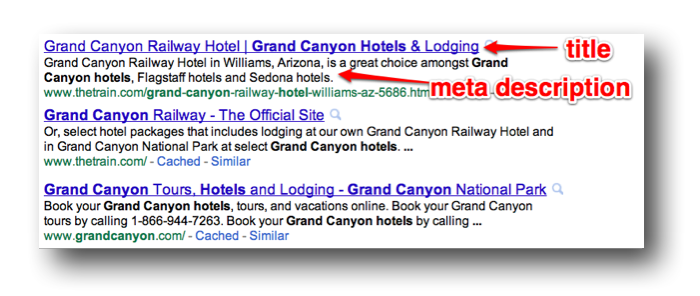
Some terms to be aware of in SEO: Meta Description – This is the description that you add the theof your website page’s code that shows in the Google Results. It just described what is on the page. Meta Descriptions should be 155 characters or less.
Meta Title .- this shows at the top of the tab in your browser and in the Google results pages.
Conversion Rate Optimisation. This is the process of getting people who visit your website to buy things or sign up for a newsletter or submit a form. If you have an online shop, a ‘conversion’ would normally be a purchase on your website.
What does “PPC” Stand for?
Pay Per Click advertising (not Payment Protection Cover as I thought in my interview at the bank I used to work at). The 2 most popular forms of this are Google Adwords and Facebook advertising. Facebook is usually more effective on a smaller budget.
HTML stands for hyper text markup language. It structures websites whilst something called CSS – Cascading Style Sheets.
The best place to start learning HTML is w3 Schools. It can be overwhelming at first, but it’s easy when you get the hang of it. It’s just a load of numbers and letters inside angle brackets <> to remember. There’s no working out or formulas to remember, just letters and numbers.
HTML is one of the ways a websites ‘talks’ to a browser, so that the browser can render the website and show you what’s on there.
CSS makes it looks nice, adding colours, styles etc. For example the CSS might tell the browser to make all the main headings red and all the list items italic.
What is DA?
DA stands for Domain Authority. DA is an indication of how ‘powerful’ or authoritative a website is. The higher the DA (score of 1-100), the more valuable a link is from that website.
What is a Link?
A link or a hyperlink is a bit of text or an image, that you click to go to another website. For example this red underlined text is a link to a fitness blog. When you click it, you should be taken to another blog.
The more links a website has, from high quality websites, the more likely it is to rank higher in Google. You can gain links by creating great content, you can create and run marketing campaigns that people will want to write about, or you can be naughty and pay for some links.
What is Guest Posting?
Guest posting is an old school tactic to gain links to your website and rank on Google. You create an article/blog post, send it to a blogger in an email and ask if they would like to use it on their website. The article will contain a link back to your own website. The typical response from a blogger is either “no thanks” or “okay, that will cost $50”.
Now, this is against Google guidelines and you can get penalised by Google for doing this. People still do though. In theory, if a blogger accepts a payment to link to another website, in any form, whether it is via a blog post or sidebar-link or banner, then it should be a ‘no-follow’ link.
What is a NoFollow Link?
A no follow link has the HTML code – rel=”nofollow” added to it.
This tells Google NOT to count this link and not factor it in to it’s ranking algorithm.
What is the Google Algorithm?
It’s the formula that Google uses to work out where to rank websites on their results pages. Apparently nobody knows all of it, but it looks at how many other websites link to yours, the quality of the websites linking to yours, the quality of your website and its content and how fast your website loads.
What are Keywords?
Keywords or KWs, are search terms used in Google. If I search for “Red apples” then the keyword is “red apples”.
Rather confusingly, search phrases are also called keywords. You want to find KWs with lots of monthly searches, that don’t have lots of competition and add them to your content and headings in a natural format. Don’t stuff them in everywhere.
Use the Keyword Planner Tool to find KWs with lots of monthly searches. And do a Google search to see which websites rank for those terms. If the top 10 websites for that KW are the likes of the BBC, Fox News and Amazon, you probably aren’t going to rank on the first page for that term.
Long Tail Keywords are less popular KWS, with less searches but often ‘convert’ to sales etc. better.
A Head Term might be “Tennis Balls”
A Long Tail Keyword might be “Buy Yellow Slazenger Tennis Balls UK”
“Tennis Balls” will have a much higher volume of monthly searches but will be very hard to rank on the first page of Google for. “Buy Yellow Slazenger Tennis Balls UK” will have less search volume each month, but will be easier to rank for and people searching for that term are more likely to buy/convert.
Tools for Internet Marketing
A CMS – such as WordPress so that you can create a website
A Keyword Tool such as the Google Keyword Planner. So that you can see what keywords to try and rank for or advertise with if you’re using PPC ads.
Google Analytics – to see who is coming to your site, where from and to what pages.
Google Chrome and some extensions such as the Moz Bar
Screaming Frog for Technical SEO. This gets all the information from a website and downloads it into an Excel Spreadsheet.
SEO Mofo – to make sure your meta titles & descriptions are the correct length. Add a CTA – Call To Action such as “Book Now!” or “Learn More” at the end of your descriptions.
Yoast SEO Plugin – This makes it easy to add meta titles and descriptions as you make your webpages and blog posts.





 Small Business Dad