Just use SEMRush – Organic Research – Positions tab and download and pivot the pages data – no need for advanced filter
Once you’ve found the blog posts with the most traffic, you can analyse the “Exact URL” in SEMRush
This analysis, should show you the keywords on the page that generate most of the search traffic
I personally like to go after KWs with a Keyword Difficulty score of less than 20 for my personal blog and under 30 for my employer’s blog
You can also use Reddit & Quora for Content Ideas
Unsolicited #SEO tip: You can get great ideas for specific content ahead of features like PAAs being generated by using Google site operators with specific sites. For instance, I can use the command:
site:reddit[dot]com/r/amateur_boxing “how do i”
or
site:reddit.com/r/bootroom “how do i”
To search just the amateur boxing subreddit for questions starting with “how do I?” You can apply this on any niche or on other sites like Quora to get up to the minute questions people are asking.
I only want the URLs that reside at the third level – i.e. /productpage/
Go to your XML sitemap – usually at Myshop.com/sitemap.xml
Right click and “save as” – save on your computer
Open Excel
Go to the Developer Tab (you might need to add this as it’s not there by default)
Click “Import”
Browse to find your sitemap.xml and import it into Excel
This usually pulls all your URLs into column 1 and other info like priority into separate columns
Delete all the columns except the first one with your URLs in it
Remove the https:// from the URLs with “find and replace” – On “Home” tab under “Find & Select” on the right
In cell B2 add the function: (change A2 – to the cell you have put the first URL in)
=LEN(A2)-LEN(SUBSTITUTE(A2,"/",""))
11. Drag the formula down the rest of column B
12. You can now order column B by the number of “/” found in each URL
If different categories have different folder structures then you can conditionally format and use different colours for different categories and then do a multiple criteria sort – by colour, then folder depth (column B)
You can download an example spreadsheet with the formula in here
I’ve made some notes from a few videos on YouTube – thought I may as well turn it into a blog post…
Summary – Get More Linkedin Followers to Your Business Page
Pay for ads to get up to 1,000 followers to begin with
Get employees to like and share
Get employees to create own content & tag company page*
Don’t post too many links (links kill reach)
Don’t post about the company all the time – where’s the value?
Do post useful content that helps target audience – provide value
Engage in relevant groups
Post videos with transcripts – upload direct to Linkedin
Reuse videos that are under 1 minute long for YouTube Shorts
Super-admin – can invite up to 100 members per month
Tag customers and other businesses in your post
Share and comment on trending topics/news
The higher up in the business an employee is, the more engagement it will tend to get if they share company posts**
*Employees could create videos, shares quotes etc. doesn’t have to be perfect and professional, as it’s the user’s content not the company’s
**People use Linkedin for networking/brown-nosing, so the more influential a person is, the more engagement they will tend to get
Notes from videos:
Linkedin
Linkedin has the Most potential for organic reach at the moment
Use Linkedin Polls for engagement
Engage and post in relevant Linkedin groups
Don’t overdo self promotion
Find out what target audience are interested in – post about that
Don’t post about your company all of the time
Post 4 to 5 times per week
Post 25% about your service or product – 75% relevant, useful, informative content
Run ads and add the “follow button”
Get employees to engage with content – make sure they optimize their profiles and networks too
Get employees to share the posts on their personal profiles
Invite connections to like the business page (you have to be a page admin)
Define perfect follower/customer persona
Determine the needs of the perfect follower – personal and business life
What is their company/employer’s needs?
Become an authority in the niche by posting informative content that addresses their needs
Get your employees to engage and share posts
Get employees to share but with their own commentary
Get employees to reply to comments on your posts
Don’t just promote the company
Get employees to share their own unique content that is of value and 20% of the time promote your business – and tag company page
Create an industry specific Linkedin group and invite people – link group to company page so you can post as company
In the group create 90% value posts and 10% promotional posts
Linkedin Ads – target specific people, area, industry, job title etc. – use ads to get 1,000 followers to help organic reach afterwards
Notes from Reading Articles about Getting More Linkedin Followers
– social media platforms, want to be content platforms:
More videos (with in-video transcripts),
Business related Memes/quotes (scannable content, nobody really reads posts on FB or Linkedin)
Publish more posts without links (platforms tend to kill your reach if you link out to other sites, apparently),
– Whilst content that is posted directly to a social media platform will tend to be amplified, if it is hosted externally
e.g. on Youtube, the reach will be killed by the platform – they don’t want people to leave their site/app via links.
create “micro-content” for social media, by turning videos, webinars etc into smaller content e.g. quotes from videos into images and memes, longer videos into 30 second clips with in-video transcripts.
Targeting specific locations? Use search function on Linkedin and Instagram to comment on relevant posts.
Incentivise employee engagement – top 3 people with most likes and shares each month get £100 voucher or some company stash – emphasise it is completely voluntary
Twitter
Use Twitter advanced search to find relevant questions and topics to engage with.
Twitter – find relevant influencers – engaged with (and potentially follow) people who engage with the influencer’s tweets. These people will tend to be relevant and active on Twitter
Put the URL of the sheet in the code below – next to where it says – var SPREADSHEET_URL =
Change the email address from drewgriffiths@live.com to your email – on the line that starts with – var RECIPIENT_EMAIL =
Change the Google sheet/doc URL and the email address
Sign into Google Ads
Click on “Tools & Settings” on the top menu near the right hand side
Click “scripts”
Click the addition (+) sign to add a new script
Paste in the below script – save – preview and then run
// Copyright 2015, Google Inc. All Rights Reserved.
//
// Licensed under the Apache License, Version 2.0 (the "License");
// you may not use this file except in compliance with the License.
// You may obtain a copy of the License at
//
//     http://www.apache.org/licenses/LICENSE-2.0
//
// Unless required by applicable law or agreed to in writing, software
// distributed under the License is distributed on an "AS IS" BASIS,
// WITHOUT WARRANTIES OR CONDITIONS OF ANY KIND, either express or implied.
// See the License for the specific language governing permissions and
// limitations under the License.

/**
 * @name Account Summary Report
 *
 * @overview The Account Summary Report script generates an at-a-glance report
 *     showing the performance of an entire Google Ads account. See
 *     https://developers.google.com/google-ads/scripts/docs/solutions/account-summary
 *     for more details.
 *
 * @author Google Ads Scripts Team [adwords-scripts@googlegroups.com]
 *
 * @version 1.1
 *
 * @changelog
 * - version 1.1
 *   - Add user-updateable fields, and ensure report row ordering.
 * - version 1.0.4
 *   - Improved code readability and comments.
 * - version 1.0.3
 *   - Added validation for external spreadsheet setup.
 * - version 1.0.2
 *   - Fixes date formatting bug in certain timezones.
 * - version 1.0.1
 *   - Improvements to time zone handling.
 * - version 1.0
 *   - Released initial version.
 */

var RECIPIENT_EMAIL = 'drewgriffiths@live.com';

var SPREADSHEET_URL = 'https://docs.google.com/spreadsheets/d/1mNjc7iJWOIq580DMLf6rYKT8xRAcl2MynnGSY29UiXY/edit#gid=3';

/**
 * Configuration to be used for running reports.
 */
var REPORTING_OPTIONS = {
  // Comment out the following line to default to the latest reporting version.
  apiVersion: 'v201809'
};

/**
 * To add additional fields to the report, follow the instructions at the link
 * in the header above, and add fields to this variable, taken from the Account
 * Performance Report reference:
 * https://developers.google.com/adwords/api/docs/appendix/reports/account-performance-report
 */
var REPORT_FIELDS = [
  {columnName: 'Cost', displayName: 'Cost'},
  {columnName: 'AverageCpc', displayName: 'Avg. CPC'},
  {columnName: 'Ctr', displayName: 'CTR'},
  {columnName: 'Impressions', displayName: 'Impressions'},
  {columnName: 'Clicks', displayName: 'Clicks'}
];

function main() {
  Logger.log('Using spreadsheet - %s.', SPREADSHEET_URL);
  var spreadsheet = validateAndGetSpreadsheet();
  spreadsheet.setSpreadsheetTimeZone(AdsApp.currentAccount().getTimeZone());
  spreadsheet.getRangeByName('account_id_report').setValue(
      AdsApp.currentAccount().getCustomerId());

  var yesterday = getYesterday();
  var date = getFirstDayToCheck(spreadsheet, yesterday);

  var rows = [];
  var existingDates = getExistingDates();

  while (date.getTime() <= yesterday.getTime()) {
    if (!existingDates[date]) {
      var row = getReportRowForDate(date);
      rows.push([new Date(date)].concat(REPORT_FIELDS.map(function(field) {
        return row[field.columnName];
      })));
      spreadsheet.getRangeByName('last_check').setValue(date);
    }
    date.setDate(date.getDate() + 1);
  }

  if (rows.length > 0) {
    writeToSpreadsheet(rows);

    var email = spreadsheet.getRangeByName('email').getValue();
    if (email) {
      sendEmail(email);
    }
  }
}

/**
 * Retrieves a lookup of dates for which rows already exist in the spreadsheet.
 *
 * @return {!Object} A lookup of existing dates.
 */
function getExistingDates() {
  var spreadsheet = validateAndGetSpreadsheet();
  var sheet = spreadsheet.getSheetByName('Report');

  var data = sheet.getDataRange().getValues();
  var existingDates = {};
  data.slice(5).forEach(function(row) {
    existingDates[row[1]] = true;
  });
  return existingDates;
}

/**
 * Sorts the data in the spreadsheet into ascending date order.
 */
function sortReportRows() {
  var spreadsheet = validateAndGetSpreadsheet();
  var sheet = spreadsheet.getSheetByName('Report');

  var data = sheet.getDataRange().getValues();
  var reportRows = data.slice(5);
  if (reportRows.length) {
    reportRows.sort(function(rowA, rowB) {
      if (!rowA || !rowA.length) {
        return -1;
      } else if (!rowB || !rowB.length) {
        return 1;
      } else if (rowA[1] < rowB[1]) {
        return -1;
      } else if (rowA[1] > rowB[1]) {
        return 1;
      }
      return 0;
    });
    sheet.getRange(6, 1, reportRows.length, reportRows[0].length)
        .setValues(reportRows);
  }
}

/**
 * Append the data rows to the spreadsheet.
 *
 * @param {Array<Array<string>>} rows The data rows.
 */
function writeToSpreadsheet(rows) {
  var access = new SpreadsheetAccess(SPREADSHEET_URL, 'Report');
  var emptyRow = access.findEmptyRow(6, 2);
  if (emptyRow < 0) {
    access.addRows(rows.length);
    emptyRow = access.findEmptyRow(6, 2);
  }
  access.writeRows(rows, emptyRow, 2);
  sortReportRows();
}

function sendEmail(email) {
  var day = getYesterday();
  var yesterdayRow = getReportRowForDate(day);
  day.setDate(day.getDate() - 1);
  var twoDaysAgoRow = getReportRowForDate(day);
  day.setDate(day.getDate() - 5);
  var weekAgoRow = getReportRowForDate(day);

  var html = [];
  html.push(
    '<html>',
      '<body>',
        '<table width=800 cellpadding=0 border=0 cellspacing=0>',
          '<tr>',
            '<td colspan=2 align=right>',
              "<div style='font: italic normal 10pt Times New Roman, serif; " +
                  "margin: 0; color: #666; padding-right: 5px;'>" +
                  'Powered by Google Ads Scripts</div>',
            '</td>',
          '</tr>',
          "<tr bgcolor='#3c78d8'>",
            '<td width=500>',
              "<div style='font: normal 18pt verdana, sans-serif; " +
              "padding: 3px 10px; color: white'>Account Summary report</div>",
            '</td>',
            '<td align=right>',
              "<div style='font: normal 18pt verdana, sans-serif; " +
              "padding: 3px 10px; color: white'>",
               AdsApp.currentAccount().getCustomerId(), '</h1>',
            '</td>',
            '</tr>',
          '</table>',
          '<table width=800 cellpadding=0 border=0 cellspacing=0>',
            "<tr bgcolor='#ddd'>",
              '<td></td>',
              "<td style='font: 12pt verdana, sans-serif; " +
                  'padding: 5px 0px 5px 5px; background-color: #ddd; ' +
                  "text-align: left'>Yesterday</td>",
              "<td style='font: 12pt verdana, sans-serif; " +
                  'padding: 5px 0px 5px 5px; background-color: #ddd; ' +
                  "text-align: left'>Two Days Ago</td>",
              "<td style='font: 12pt verdana, sans-serif; " +
                  'padding: 5px 0px 5x 5px; background-color: #ddd; ' +
                  "text-align: left'>A week ago</td>",
            '</tr>');
  REPORT_FIELDS.forEach(function(field) {
    html.push(emailRow(
        field.displayName, field.columnName, yesterdayRow, twoDaysAgoRow,
        weekAgoRow));
  });
  html.push('</table>', '</body>', '</html>');
  MailApp.sendEmail(email, 'Google Ads Account ' +
      AdsApp.currentAccount().getCustomerId() + ' Summary Report', '',
      {htmlBody: html.join('\n')});
}

function emailRow(title, column, yesterdayRow, twoDaysAgoRow, weekAgoRow) {
  var html = [];
  html.push('<tr>',
      "<td style='padding: 5px 10px'>" + title + '</td>',
      "<td style='padding: 0px 10px'>" + yesterdayRow[column] + '</td>',
      "<td style='padding: 0px 10px'>" + twoDaysAgoRow[column] +
          formatChangeString(yesterdayRow[column], twoDaysAgoRow[column]) +
          '</td>',
      "<td style='padding: 0px 10px'>" + weekAgoRow[column] +
          formatChangeString(yesterdayRow[column], weekAgoRow[column]) +
          '</td>',
      '</tr>');
  return html.join('\n');
}


function getReportRowForDate(date) {
  var timeZone = AdsApp.currentAccount().getTimeZone();
  var dateString = Utilities.formatDate(date, timeZone, 'yyyyMMdd');
  return getReportRowForDuring(dateString + ',' + dateString);
}

function getReportRowForDuring(during) {
  var report = AdsApp.report(
      'SELECT ' +
          REPORT_FIELDS
              .map(function(field) {
                return field.columnName;
              })
              .join(',') +
          ' FROM ACCOUNT_PERFORMANCE_REPORT ' +
          'DURING ' + during,
      REPORTING_OPTIONS);
  return report.rows().next();
}

function formatChangeString(newValue,  oldValue) {
  var x = newValue.indexOf('%');
  if (x != -1) {
    newValue = newValue.substring(0, x);
    var y = oldValue.indexOf('%');
    oldValue = oldValue.substring(0, y);
  }

  var change = parseFloat(newValue - oldValue).toFixed(2);
  var changeString = change;
  if (x != -1) {
    changeString = change + '%';
  }

  if (change >= 0) {
    return "<span style='color: #38761d; font-size: 8pt'> (+" +
        changeString + ')</span>';
  } else {
    return "<span style='color: #cc0000; font-size: 8pt'> (" +
        changeString + ')</span>';
  }
}

function SpreadsheetAccess(spreadsheetUrl, sheetName) {
  this.spreadsheet = SpreadsheetApp.openByUrl(spreadsheetUrl);
  this.sheet = this.spreadsheet.getSheetByName(sheetName);

  // what column should we be looking at to check whether the row is empty?
  this.findEmptyRow = function(minRow, column) {
    var values = this.sheet.getRange(minRow, column,
        this.sheet.getMaxRows(), 1).getValues();
    for (var i = 0; i < values.length; i++) {
      if (!values[i][0]) {
        return i + minRow;
      }
    }
    return -1;
  };
  this.addRows = function(howMany) {
    this.sheet.insertRowsAfter(this.sheet.getMaxRows(), howMany);
  };
  this.writeRows = function(rows, startRow, startColumn) {
    this.sheet.getRange(startRow, startColumn, rows.length, rows[0].length).
        setValues(rows);
  };
}

/**
 * Gets a date object that is 00:00 yesterday.
 *
 * @return {Date} A date object that is equivalent to 00:00 yesterday in the
 *     account's time zone.
 */
function getYesterday() {
  var yesterday = new Date(new Date().getTime() - 24 * 3600 * 1000);
  return new Date(getDateStringInTimeZone('MMM dd, yyyy 00:00:00 Z',
      yesterday));
}

/**
 * Returned the last checked date + 1 day, or yesterday if there isn't
 * a specified last checked date.
 *
 * @param {Spreadsheet} spreadsheet The export spreadsheet.
 * @param {Date} yesterday The yesterday date.
 *
 * @return {Date} The date corresponding to the first day to check.
 */
function getFirstDayToCheck(spreadsheet, yesterday) {
  var last_check = spreadsheet.getRangeByName('last_check').getValue();
  var date;
  if (last_check.length == 0) {
    date = new Date(yesterday);
  } else {
    date = new Date(last_check);
    date.setDate(date.getDate() + 1);
  }
  return date;
}

/**
 * Produces a formatted string representing a given date in a given time zone.
 *
 * @param {string} format A format specifier for the string to be produced.
 * @param {date} date A date object. Defaults to the current date.
 * @param {string} timeZone A time zone. Defaults to the account's time zone.
 * @return {string} A formatted string of the given date in the given time zone.
 */
function getDateStringInTimeZone(format, date, timeZone) {
  date = date || new Date();
  timeZone = timeZone || AdsApp.currentAccount().getTimeZone();
  return Utilities.formatDate(date, timeZone, format);
}

/**
 * Validates the provided spreadsheet URL to make sure that it's set up
 * properly. Throws a descriptive error message if validation fails.
 *
 * @return {Spreadsheet} The spreadsheet object itself, fetched from the URL.
 */
function validateAndGetSpreadsheet() {
  if ('YOUR_SPREADSHEET_URL' == SPREADSHEET_URL) {
    throw new Error('Please specify a valid Spreadsheet URL. You can find' +
        ' a link to a template in the associated guide for this script.');
  }
  var spreadsheet = SpreadsheetApp.openByUrl(SPREADSHEET_URL);
  var email = spreadsheet.getRangeByName('email').getValue();
  if ('foo@example.com' == email) {
    throw new Error('Please either set a custom email address in the' +
        ' spreadsheet, or set the email field in the spreadsheet to blank' +
        ' to send no email.');
  }
  return spreadsheet;
}
There is much talk about emotional intelligence and the importance of it, but I rarely see any articles, posts or videos that explain how to develop it.
One thing that I personally think provides a foundation of emotional intelligence, is the ability to ‘detach from one’s thoughts’ – which normally requires a meditation practice. If you can’t stand back and observe your thoughts, it’s very difficult to evaluate their validity.
Physiological Responses & Emotions
Pre Existing Belief Bias
When information contradicts a pre-existing belief, our bodies generate a stress response with cortisol and adrenaline
When we force our opinion on someone, or someone confirms a pre-existing belief, our bodies generate a “dopamine-reward”
Consequences of Pre-Existing Belief Bias
Bullying – e.g. we see someone overweight – we’ve been led to belief as a child this is “wrong” or undesirable, or negative. So we bully the person
We dismiss people as being weird
We mock people with different beliefs
We’re brainwashed into fighting wars against people who oppose our beliefs (pretty heavy stuff!)
Examples of Pre Existing Belief Bias
When a child sees someone that is overweight – they believe people shouldn’t be overweight, so they bully that person
When someone questions if high cholesterol is the cause of heart disease – people think the statement is ridiculous, despite mounting scientific evidence and refuse to comprehend this counter-argument to mainstream ideas.
Cognitive Biases
Self Serving Bias People tend to take credit for things when they go right, but blame others when things go wrong. People may also exaggerate what the do right and exaggerate what others do wrong. A classic example, is housework – both individuals in a marriage often over-estimate their own contribution to housework and underestimate their partner’s contribution
Confirmation Bias Reaffirming an existing belief by looking for information that confirms it. For example, if someone believes coconut oil is unhealthy because of the high saturated fat content – they might search for “why coconut oil is unhealthy?” rather than a more neutral search-term such as “what are the health benefits and health risks associated with coconut oil?”
Confirmation bias and self Serving bias are often intertwined. For example, a mother who doesn’t breastfeed her children, might read about babies losing weight and becoming ill because of not getting enough volume of milk via breastfeeding. The mother globally concludes from this, that breastfeeding is bad.
Global Judgements based on individual or minor observations David may judge Tom for being a boxer – because Tom engages in violence, there is no way he could be a nice person. This is also based on a self serving bias, David is an academic who is not athletic and as a result, will discount the value of anything physical or violent when possible. I’m not sure what the proper phrase is for this type of bias Another example might be that Tim, saw Peter lose his temper once, in 1999. Tim has since then held the belief that Peter has anger management problems.
Cognitive biases are highly prevalent in martial arts. For example, someone that does a traditional martial art, may state that MMA is no good for self defense, as there are too many rules. A boxer may dismiss grappling as “rolling around on the floor” and a grappler may dismiss boxing as ineffective because “most fights end in a grapple” (true, but they also tend to start and end with punches!).
Logical Fallicies
Questioning the messenger instead of the message (Also known as Ad Hominem) You attacked your opponent’s character or personal traits in an attempt to undermine their argument. When someone attacks a person, instead of the person’s opinion. For example, if a vegetarian is wearing leather shoes, whilst debating the morality of vegetarianism, someone might attack the vegetarian for wearing leather shoes. This however, doesn’t address the issue being debated – is vegetarianism more ethical that a diet containing meat-products?
Ad hominem attacks can take the form of overtly attacking somebody, or more subtly casting doubt on their character or personal attributes as a way to discredit their argument. The result of an ad hom attack can be to undermine someone’s case without actually having to engage with it.
Example: After Sally presents an eloquent and compelling case for a more equitable taxation system, Sam asks the audience whether we should believe anything from a woman who isn’t married, was once arrested, and smells a bit weird.
The Strawman Argument Changing the subject being debated half way through a debate. For example, someone might say that lots of sleep isn’t good for you, because depressed people sleep more than happy people. When it is pointed out that scientific evidence shows that too little sleep, might lead to degenerative brain conditions, and give Margaret Thatcher as an example – a strawman counter argument would be to refute this, because Margaret Thatcher achieved so much. Rather than addressing whether or not sleep is good for health, the debate changes to the achievement levels of famous people who are known not to sleep 8 hours or more.
A straw man is a form of argument and an informal fallacy of having the impression of refuting an argument, whereas the proper idea of the argument under discussion was not addressed or properly refuted. One who engages in this fallacy is said to be “attacking a straw man”. Wikipedia
Other Emotional Intelligence Issues
Stooping in arguments One major issue with debates and arguments is the willingness for one person to inflict emotional damage or to stoop more than another person.
For example, in an office environment, where aggression is deemed inappropriate – one debator may resort to aggressiveness, whilst the other person is unwilling to become aggressive, and so let’s the aggressive individual ‘win’ the debate to prevent an esculation. When future conflicts in opinion arise, the more passive individual may not be willing to dispute or discuss anything, due to fear of an aggressive confrontation.
Victim Triad When person X complains to person Y, and person Y gives them sympathy but then person X complains to person Z and is told to look for a solution or that the sitation is not especially bad, person X will often feel like a victim of both the scenario they are complaining about and the lack of sympathy from person Z
Drama Triad If person X ridicules, bullies or is not particularly nice to person Y for a prolonged period of time – eventually person Y retaliates and tells person X to stop. Person X may feel like a victim and engage in vicious gossip about person Y for being in such a bad mood. Person X and person Y feel like victims in this situation.
Emotional Projection Blaming other people for your negative emotions. An individual who is subconsciously (or consciously) deemed as being weak, is usually the subject of another person’s projected emotions.
A few of the above are not directly related to emotional intelligence but an awareness of them could help to foster it, in my opinion.
The idea of technical SEO is to minimise the work of bots when they come to your website to index it on Google and Bing. Look at the build, the crawl and the rendering of the site.
To get started:
Crawl with Screaming Frog with “Text” Rendering – check all the structured data options so you can check schema (under Configuration – Spider – Extraction)
Crawl site with Screaming Frog with “JavaScript” rendering also in a separate or second crawl
Don’t crawl the sitemap.xml
This allows you to compare the JS and HTML crawls to see if JS rendering is required to generate links, copy etc.
Download the sitemap.xml – import into Excel – you can then check sitemap URLs vs crawl URLs.
Check “Issues” report under Bulk Export menu for both crawls
Also download or copy and paste sitemap URLs into Screaming Frog in list mode – check they all result in 200 status
*Great for tailoring copy and pages. Just turn it on and add query parameter
Summary:
– Perform a crawl with Screaming Frog – In Configuration – Crawl – Rendering – Crawl once with Text only and once with JavaScript
Check indexation with site: searches including:
site:example.com -inurl:www
site:*.example.com -inurl:www
site:example.com -inurl:https
– Search screaming frog crawl – for “http:” on the “internal” tab – to find any unsecure URLs
*Use a chrome plug in to disable JS and CSS*
Check pages with JS and CSS disabled – Are all the page elements visible? Do Links work?
Configuration Checks
Check all the prefixes – http, https and www redirect (301) to protocol your using – e.g. https://www.
Does trailing slash added to URL redirect back to original URL structure?
Is there a 404 page?
Robots & Sitemap
Is Robots.txt present?
Is sitemap.xml present? (and in the sitemap)
Is Sitemap Submitted in S.C.?
X-robots present?
Are all the sitemaps naming conventions in lower case?
Are the URLs correct in the sitemap – correct domain and correct URL structure?
Do sitemap URLs all 200? (including images) List Mode in Screaming Frog – “Upload” – Download sitemap – “ok”
For site migrations check – Old sitemap and Crawl Vs New – For example, Magento 1 website sitemap vs Magento 2 – anything missing or added – what are status codes?
– Status Codes – any 404s or redirects in SCreaming Frog crawl?
Rendering Check – Screaming Frog – also check pages with JS and CSS disable. Check links are present and work
Are HTML Links and H1s in the rendered HTML – check URL Inspection in Search Console or Mobile Friendly text?
Do pages work with JS disabled – links and images visible etc?
What hreflang links are present on the site?
Schema – Check all schema reports in Screaming Frog for errors
Sitemap Checks Are crawl URLs missing from the sitemap? (check sitemap Vs crawl URLs that 200 and are “indexable”
Site: scrape How many pages are indexed?
Do all the scraped URLs result in a 200 status code?
H1s Are any duplicate H1s? Are any pages missing H1s? Any multiple H1s?
Images Are any images missing alt text? Are any images too big in terms of KB?
Canonicals Are there any non-indexable canonical URLs?
Are any canonicals canonicalised? e.g. pages with different canonicals that arent simples/config products
URL structure Errors
Meta Descriptions Are any meta descriptions too short? Are anymeta descriptions too long? Are any meta descriptions duplicated?
Meta Titles Are any meta titles too short? Are anymeta titles too long? Are any meta titles duplicated?
Robots tags blocking any important pages?
Menu Is the menu functioning properly?
Pagination Functioning fine for UX? Canonical to root page?
Check all the issues in the issues report in Screaming Frog
PageSpeed Checks Lighthouse – check homepage plus 2 other pages
GTMetrix
pingdom
Manually check homepage, listing page, product page for speed
Dev Tools Checks (advanced) Inspect main elements – are they visible in the inspect window? e.g. right click and inspect the Headings – check has meta title and desc Check on mobile devices Check all the elements result in a 200 – view the Network tab
Console tab – refresh page – what issues are flagged? Unused JS in the elements tab – coverage
other Checks
Has redirect file been put in place? Have hreflang tags for live sites been added? Any meta-refresh redirects!?
Tech SEO 1 – The Website Build & Setup
The website setup – a neglected element of many SEO tech audits.
Storage Do you have enough storage for your website now and in the near future? you can work this out by taking your average page size (times 1.5 to be safe), multiplied by the number of pages and posts, multiplied by 1+growth rate/100
for example, a site with an average page size of 1mb with 500 pages and an annual growth rate of 150%
1mb X 1.5 X 500 X 1.5 = 1125mb of storage required for the year.
You don’t want to be held to ransom by a webhost, because you have gone over your storage limit.
How is your site Logging Data? Before we think about web analytics, think about how your site is storing data. As a minimum, your site should be logging the date, the request, the referrer, the response and the User Agent – this is inline with the W3 Extended Format.
When, what it was, where it came from, how the server responded and whether it was a browser or a bot that came to your site.
Blog Post Publishing Can authors and copywriters add meta titles, descriptions and schema easily? Some websites require a ‘code release’ to allow authors to add a meta description.
Site Maintenance & Updates – Accessibility & Permissions Along with the meta stuff – how much access does each user have to the code and backend of a website? How are permissions built in? This could and probably should be tailored to each team and their skillset.
For example, can an author of a blog post easily compress an image? Can the same author update a menu (often not a good idea) Who can access the server to tune server performance?
Tech SEO 2 – The Crawl
Google Index
Carry out a site: search and check the number of pages compared to a crawl with Screaming Frog.
With a site: search (for example, search in Google for site:businessdaduk.com) – don’t trust the number of pages that Google tells you it has found, scrape the SERPs using Python on Link Clump:
How to scrape Google SERPs in one click – Don’t use LinkClump, use the instructions on my blog post here to make your own SERP extractor
Too many or too few URLs being indexed – both suggest there is a problem.
Correct Files in Place – e.g. Robots.txt Check these files carefully. Google says spaces are not an issue in Robots.txt files, but many coders and SEOers suggest this isn’t the case.
XML sitemaps also need to be correct and in place and submitted to search console. Be careful with the <lastmod> directive, lots of websites have lastmod but don’t update it when they update a page or post.
Response Codes Checking response codes with a browser plugin or Screaming Frog works 99% of the time, but to go next level, try using curl and command line. Curl avoids JS and gives you the response header.
You need to download cURL which can be a ball ache if you need IT’s permission etc.
Anyway, if you do download it and run curl, your response should look like this:
Next enter an incorrect URL and make sure it results in a 404.
Canonical URLs Each ‘resource’ should have a single canonical address.
common causes of canonical issues include – sharing URLs/shortened URLs, tracking URLs and product option parameters.
The best way to check for any canonical issues is to check crawling behaviour and do this by checking log files.
You can check log files and analyse them, with Screaming Frog – the first 1,000 log files can be analysed with the free version (at time of writing).
Most of the time, your host will have your logfiles in the cPanel section, named something like “Raw Access”. The files are normally zipped with gzip, so you might need a piece of software to unzip them or just allow you to open them – although often you can still just drag and drop the files into Screaming Frog.
Lighthouse Use lighthouse, but use in with command line or use it in a browser with no browser add-ons.If you are not into Linux, use pingdom, GTMetrix and Lighthouse, ideally in a browser with no add-ons.
Look out for too much code, but also invalid code. This might include things such as image alt tags, which aren’t marked up properly – some plugins will display the code just as ‘alt’ rather than alt=”blah”
Javascript Despite what Google says, all the SEO professionals that I follow the work of, state that client-side JS is still a site speed problem and potential ranking factor. Only use JS if you need it and use server-side JS.
Use a browser add-on that lets you turn off JS and then check that your site is still full functional.
Schema
Finally, possibly in the wrong place down here – but use Screaming Frog or Deepcrawl to check your schema markup is correct.
You can add schema using the Yoast or Rank Math SEO plugins
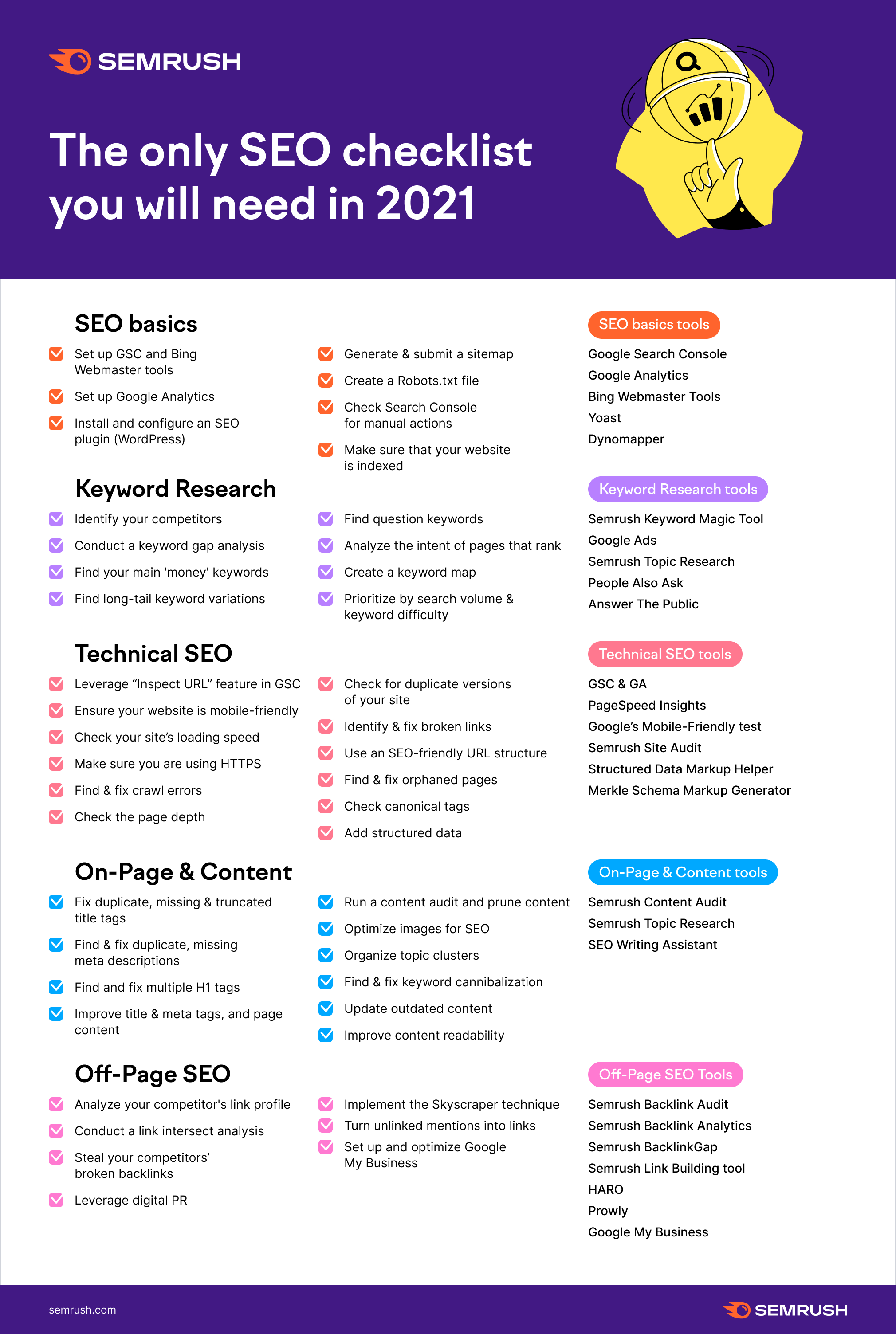
The Actual Tech SEO Checklist (Without Waffle)
Basic Setup
Google Analytics, Search Console and Tag Manager all set up
Site Indexation
Sitemap & Robots.txt set up
Check appropriate use of robots tags and x-robots
Check site: search URLs vs crawl
Check internal links pointing to important pages
Check important pages are only 1 or 2 clicks from homepage
For render blocking JS and stuff, there are WordPress plugins like Autoptimize and the W3 Total Cache.
Make sure there are no unnecessary redirects, broken links or other shenanigans going on with status codes. Use Search Console and Screaming Frog to check.
Site UX
Mobile Friendly Test, Site Speed, time to interactive, consistent UX across devices and browsers
Consider adding breadcrumbs with schema markup.
Clean URLs
Image from Blogspot.com
Make sure URLs – Include a keyword, are short – use a dash/hyphen –
Secure Server HTTPS
Use a secure server, and make sure the unsecure version redirects to it
Allow Google to Crawl Resources
Google wants to crawl your external CSS and JS files. Use “Fetch as Google” in Search Console to check what Googlebot sees.
Hreflang Attribute
Check that you are using and implementing hreflang properly.
Tracking – Make Sure Tag Manager & Analytics are Working
Check tracking is working properly. You can check tracking coed is on each webpage with Screaming Frog.
Internal Linking
Make sure your ‘money pages’ or most profitable pages, get the most internal links
Content Audit
Redirect or unpublish thin content that gets zero traffic and has no links. **note on this, I had decent content that had no visits, I updated the H1 with a celebrity’s name and now it’s one of my best performing pages – so it’s not always a good idea to delete zero traffic pages**
Consider combining thin content into an in depth guide or article.
Use search console to see what keywords your content ranks for, what new content you could create (based on those keywords) and where you should point internal links.
Use Google Analytics data regarding internal site searches for keyword and content ideas 💡
Update old content
Fix meta titles and meta description issues – including low CTR
Find & Fix KW cannibalization
Optimize images – compress, alt text, file name
Check proper use of H1 and H2
See what questions etc. are pulled through into the rich snipetts and answer these within content
Well, I am cheating a bit here as it is still 2020, but it’s December 22nd so please forgive me.
I don’t have any plugins on this site, but I do on my ecommerce site – NiceMMA.com
I’ve also been asked to look into plugins and basically update myself with WordPress ready for 2021 and a slightly new job role, so a thought a blog post might make a good place to record my findings.
Rank Math SEO – WordPress Plugin
This is similar to Yoast but you get more in the free version. I’m not sure I’ll be using it in my day job though, as it asks for permission to analytics and search console.
You can update URLs, redirects and a bunch of other great things with the free version and it also gives a quick SEO audit, which is nice.
Rank Math SEO allows you to look at ‘focus keywords’ and makes it easy to update the meta details.
Duplicate Page – WordPress Plugin
If you make a specific blog layout or a contact page or anything and you don’t want to remake it from scratch, this plugin with duplicate the page or post for you and keep it as a draft so you can go in and edit it before publishing.
Manage WP – WordPress Plugin
Good for web developers, you can update all the plugins all in one go and do other stuff really easy
Empty Spam Bee
If you have a contact form or email address on your site – this should keep out most of the spam.
iThemes Security
Great security plugin. Turn off some of the notifications in the notifications center or you will get loads of emails. Check – secure the site and activate Network Group Brute Force Protection
Elementor Custom Skin
great for creating custom designs if you build WordPress sites using Elementor
This plugin works great with Custom Post Type UI
To Learn more about Elementor, subscribe to this guy’s Youtube channel –
Live Chat for WordPress
If you are looking for an ai chatbot for free, look at this plugin
Live chat can be an important tool for customer service. It can provide 24 hour instant customer support. Email and telephone contact details are great on a website, but a user is typically in a hurry and wants instant answers, and doesn’t want to wait 24 hours for a reply via email.
Click “Pages” (near the bottom-third of the page on the left)
Click on a high-performing post in terms of Impressions and Clicks in google
With the specific page/post selected, click on queries
Make a note of all relevant queries in the top 100
See if these queries can be added to the ranking post
Find any queries that are not directly related to your post
Create a new post specifically about this/these queries (if you rank for it without a specific post – you’ll rank better with a specific post for that query)
In the original post – put an internal link to the new post





 Small Business Dad