Handy if you have loads of custom extractions set up etc.
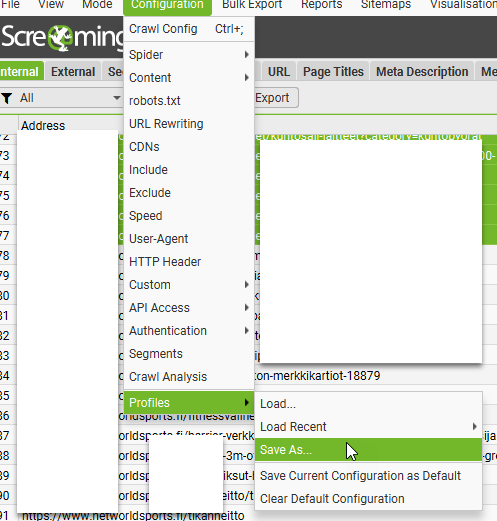
Saving Custom Config File:
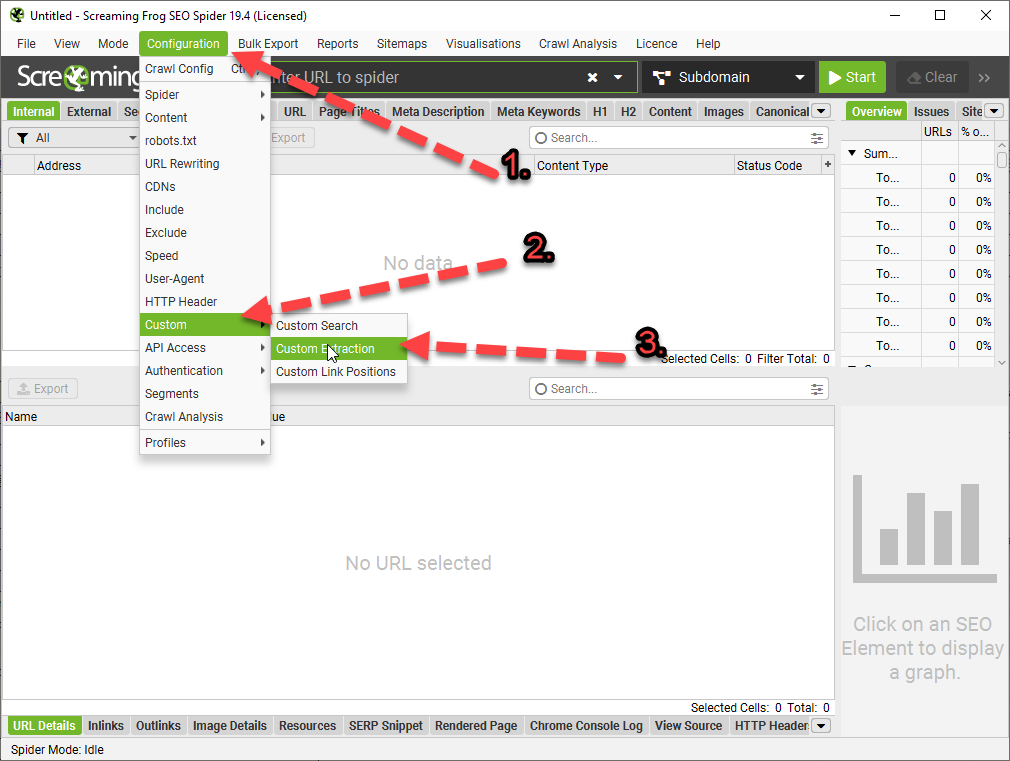
Under the Configuration Menu – go to – Profiles>Save As
Importing The Custom Config File
Configuration > Profiles > Load…
Save as default
Also worth knowing – if you use a similar setup each time you run Screaming Frog – let’s say, you exclude anything with “account” or “customer” in the URL, you can save your setup/config as default:
Which can be a nice time saver too!
I pretty much always add the following to the excludes ‘file’, so it’s easier to keep it in the default setup:
“Look, it’s not my fault you were bullied in school for being a bunch of gimps, and if I get another passive-aggressive comment or tut from you bunch of pizza-munching wankers, I’ll drag each of you outside one by one and beat the fuck out of you using my own technical skillset. Now stop being finger-pointing, arrogant pricks and start communicating properly”
Screaming Frog is the greatest SEO tool of all time. Possibly the greatest tool of all time, closely followed by the George Foreman grill.
There’s a free version and if you have massive ecommerce website, with thousands of URLs, the posh paid version is well cheap too – if I remember rightly, is only about £200.
Absolute bargain.
Scheduling a Report / Crawl
Before you start – create a crawl config file.
I usually go with default settings, plus exclude cart pages and follow redirects.
You’ll also need to create a Google Drive and Looker Studio Account.
Schedule a Screaming Frog Crawl
File > Scheduling:
click “+Add”
Give the scheduled crawl a name and set the time and date you want the first crawl to run
Also choose the frequency.
Note —> if you have a computer with a decent processor, that runs fine when you are crawling with Screaming Frog and you’re still able to do you work, then just set it for a date and time when you’ll be in work and on your computer.
However, if you have a slower computer, and running Screaming Frog at the same time as trying to do your normal work slows the computer down too much, you’ll probably want to set the crawl overnight, or at your lunchtime.
You can set windows computers to “wake up”, as long as they are plugged in. So that you’re able to run a crawl before or after work.
Although your IT department might not like it – computer running unattended with a battery etc could be in theory a fire harzard etc.
More on how to wake up your computer, later…
Back to scheduling on Screaming Frog:
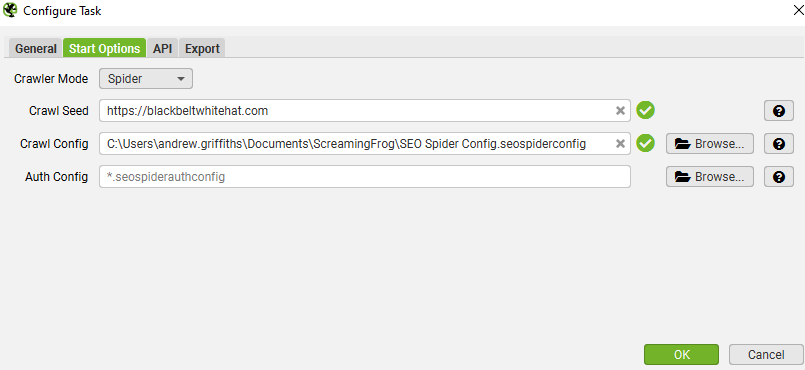
On the start options tab, enter the URL you want to crawl and select your config file
I didn’t choose anything for “auth config”
For crawl config – upload the config file you saved earlier
In the Export – choose a folder on your computer and your Google Drive account:
Click the configure icon for “Export for Looker Studio” at the bottom.
Click the 3 arrows to populate everything >>
By default, your crawl will go in a sheet in Google Drive at: ‘My Drive > Screaming Frog SEO Spider > Project Name > [task_name]_custom_summary_report’.
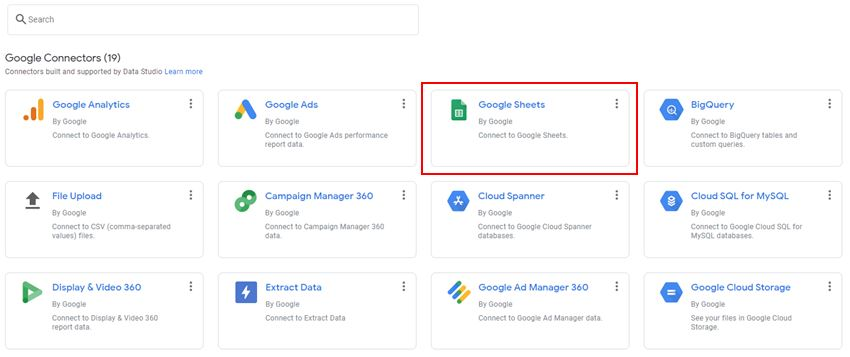
When asked – choose Google Sheets as a data source:
Ensure the ‘use first rows as headers’ option is ticked and select ‘Connect’ in the top-right.
Add the Data Source to Each Table in the Report in Looker Studio
You can probably do this in bulk somehow, but I went to each table/graph and added the Google Sheet as the data source:
When the scheduled crawl, crawls – the template should be populated
Youll now have a nice looking visual report that automatically updates each week, or month, or as frequently as you like
Waking Up Your Computer so the Crawl Can Run
Screaming Frog won’t run unless your computer is on.
You can ‘wake up’ your computer though.
Search for “Task Scheduler”
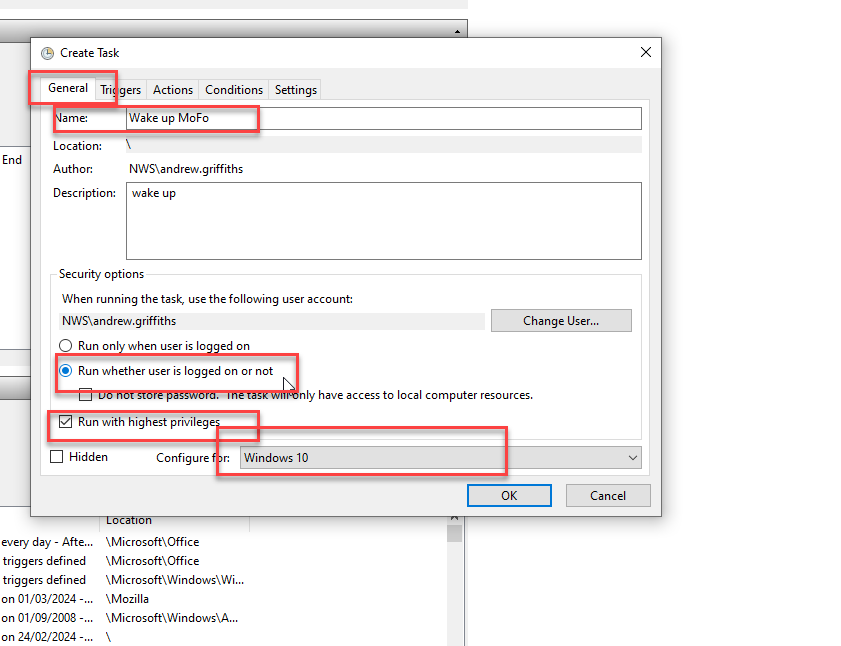
Create Task…
Click the General Tab and use the following settings:
Click on the “Actions” tab and choose a program to run. Doesn’t really matter what program, I usually choose chrome. SF should run automatically
Click the “Triggers” tab and click new
schedule the computer to wake up at the same time and frequency that you’ve set for the screaming frog crawls.
Then, that should be it.
The best way to run automatic crawls, is to sin up to Google cloud. At the moment you get $300 worth of credits free, and each crawl on an average ecommerce sure, will cost around a dollar a go.
Here’s the tutorial on how to set up Screaming Frog on the cloud ☁️:
As the name suggests, Google’s March 2024 core update aims to prioritise useful information over content that seems optimized for search engines. In theory, spammy shite should be dropped in the rankings. In theory. Hopefully the twats at hydragun who keep robbing my MMA blogs content will get a spanking.
The helpful content system is revamped and integrated into the core ranking algorithm to better identify genuinely helpful content and reduce unoriginal content.
The guys in the know, expect the rollout to take a month, with significant ranking fluctuations during this period.
Google aims to reduce low-quality, unoriginal content in search results by 40%. Not 100%, updates begin at 40.
Actionable To-Do List:
Review Content Quality: Assess your website’s content for originality and usefulness to real users, not just for SEO.
Write from experience, and in the first person. Unless you’re a big brand, then do what you like.
Monitor Rankings: Prepare for fluctuations in search rankings as the update rolls out. Use this time to identify areas for improvement.
Update Content Strategy: Focus on creating high-quality, original content that addresses your audience’s needs and questions. Use forums and social media groups to identify your customers pain points and common questions. Your CS and sales teams can also provide insights. Also get chat gpt to put keywords into themes of different queries.
Avoid Spam Tactics: Steer clear of expired domain abuse, scaled content abuse, and site reputation abuse to avoid penalties.
Build your brand. Branded searches and search volumes, make a massive difference, in my experience (see what I did there?).
It generally helps, in theory, to write from experience rather than just giving an overview that anyone could scrape and rewrite from the internet. Include your own images, videos etc.
I don’t have any images of Google updates, see here’s a pic of my dog:
Big brands will still probably have a massive advantage regardless of what they do.
Spam Updates:
Significant changes to spam handling will start on May 5, 2024, affecting sites through algorithmic adjustments or manual actions.
New spam policies target expired domain abuse, scaled content abuse (especially AI-generated content), and site reputation abuse.
General Recommendations:
Recognize the shift towards rewarding authoritative and genuinely helpful content.
Anticipate a more significant impact from updates targeting spam and low-quality content.
Understand that recovery from these updates may require fundamental changes beyond SEO, focusing on building a reputable and sought-after brand for quality content.
Okay so, caffeine is as necessary as oxygen to most parents.
**Drink coffee and consume everything else at your own risk, innit.**
Wait at Least 1 Hour Before Having a Coffee
You’re cortisol levels are high and adenesine levels are low in the morning, you can greatly reduce caffeine intake with minimal negative impact by waiting an hour after waking up, before consuming caffeine.
^I robbed this concept from the Huberman Lab podcast…seems to work.
If youre a 3 or 4 a day type of guy, waiting an hour or two in the morning, you can usually cut back by 1 or perhaps 2 coffees per day.
Add These To Your Coffee ☕️
Make the fecker stronger by adding:
– 100mg agmatine – makes it more potent
– 100mg l theanine – makes it less jittery & last longer
Ideally take the agmatine 5 mins before the coffee, doesn’t make a massive difference though.
Agmatine is pretty potent and affects people differently.
There’s good research now on agmatine for depression and it had minimal side effects, usually GI upset and headaches for some at higher doses.
Studies on agmatine and depression used doses around 2.5g per day. Which is high.
Agmatine is classed as a “novel food” in the UK, so do your own research before necking ten ton of it in your next coffee.
Start with 100mg, people take much more but its best to find a sweet spot.
People use agmatine to drop caffeine intake and to reduce tolerance rather than to just make the daily coffee stronger.
1 coffee usually lasts me all day if I take 500mg agmatine in the morning.
Optimise Mitochondrial Function
Caffeine works by blunting the effects of adenosine. It can also increase dopamine levels slightly.
This isn’t the only way to get more energy. Research optimising mitochondrial function if you want to take your energy up another notch.
ALCAR, PQQ, coQ10, red light therapy and even methylene blue are options to fire up the powerhouses. Just do some research before jumping in, ALCAR can impact TMAO release which may or may not be bad for cardiovascular health (jury is still out), and methylene blue with red light therapy is highly effective but doctors and academics ha e different opinions on methylene blue and its long term effects.
Anything that reduces excessive inflammation will also help you feel better and more energised. Sounds woo woo, but look into the research on grounding and grounding mats (or just stand bare foot on the garden for 5 mins).
Other Stuff
Jumping in an ice bath with also give you a big hit of dopamine – the feel good motivational hormone – for at least a few hours.
getting sunlight in your eyes in the morning, and minimising light in the evening, especially blue light, is also good for optimising dopamine.
Light is important yo:
If you have chronic low energy, you could have burnout or even depression.
I’m not fully versed in burnout, but the way I understand it…you will normally derive energy and motivation from dopamine and feel good hormones, when you’re burnt out, you’ve depleted all your dopamine and it hasn’t been restocked – so you start relying on stress hormones to keep going.
Optimising dopamine levels and receptor sensitivity is pretty complex but you want to try and optimise sleep, and avoid too many dopamine peaking activities.
Positive intermittent reinforced is used in gambling and social media to keep people hooked – it hammers your dopamine levels. Adult / pawn films also does the same, as does coke, sugary foods and energy drinks.
Over the past week, the SEO and PPC landscape has seen several significant updates and insights:
Google Structured Data Carousels (Beta): Google introduced new documentation for what it calls host carousels within Google Search, aiming to enhance content visibility and interaction.
Performance Max Campaigns: Concerns have been raised about Google’s lack of transparency around Performance Max (PMax) performance data, with advertisers criticizing the platform for not showing channel-specific KPIs.
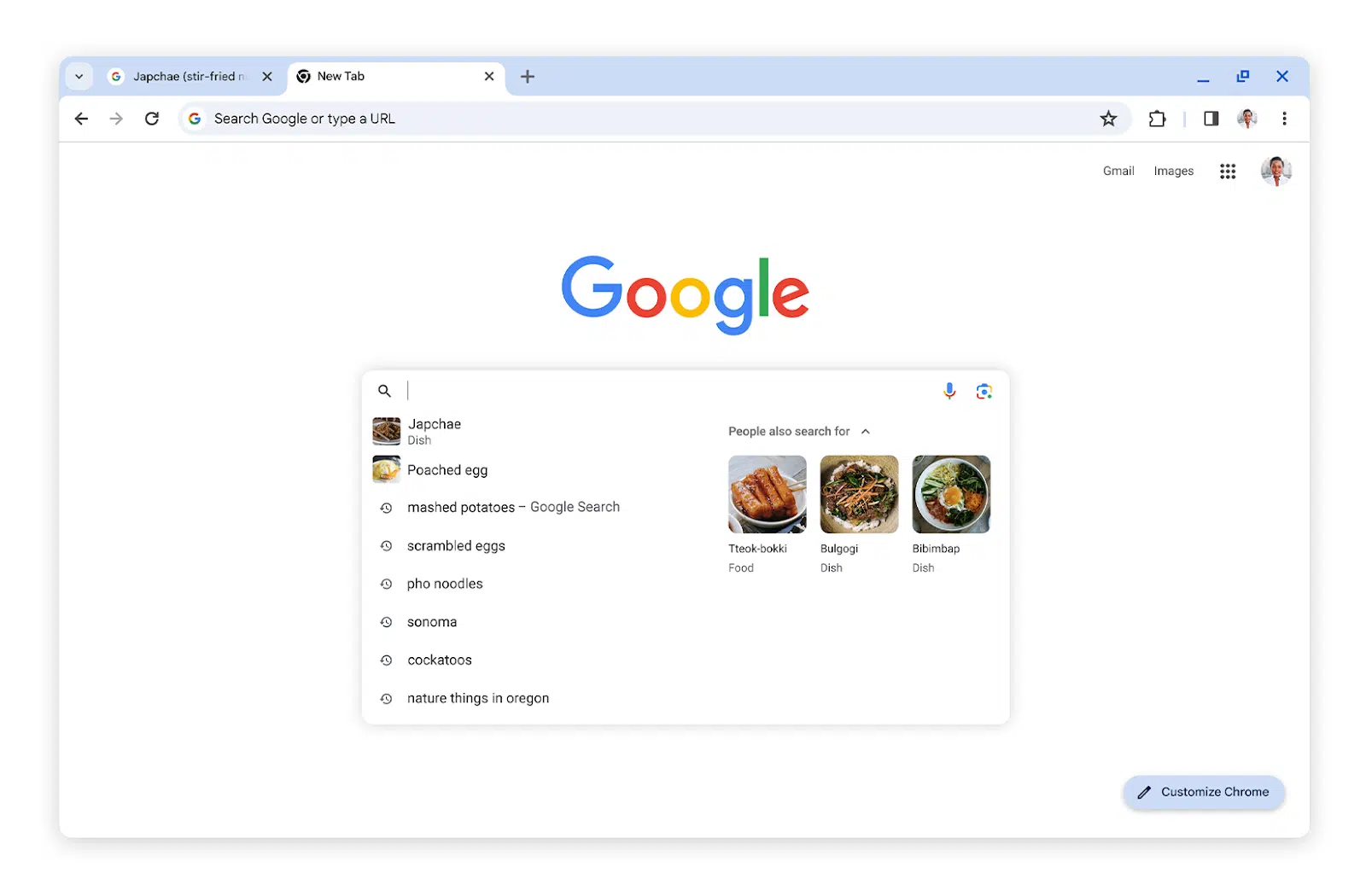
Google Chrome Search Suggestions Update: Google Chrome now offers enhanced search suggestions, including what others are searching for and more image thumbnails in the search box*
AI Content and GPTBot: Discussions around AI-generated content and the use of OpenAI’s GPTBot for crawling websites have been prominent. The consensus is that embracing GPTBot can offer more benefits than drawbacks, with advice on improving AI content to avoid generic writing and plagiarism.
Video SEO and Site Migrations: Advanced techniques for video SEO were highlighted, including the debate between self-hosting versus YouTube embedding. Additionally, AI-powered redirect mapping was discussed as a method to speed up site migrations.
Legal and Policy Updates: Google faces a $2.27 billion lawsuit from European publishers over advertising practices, and reminders were issued about Google enforcing stricter rules for consumer finance ad targeting.
Digital Marketing Trends for SMBs: A new report sheds light on the digital marketing approaches of small and medium-sized businesses (SMBs) in 2024, focusing on key trends, goals, and challenges.
*Google Search Suggestions Update:
Actionable Points for SEO and Digital Marketing
Based on the recent SEO news, here are some actionable recommendations:
Embrace Google’s New Features: Experiment with Google’s structured data carousels and update your site’s structured data accordingly to take advantage of these new search features.
Transparency with Performance Max Campaigns: Closely monitor PMax performance data and consider diversifying your ad strategies to mitigate risks associated with opaque KPIs.
Optimize for Google Chrome’s Enhanced Search Suggestions: Ensure your website’s content is optimized for search suggestions, including the use of relevant keywords and high-quality images.
Unblock GPTBot and Improve AI Content: Do not block GPTBot from crawling your site; instead, focus on creating high-quality, insightful AI-generated content that avoids generic writing and plagiarism.
Advanced Video SEO Techniques: Explore advanced video SEO techniques, such as deciding between self-hosting and YouTube embedding based on your content strategy and ensuring your videos are properly indexed.
AI-Powered Site Migration: Utilize AI for efficient redirect mapping during site migrations to save time and reduce errors, ensuring a smooth transition to a new CMS.
Stay Informed on Legal and Policy Changes: Keep abreast of legal and policy updates affecting digital advertising to ensure your marketing practices remain compliant and effective.
Actionable SEO Tips
Advanced Video SEO Techniques and AI Copy Creation
For advanced video SEO, focus on:
Choosing the Right Hosting Platform: Decide between self-hosting and platforms like YouTube based on your goals (e.g., traffic vs. engagement).
Optimizing Video Metadata: Ensure titles, descriptions, and tags are keyword-rich and descriptive.
Creating Engaging Thumbnails: Use compelling thumbnails to increase click-through rates.
Leveraging Video Transcripts: Improve accessibility and indexability by including transcripts.
To create helpful AI copy that ranks well, focus on:
Providing Detailed Instructions: Give the AI specific, detailed prompts that align with your content goals.
Emphasizing Value and Originality: Instruct the AI to generate content that offers unique insights or solutions.
Incorporating SEO Best Practices: Include keywords and SEO strategies within your prompts to guide the AI in producing SEO-friendly content.
Example Prompts for AI Copy Creation
Becoming a Full Stack Developer:
“Write an introductory guide for beginners on becoming a full stack developer, focusing on essential skills and languages.”
“List the top resources for learning full stack development, including online courses, books, and communities.”
“Explain the importance of project-based learning in full stack development and provide examples of beginner-friendly projects.”
Tech SEO Audit and Site Migration Checklist:
“Create a comprehensive checklist for conducting a technical SEO audit, covering site speed, mobile-friendliness, and on-page SEO factors.”
“Outline the steps for a successful site migration to a new CMS, emphasizing SEO considerations like URL structure and 301 redirects.”
“Discuss common pitfalls in site migrations and how to avoid them, focusing on maintaining search rankings and user experience.”
These prompts are designed to guide AI in producing detailed, valuable content that addresses specific user needs and adheres to SEO best practices.
SEO and Digital Marketing News Summary – February 2024
Google Ads API Version 16 Launch: Introduces new capabilities for tracking campaign performance.
Instagram Expands Creator Marketplace: Now available in eight new markets, facilitating connections between brands and creators for ads.
Performance Max Campaigns Update: Google Ads emphasizes Performance Max with new call-to-action features, aiming to streamline campaign setups.
Google Analytics 4 Enhancements: Updates to the Advertising workspace simplify reporting for marketers, focusing on campaign tracking and behavioral insights.
Reddit and Google’s AI Content Licensing Deal: A significant move that could impact search visibility and content strategy.
Link Building Strategies for 2024: Fresh insights on effective backlinking practices to maximize website potential.
SEO Integration in Multichannel Marketing: Highlighting the importance of SEO in building brand visibility across various marketing channels.
Custom GPTs for SEO: The introduction of SEO-focused ChatGPT plugins in the GPT Store for content optimization and keyword analysis.
Pinterest Launches Cooking Series with Shoppable Experience: A novel approach to integrating content and commerce.
Local Search Trends and Tactics for 2024: Emphasizing the importance of local SEO strategies for location-based businesses.
1. Leverage New Google Ads Features
Actionable Tip: Familiarize yourself with the latest features of Google Ads API Version 16. Specifically, look into new capabilities for tracking campaign performance and efficiency improvements.
Where to Find More Information: Visit the Google Ads Developer Blog for detailed release notes and guides on utilizing the new features of Version 16.
2. Optimize for Performance Max
Actionable Tip: Use the new call-to-action features in Performance Max campaigns to create more compelling and effective ads. Focus on designing ads that directly address your target audience’s needs and interests.
Example and Resources: Google’s Performance Max Campaigns guide provides insights into setting up and optimizing these campaigns for better engagement and conversion rates.
There’s some good info about PMax campaigns in this reddit thread:
Actionable Tip: Take advantage of GA4’s updated Advertising workspace to gain insights into your campaigns. Use the dedicated spaces for tracking and analyzing campaigns and for behavioral insights to refine your marketing strategies.
Actionable Tip: Explore how AI-generated content can enhance your content marketing efforts. Use AI for content ideation, drafting initial content outlines, and optimizing existing content for SEO.
Resources: OpenAI’s GPT-3 Examples page showcases various applications of AI in content creation, providing inspiration for marketers.
5. Focus on Quality Backlinks
Actionable Tip: Prioritize acquiring backlinks from authoritative and relevant websites. Use tools like Ahrefs or Moz to identify potential backlink sources and monitor your backlink profile’s health.
Example and Resources: Moz’s guide on Link Building offers strategies for earning high-quality backlinks, including guest blogging and influencer outreach.
Good tip for link building – is generate your own research with Google Surveys etc – people love to link to statistics
Create Linkable Assets
6. Harmonize SEO with Other Channels
Actionable Tip: Ensure your SEO strategy complements your social media, email, and PPC campaigns. For example, use insights from PPC campaigns to inform your SEO keyword strategy and vice versa.
Resources: HubSpot’s Marketing Blog provides numerous articles on integrating SEO with other digital marketing channels.
7. Utilize SEO-focused ChatGPT Plugins
Actionable Tip: Explore the GPT Store for plugins specifically designed for SEO tasks, such as content optimization and keyword research. These tools can help streamline your SEO workflow and enhance content quality.
Where to Find More Information: Visit the GPT Store and search for SEO-related plugins to find tools that can assist with your specific needs.
Some of the best Chat GPT SEO Plugins include
Automated Writer by OctaneAI
Bramework SEO Booster by Bramework
SEO by Elevate
Outrank Article by aiseo.ai
Scraper by hqdata.com
SEOmator Free Keyword Research & SERP Analyzer GPT by seomator.com
8. Experiment with Shoppable Content
Actionable Tip: Create content that directly links to products or services, making it easy for readers to make a purchase. Use platforms like Instagram and Pinterest to showcase shoppable posts and stories.
Example: How to Create Shoppable Pins guide explains the process of turning your Pins into shoppable experiences.
9. Enhance Your Local SEO
Actionable Tip: Claim and optimize your Google My Business listing, focus on acquiring local backlinks, and encourage customers to leave positive reviews. Use local keywords in your website’s content and metadata.
Resources: Google’s Manage your Business Profile page provides step-by-step instructions on optimizing your listing for better local search visibility.
Actionable Tip: Regularly read industry blogs and attend webinars to stay updated on the latest SEO and digital marketing trends. Websites like Search Engine Journal, Moz Blog, and Search Engine Land are excellent resources for the latest news and insights.
Use Inspect Element (right click on the copy and choose “inspect” if you use Chrome browser) – to identify the name, class or ID of the div or element the page copy is contained in:
In this example the Div class is “prose” (f8ck knows why)
You can copy the Xpath instead – but it appears to do the same thing as just entering the class or id of the div:
The following will scrape any text in the div called “prose”:
*Click Image to enlarge^
Once you are in the Custom Extraction Window – Choose:
Extractor 1
X Path
In the next box enter –> //div[@class=’classofdiv‘] —->
in this example – //div[@class=’prose’]
Extract Text
//div[@class='prose']
^Enter the above into the 3rd 'box' in the custom extraction window/tab.
Replace "prose" with the name of the div you want to scrape.
If you copy the Xpath using Inspect Element – select the exact element you want. For example, don’t select the Div that contains text you want to scrape – select the text itself:
Here are some more examples:
How to Extract Common HTML Elements
(Please Note – the formatting changes the single quote marks ‘ ‘ – you may need to override them manually with single quotes using your keyboard, before adding to Screaming Frog. For example //div[@class=’read-more’]
Should be:
//div[@class='read-more']
XPath
Output
//h1
Extract all H1 tags
//h3[1]
Extract the first H3 tag
//h3[2]
Extract the second H3 tag
//div/p
Extract any <p> contained within a <div>
//div[@class=’author’]
Extract any <div> with class “author” (remember to check ‘ quote marks are correct)
//p[@class=’bio’]
Extract any <p> with class “bio”
//*[@class=’bio’]
Extract any element with class “bio”
//ul/li[last()]
Extract the last <li> in a <ul>
//ol[@class=’cat’]/li[1]
Extract the first <li> in a <ol> with class “cat”
count(//h2)
Count the number of H2’s (set extraction filter to “Function Value”)
//a[contains(.,’click here’)]
Extract any link with anchor text containing “click here”
//a[starts-with(@title,’Written by’)]
Extract any link with a title starting with “Written by”
How to Extract Common HTML Attributes
XPath
Output
//@href
Extract all links
//a[starts-with(@href,’mailto’)]/@href
Extract link that starts with “mailto” (email address)
//img/@src
Extract all image source URLs
//img[contains(@class,’aligncenter’)]/@src
Extract all image source URLs for images with the class name containing “aligncenter”
//link[@rel=’alternate’]
Extract elements with the rel attribute set to “alternate”
//@hreflang
Extract all hreflang values
How to Extract Meta Tags (including Open Graph and Twitter Cards)
I recommend setting the extraction filter to “Extract Inner HTML” for these ones.
If the ‘shorter code’ in the tables above doesn’t work for some reason, you may have to right click – inspect and copy the full Xpath code to be more specific with what you want to extract:
For sections of text like paragraphs and on page descriptions, select the actual text in the inspect window before copying the Xpath.
Update 2
We wanted to compare the copy and internal links before and after a site-migration to a new CMS.
To see the links in HTML format – you just need to check “Extract Text” to “Extract Inner HTML” in the final drop down: (click image to enlarge)
On the new CMS, it was easier to just copy the XPath
Why Use Custom Extraction with Screaming Frog?
I’m glad you asked.
We used it to check that page copy had migrated properly to a new CMS.
We also extracted the HTML within the copy, to check the internal links were still present.
One cool thing you can do – is scrape reviews and then analyse the reviews to see key feedback/pain points that could inform superior design.
Here’s a good way to use custom extraction/search to find text that you want to use for anchor text for internal links:
Or – just paste into Chat GPT and ask for insights and pain-points to help develop a better product.
I asked Chat GPT and Google Gemini why I would want to scrape copy from sites and got these responses:
Monitoring Competitors
Content Strategy Insights: Gather headings, titles, and meta descriptions from competitor websites to gain insights into their content strategies and how they optimize for search engines.
Pricing Information: For e-commerce platforms, you can use custom extraction to keep an eye on competitors’ pricing strategies by pulling prices for similar products.
Promotional Strategies: Collect details on promotions, discounts, or special offers from competitors’ sites to evaluate how they stack up against your own promotional efforts.
Keyword Usage: Identify specific keywords from competitors’ content to understand how they are targeting particular topics or niches.
Backlink Analysis: While Screaming Frog isn’t primarily a backlink tool, you can utilize custom extraction to pinpoint external links on a page, providing insights into a competitor’s backlink strategy.
Optimizing Your Own Website
Content Optimization: Employ custom extraction to review your own site’s headings, titles, meta descriptions, and keyword usage to spot areas that need improvement.
Structural Data: Extract and assess structured data (like Schema markup) across your site to ensure proper implementation and identify potential enhancement opportunities.
Internal Linking: Analyze internal linking structures to understand the flow of page authority throughout your site and to find orphan pages or those with insufficient internal link support.
Audit Forms and Calls to Action (CTAs): Extract form action URLs and CTA links to verify they are working correctly and to optimize their placement and wording.
Identify Outdated Content: Use custom extraction to locate dates and timestamps on your content, which can help you identify articles or pages that may require updates.
Gemini said:
Reasons to Use Custom Extraction in Screaming Frog:
The custom extraction feature in Screaming Frog provides numerous advantages for website analysis and data collection. Here are some important reasons to utilize it:
Extract Specific Data:
Go beyond basic SEO metrics: While Screaming Frog offers valuable insights, custom extraction enables you to focus on specific data points that may not be easily accessible, such as product prices, article publish dates, or user reviews.
Gain deeper competitor insights: Extract information on competitor pricing strategies, product descriptions, or content structures to compare with your own website.
Gather information for internal analysis: Monitor specific elements on your site, like call to action (CTA) button text or internal linking structures, to observe changes and assess their impact.
Automate Data Collection:
Save time and effort: Collecting data manually can be labor-intensive and prone to errors. Custom extraction streamlines the process, allowing you to efficiently gather information across numerous pages.
Maintain consistent data: By setting up automated data extraction, you ensure uniform data collection over time, which facilitates better trend analysis and comparisons.
Enhance Reporting and Analysis:
Combine extracted data with existing Screaming Frog metrics: Merge the extracted data with other SEO parameters such as page titles, meta descriptions, and internal links for a more thorough analysis.
Create custom reports: Use the extracted data to generate tailored reports for specific purposes, like competitor pricing comparisons or evaluations of content performance.
Monitoring Competitors:
Custom extraction serves as a valuable tool for competitor monitoring in various ways:
Extract competitor pricing data: Keep track of competitor pricing trends, identify potential gaps in your own pricing strategy, and make informed pricing decisions.
Analyze competitor content structure and keywords: Learn how competitors format their content, pinpoint their targeted keywords, and gain insights to enhance your own strategy.
Note for self – for Magento 2, Hyva theme Sub-category page copy – scrape using:















 Small Business Dad