If the links don’t have .html in the protocol (at the end of them), then first concatenate the URLs to add * at the end of them all.
If they do have .HTML, then find and replace .HTML with .html*
Next – use Text to Columns, use * as the “delimiter”
Removing code from the Start of the URLs
If the links are relative:
Use text to columns again and use / as the delimiter
If the links contain the full domain name, then concatenate * at the start of the domain name and use text to columns again to remove the code fro the start of the URLs
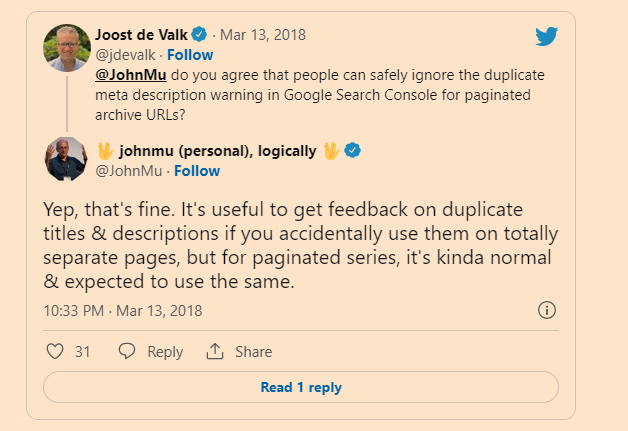
If possible give paginated pages their own “sub-optimal” meta titles & descriptions
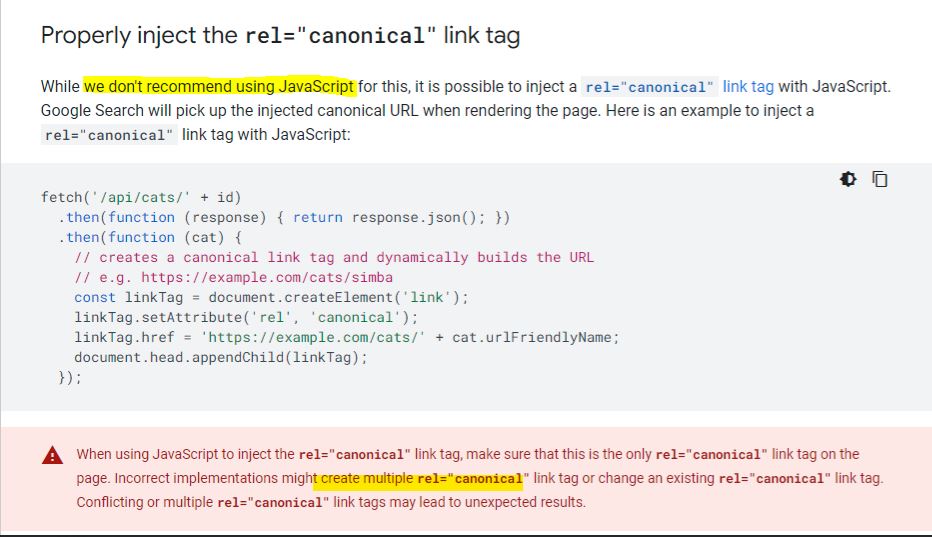
It’s not best practice to use JS to inject/create canonical URLs
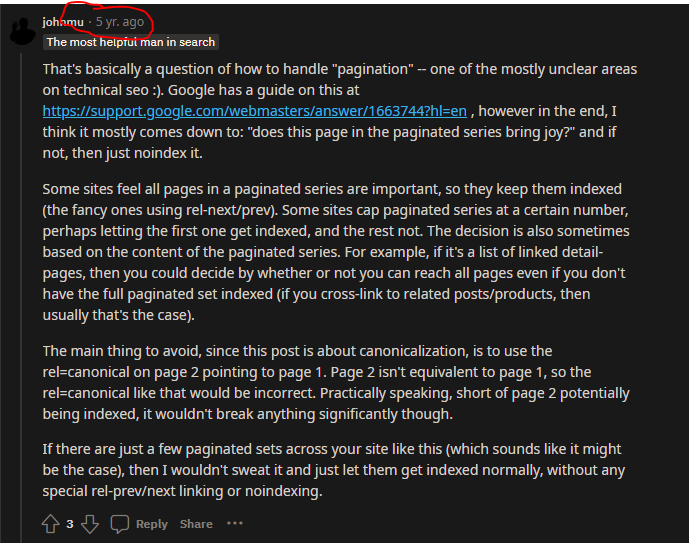
Don’t have multiple canonical URLs (see reddit thread here)
John Mueller commented, “We don’t treat pagination differently. We treat them as normal pages.”
Meaning paginated pages are not recognized by Google as a series of pages consolidated into one piece of content as they previously advised. Every paginated page is eligible to compete against the root page for ranking.
To encourage Google to return the root page in the SERPs and prevent “Duplicate meta descriptions” or “Duplicate title tags” warnings in Google Search Console, make an easy modification to your code.
Pagination Checklist
Uses a href HTML links?
Links need to be in the <head>
works with JS disabled?
Different page numbers have self-referencing canonical URLs?
Do Not Include Paginated Pages in Sitemaps
Optimize Meta Tags, If Possible – Different title on each page
Ensure that the robots’ meta-tag doesn’t contain noindex
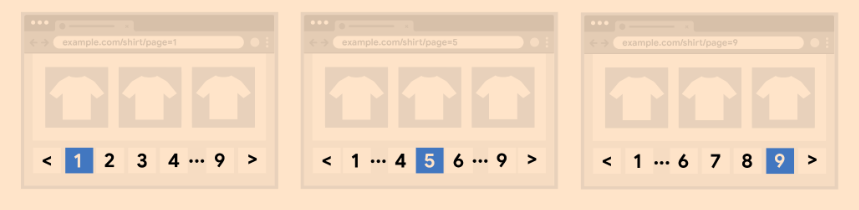
Link to first page should be root page, not a parameter ?p=1 page
“Previous button” < on page 2 – should like to root page, not ?p=1
The successive paginated pages could have titles like:
These paginated URL page titles and meta descriptions are purposefully suboptimal to dissuade Google from displaying these results, rather than the root page.
If even with such modifications, paginated pages are ranking in the SERPs, try other traditional on-page SEO tactics such as:
De-optimize paginated page H1 tags.
Add useful on-page text to the root page, but not paginated pages.
You can improve the experience of users on your site by displaying a subset of results to improve page performance (page experience is a Google Search ranking signal), but you may need to take action to ensure the Google crawler can find all your site content.
For example, you may display a subset of available products in response to a user using the search box on your ecommerce site – the full set of matches may be too large to display on a single web page, or take too long to retrieve.
Beyond search results, you may load partial results on your ecommerce site for:
Category pages where all products in a category are displayed
Blog posts or newsletter titles that a site has published over time
User reviews on a product page
Comments on a blog post
Having your site incrementally load content, in response to user actions, can benefit your users by:
Improving user experience as the initial page load is faster than loading all results at once.
Reducing network traffic, which is particularly important for mobile devices.
Improving backend performance by reducing the volume of content retrieved from databases or similar.
Improving reliability by avoiding excessively long lists that may hit resource limits leading to errors in the browser and backend systems.
Selecting the best UX pattern for your site
To display a subset of a larger list, you can choose between different UX patterns:
Pagination: Where a user can use links such as “next”, “previous”, and page numbers to navigate between pages that display one page of results at a time.
Load more: Buttons that a user can click to extend an initial set of displayed results.
Pros: Gives users insight into result size and current position
Cons: More complex controls for users to navigate through resultsContent is split across multiple pages rather than being a single continuous listViewing more requires new page loads
Load more
Pros: Uses a single page for all contentCan inform user of total result size (on or near the button)
Cons: Can’t handle very large numbers of results as all of the results are included on a single web page
Infinite scroll
Pros: Uses a single page for all contentIntuitive – the user just keeps scrolling to view more content
Cons: Can lead to “scrolling fatigue” because of unclear result sizeCan’t handle very large numbers of results
How Google indexes the different strategies
Once you’ve selected the most appropriate UX strategy for your site and SEO, make sure the Google crawler can find all of your content.
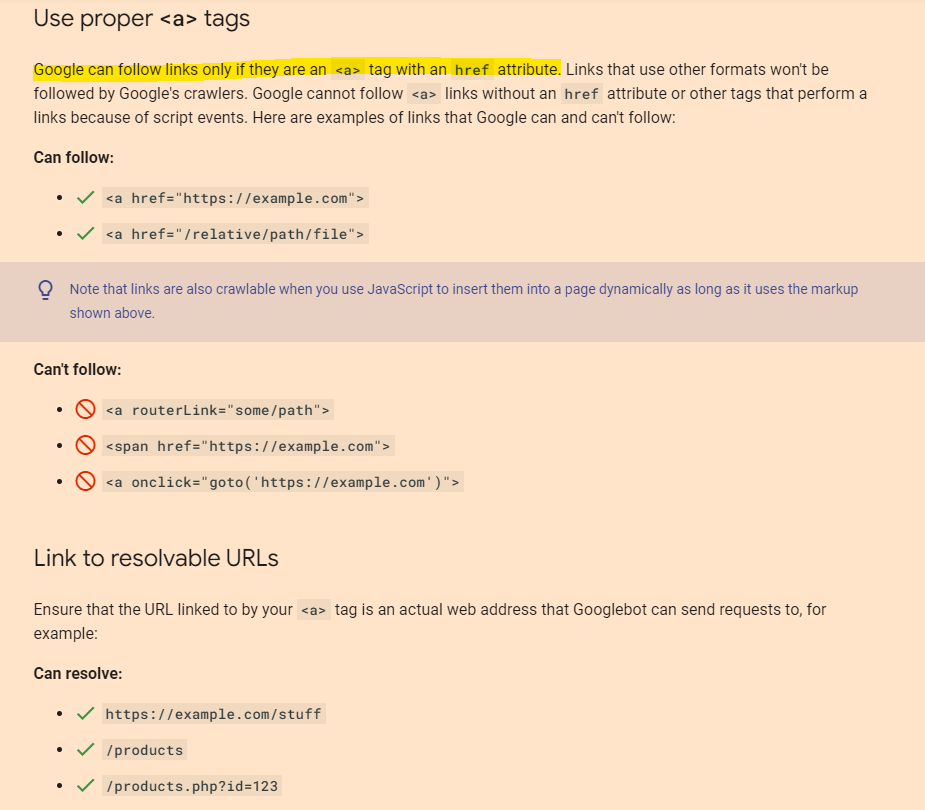
For example, you can implement pagination using links to new pages on your ecommerce site, or using JavaScript to update the current page. Load more and infinite scroll are generally implemented using JavaScript. When crawling a site to find pages to index, Google only follows page links marked up in HTML with <a href> tags. The Google crawler doesn’t follow buttons (unless marked up with <a href>) and doesn’t trigger JavaScript to update the current page contents.
If your site uses JavaScript, follow these JavaScript SEO best practices. In addition to best practices, such as making sure links on your site are crawlable, consider using a sitemap file or a Google Merchant Center feed to help Google find all of the products on your site.
Best practices when implementing pagination
To make sure Google can crawl and index your paginated content, follow these best practices:
To make sure search engines understand the relationship between pages of paginated content, include links from each page to the following page using <a href> tags. This can help Googlebot (the Google web crawler) find subsequent pages.
In addition, consider linking from all individual pages in a collection back to the first page of the collection to emphasize the start of the collection to Google. This can give Google a hint that the first page of a collection might be a better landing page than other pages in the collection.
Normally, we recommend that you give web pages distinct titles to help differentiate them. However, pages in a paginated sequence don’t need to follow this recommendation. You can use the same titles and descriptions for all pages in the sequence. Google tries to recognize pages in a sequence and index them accordingly.
Use URLs correctly
Give each page a unique URL. For example, include a ?page=n query parameter, as URLs in a paginated sequence are treated as separate pages by Google.
Don’t use the first page of a paginated sequence as the canonical page. Instead, give each page in its own canonical URL.
Don’t use URL fragment identifiers (the text after a # in a URL) for page numbers in a collection. Google ignores fragment identifiers. If Googlebot sees a URL to the next page that only differs by the text after the #, it may not follow the link, thinking it has already retrieved the page.
In the past, Google used <link rel=”next” href=”…”> and <link rel=”prev” href=”…”> to identify next page and previous page relationships. Google no longer uses these tags, although these links may still be used by other search engines.
Avoid indexing URLs with filters or alternative sort orders
You may choose to support filters or different sort orders for long lists of results on your site. For example, you may support ?order=price on URLs to return the same list of results ordered by price.
It’s more usable on mobile. One of the biggest advantages of infinite scrolling is that it’s incredibly usable on mobile devices. Simply scrolling down to view more content is far easier than asking users to click on a tiny “next” button or number every time they want to go to the next page.
Infinite scroll is better for user engagement. There’s a reason why Aussies spend hours on end scrolling through social media. Having content continuously load means that users can browse and engage with your site without being interrupted. This can be beneficial for content marketing and SEO, particularly given that Google is now using user behaviour as a ranking signal.
Cons of infinite scroll
Difficulties with crawling. Like pagination, the infinite scroll can also create problems when it comes to having your site crawled by Google (or other search engines). Search bots only have a limited time to crawl a page. If your content is too lengthy or takes too long to load, it loses the opportunity to be crawled — meaning entire chunks of your content might go unindexed.
It can be hard to find information. Depending on the length of your page, an infinite scroll can make it difficult for users to go back and revisit previous sections or products that they’re interested in. You might end up losing valuable leads or conversions simply because users found it too difficult to find what they were looking for, and chose to look elsewhere.
Limited access to the footer. Website footers contain valuable information for site visitors, such as social media network buttons, shipping policies, FAQs and contact information. However, with infinite scroll, it’s tough for users to access this section on your site.
At the end of the day, while users might appreciate infinite scrolling, this option isn’t as beneficial for SEO as website pagination. Pagination is the ideal option for search engines, provided you handle paginated pages in line with SEO best practices.
Duplicate content is likely to be one of the biggest challenges you’ll come across when implementing pagination on your website.
To overcome these issues, you’ll need to use a self-referencing rel = “canonical” attribute on all of your paginated pages that directs back to the “View All” version of your page. This tag tells Google to crawl and index the “View All” version only and ignore any duplicated content in your paginated pages.
***If you choose to use a View All page**
In the HTML, it looks like this:
Image source: SEO Clarity
Last but not least, make sure you use internal linking to different paginated URLs using the rel=”next” and rel=”prev” tags along with your canonical tag. These can be incorporated into your HTML like so:
Even though these aren’t a ranking factor, they still help Google (and Bing) understand the order of paginated content on your website.
2. Make sure to use crawlable anchor links
The first step to getting Google to crawl and index pages that are paginated? Make sure that the search engine can access them. Throughout your website, you should link to your paginated category pages using crawlable anchor site links with href attributes.
Let’s say you’re linking to page 3 of your product catalogue. Crawlable paginated links would look like this:
Even though your paginated pages are indexable, paginated URLs shouldn’t be included on your XML sitemap. Adding them in will only use up your ‘crawl budget’ with Google and could even lead to Google picking a random page to rank (such as page 3 in your product catalogue).
The only exception to this is when you choose to have important pages consolidated into a “View All” page, which absolutely needs to be included in your XML sitemap.
A final word on this one: don’t noindex paginated pages. While the no-index tag tells Google not to index paginated pages, it could lead to Google eventually no-following internal links from that page. In turn, this might cause other pages that are linked from your paginated pages to be removed from Google’s index.
4. Ensure you optimise your on-page SEO
Even if your paginated pages use self-referencing canonical URL tags, feature crawlable anchor links and are excluded from your XML sitemap, you should still follow best practices for on-page SEO.
As we touched on earlier, paginated pages are treated as unique pages in Google’s search index. This means that each page needs to follow on-page SEO guidelines if you want to rank in search results.
In case you needed more proof, here are John Mueller’s recommendations on this topic:
“I’d also recommend making sure the pagination pages can kind of stand on their own. So similar to two category pages where if users were to go to those pages directly, there would be something useful for the user to see there. So it’s not just like a list of text items that go from zero to 100 and links to different products. It’s actually something useful kind of like a category page where someone is looking for a specific type of a product they can go there, and they get that information.” – John Mueller, Google Webmaster English Hangouts
This means that every paginated page should:
Have unique meta tags, including title tags and meta descriptions
Feature mobile-friendly design that’s optimised for smaller screens
Load quickly on desktop and mobile devices
Include filters to help narrow down products (if you’re running an online store)
Deliver value for visitors
Tip: If you’re running an online store with eCommerce category pages, Google’s UX Playbook for Retail contains all the best practices you need to know to turn clicks into customers.
SEO-Friendly Pagination: A Complete Best Practices Guide
Summary
Canonical tags to the same page (not to the view all or first page)
Use rel=next and rel=prev
If possible give paginated pages their own “sub-optimal” meta titles & descriptions
Not sure if this is an issue:
Pagination Causes Duplicate Content
Correct if pagination has been improperly implemented, such as having both a “View All” page and paginated pages without a correct rel=canonical or if you have created a page=1 in addition to your root page.
Incorrect when you have SEO friendly pagination. Even if your H1 and meta tags are the same, the actual page content differs. So it’s not duplication.
Pagination Creates Thin Content
Correct if you have split an article or photo gallery across multiple pages (in order to drive ad revenue by increasing pageviews), leaving too little content on each page.
Incorrect when you put the desires of the user to easily consume your content above that of banner ad revenues or artificially inflated pageviews. Put a UX-friendly amount of content on each page.
Pagination Uses Crawl Budget
Correct if you’re allowing Google to crawl paginated pages. And there are some instances where you would want to use that budget.
For example, for Googlebot to travel through paginated URLs to reach deeper content pages.
Often incorrect when you set Google Search Console pagination parameter handling to “Do not crawl” or set a robots.txt disallow, in the case where you wish to conserve your crawl budget for more important pages. (use robots.txt for this as no longer in Search Console)
Managing Pagination According to SEO Best Practices
Use Crawlable Anchor Links
For search engines to efficiently crawl paginated pages, the site must have anchor links with href attributes to these paginated URLs.
Be sure your site uses <a href=”your-paginated-url-here”> for internal linking to paginated pages. Don’t load paginated anchor links or href attribute via JavaScript.
Additionally, you should indicate the relationship between component URLs in a paginated series with rel=”next” and rel=”prev” attributes.
Yes, even after Google’s infamous Tweet that they no longer use these link attributes at all.
Google is not the only search engine in town. Here is Bing’s take on the issue.
Complement the rel=”next” / “prev” with a self-referencing rel=”canonical” link.
So /category?page=4 should rel=”canonical” to /category?page=4.
This is appropriate as pagination changes the page content and so is the master copy of that page.
If the URL has additional parameters, include these in the rel=”prev” / “next” links, but don’t include them in the rel=”canonical”.
Doing so will indicate a clear relationship between the pages and prevent the potential of duplicate content.
Common errors to avoid:
Placing the link attributes in the <body> content. They’re only supported by search engines within the <head> section of your HTML.
Adding a rel=”prev” link to the first page (a.k.a. the root page) in the series or a rel=”next” link to the last. For all other pages in the chain, both link attributes should be present.
Beware of your root page canonical URL. Chances are on ?page=2, rel=prev should link to the canonical, not a ?page=1.
The <head> code of a four-page series will look something like this:
One pagination tag on the root page, pointing to the next page in series.
John Mueller commented, “We don’t treat pagination differently. We treat them as normal pages.”
Meaning paginated pages are not recognized by Google as a series of pages consolidated into one piece of content as they previously advised. Every paginated page is eligible to compete against the root page for ranking.
To encourage Google to return the root page in the SERPs and prevent “Duplicate meta descriptions” or “Duplicate title tags” warnings in Google Search Console, make an easy modification to your code.
If the root page has the formula:
The successive paginated pages could have the formula:
These paginated URL page titles and meta description are purposefully suboptimal to dissuade Google from displaying these results, rather than the root page.
If even with such modifications, paginated pages are ranking in the SERPs, try other traditional on-page SEO tactics such as:
De-optimize paginated page H1 tags.
Add useful on-page text to the root page, but not paginated pages.
Add a category image with an optimized file name and alt tag to the root page, but not paginated pages.
Don’t Include Paginated Pages in XML Sitemaps
While paginated URLs are technically indexable, they aren’t an SEO priority to spend crawl budget on.
As such, they don’t belong in your XML sitemap.
Handle Pagination Parameters in Google Search Console
If you have a choice, run pagination via a parameter rather than a static URL.
For example:
example.com/category?page=2
over
example.com/category/page-2
While there is no advantage using one over the other for ranking or crawling purposes, research has shown that Googlebot seems to guess URL patterns based on dynamic URLs. Thus, increasing the likelihood of swift discovery.
On the downside, it can potentially cause crawling traps if the site renders empty pages for guesses that aren’t part of the current paginated series.
If Google guesses http://www.example.com/category?page=7 and a live, but empty, page is loaded, the bot wastes crawl budget and potentially get lost in an infinite number of pages.
Make sure a 404 HTTP status code is sent for any paginated pages which are not part of the current series.
Another advantage of the parameter approach is the ability to configure the parameter in Google Search Console to “Paginates” and at any time change the signal to Google to crawl “Every URL” or “No URLs”, based on how you wish to use your crawl budget. No developer needed!
Don’t ever map paginated page content to fragment identifiers (#) as it is not crawlable or indexable, and as such not search engine friendly.
Sources for KPIs can include:
Server log files for the number of paginated page crawls.
Site: search operator (for example site:example.com inurl:page) to understand how many paginated pages Google has indexed.
Google Search Console Search Analytics Report filtered by pages containing pagination to understand the number of impressions.
Google Analytics landing page report filtered by paginated URLs to understand on-site behavior.
Also – if you have more than 3 pages in a sequence (and pagination only shows 3 pages), then consider keeping the first page visible and linked-to:
SEO and Vue.JS Notes – I recently did some research on this for a new website we’re building. I thought it’s worth a post for future reference and for anyone interested!
Summary
90% of what I’ve found suggests you need to use Server-side or pre-rendering Javascript
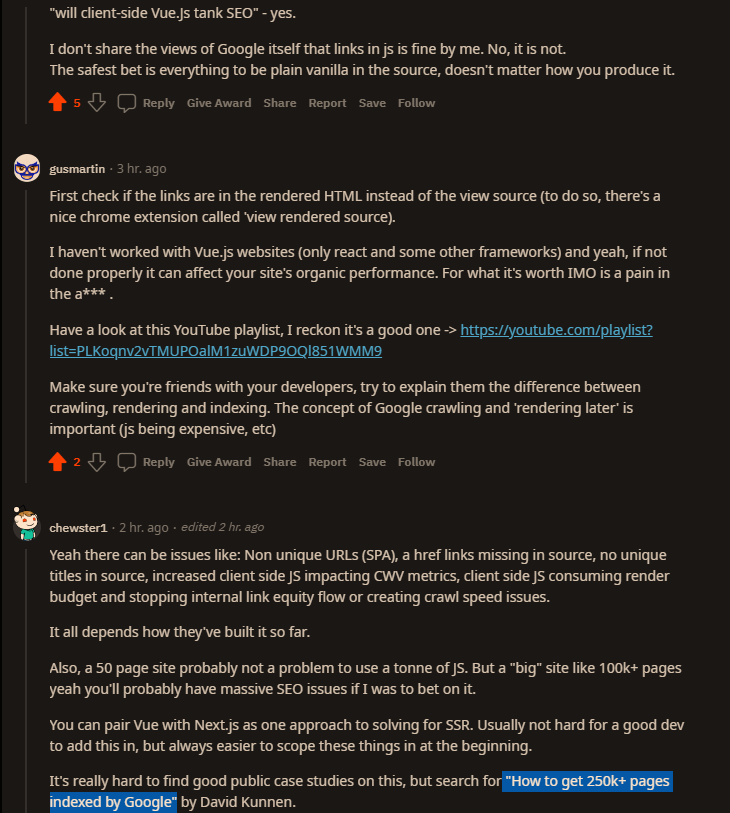
Make sure all links are available in the proper a href HTML markup in the “View Source” of page
Not everyone can have a Node server for their project. And there may be a lot of reasons for that: shared webhost, no root access…
So here are 4 ways to handle SEO in 2021 with an SPA.
1. SEO on the client side with Google crawlers
React, Vue, Svelte… All these are frontend frameworks initially used to create SPAs, aka websites/webapps with CSR (Client Side Rendering).
What does this mean? It means the rendering is done in the browser. Therefore, the HTML sent to the browser & search engine crawlers is empty!
No HTML content = No SEO.
Remember, you need to handle SEO tags (title, meta…) on the client side! You can use vue-meta or vue-headfor that (personally, I prefer vue-meta).
2. SEO with Node-based Server Side Rendering (SSR)
So SSR aka Sever Side Rendering, is a “new” concept that came with frontend frameworks. It’s based on Isomorphic programming which means the same app and code is executed on backend context and frontend context.
Because your app is executed on the backend, the server returns your component tree as an HTML string to the browser.
What does this mean? Since each initial request is done by a Node server that sends HTML, this even works for social media crawlers or any other crawler.
SSR with Vue can be done in 2 ways, DIY or with a framework on top of Vue:
Of course, SEO with Node-based SSR has it’s drawbacks:
You need… A Node server! Don’t worry, you only need it for the initial HTML rendering, not for your API.
3. SEO using “classic” Server Side Rendering (SSR)
So, based on what we learnt in 1 & 2, we can acheive something similar with a any backend language.
To solve this, we need to do 4 actions with any type of backend:
Use a backend router that mirrors the frontend router, so that the initial response can render content based on the url asked
In the backend response, we will only generate title & meta tags since our backend can’t execute frontend code
We will store some initial data in a variable on the window object so that the SPA can access it at runtime on the client
On the client, you check if there’s data on the window object. If there is, you have nothing to do. If there isn’t, you do a request to the API server.
That’s pretty much it for the backend, nothing more. You only need a single “view” file that takes title, meta, initialData or whatever parameters you need for SEO/SMO and that’s it.
The “window.initialData = @ json($state)” is also very important here, but not mandatory for SEO. It’s for performance/UX purposes. It’s just for you to have initial data in the frontend, to avoid an initial AJAX request to your API server.
Of course, SEO with classic SSR has it’s drawbacks:
You have to mirror each route were you need SEO on the backend
You have to pass “the same data” to the frontend and to APIs, sometimes if feels like duplicating stuff
4. JAMStack aka Static Site Generation aka Prerendering
This is my the method I love the most, but it isn’t meant for all situations.
So what is JAMStack? Well it’s a fancy word for something that existed before that we called: static websites.
So what’s JAMStack then? JavaScript API Markup.
JAMStack is the concept of prerendering, but automated and modernized.
It’s an architecture solely based on the fact that you will prerender markup with initial data, that markup would use JavaScript to bring interaction and eventually more data from APIs (yours and/or others).
In a JAMStack architecture, you would usually use a frontend framework to prerender your static files that would then turn to an SPA.
It’s mostly based on the fact that you would rebuild pages on-the-fly anytime data changes in your APIs, through webhooks with CI/CD.
So it’s really nice, but not great for websites/webapps that have daily updates with a lot of pages.
Why? Because all pages are regenerated each time.
It’s the fastest, most SEO-friendly and “cheapest” method.
You only need your API server, a static host (Netlify, Vercel, S3, Firebase Hosting, etc…), and a CI/CD system for rebuilds which you most likely already have to handle tests or deployment.
Any other SSG (static site generator) would be good but, you won’t have hydration with those not Vue-driven.
APIs: You can create your own API but, usually when you do JAMStack, it’s for content-drive websites/webapps. That’s why we often use what we call: Headless CMSs.
A headless CMS, is a CMS that can render HTTP APIs as a response.
There are many of them: Strapi, Directus (Node), WordPress (yep it can), Cockpit CMS (PHP), Contentful, Dato, Prismic (hosted)…
These frameworks allow one to achieve new, previously-unthinkable things on a website or app, but how do they perform in terms of SEO? Do the pages that have been created with these frameworks get indexed by Google? Since with these frameworks all — or most — of the page rendering gets done in JavaScript (and the HTML that gets downloaded by bots is mostly empty), it seems that they’re a no-go if you want your websites to be indexed in search engines or even parsed by bots in general.
This seems to imply that we don’t have to worry about providing Google with server-side rendered HTML anymore. However, we see all sorts of tools for server-side rendering and pre-rendering made available for JavaScript frameworks, it seems this is not the case. Also, when dealing with SEO agencies on big projects, pre-rendering seems to be considered mandatory. How come?
Okay, so the content gets indexed, but what this experiment doesn’t tell us is: will the content be ranked competitively? Will Google prefer a website with static content to a dynamically-generated website? This is not an easy question to answer.
From my experience, I can tell that dynamically-generated content can rank in the top positions of the SERPS. I’ve worked on the website for a new model of a major car company, launching a new website with a new third-level domain. The site was fully generated with Vue.js — with very little content in the static HTML besides <title> tags and meta descriptions.
So, why all the fuss about pre-rendering — be it done server-side or at project compilation time? Is it really necessary? Although some frameworks, like Nuxt, make it much easier to perform, it is still no picnic, so the choice whether to set it up or not is not a light one.
I think it is not compulsory. It is certainly a requirement if a lot of the content you want to get indexed by Google comes from external web service and is not immediately available at rendering time, and might — in some unfortunate cases — not be available at all due to, for example, web service downtime. If during Googlebot’s visits some of your content arrives too slowly, then it might not be indexed. If Googlebot indexes your page exactly at a moment in which you are performing maintenance on your web services, it might not index any dynamic content at all.
Furthermore, I have no proof of ranking differences between static content and dynamically-generated content. That might require another experiment. I think that it is very likely that, if content comes from external web service and does not load immediately, it might impact on Google’s perception of your site’s performance, which is a very important factor for ranking.
If you rely on Googlebot executing your JavaScript to render vital content, then major JavaScript errors which could prevent the content from rendering must be avoided at all costs. While bots might parse and index HTML which is not perfectly valid (although it is always preferable to have valid HTML on any site!), if there is a JavaScript error that prevents the loading of some content, then there is no way Google will index that content.
The other search engines do not work as well as Google with dynamic content. Bing does not seem to index dynamic content at all, nor do DuckDuckGo or Baidu. Probably those search engines lack the resources and computing power that Google has in spades.
Parsing a page with a headless browser and executing JavaScript for a couple of seconds to parse the rendered content is certainly more resource-heavy than just reading plain HTML. Or maybe these search engines have made the choice not to scan dynamic content for some other reasons. Whatever the cause of this, if your project needs to support any of those search engines, you need to set up pre-rendering.
Note: To get more information on other search engines’ rendering capabilities, you can check this article by Bartosz Góralewicz. It is a bit old, but according to my experience, it is still valid.
Remember that your site will be visited by other bots as well. The most important examples are Twitter, Facebook, and other social media bots that need to fetch meta information about your pages in order to show a preview of your page when it is linked by their users. These bots will not index dynamic content, and will only show the meta information that they find in the static HTML. This leads us to the next consideration.
If your site is a so-called “One Page website”, and all the relevant content is located in one main HTML, you will have no problem having that content indexed by Google. However, if you need Google to index and show any secondary page on the website, you will still need to create static HTML for each of those — even if you rely on your JavaScript Framework to check the current URL and provide the relevant content to put in that page. My advice, in this case, is to create server-side (or static) pages that at least provide the correct title tag and meta description/information.
If you need your site to perform on search engines other than Google, you will definitely need pre-rendering of some sort.
Vue SEO Tutorial with Prerendering
“No search engines will be able to see the content, therefore it’s not going to rank…”
When creating Devsnap I was pretty naive. I used create-react-app for my frontend and Go with GraphQL for my backend. A classic SPA with client side rendering.
I knew for that kind of site I would have Google to index a lot of pages, but I wasn’t worried, since I knew Google Bot is rendering JavaScript by now and would index it just fine
Oh boy, was I wrong.
At first, everything was fine. Google was indexing the pages bit by bit and I got the first organic traffic.
1. Enter SSR
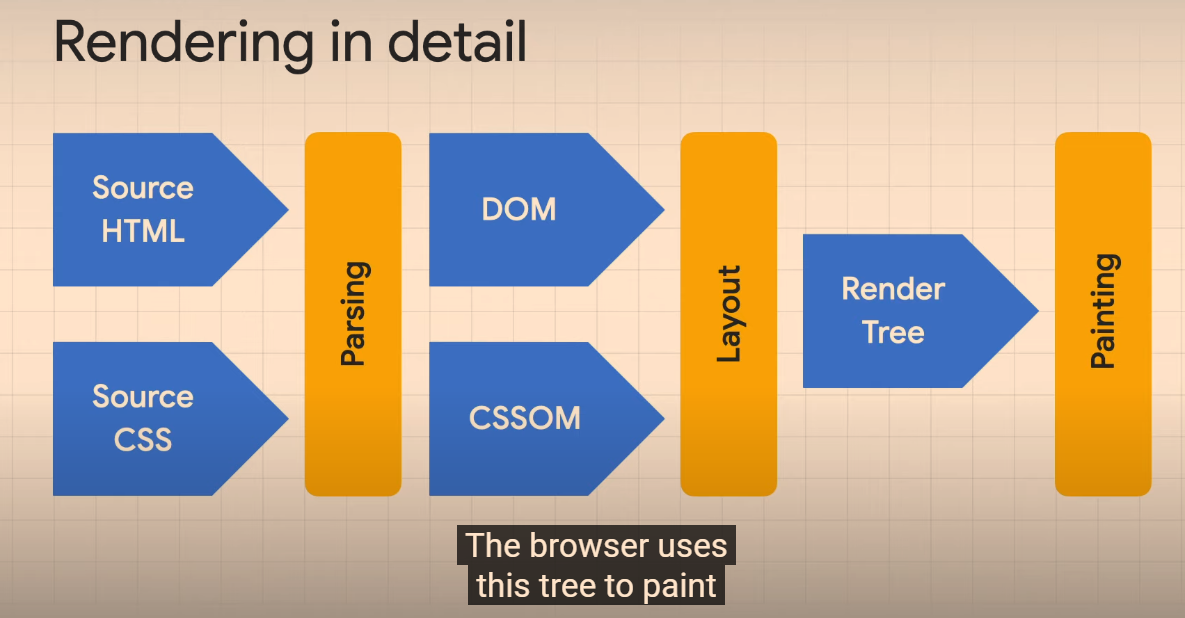
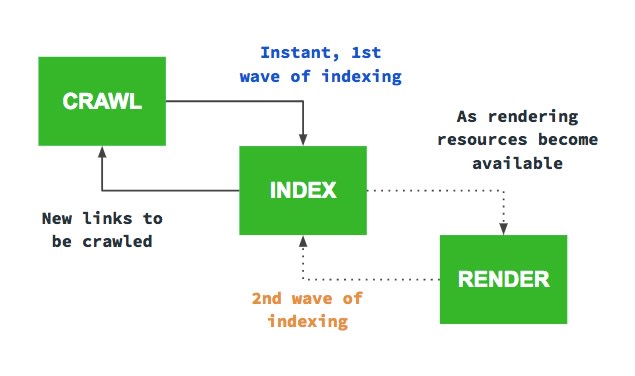
I started by implementing SSR, because I stumbled across some quote from a Googler, stating that client side rendered websites have to get indexed twice. The Google Bot first looks at the initial HTML and immediately follows all the links it can find. The second time, after it has sent everything to the renderer, which returns the final HTML. That is not only very costly for Google, but also slow. That’s why I decided I wanted Google Bot to have all the links in the initial HTML.
I was doing that, by following this fantastic guide. I thought it would take me days to implement SSR, but it actually only took a few hours and the result was very nice.
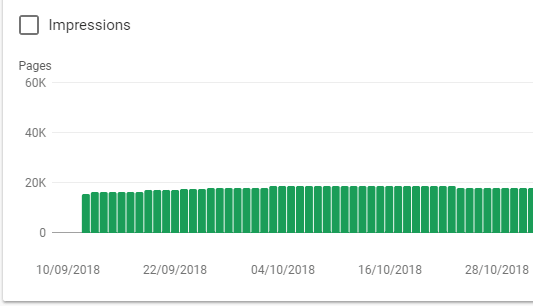
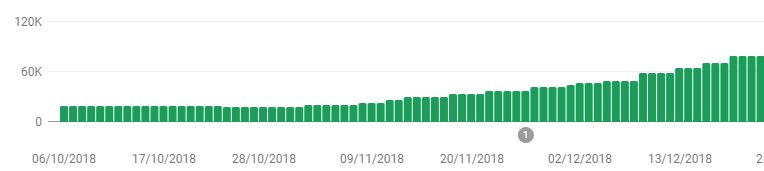
Without SSR I was stuck at around 20k pages indexed, but now it was steadily growing to >100k.
But it was still not fast enough
Google was not indexing more pages, but it was still too slow. If I ever wanted to get those 250k pages indexed and new job postings discovered fast, I needed to do more.
2. Enter dynamic Sitemap
With a site of that size, I figured I’d have to guide Google somehow. I couldn’t just rely on Google to crawl everything bit by bit. That’s why I created a small service in Go that would create a new Sitemap two times a day and upload it to my CDN.
Since sitemaps are limited to 50k pages, I had to split it up and focused on only the pages that had relevant content.
After submitting it, Google instantly started to crawl faster.
But it was still not fast enough
I noticed the Google Bot was hitting my site faster, but it was still only 5-10 times per minute. I don’t really have an indexing comparison to #1 here, since I started implementing #3 just a day later.
3. Enter removing JavaScript
I was thinking why it was still so slow. I mean, there are other websites out there with a lot of pages as well and they somehow managed too.
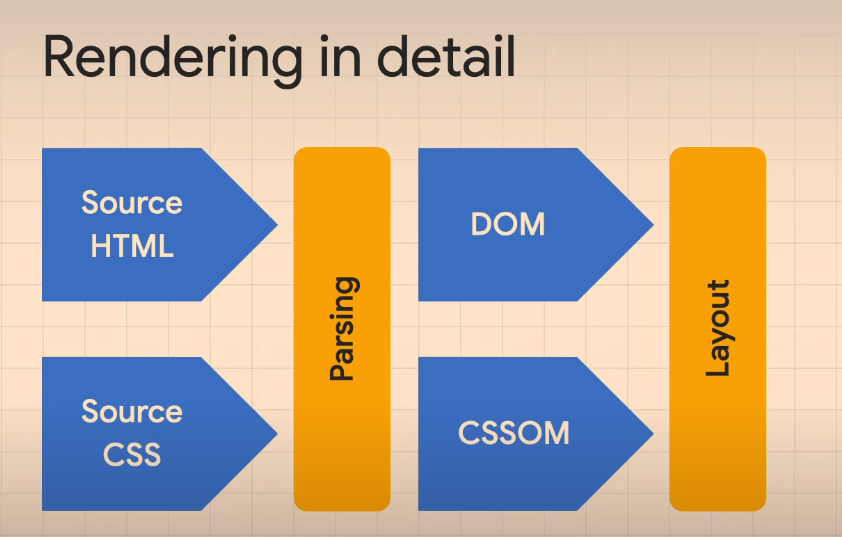
That’s when I thought about the statement of #1. It is reasonable that Google only allocates a specific amount of resources to each website for indexing and my website was still very costly, because even though Google was seeing all the links in the initial HTML, it still had to send it to the renderer to make sure there wasn’t anything to index left. It simply doesn’t know everything was already in the initial HTML when there is still JavaScript left.
So all I did was removing the JavaScript for Bots.
To exclude any URLs using ? and + (as per our weird URLs with parameters) use – .*[\?\+].*
You can just exclude crawling JS and CSS in the crawl > Configuration but I find it slightly quicker this way
If you are using JS rendering to crawl, you might want to crawl JS files too. Depending on if they’re required to follow any JS links etc (generally bad idea to have JS links, if you do, have a HTML backup or prerendering in place)
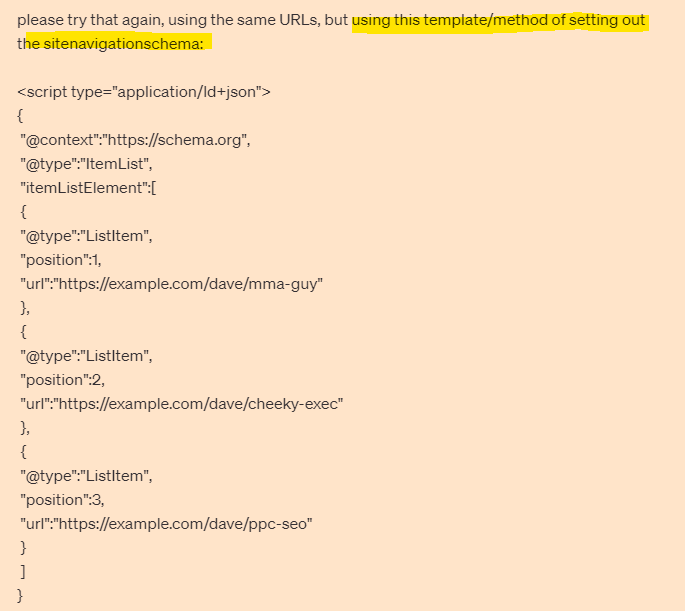
To associate name and other elements with the URL, it appears best to use ItemList in the schema markup, below is an example of SiteNavigationElement schema:
It is in schema format so directly informs Google of page locations and what they’re about.
You can put it separately from the main navigation markup, in either the <head> or the <body> when using the recommended JSON format. Which effectively gives Googlebot an additional number of links to crawl or at least acknowledged with some additional data describing what the links are about.
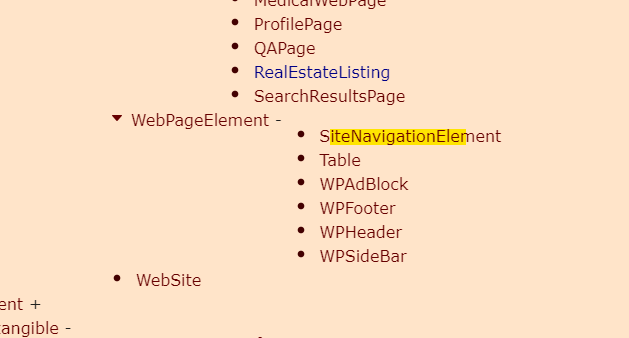
There are some old posts saying Navigation Schema is not approved by Google, but it now appears to be on the list of approved schema – screenshotted below “SiteNavigationElement”:
From what I’ve read and from the example I’ve been sent during my ‘research’, it appears you can have the schema code, completely separate to the main HTML navigation code – so effectively adds an additional incidence of HTML links (which is good).
Implementing Navigation Schema
If using JSON – put the schema code in <head> or <body> of HTML page
The schema can be placed on all of the site’s pages.
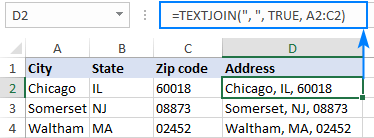
I needed a way of combining a load of commerce product identifier numbers into one cell, separated by columns.
You can download the spreadsheet with the formula here.
Textjoin Formula Example
TEXTJOIN(",",TRUE,F6:F35)
The comma in speech marks, adds the comma between the numbers Not sure what “TRUE” does to be honest! The F6:F35 is just the cells that the original list, that’s aligned vertically in this case, was in.
Nobody gives a f*ck about your behind the scenes bollocks, and nobody is googling to find out about the industry award that you won (and paid about 10k to enter).
Create content that’s relevant and of interest to your target audience
Content marketing and inbound marketing is kind of, the new SEO. Google, as we’ve heard a million times, loves great content and great content attracts genuine links.
Create a blog and social media profiles that you’re customers will want to subscribe to – because they’re interesting!
The process is easy, the execution can be a bit of a b@stard to do though.
Identify your target audience
Find out where they hang out online e.g. which Reddit forums and Facebook groups etc
Identify your target audience’s common questions and pain points
Use a tool like SEMRush to ID low competition search terms regarding the questions & pain points
Create useful, in-depth copy/posts that helps your target audience
If resource available, create videos for YouTube based on posts that get most traction
Create short videos suitable for social – with captions!
For blog content, see if you can match the topics you’ve found, with specific keywords, ideally with the highest volume.
Check the search engine results pages (SERPs) and identify any keywords which have “weak” or somewhat irrelevant results.
It’s a bit beyond the scope of this post, but look to optimise your blogs for “rich snippets”, by using lists and html tables.
To check for keywords, you’ll need Keyword Tool like SEMRush to do this, or search “free keyword tool”.
Keep each blog post specific to one or two keywords.
You can also promote your blog posts with outreach, although some content marketing gurus, say you’re better off investing all your time in creating content, rather than promoting it.
For Reddit, you can use this great Reddit Keyword Tool, to identify the most common topics of discussion, in a given forum/subReddit.
The backbone of good content, is that, well, it’s actually good – well written, easy to read, full of visual assets if possible.
When it comes to blog posts, make the content scannable with lists, bullet points and images. If you have the resource, infographics are always a good addition to a blog post.
Statistics are also a great way to attract links and citations from other websites. For example, if you work out the average price of a [given product or service] in the UK, it’s relatively likely to attract links. If you sell UK holiday homes or used campervans, you might work out the average price of new camper van, or the cost per holiday of an overseas holiday versus a holiday home.
Help, Help, Help, Sell
Gary V’s book Jab, Jab, Jab, Right Hook is a bit old now, but the adage of setting up a sale several times, before trying to promote your service or product is still valid, in my opinion.
The “jab” in the book title, is the useful or entertaining content aimed at your target audience
The “right hook” is a blog and/or social media post that aims to sell a product or service.
Would you follow a social account or blog that’s just trying to sell you a service or product?
For example, if an accounting software company has a Facebook account that just promotrs its software directly in every single post, not many people will be interested. However, if the Facebook page posts about tax saving tips, digital marketing for small businesses etc it’s likely to get more engagement.
I’d also avoid lots of
Behind the scenes posts.unless you’re an established brand, nobody gives a shit
Virtue signalling posts
You might follow a brand or company on social media etc, that just promotes itself, if you already know the brand, or if you’re interested in working at the company.
However, unless you’re an established brand, or you create content just for recruitment purposes, then it’s generally best to create blog and social media posts that help, entertain, and/or interest your target audience.
Establish yourself as an authority in your niche, with helpful & insightful content
Drew Griffiths (2022)
It can definitely help to promote discounts and offers on social platforms and blogs, but that’s generally the that’s the “right hook”, whereas the “jab, jab, jab” relates to the helpful, insightful content that should take up about 75% of all your posts.
If you’re in the business to business sector for example, you can gain brand awareness and an online following by providing posts that provide helpful advise on SEO, PPC, Social Media Marketing, Digital Marketing Tools etc. If you’re just trying to directly sell your office chairs, or accounting software in every single blog and social media post, you’re probably not going to get a large, engaged, following.
Don’t Post Links all the Time on Social Media
Social media platforms, from Facebook to LinkedIn, all want to keep users, on their platform. Links will tend to take people onto different websites, and as a result, posting links to your blog etc, will tend to kill your organic reach (the amount of people who see your social media post).
Keto Diet Products Example
If you were running a business selling Keto supplements and foods. You can study the Keto subreddits and Facebook groups, and you’d probably find that there are lots of questions regarding keto desserts.
Jump onto SEMRush, or another SEO Tool and find search terms, and potential headings for blog posts – that have a low level of competition – i.e. it’s relatively easy to rank for.
Create in-depth keto dessert blog content that’s better than what already exists.
Optimise the content for the search terms that you’ve identified on SEMRush.
Reformat the content for social media. Captioned videos tend to do well, as these are the least popular form of content – social media is full of images and text posts, so it’s a bit easier to stand out with a video.
Consider creating a free eBook about keto desserts. Promote the eBook on social media to “warm up” your target audience to your brand* Remarket your products to those that download the eBook.
Create a serious of posts & videos regarding the best keto desserts, the best sweeteners and the best supplements to help with sugar cravings.
*It’s difficult to sell products, particularly high value products to people on Facebook, Instagram etc, as they’re not actively searching for something to buy. Best practice is said to be, create an offer e.g. an eBook, Webinar etc that’s directly of interest (and NOT necessarily directly about your product) and advertise it to your target market on social media – Then remarket to those that engage with your advert.
Hope this blog post helps!
I know the irony about in-depth, long format content that I’m touting in this post, but please bear in mind, I’m writing this on my lunch and I’m not trying to sell anything. Well, unless you want to buy an MMA T-shirt.
The channel covers how to put together powerpoints, how to create videos for your small business and lots of marketing fundamentals for business owners
Semantic search adds context and meaning to search results. For example, if someone is searching for “Lego” – do they want to buy Lego toys, or see a Lego movie or TV show (Ninjago is great). Another example might be “Tesla” – do people want to see the latest self-driving car, or learn more about Tesla the scientist and inventor?
How to Optimise for Semantic Search
Make sure you understand search intent and any confusing searches like Tesla(inventor or car?), Jaguar (car or animal?), etc
Look for structured data opportunities
Optimise internal links – especially if you are using a “Pillar Post” and “Cluster Page” structure
Follow traditional on page SEO best practices with headers, meta titles, alt tags etc
Tools for Semantic Search
SMA Marketing have done a cool YouTube video about Semantic Search and they recommend tools including:
Wordlift
Frase
Advanced Custom Fields for WordPress
Google Colab with a SpaCy
Before you publish a post – look at the search results for the keyword(s) you are optimising the post for. Check in incognito in Chrome to remove most of the personalisation of the results.
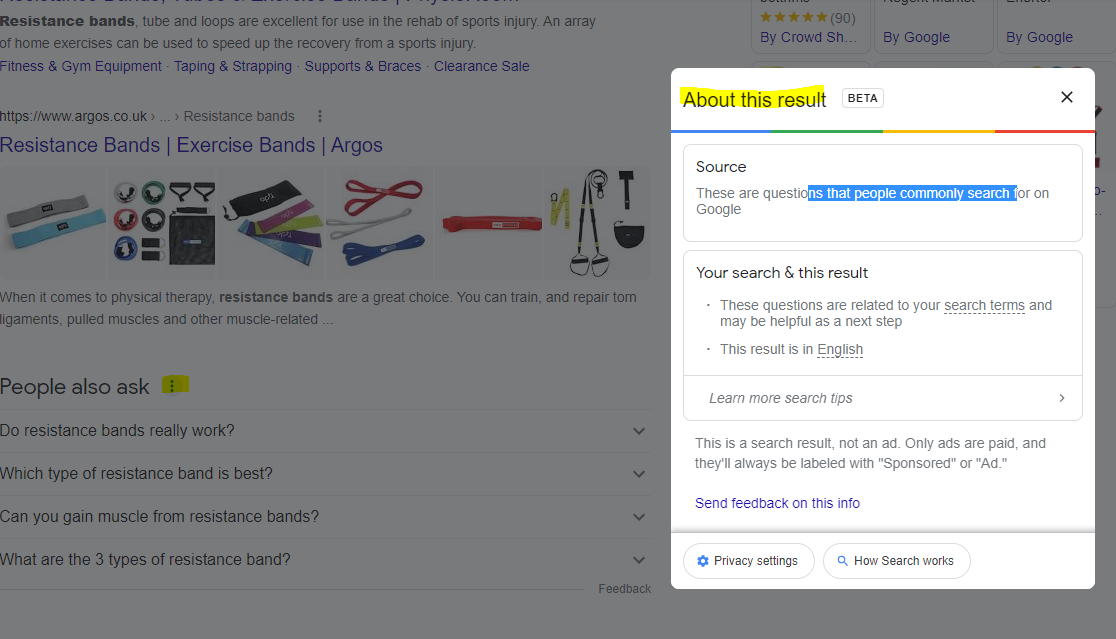
For any answer boxes or snippets, you can click the “3 dots” to get information about the results:
As well as the snippets, you can click the 3 dots next to any organic result. Here’s another result for “MMA training program pdf” with some additional information:
With this in mind – if you are looking to rank for “MMA training program pdf” then you will want to include the search terms highlighted in the “About this result” box: mma, training, program, pdf and ideally LSI keywords “workout” and “plan”.
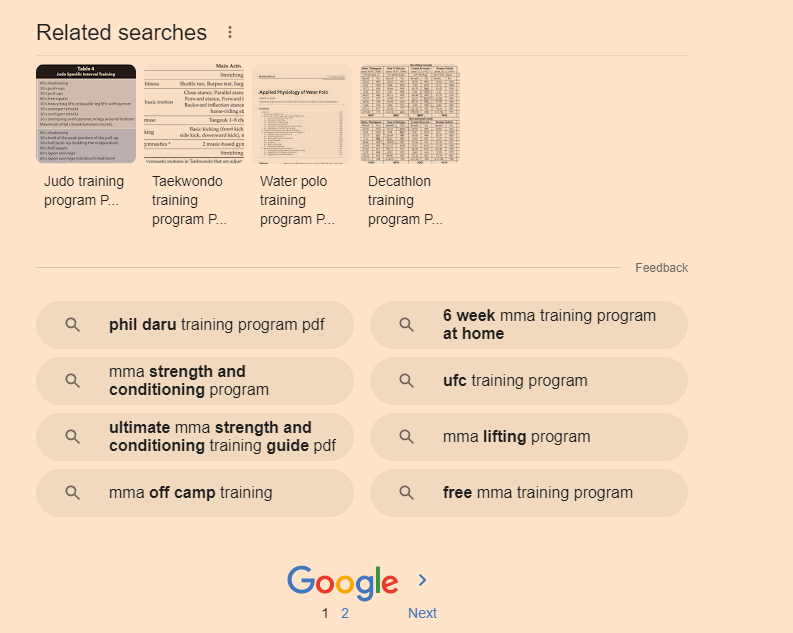
It’s also a good idea to scroll down to the bottom of the SERP and check out the “related searches”
Take a look too at any breadcrumb results that pull through below the organic listings. Combining all this information will give you a good idea as to what Google understands by your search query and what people are looking for too.
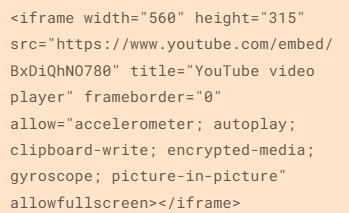
Hover over [1] and click the play icon that appears (highlighted yellow in screenshot below)
When that section has finished loading and refreshing, scroll down to the “Installation tensorflow + transformers + pipelines” section and click the play icon there.
When that’s finished doing it’s thing, scroll down again, and add your search query to the uQuery_1: section:
add your query and then press the “play” button on the left hand side opposite the uQuery_1 line
You should then see the top 10 organic results from Google on the left hand side – in the form of a list of URLs
Next, you can scrape all the results by scrolling down to the “Scraping results with Trafilatura” section and hover over the “[ ]” and press play again:
Next, when the scraping of results is done – scroll down to “Analyze terms from the corpus of results” section and click the play button that appears when you hover over “[ ]”
Next! when that’s done click the play button on the section full of code starting with:
“df_1[‘top_result’] = [‘Top 3’ if x <= 3 else ‘Positions 4 – 10’ for x in df_1[‘position’]] # add top_result = True when position <=3 “
Finally – scroll down and click the play button on the left of the “Visualizing the Top Results” section.
On the right hand side where it says “Top Top 3” and lists a load of keywords/terms – these are frequent and meaningful (apparently) terms used in the top 3 results for your search term.
Below that, you can see the terms used in the results from 4-10
Terms at the top of the graph are used frequently in the top 3 results e.g. “Mini bands”
Terms on the right are used frequently by the results in positions 4-10
From the graph above, I can see that for the search term “resistance bands” the top 3 results are using some terms, not used by 4-10 – including “Mini bands”, “superbands” “pick bodylastics”
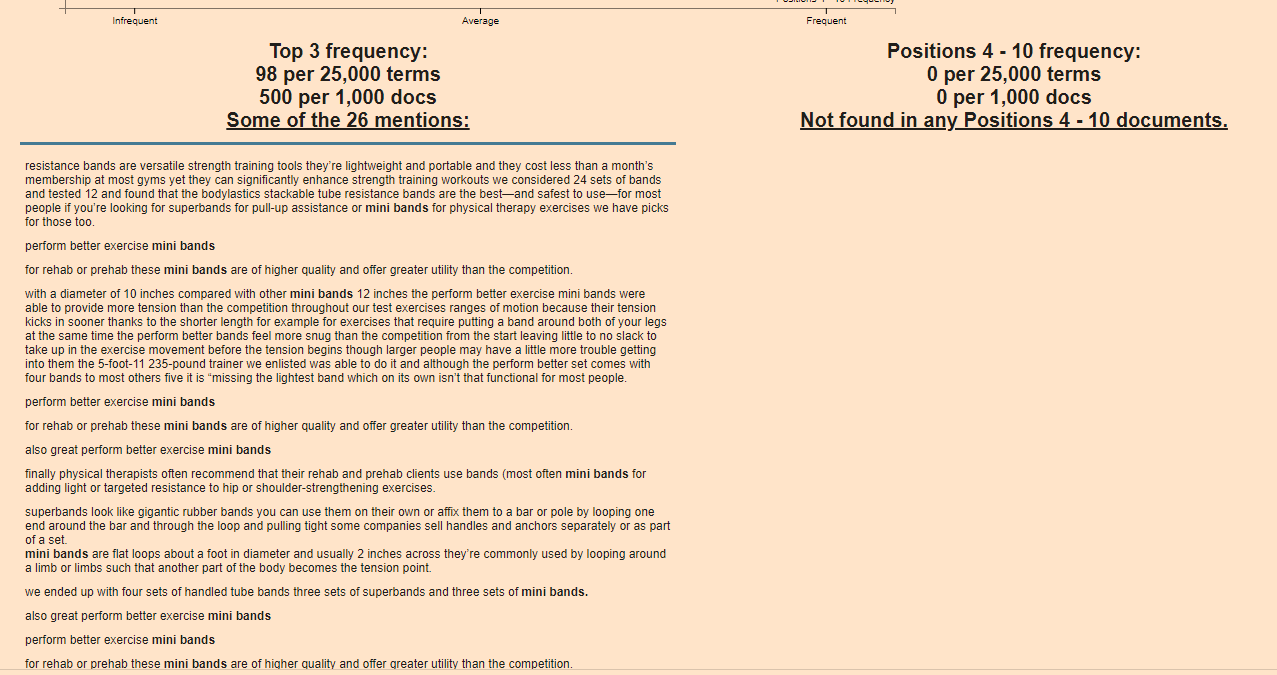
If you click on a term/keyword in the graph – a ton of information appears just below:
e.g. if I click “mini bands”
It’s interesting that “mini bands” is not featured at all in the results positioned 4-10
If you were currently ranking in position 7 for example, you’d probably want to look at adding “mini bands” into your post or product page
You can now go to the left-side-bar and click “Top 25 Terms” and click the “play icon” to refresh the data:
Obviously – use your experience etc and take the results with a pinch of salt – some won’t be relevant.
Natural Language Processing
next click on “Natural Langauge Processing” in the side-menu
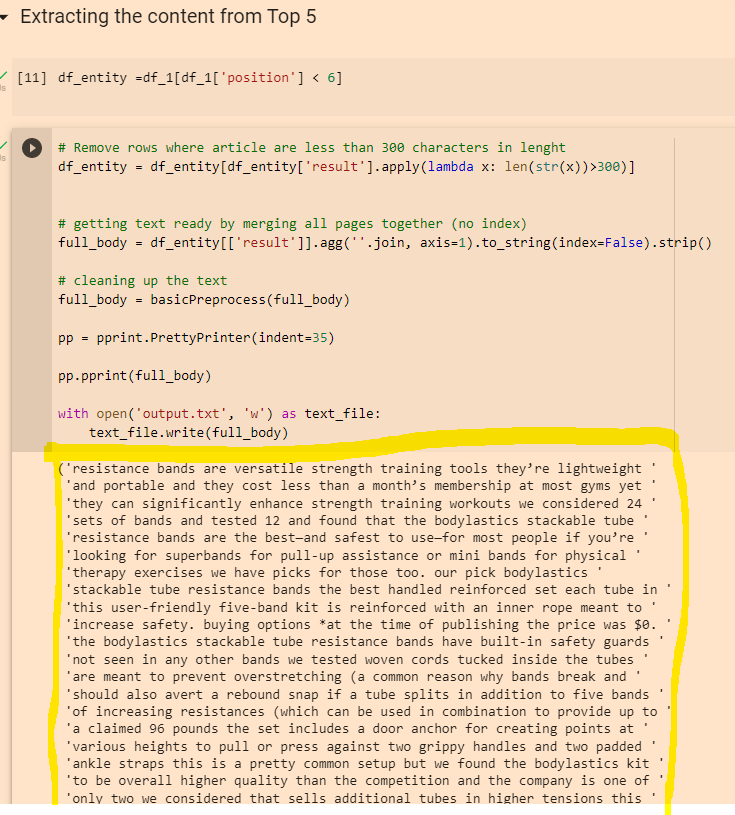
Click the “play” icons next to “df_entity =df_1[df_1[‘position’] < 6]” and the section below.
When they have finished running click the play icon next to “Extracting Entities”
Click “play” on the “remove duplicates” section and again on the “Visualising Data” section
This should present you with a colourful table, with more terms and keywords – although for me most of the terms weren’t relevant in this instance 😦
You can also copy the output from the “Extracting the content from Top 5” section:
Then paste it into the DEMO/API for NLP that Google have created here:
You can then click the different tabs/headings and get some cool insights
Remember to scroll right down to the bottom, as you’ll find some additional insights about important terms and their relevance
The Google NLP API is pretty interesting. You can also copy and paste your existing page copy into it, and see what Google categories different terms as, and how “salient” or important/relevant it thinks each term is. For some reason, it thinks “band” is an organisation in the above screenshot. You can look to improve the interpretations by adding relevant contextual copy around the term on the page, by using schema and internal links.






















 Small Business Dad