TL;DR
The September spam update finished on 8 October after 13 days and 16 hours. Three waves of ranking volatility hit sites along the way. Google then quietly tightened its helpful content guidance, published its first official crawl, index and recovery timing ranges, and added more inline links, carousels and creator profiles to AI Mode. OpenAI shipped GPT 6 with Intelligent UI. Google followed with Gemini 4 Argon. Bing opened a Topics Portfolio beta that may be the best free AI visibility report currently available.
New since Friday: Fresh ranking volatility spiked over the weekend of 17 to 19 October. Google denies a new update. The industry suspects one. OpenAI confirmed a ChatGPT bug that dropped UTM tags on outbound links from 8 to 15 October. Nozzle revealed that roughly 8% of Google SERPs served to rank trackers since mid September were poisoned with fake results. Google also pushed Gemini 4 Argon into Antigravity and added a Follow button to Discover videos.
Three jobs this week: date impact analysis from 24 September to 8 October, mark 8 to 15 October in analytics as a ChatGPT data glitch, and claim the Bing Topics Portfolio beta.
What’s new since Friday 16 October
- 15 October: Google rolled more inline links, source blocks, article carousels and creator profile links into AI Mode and AI Overviews.
- 16 October: A ranking volatility spike hit the SERPs. Barry Schwartz flagged an unconfirmed update. Google’s dashboard still shows nothing.
- 14 to 15 October: OpenAI confirmed and fixed a bug that stripped UTM tags from ChatGPT outbound links between 8 and 15 October. Adobe tracked roughly 31,000 ChatGPT visits per day misclassified as direct traffic across one 500 page panel.
- 10 October: Nozzle published research showing 8% of SERPs served to rank trackers since 13 September were poisoned, versus a baseline of 0.17%. The share peaked near 27% between 27 and 29 September.
- 16 October: Gemini 4 Argon reached Google Antigravity for AI Pro subscribers. Google Discover added a Follow button to its video content viewer.
- Over the weekend of 17 to 19 October: WebmasterWorld threads filled with reports of near zero traffic, stale News and Discover feeds, and the strong suspicion of a core update that Google has not confirmed.
Fourteen days, three waves of volatility, two major AI launches, one giant data glitch. This round up covers 5 October to 19 October 2026, what it means, and what to do about it.
What To Actually Know
Six developments shape planning for the rest of Q4:
- The September 2026 spam update finished on 8 October at 04:37 ET. Rollout time: 13 days and 16 hours. Normal spam updates in 2026 took two days. Google called this one “a normal spam update.” Barry Schwartz, Glenn Gabe and Lily Ray all described effects closer to a core update.
- Fresh volatility hit on 16 October. It kept running through the weekend. Google’s Search Status Dashboard shows no new update. Forum chatter leans heavily towards one being in progress.
- Google published official crawl, index and recovery timing ranges at Search Central Live Deep Dive Europe on 2 October. Core update recovery typical: 3 to 6 months. Slowest: 6 months to a year.
- Helpful content guidance tightened on authorship and AI on 1 October and again on 5 October. Fake author profiles are now called deception. Unreviewed AI content gets called out by name. Spam policy did not change. The quality lens did.
- OpenAI shipped GPT 6 and Intelligent UI on 7 and 8 October. Google followed with Gemini 4 Argon on 13 October. Answers now contain interactive tools, forms and charts. Plain text answers are becoming the exception.
- Rank tracking data is unreliable. Nozzle found Google serving fake results to tracker tools on 8% of SERPs since mid September. Combined with the ChatGPT UTM bug from 8 to 15 October, nothing outside Search Console or Bing Webmaster Tools can be fully trusted right now.
1. The September 2026 Spam Update finished, but the aftershocks haven’t
Google Search Central confirmed completion on 8 October. The quote: “The rollout was complete as of October 8, 2026.” Rollout time: 13 days and 16 hours. That’s longer than any 2026 spam update by an order of magnitude.
The 2026 spam update timeline
| Update | Started | Finished | Rollout time |
|---|---|---|---|
| March 2026 | 24 Mar | 25 Mar | About 19.5 hours |
| June 2026 | 24 Jun | 26 Jun | About 2 days 1 hour |
| August 2026 | 18 Aug | 21 Aug | About 2 days 16 hours |
| September 2026 | 24 Sep | 8 Oct | About 13 days 16 hours |
The three waves of volatility
Relative volatility across the rollout. Aggregated signal from Semrush Sensor, Mozcast, AccuRanker and WebmasterWorld threads.
Sources: Barry Schwartz (Search Engine Roundtable), Glenn Gabe (G Squared Interactive), aggregated via Numinix and Distribb.
What got hit, what came back
Lily Ray flagged a representative casualty. A local services site had 143 county landing pages built from a single template. Traffic rose fast, held, then evaporated. The pattern repeated across several site categories:
- Programmatic or templated pages with little unique value.
- Unreviewed AI content at scale.
- Doorway pages that funnel traffic to a different destination.
- Parasite SEO setups piggybacking on domains with trust they did not earn.
On the recovery side, Glenn Gabe reported Reddit’s AI translated threads climbing again in Italy, Germany, Brazil and France after being crushed by the May and June updates. Edward Sturm posted that Reddit’s estimated organic traffic in Semrush hit an all time high. One site hit by the August 2026 update went from close to zero to roughly 8,000 clicks per day during this rollout and reappeared in AI Overviews and AI Mode.
What the community is saying
“Google called this ‘a normal spam update’ on LinkedIn. Taking two weeks to roll out is not normal, and the impact felt core update adjacent for a lot of sites.”
Barry Schwartz, Search Engine Roundtable, 8 October
“Several site owners emailed me about large drops starting 30 September. This update rolled out in stages. The industry just saw them as one update.”
Glenn Gabe, G Squared Interactive
“Every single website I monitor or have analytics access to is seeing barely any traffic today.”
WebmasterWorld member, 16 October
“Sigh, was hoping that the end of the update would stabilize things, but it’s just made them worse.”
WebmasterWorld member, 16 October
“Seems like a Core update on the way.”
WebmasterWorld member, 19 October
Charles Floate flagged a different problem on LinkedIn. The major SEO suites look out of sync with Search Console. Google’s anti scraping changes are hiding the real picture from third party tools. Ahrefs posted a notice that some SERP data may be inconsistent during the rollout.
2. Google published its first official crawl, index and recovery times
At Search Central Live Deep Dive Europe in Barcelona on 2 October, Google’s Gary Illyes shared the first on record “typical” and “slowest” timing ranges for the full search pipeline. Search Engine Journal published them on 4 October. Think of these as the numbers finally safe to quote to a client.
Crawling and indexing
| Event | Typical | Slowest |
|---|---|---|
| New URL discovered | About 20 hours | Weeks to never |
| Known URL refreshed | About 30 days | Weeks to never |
| Sitemap processing | About 24 hours | Up to 14 days, or never |
| End to end indexing | About 1.5 hours | Months, or never (quality) |
| Canonicalisation change | 1 to 3 weeks | Months |
| Site move | 1 to 3 months | 6 months to a year or more |
Search results and recovery
| Event | Typical | Slowest |
|---|---|---|
| Title change picked up | 1 to 2 days | Several weeks to months |
| Snippet change picked up | 1 to 2 days | Several weeks to months |
| GSC URL removal (owner) | About 2 hours | 24 hours |
| Manual action removal | 1 to 2 weeks | 4 to 6 weeks, longer for dormant sites |
| Core update recovery | 3 to 6 months | 6 months to a year |
Illyes was clear that these are reference points, not deadlines. The typical core update recovery of 3 to 6 months is the single most useful stat Google has volunteered this year. It settles plenty of nervous conversations.
3. Google quietly tightened its helpful content and AI guidance
No new algorithm was announced. Instead, Google edited two Search Central documents on 1 October and again on 5 October. The pages: helpful content, and generative AI content. Barry Schwartz surfaced the authorship change on 6 October.
Three changes that matter
- Fake author profiles are now explicitly deception. The updated page calls out AI headshots, invented names and false credentials. Deception makes a page untrustworthy to users and to automated quality systems. The last phrase is new.
- Unreviewed AI content gets named directly. The generative AI guide tells teams to manually fact check AI output before publishing. Titles, meta descriptions, structured data and image alt text all included.
- Main Content got elevated. The helpful content page now defines Main Content as the primary thing that answers the user. Four quality markers follow: effort, originality, skill and experience, and accuracy.
At a separate European event on 5 October, Google reportedly told attendees that spam updates now use AI to detect AI spam. The most 2026 sentence of the year, and a strong hint at what the September rollout targeted.
Second order effects came fast. On 2 and 3 October, affiliate networks began asking publishers for proof of human authorship. By week two, some unionised newsrooms reportedly signed contracts banning synthetic bylines. Any content supply chain that includes third party writers now faces a compliance headache for Q4.
4. AI search: GPT 6, Gemini 4 Argon, and the end of plain text answers
The biggest week for AI search product news in 2026. Six releases in nine days:
| Date | Release | Why it matters |
|---|---|---|
| 5 Oct | OpenAI visual ads in ChatGPT | Native ad units alongside image generation. First US advertisers testing this month. |
| 7 Oct | GPT 6 and Intelligent UI for paid tiers | Answers now contain interactive tools, forms, charts and mini apps. |
| 8 Oct | GPT 6 extends to Free and Go tiers | About 1.2 billion weekly users now on Intelligent UI. |
| 13 Oct | Gemini 4 Argon rolls out in AI Mode | AI Pro and Ultra get it worldwide. More direct answers, less hedging. |
| 13 Oct | Bing Topics Portfolio beta | The first free report naming AI topic clusters where competitors show and other sites don’t. |
| 15 Oct | AI Mode and AI Overviews get more inline links, source blocks, article carousels and creator profiles | Google says preferred source usage grew 7x this year. |
| 16 Oct | Gemini 4 Argon reaches Google Antigravity | AI Pro subscribers only. Agentic coding workflows get the latest model. |
Intelligent UI matters most
For most of ChatGPT’s history the output has been text. GPT 6’s Intelligent UI changes that. The model now picks the format. Plain text, buttons, forms, calculators, labelled diagrams, cooking timelines, playable games. Ask for a dinner for twelve and a quantity calculator appears. Ask about splitting a bill and a bill splitter builds itself in the conversation.
OpenAI also claims GPT 6 Instant starts answering web search questions 44% sooner than GPT 5.6 Instant on average, with better instruction following and less hedging. The Chat tab moved to GPT 6 Sol (paid) and GPT 6 Luna (free) across 7 and 8 October. Work and Codex are unchanged for now.
The SEO problem Intelligent UI creates
When the answer is a built in tool rather than a sentence with a citation, less surface area remains for a link to appear. Expect a two to three month lag before anyone has solid data on how much this reduces citations. Any brand actively tracking AI visibility in ChatGPT should assume the citation to tool ratio shifts against sites, not in favour of them.
Bing Topics Portfolio is the sleeper hit
For practical value, the quietest release of the fortnight was Microsoft’s. Bing Topics Portfolio sits inside Bing Webmaster Tools’ AI performance reports. It groups the grounding queries where a site appears into thematic clusters. Each topic shows:
- Topic Size: total citations across all sites for that topic.
- Sites Cited: how many sites appear in that topic cluster.
- Queries: how many distinct AI queries sit within the topic.
The killer feature: Top Opportunity Queries. A list of strong AI queries where competitors appear and a given site does not. One free report, one claim, one Q4 content brief half written.
What Google added to AI Mode on 15 October
Google rolled a fresh set of changes into AI Mode and AI Overviews:
- More inline links. Links appear inside words and phrases within AI responses, and higher up than before.
- Source blocks. When only a few official sites answer a query, a dedicated section at the top lists them with a short explanation.
- Article carousels. Shown in more locations, more languages and for a wider range of queries. Preferred sources get the spotlight.
- Related articles with thumbnails. Images and card style layouts aim to feel more clickable.
- Creator profile links in AI Mode videos. Clicking a creator’s name sends traffic to a Google Search profile page, not the creator’s own site.
The headline figure: Google reports that preferred source usage grew 7x this year. The caveat: no click data has been published, and Barry Schwartz suspects the overall effect on publisher clicks is small.
5. The measurement layer broke twice this fortnight
Two separate stories, same conclusion. Trusting anything outside first party data right now is risky.
Nozzle: 8% of SERPs served to rank trackers were fake
Nozzle published research on 10 October analysing 17.8 million SERPs since 13 September. The headline numbers:
| Metric | Baseline | 13 Sep onwards |
|---|---|---|
| Share of SERPs poisoned | 0.17% | 8.0% average, peaking at 27% on 29 Sep |
| Organic results kept from previous SERP | 88.5% | 20.7% |
| Tracked site falls out of top 10 | 2.7% | 58.6% |
In short, Google appears to be serving fake pages to rank trackers rather than refusing their requests. Social sites and forums fill the gap. Reddit visibility rose by 8.0 points on poisoned pages. 77.9% of poisoned SERPs returned to normal within three days. Nozzle credits Google’s broader fight against AI scraping, with rank trackers caught in the collateral damage.
OpenAI’s UTM bug misclassified ChatGPT traffic as direct from 8 to 15 October
Between 8 and 15 October, ChatGPT stopped adding its utm_source=chatgpt.com tag to outbound links. Because ChatGPT also normally strips the HTTP referrer, GA4 and Adobe recorded those visits as direct traffic.
OpenAI acknowledged the error on 14 October and finished the fix roughly 24 hours later. Tagged links are now back to about 95 to 100% of normal levels.
Adobe’s Cedric Huesler analysed 500 pages where ChatGPT normally drives at least 5% of visits. Reported ChatGPT traffic fell by around 31,000 visits per day. Direct traffic rose by around 26,000. Two in every three pages that lost ChatGPT traffic also saw direct traffic rise.
The practical fix: mark 8 to 15 October as a known data glitch in GA4 or Adobe Analytics. Do not change attribution models or channel rules based on that week. Keep UTM parameters on anything AI driven.
6. Google Discover is becoming an “AI concierge,” plus the quick hits
On 12 October, Search Engine Land, PPC Land and Search Engine Journal all picked up a Google job listing for a Principal UX lead on Discover. Salary: up to $382,000. The brief: turn Discover into a proactive, hyper personalised concierge with tighter AI integration. The signal: Discover is being rebuilt as the feed side entry point to AI Mode, in the same way Search was rebuilt as the query side one.
Any publisher relying heavily on Discover traffic should watch this more carefully than any upcoming core update. Previous Discover rebuilds have been brutal on traffic. A Follow button quietly appeared in Discover’s video content viewer on 16 October, which hints at the direction of travel.
Quick hits (dated)
| Date | Story | Action |
|---|---|---|
| 5 Oct | Google appeals the US search monopoly ruling | No near term SEO impact. Watch Q1 2027. |
| 5 Oct | Dark mode confirmed for Google Search Console | Cosmetic. Enjoy. |
| 7 Oct | Review rich results disappearing for healthcare pages | YMYL health sites should re check schema and expect lower CTR. |
| 8 Oct | UGC Fresh Data Program opens applications | Only relevant to UGC platforms. Paywall and login content is out. |
| 10 to 12 Oct | GSC Performance report lagged about 60 hours | Longest delay since Dec 2025. Back to normal by 12 Oct. |
| 13 Oct | Google: site migrations can run beyond 4 months | Factor into migration planning. Old URLs may still rank for months. |
| 16 Oct | Google Ads: online gambling category certification rollout starts | Affected advertisers should begin applications. |
| 16 Oct | Google Ads: lead forms support lead scoring (up to 12 qualifying answers per question) | Review lead form questions for high intent filters. |
| 16 Oct | Google Ads API moves to twice monthly releases | Factor into dev team sprint planning. |
| 16 Oct | Google Dataset Search outage (restored same day) | No lasting effect reported. |
| 16 to 19 Oct | Fresh ranking volatility, unconfirmed update rumours | Check Search Console. Do not act on third party data alone. |
What To Actually Do
A short list for the next ten working days, in rough priority order:
- Date impact analysis from 24 September to 8 October. Pull clicks, impressions and average position by page type for that window. Compare against the previous four weeks. Pages that lost traffic across both waves are the real spam signal casualties. Pages that dropped in wave one and recovered are noise.
- Mark 8 to 15 October as a ChatGPT data glitch in GA4 and Adobe Analytics. Any apparent ChatGPT traffic drop that week was the UTM bug. Direct traffic rose by roughly the same amount it fell. Do not change attribution models based on it.
- Run a fake author and AI hallucination audit on the top 20 pages. For each: is the author real and verifiable? If AI assisted, is a documented human review step on record? Flag any page that fails either test.
- Claim the Bing Topics Portfolio beta inside Bing Webmaster Tools. Pull the Top Opportunity Queries list. That is a Q4 AI visibility content brief, half written.
- Set recovery expectations using Google’s own numbers. 3 to 6 months typical for core update recovery, 6 months to a year worst case. 1 to 2 weeks for manual action removal. Up to 14 days for sitemap processing. All on record now.
- Add a GPT 6 citation check to the AI visibility tracker. Run the fixed prompt set after 8 October and compare citation share to the pre GPT 6 baseline. Falling citations alongside rising tool based answers signal what happened.
- Do not trust rank tracking data alone for the next 3 to 4 weeks. Nozzle’s research puts 8% of SERPs served to trackers as fake. Cross check against Search Console before any ranking based decision.
- Diversify away from Discover. The move to an AI concierge model is coming, and prior rebuilds have hurt traffic badly.
- Watch the Search Status Dashboard this week. If Google confirms the 16 October volatility as an update, impact analysis should run from that date, not the end of the spam update.
The fortnight’s summary in one line: Google finished the harshest spam update of the year, raised the bar on authorship and AI content on paper, broke the measurement layer twice, and watched OpenAI and its own Gemini team rewire what an answer looks like.
Next round up in two weeks. Comments welcome on recovery playbooks for the spam update, GPT 6’s effect on AI citations, or how to use the Bing Topics Portfolio properly.
Sources: Google Search Central (@googlesearchc, 8 October); Google Search Status Dashboard, checked 19 October 2026; Search Engine Roundtable (Barry Schwartz, 8, 13 and 16 October); Search Engine Land (crawl timing ranges reporting; AI Mode and AI Overviews changes, 15 October; Bing Topics Portfolio, 13 October; ChatGPT UTM story, 16 October); Search Engine Journal (Google timing ranges, 4 October); Search Engine Watch (unconfirmed October update, 16 to 19 October); 9to5Google (Gemini 4 Argon, 13 October); Unite.AI (GPT 6 Intelligent UI, 7 and 8 October); TechCrunch (OpenAI visual ads, 5 October); PPC Land (fake author profiles; Google Discover job listing); SearchHerald (October 2026 archive); DesignRush SEO Roundup (8 October week); Distribb (September 2026 spam update retrospective); AEOSoup (helpful content guidance updates); WebmasterWorld (September and October 2026 observations threads); Numinix (October 2026 SEO news); Nozzle (Poisoned Google SERPs research, 10 October); Marketing4eCommerce (OpenAI UTM bug analysis).


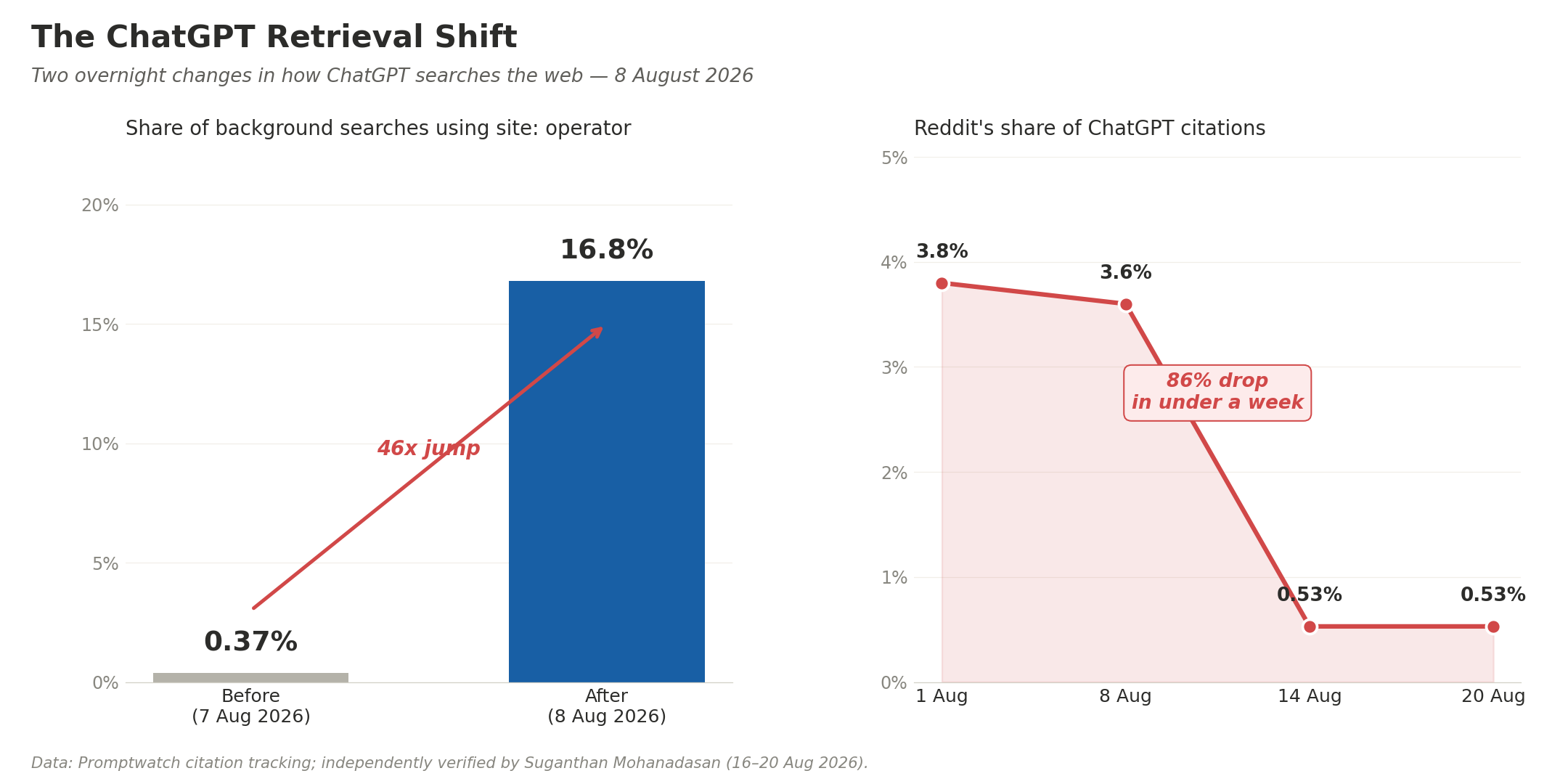
 Data: Promptwatch citation tracking; independently verified by Suganthan Mohanadasan (16–20 Aug 2026).