Business Audience Schema Example [2024]


{
  "@context": "https://schema.org",
  "@type": "WebPage",
  "mainEntity": {
    "@type": "BusinessAudience",
    "audienceType": "Consumers",
    "description": "Middle-class residents of the United Kingdom interested in purchasing t-shirts.",
    "geographicArea": {
      "@type": "AdministrativeArea",
      "name": "United Kingdom"
    },
    "hasOfferCatalog": {
      "@type": "OfferCatalog",
      "name": "T-Shirts",
      "itemListElement": [
        {
          "@type": "Offer",
          "itemOffered": {
            "@type": "Product",
            "name": "T-Shirt"
          }
        }
      ]
    },
    "additionalType": "https://schema.org/Commerce",
    "audience": {
      "@type": "Audience",
      "audienceType": "Middle-class",
      "description": "Individuals with average to above-average income levels"
    }
  }
}

Here’s business Audience schema for a B2B business:

{
  "@context": "https://schema.org",
  "@type": "BusinessAudience",
  "audienceType": "Business",
  "numberOfEmployees": {
    "@type": "QuantitativeValue",
    "minValue": 50,
    "maxValue": 500
  },
  "yearlyRevenue": {
    "@type": "QuantitativeValue",
    "minValue": 1000000,
    "maxValue": 10000000
  },
  "geographicArea": {
    "@type": "AdministrativeArea",
    "name": "United States"
  }
}

Implementing Redirects with Filezilla and MTPutty (On a sonasi server)

This is our inhouse protocol, it might differ in normal places…

Open FileZilla – connect to M2 server (magento 2, rather than our magento 1 server)

Click domains folder –

Select relevant domain

Select Rewrites

Right Click – Config folder and click View/Edit – Open in a text editor like Sublime

Add redirects in the following format:

#Note to say who did redirects on what date

rewrite ^/rwl-x-la-new-member-starter-pack.html$ /gym-equipment.html permanent;
rewrite ^/rwl-x-la-ultimate-starter-pack-intermediate.html$ /gym-equipment.html permanent;
rewrite ^/rwl-x-la-new-member-dumbbell-pack.html$ /gym-equipment.html permanent;

- Save the file

This will redirect the URL example.com/rwl-x-la-new-member-starter-pack.html to example.com/gym-equipment.html

and so on…the other 2 below will also redirect to gym-equipment.html

Open MTPUTTY

Connect to relevant server – in my case – server 3

type in “ntest” and check for any error messages

if ok – type in “nreload”

That should be it!

How to Buy a House in Italy for 1 Euro [step by step guide]

Depopulation, has some potential benefits for property investors!

Buying a house in Italy for 1 euro is a great opportunity, promoted by several towns aiming to revive declining populations and renovate old properties.

Here’s a step-by-step guide tailored for a UK resident:

Step-by-Step Instructions:

Research and Choose a Town: Several Italian towns have offered homes for 1 euro. Each town has different terms and conditions. Here are some notable ones:

  • Sambuca di Sicilia
  • Ollolai, Sardinia
  • Mussomeli, Sicily
  • Bivona, Sicily
  • Laurenzana, Basilicata

    Visit the Official Websites: Each town usually has an official website or a dedicated page for the 1 euro house initiative. Here are some URLs:

      Understand the Conditions: Each town has specific conditions that buyers must meet, such as:

      • Committing to renovate the property within a specified timeframe (usually 3 years).
      • Paying a deposit (often around €5,000), which is refunded after renovations are completed.
      • Using local contractors for the renovation work.

        Contact the Municipality: Send an email or call the municipal office to express your interest and get detailed information.

          Plan a Visit: It’s highly recommended to visit the town and view the properties. Contact the municipality to arrange a visit.

            Prepare Your Documents:

            • Passport
            • Proof of income
            • Proof of funds for renovation

              Sign the Preliminary Agreement: During your visit, if you decide to proceed, you will sign a preliminary purchase agreement (compromesso).

                Open an Italian Bank Account: You will need an Italian bank account to handle transactions and utility payments. Many banks offer services in English.

                  Hire a Local Notary (Notaio): The notary will handle the legal aspects of the purchase, ensuring the property is free from debts and encumbrances.

                    Finalize the Purchase: After the preliminary agreement, you will sign the final deed (atto di vendita) before a notary. This completes the purchase.

                      Commence Renovation: Begin renovation work as per the conditions. Ensure you adhere to local building codes and regulations.

                        1. Enjoy Your New Home: Once renovations are complete, you can enjoy your new Italian home!

                        Useful Resources:

                        This is a general guide, so make sure to get detailed information from the specific municipality you’re interested in. Good luck with your house hunt in Italy!

                        eCommerce Structured Data

                        E-commerce Example for Structured Data Carousels

                        Below are step by step instructions

                        You will need:

                        • A “summary” or “Product Listings Page” with structured data
                        • Structured data on the product pages themselves

                        At the time of writing, this feature is only available in EU countries.

                        Step 1: Choose and Implement a Summary Page

                        Create a summary page that lists multiple products, each linking to a detailed product page.

                        For example, a category page that lists “Top 5 Winter Coats.”

                        Step 2: Add Required Properties to the Summary Page

                        Add the ItemList structured data to your summary page. Here’s an example in JSON-LD format:

                        <html>
                          <head>
                            <title>Top 5 Winter Coats</title>
                            <script type="application/ld+json">
                              {
                                "@context": "https://schema.org",
                                "@type": "ItemList",
                                "itemListElement": [
                                  {
                                    "@type": "ListItem",
                                    "position": 1,
                                    "item": {
                                      "@type": "Product",
                                      "name": "Puffy Coat Series by Goat Coat",
                                      "image": [
                                        "https://example.com/photos/1x1/photo.jpg",
                                        "https://example.com/photos/4x3/photo.jpg",
                                        "https://example.com/photos/16x9/photo.jpg"
                                      ],
                                      "offers": {
                                        "@type": "AggregateOffer",
                                        "lowPrice": 45.00,
                                        "highPrice": 60.00,
                                        "priceCurrency": "USD"
                                      },
                                      "aggregateRating": {
                                        "@type": "AggregateRating",
                                        "ratingValue": 4.9,
                                        "reviewCount": 50
                                      },
                                      "url": "https://www.example.com/puffy-coats"
                                    }
                                  },
                                  {
                                    "@type": "ListItem",
                                    "position": 2,
                                    "item": {
                                      "@type": "Product",
                                      "name": "Wool Coat Series by Best Coats Around",
                                      "image": [
                                        "https://example.com/photos/1x1/photo.jpg",
                                        "https://example.com/photos/4x3/photo.jpg",
                                        "https://example.com/photos/16x9/photo.jpg"
                                      ],
                                      "offers": {
                                        "@type": "AggregateOffer",
                                        "lowPrice": 189.00,
                                        "highPrice": 200.00,
                                        "priceCurrency": "USD"
                                      },
                                      "aggregateRating": {
                                        "@type": "AggregateRating",
                                        "ratingValue": 4.7,
                                        "reviewCount": 827
                                      },
                                      "url": "https://www.example.com/wool-coats"
                                    }
                                  },
                                  {
                                    "@type": "ListItem",
                                    "position": 3,
                                    "item": {
                                      "@type": "Product",
                                      "name": "Antarctic Coat by Cold Coats",
                                      "image": [
                                        "https://example.com/photos/1x1/photo.jpg",
                                        "https://example.com/photos/4x3/photo.jpg",
                                        "https://example.com/photos/16x9/photo.jpg"
                                      ],
                                      "offers": {
                                        "@type": "Offer",
                                        "price": 45.00,
                                        "priceCurrency": "USD"
                                      },
                                      "aggregateRating": {
                                        "@type": "AggregateRating",
                                        "ratingValue": 4.9,
                                        "reviewCount": 1290
                                      },
                                      "url": "https://www.example.com/antarctic-coat"
                                    }
                                  }
                                ]
                              }
                            </script>
                          </head>
                          <body>
                          </body>
                        </html>

                        Step 3: Validate Your Code

                        1. Rich Results Test: Validate your structured data using the Rich Results Test.
                        2. URL Inspection Tool: Use the URL Inspection tool in Google Search Console to ensure your page is accessible and not blocked by robots.txt or noindex tags.

                        Step 4: Deploy Your Page

                        1. Deploy your summary page and a few detail pages.
                        2. Use the URL Inspection tool to request indexing of your new pages.

                        Step 5: Submit a Sitemap

                        1. Create a sitemap including your summary and detail pages.
                        2. Submit the sitemap through Google Search Console to ensure Google knows about all your pages.

                        Step 6: Follow Guidelines

                        1. Ensure compliance with Search Essentials.
                        2. Adhere to general structured data guidelines and specific requirements for carousel rich results.

                        Example Detail Pages

                        Each product linked from the summary page should have its own detail page with structured data. For example:

                        <html>
                          <head>
                            <title>Puffy Coat Series by Goat Coat</title>
                            <script type="application/ld+json">
                              {
                                "@context": "https://schema.org",
                                "@type": "Product",
                                "name": "Puffy Coat Series by Goat Coat",
                                "image": [
                                  "https://example.com/photos/1x1/photo.jpg",
                                  "https://example.com/photos/4x3/photo.jpg",
                                  "https://example.com/photos/16x9/photo.jpg"
                                ],
                                "description": "A stylish and warm puffy coat perfect for winter.",
                                "offers": {
                                  "@type": "Offer",
                                  "price": 45.00,
                                  "priceCurrency": "USD",
                                  "url": "https://www.example.com/puffy-coats"
                                },
                                "aggregateRating": {
                                  "@type": "AggregateRating",
                                  "ratingValue": 4.9,
                                  "reviewCount": 50
                                }
                              }
                            </script>
                          </head>
                          <body>
                          </body>
                        </html>

                        That should be it!


                        Deleting White Space from Excel Cells

                        I had to use the VBA method at the bottom to remove whitespace from a Screaming Frog custom extraction:

                        Method 1: TRIM Function

                        The TRIM function removes all spaces from text except for single spaces between words.

                        1. Suppose your text is in cell A1.
                        2. In another cell, enter the following formula:excelCopy code=TRIM(A1)

                        Method 2: CLEAN and SUBSTITUTE Functions

                        If there are non-breaking spaces (which TRIM doesn’t remove), you can use the SUBSTITUTE function to replace them with regular spaces first.

                        1. In a cell, enter the following formula:excelCopy code=SUBSTITUTE(A1, CHAR(160), " ") This replaces non-breaking spaces with regular spaces.
                        2. Then, apply the TRIM function:excelCopy code=TRIM(SUBSTITUTE(A1, CHAR(160), " "))

                        Method 3: Find and Replace

                        You can also use the Find and Replace feature to remove extra spaces:

                        1. Select the range of cells you want to clean.
                        2. Press Ctrl + H to open the Find and Replace dialog box.
                        3. In the “Find what” box, enter two spaces (press the space bar twice).
                        4. In the “Replace with” box, enter one space.
                        5. Click “Replace All.”
                        6. Repeat the process until no double spaces are found.
                        7. For leading and trailing spaces, you can remove them manually by replacing leading spaces with nothing and trailing spaces similarly.

                        Method 4: VBA Macro

                        For more advanced cleaning, you can use a VBA macro:

                        1. Press Alt + F11 to open the VBA editor.
                        2. Insert a new module by clicking Insert > Module.
                        3. Copy and paste the following code into the module:

                        Sub RemoveSpaces()
                            Dim cell As Range
                            For Each cell In Selection
                                If cell.HasFormula = False Then
                                    cell.Value = Trim(WorksheetFunction.Clean(cell.Value))
                                End If
                            Next cell
                        End Sub
                        

                        1. Close the VBA editor.
                        2. Select the range of cells you want to clean.
                        3. Press Alt + F8, select RemoveSpaces, and click Run.

                        By using these methods, you can efficiently remove unwanted whitespace from your cells in Excel.

                        Categorising Data – By Colour – In Excel (Using an IF statement)

                        Had to categorise some keywords, if there’s a quicker way of doing it – please let me know

                        • Paste keywords into column A
                        • In column D – Paste all relevant words for a category.
                          For example – I pasted all the words I could think of relating to gardening – such as “tree”, “fruit”, “garden”, “bush”, etc. – There were 18 words in total
                        • In cell E2 paste the formula:
                        =IF(SUMPRODUCT(--ISNUMBER(SEARCH($D$1:$D$19,A2)))>0, "Contains value from range", "Does not contain value from range")
                        • Now drag the formula down
                        • Filter column E to “contains value for range”
                        • Colour in the keywords green – or a chosen, relevant colour
                        excel conditional formatting with If Statement

                        Add another list of relevant words – for example, above I have added sports, to highlight sports netting keywords.

                        Drag formula down and repeat

                        I found a quicker way – use Chat GPT and the prompt:

                        “please can you group these keywords by theme or words containing – e.g. keywords containing “golf”.

                        Please include the search volume.

                        The list is set out with a keyword – then a comma, – then the search volume for the keyword, – then a second comma – before the next keyword is listed

                        funny polo shirts , 170 ,
                        funny polo shirt , 30 ,

                        replace “funny polo shirts” with a list of your own keywords.

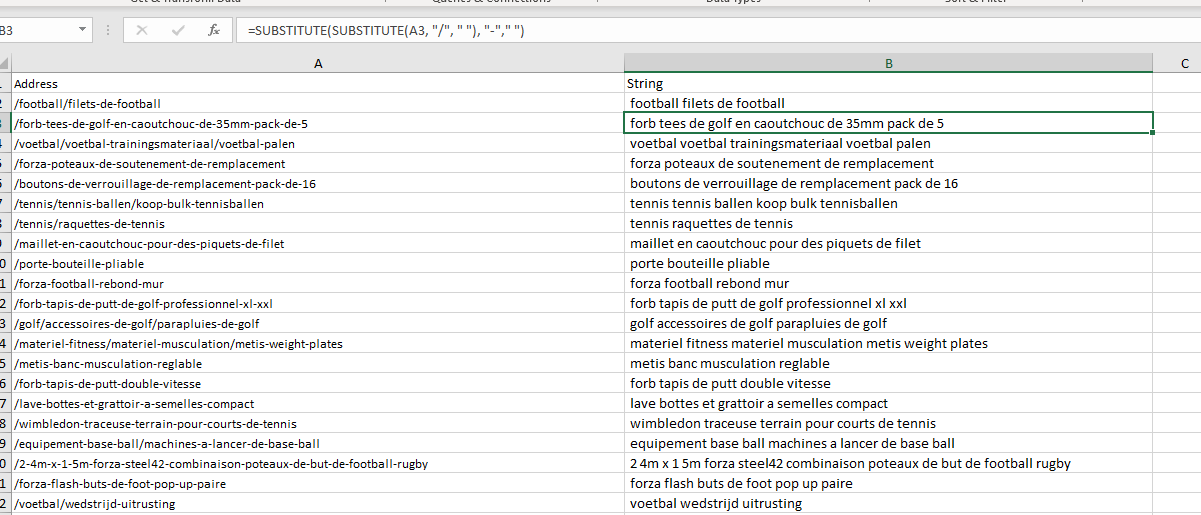
                        Change a URL into a String of Words in Excel

                        Put URLs into column A – Find and Replace – enter domain to find and replace with nothing

                        in column b – add a heading in B1 of “string of words”

                        in cell b2 enter the formula:

                        =SUBSTITUTE(SUBSTITUTE(A2, "/", " "), "-"," ")


                        ^The formula will find and replace forward slashes with spaces and hyphens/dashes with spaces.

                        I used this, to then use the Google Sheets formula DETECTLANGUAGE to check URLs where in French / Dutch

                        Screaming Frog – How to Save & Load a Custom Crawl Coniguration

                        Handy if you have loads of custom extractions set up etc.

                        • Saving Custom Config File:

                        Under the Configuration Menu – go to – Profiles>Save As

                        • Importing The Custom Config File

                        Configuration > Profiles > Load…

                        SF custom Config File Import
                        • Save as default

                          Also worth knowing – if you use a similar setup each time you run Screaming Frog – let’s say, you exclude anything with “account” or “customer” in the URL, you can save your setup/config as default:

                        Which can be a nice time saver too!

                        I pretty much always add the following to the excludes ‘file’, so it’s easier to keep it in the default setup:

                        ^https?://[^/]+/customer/account/.*
                        ^https?://[^/]+/checkout/cart/.*
                        
                        ^.\?.
                        
                        .js$
                        
                        .css$

                        How to Improve the Relationship between SEO & Developers [Breaking Down Silos]

                        If you work in SEO –

                        Walk into the developers office/pit/den

                        Say the following:

                        “Look, it’s not my fault you were bullied in school for being a bunch of gimps, and if I get another passive-aggressive comment or tut from you bunch of pizza-munching wankers, I’ll drag each of you outside one by one and beat the fuck out of you using my own technical skillset. Now stop being finger-pointing, arrogant pricks and start communicating properly”

                        Job done