Nobody gives a f*ck about your behind the scenes bollocks, and nobody is googling to find out about the industry award that you won (and paid about 10k to enter).
Create content that’s relevant and of interest to your target audience
Content marketing and inbound marketing is kind of, the new SEO. Google, as we’ve heard a million times, loves great content and great content attracts genuine links.
Create a blog and social media profiles that you’re customers will want to subscribe to – because they’re interesting!
The process is easy, the execution can be a bit of a b@stard to do though.
Identify your target audience
Find out where they hang out online e.g. which Reddit forums and Facebook groups etc
Identify your target audience’s common questions and pain points
Use a tool like SEMRush to ID low competition search terms regarding the questions & pain points
Create useful, in-depth copy/posts that helps your target audience
If resource available, create videos for YouTube based on posts that get most traction
Create short videos suitable for social – with captions!
For blog content, see if you can match the topics you’ve found, with specific keywords, ideally with the highest volume.
Check the search engine results pages (SERPs) and identify any keywords which have “weak” or somewhat irrelevant results.
It’s a bit beyond the scope of this post, but look to optimise your blogs for “rich snippets”, by using lists and html tables.
To check for keywords, you’ll need Keyword Tool like SEMRush to do this, or search “free keyword tool”.
Keep each blog post specific to one or two keywords.
You can also promote your blog posts with outreach, although some content marketing gurus, say you’re better off investing all your time in creating content, rather than promoting it.
For Reddit, you can use this great Reddit Keyword Tool, to identify the most common topics of discussion, in a given forum/subReddit.
The backbone of good content, is that, well, it’s actually good – well written, easy to read, full of visual assets if possible.
When it comes to blog posts, make the content scannable with lists, bullet points and images. If you have the resource, infographics are always a good addition to a blog post.
Statistics are also a great way to attract links and citations from other websites. For example, if you work out the average price of a [given product or service] in the UK, it’s relatively likely to attract links. If you sell UK holiday homes or used campervans, you might work out the average price of new camper van, or the cost per holiday of an overseas holiday versus a holiday home.
Help, Help, Help, Sell
Gary V’s book Jab, Jab, Jab, Right Hook is a bit old now, but the adage of setting up a sale several times, before trying to promote your service or product is still valid, in my opinion.
The “jab” in the book title, is the useful or entertaining content aimed at your target audience
The “right hook” is a blog and/or social media post that aims to sell a product or service.
Would you follow a social account or blog that’s just trying to sell you a service or product?
For example, if an accounting software company has a Facebook account that just promotrs its software directly in every single post, not many people will be interested. However, if the Facebook page posts about tax saving tips, digital marketing for small businesses etc it’s likely to get more engagement.
I’d also avoid lots of
Behind the scenes posts.unless you’re an established brand, nobody gives a shit
Virtue signalling posts
You might follow a brand or company on social media etc, that just promotes itself, if you already know the brand, or if you’re interested in working at the company.
However, unless you’re an established brand, or you create content just for recruitment purposes, then it’s generally best to create blog and social media posts that help, entertain, and/or interest your target audience.
Establish yourself as an authority in your niche, with helpful & insightful content
Drew Griffiths (2022)
It can definitely help to promote discounts and offers on social platforms and blogs, but that’s generally the that’s the “right hook”, whereas the “jab, jab, jab” relates to the helpful, insightful content that should take up about 75% of all your posts.
If you’re in the business to business sector for example, you can gain brand awareness and an online following by providing posts that provide helpful advise on SEO, PPC, Social Media Marketing, Digital Marketing Tools etc. If you’re just trying to directly sell your office chairs, or accounting software in every single blog and social media post, you’re probably not going to get a large, engaged, following.
Don’t Post Links all the Time on Social Media
Social media platforms, from Facebook to LinkedIn, all want to keep users, on their platform. Links will tend to take people onto different websites, and as a result, posting links to your blog etc, will tend to kill your organic reach (the amount of people who see your social media post).
Keto Diet Products Example
If you were running a business selling Keto supplements and foods. You can study the Keto subreddits and Facebook groups, and you’d probably find that there are lots of questions regarding keto desserts.
Jump onto SEMRush, or another SEO Tool and find search terms, and potential headings for blog posts – that have a low level of competition – i.e. it’s relatively easy to rank for.
Create in-depth keto dessert blog content that’s better than what already exists.
Optimise the content for the search terms that you’ve identified on SEMRush.
Reformat the content for social media. Captioned videos tend to do well, as these are the least popular form of content – social media is full of images and text posts, so it’s a bit easier to stand out with a video.
Consider creating a free eBook about keto desserts. Promote the eBook on social media to “warm up” your target audience to your brand* Remarket your products to those that download the eBook.
Create a serious of posts & videos regarding the best keto desserts, the best sweeteners and the best supplements to help with sugar cravings.
*It’s difficult to sell products, particularly high value products to people on Facebook, Instagram etc, as they’re not actively searching for something to buy. Best practice is said to be, create an offer e.g. an eBook, Webinar etc that’s directly of interest (and NOT necessarily directly about your product) and advertise it to your target market on social media – Then remarket to those that engage with your advert.
Hope this blog post helps!
I know the irony about in-depth, long format content that I’m touting in this post, but please bear in mind, I’m writing this on my lunch and I’m not trying to sell anything. Well, unless you want to buy an MMA T-shirt.
The channel covers how to put together powerpoints, how to create videos for your small business and lots of marketing fundamentals for business owners
Thanks to all the external sheets, this has become tricky.
I’ve been using this technique, because I’m an SEO Executive, developing pages for our Magento site, without any dev help – so I’m using existing pages and robbing bits of code to help me layout images properly.
This is for personal reference – so apologies if it doesn’t work for you (let me know)
Right click – Inspect Element
Click the pointer near the top left of the inspect element window – or hover in the code until the area you want to copy is highlighted.
In the elements window, find the element you want to rob the code for and hover over it with the pointer
Move upwards, until the entire section is highlighted – if you move upwards with the pointer and it selects the element/section above, then you’ve gone too far, so move down one
Right click – Copy – Copy Element
Paste into your own code
Note – unlike me (I’m updating the same site as I’m stealing code from) if you are trying to get the code form another website, you’ll need to get the style sheet.
Right click on the webpage and “View source” – then look for:
<link rel=”stylesheet” type=”text/css” href
and click the link after “href” – that should take you to the CSS sheet
Semantic search adds context and meaning to search results. For example, if someone is searching for “Lego” – do they want to buy Lego toys, or see a Lego movie or TV show (Ninjago is great). Another example might be “Tesla” – do people want to see the latest self-driving car, or learn more about Tesla the scientist and inventor?
How to Optimise for Semantic Search
Make sure you understand search intent and any confusing searches like Tesla(inventor or car?), Jaguar (car or animal?), etc
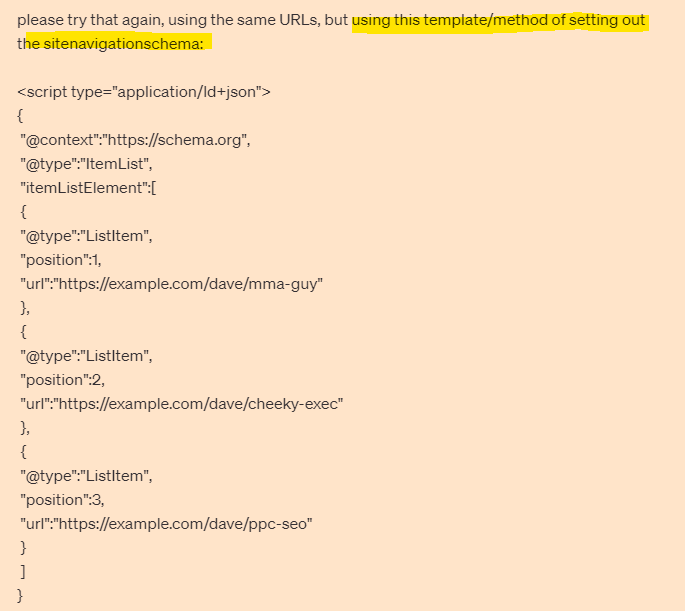
Look for structured data opportunities
Optimise internal links – especially if you are using a “Pillar Post” and “Cluster Page” structure
Follow traditional on page SEO best practices with headers, meta titles, alt tags etc
Tools for Semantic Search
SMA Marketing have done a cool YouTube video about Semantic Search and they recommend tools including:
Wordlift
Frase
Advanced Custom Fields for WordPress
Google Colab with a SpaCy
Before you publish a post – look at the search results for the keyword(s) you are optimising the post for. Check in incognito in Chrome to remove most of the personalisation of the results.
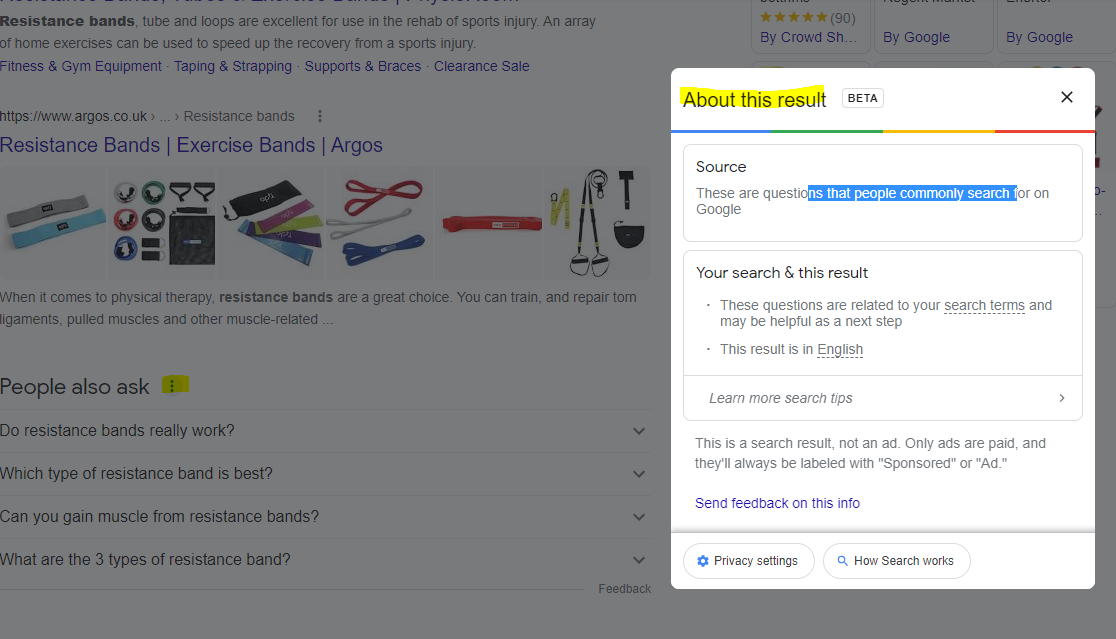
For any answer boxes or snippets, you can click the “3 dots” to get information about the results:
As well as the snippets, you can click the 3 dots next to any organic result. Here’s another result for “MMA training program pdf” with some additional information:
With this in mind – if you are looking to rank for “MMA training program pdf” then you will want to include the search terms highlighted in the “About this result” box: mma, training, program, pdf and ideally LSI keywords “workout” and “plan”.
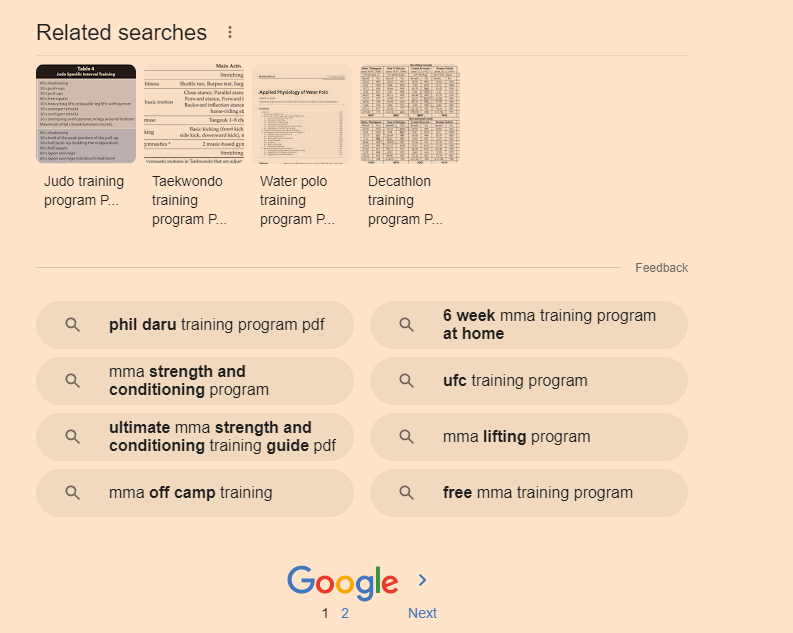
It’s also a good idea to scroll down to the bottom of the SERP and check out the “related searches”
Take a look too at any breadcrumb results that pull through below the organic listings. Combining all this information will give you a good idea as to what Google understands by your search query and what people are looking for too.
Hover over [1] and click the play icon that appears (highlighted yellow in screenshot below)
When that section has finished loading and refreshing, scroll down to the “Installation tensorflow + transformers + pipelines” section and click the play icon there.
When that’s finished doing it’s thing, scroll down again, and add your search query to the uQuery_1: section:
add your query and then press the “play” button on the left hand side opposite the uQuery_1 line
You should then see the top 10 organic results from Google on the left hand side – in the form of a list of URLs
Next, you can scrape all the results by scrolling down to the “Scraping results with Trafilatura” section and hover over the “[ ]” and press play again:
Next, when the scraping of results is done – scroll down to “Analyze terms from the corpus of results” section and click the play button that appears when you hover over “[ ]”
Next! when that’s done click the play button on the section full of code starting with:
“df_1[‘top_result’] = [‘Top 3’ if x <= 3 else ‘Positions 4 – 10’ for x in df_1[‘position’]] # add top_result = True when position <=3 “
Finally – scroll down and click the play button on the left of the “Visualizing the Top Results” section.
On the right hand side where it says “Top Top 3” and lists a load of keywords/terms – these are frequent and meaningful (apparently) terms used in the top 3 results for your search term.
Below that, you can see the terms used in the results from 4-10
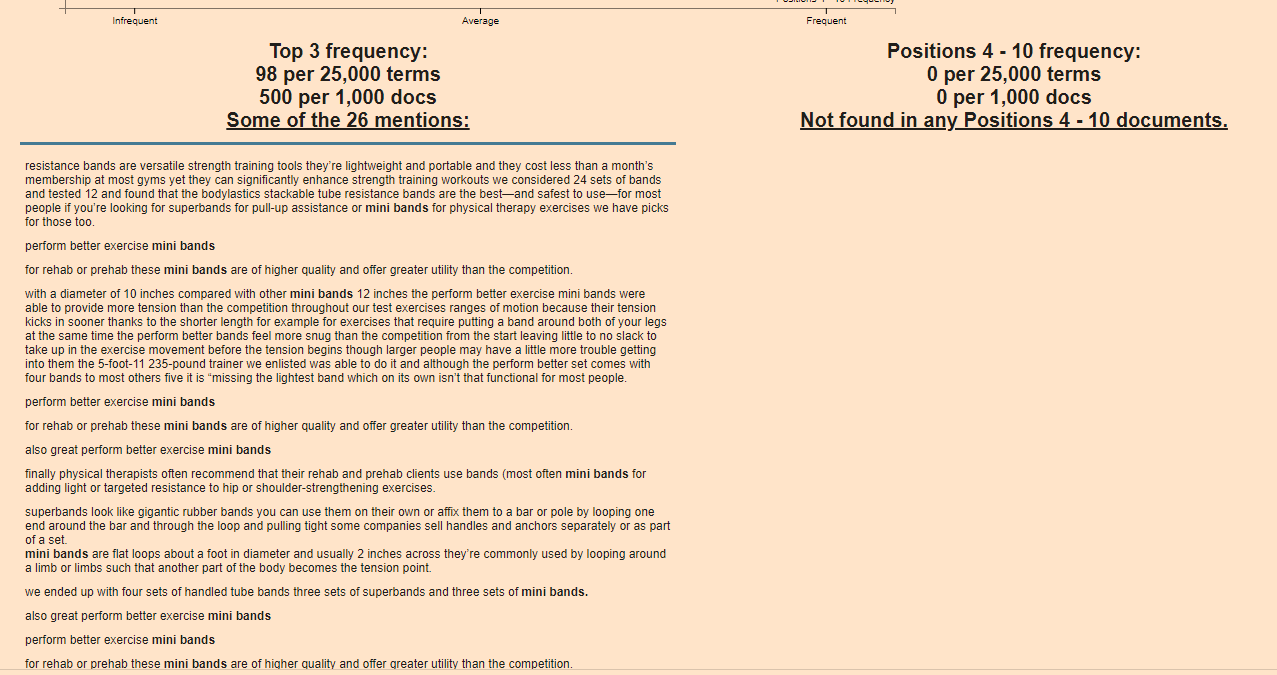
Terms at the top of the graph are used frequently in the top 3 results e.g. “Mini bands”
Terms on the right are used frequently by the results in positions 4-10
From the graph above, I can see that for the search term “resistance bands” the top 3 results are using some terms, not used by 4-10 – including “Mini bands”, “superbands” “pick bodylastics”
If you click on a term/keyword in the graph – a ton of information appears just below:
e.g. if I click “mini bands”
It’s interesting that “mini bands” is not featured at all in the results positioned 4-10
If you were currently ranking in position 7 for example, you’d probably want to look at adding “mini bands” into your post or product page
You can now go to the left-side-bar and click “Top 25 Terms” and click the “play icon” to refresh the data:
Obviously – use your experience etc and take the results with a pinch of salt – some won’t be relevant.
Natural Language Processing
next click on “Natural Langauge Processing” in the side-menu
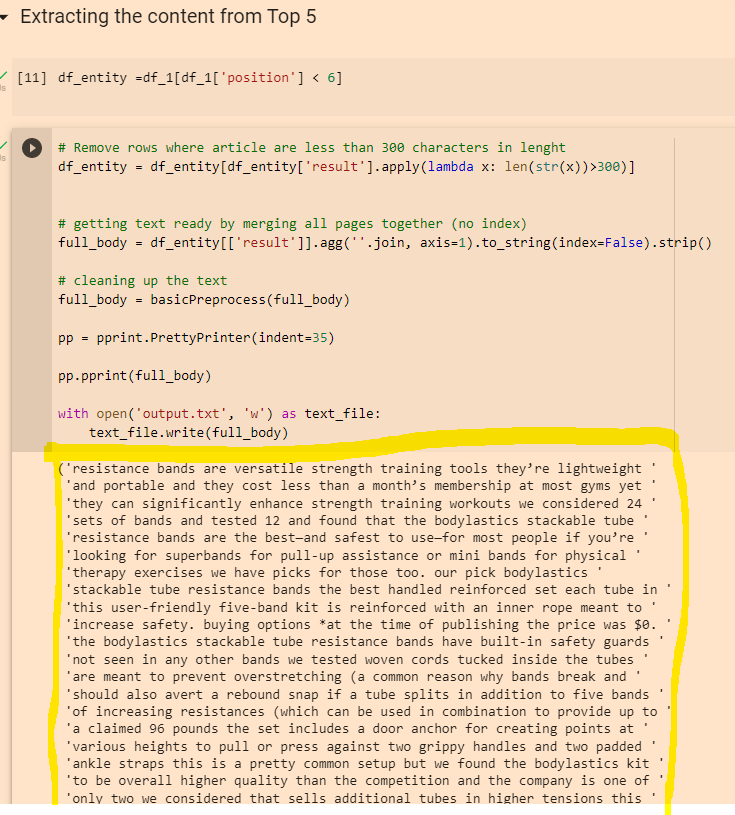
Click the “play” icons next to “df_entity =df_1[df_1[‘position’] < 6]” and the section below.
When they have finished running click the play icon next to “Extracting Entities”
Click “play” on the “remove duplicates” section and again on the “Visualising Data” section
This should present you with a colourful table, with more terms and keywords – although for me most of the terms weren’t relevant in this instance 😦
You can also copy the output from the “Extracting the content from Top 5” section:
Then paste it into the DEMO/API for NLP that Google have created here:
You can then click the different tabs/headings and get some cool insights
Remember to scroll right down to the bottom, as you’ll find some additional insights about important terms and their relevance
The Google NLP API is pretty interesting. You can also copy and paste your existing page copy into it, and see what Google categories different terms as, and how “salient” or important/relevant it thinks each term is. For some reason, it thinks “band” is an organisation in the above screenshot. You can look to improve the interpretations by adding relevant contextual copy around the term on the page, by using schema and internal links.
For lead generation websites, if you are a local tradesman for example, you’ll want a Call to ACTION button on the homepage, and probably all of your other pages – a Contact Now button for example
Homepage Call to Action
Strong Call To Action
You will probably want a “Call to Action” or “CTA” button, such as “Buy Now”, “Learn More” or “Contact Us”
This CTA button is generally placed “above the fold” on most pages, so that people don’t have to scroll down or look for a way to get in touch or buy from you.
“Join Free for a Month” – is the CTA on Netflix’s homepage (at the time of writing)
For more expensive, high end or though-out purchases such as – buying a car or contacting a therapist, sometimes it’s better to have the CTA below the fold. The best thing to do is test it, with Google Optimize.
For more information about “Conversion Rate Opimization” (CRO), see this article:
For a full SEO (Search Engine Optimization) checklist for your website – to help get visibility on Google – see this article – https://backlinko.com/seo-checklist
Google My Business
Register your website and your office with Google My Business
Google will send out a postcard to your office (or home) address
The postcard has a code – so you can confirm you are at that address
Local Directories
Register your business with high quality, local directories such as
Bing Places
Yelp
Yell
Free Index
Open Di
Try and get on any local government directories too.
Social Media & Captioned Videos
If relevant, register your business on:
Linkedin
Facebook
Instagram
TikTok
Arguably the best way to get noticed on social media at the moment, is to create videos with captions – so they can be watched on mute.
Linkedin is said to have the greatest organic reach at the moment too – meaning you can get your video, image or text-post in front of more people, without paying for ads.
Social media sites like people posting videos too – because they drive a high rate of engagement and keep people on the site for longer.
Do NOT post to YouTube and then post a link on social media
Instead – upload your video direct to the platform.
For example, if you have a Facebook page, upload the video directly to Facebook, so that Facebook hosts the video and not YouTube.
Social media sites will tend to kill your reach if you post a link – they don’t want people to click and leave their website
YouTube is also showing on more and more Search Results Pages on Google.
Consider creating a YouTube channel with lots of informative, helpful and entertaining content.
You can then edit the videos and post to specific social media platforms.
Find out the pain point of your target audience and create video content that helps with those pain points.
Take long form videos and edit them into YouTube shorts, and shorter clips for social media.
If you work in b2b for example, you could do a webinar on digital marketing for small businesses, create some 1 minute highlights of the most informative points and create a YouTube short, and create lists of 30 second clips for tiktok, Facebook, twitter, Instagram and LinkedIn.
Make sure you add captions to your videos for social media!
80% of social media videos ate watched muted.
Jab, Jab, Jab – Right Hook
General principle of content and social media marketing by Gary V.
Identify your target market
Identify their issues and pain points
Post helpful content related to their pain points and problems
Do NOT constantly promote your business – slip in the odd “Right Hook”, every 3 or 4 posts
People do not want to be sold to constantly, they want helpful, insightful and funny content.
For example.
If you target market is small business owners, take a look on Quora and Reddit and see what people are talking about. If a common theme is Facebook advertising for example, make some helpful videos and blog posts about Facebook marketing.
SEO, PPC and More
The above is just a foundation.
If you have the time and resources, you will ideally produce lots of insightful blog content, earn lots of inbound links and work your way to the top of Google.
You will also want to consider “PPC” – Pay Per Click ads on Google, Facebook and Linkedin.
One beginner mistake to avoid with ads – is sending people to your homepage.
Have a specific “landing page” for each advertising campaign.
oh – make sure you have a good looking logo too. You can use Canva or hire someone on PeoplePerHour.com
Google ads is changing all the time, but generally speaking you’ll want to use exact match keywords and create very specific ads for each keyword or group of keywords.
A good place to start with SEO is to check your website using an On-Page SEO Checklist.
Videos can also be used as aa way to gain presen o Google.
Videos are great for social media, and YouTube is also starting to show more and more often in the Google results. I would personally have a good go at gaining an online presence using videos and social media – particularly Linkedin at the moment.
Build a Brand
Here’s a good article that some hero wrote about building your brand as a small business
Identify other propositions “why use me/us and not the competitor?”
Write down your brand story
Use high quality photography & videography (avoid stock pictures)
Consider making customer support a key element of your brand – this can help with online reviews too. Pre-purchase, purchase and post-purchase consumer stages are all opportunities to impress and help.
Just use SEMRush – Organic Research – Positions tab and download and pivot the pages data – no need for advanced filter
Once you’ve found the blog posts with the most traffic, you can analyse the “Exact URL” in SEMRush
This analysis, should show you the keywords on the page that generate most of the search traffic
I personally like to go after KWs with a Keyword Difficulty score of less than 20 for my personal blog and under 30 for my employer’s blog
You can also use Reddit & Quora for Content Ideas
Unsolicited #SEO tip: You can get great ideas for specific content ahead of features like PAAs being generated by using Google site operators with specific sites. For instance, I can use the command:
site:reddit[dot]com/r/amateur_boxing “how do i”
or
site:reddit.com/r/bootroom “how do i”
To search just the amateur boxing subreddit for questions starting with “how do I?” You can apply this on any niche or on other sites like Quora to get up to the minute questions people are asking.
I only want the URLs that reside at the third level – i.e. /productpage/
Go to your XML sitemap – usually at Myshop.com/sitemap.xml
Right click and “save as” – save on your computer
Open Excel
Go to the Developer Tab (you might need to add this as it’s not there by default)
Click “Import”
Browse to find your sitemap.xml and import it into Excel
This usually pulls all your URLs into column 1 and other info like priority into separate columns
Delete all the columns except the first one with your URLs in it
Remove the https:// from the URLs with “find and replace” – On “Home” tab under “Find & Select” on the right
In cell B2 add the function: (change A2 – to the cell you have put the first URL in)
=LEN(A2)-LEN(SUBSTITUTE(A2,"/",""))
11. Drag the formula down the rest of column B
12. You can now order column B by the number of “/” found in each URL
If different categories have different folder structures then you can conditionally format and use different colours for different categories and then do a multiple criteria sort – by colour, then folder depth (column B)
You can download an example spreadsheet with the formula in here