As the name suggests, Google’s March 2024 core update aims to prioritise useful information over content that seems optimized for search engines. In theory, spammy shite should be dropped in the rankings. In theory. Hopefully the twats at hydragun who keep robbing my MMA blogs content will get a spanking.
The helpful content system is revamped and integrated into the core ranking algorithm to better identify genuinely helpful content and reduce unoriginal content.
The guys in the know, expect the rollout to take a month, with significant ranking fluctuations during this period.
Google aims to reduce low-quality, unoriginal content in search results by 40%. Not 100%, updates begin at 40.
Actionable To-Do List:
Review Content Quality: Assess your website’s content for originality and usefulness to real users, not just for SEO.
Write from experience, and in the first person. Unless you’re a big brand, then do what you like.
Monitor Rankings: Prepare for fluctuations in search rankings as the update rolls out. Use this time to identify areas for improvement.
Update Content Strategy: Focus on creating high-quality, original content that addresses your audience’s needs and questions. Use forums and social media groups to identify your customers pain points and common questions. Your CS and sales teams can also provide insights. Also get chat gpt to put keywords into themes of different queries.
Avoid Spam Tactics: Steer clear of expired domain abuse, scaled content abuse, and site reputation abuse to avoid penalties.
Build your brand. Branded searches and search volumes, make a massive difference, in my experience (see what I did there?).
It generally helps, in theory, to write from experience rather than just giving an overview that anyone could scrape and rewrite from the internet. Include your own images, videos etc.
I don’t have any images of Google updates, see here’s a pic of my dog:
Big brands will still probably have a massive advantage regardless of what they do.
Spam Updates:
Significant changes to spam handling will start on May 5, 2024, affecting sites through algorithmic adjustments or manual actions.
New spam policies target expired domain abuse, scaled content abuse (especially AI-generated content), and site reputation abuse.
General Recommendations:
Recognize the shift towards rewarding authoritative and genuinely helpful content.
Anticipate a more significant impact from updates targeting spam and low-quality content.
Understand that recovery from these updates may require fundamental changes beyond SEO, focusing on building a reputable and sought-after brand for quality content.
Over the past week, the SEO and PPC landscape has seen several significant updates and insights:
Google Structured Data Carousels (Beta): Google introduced new documentation for what it calls host carousels within Google Search, aiming to enhance content visibility and interaction.
Performance Max Campaigns: Concerns have been raised about Google’s lack of transparency around Performance Max (PMax) performance data, with advertisers criticizing the platform for not showing channel-specific KPIs.
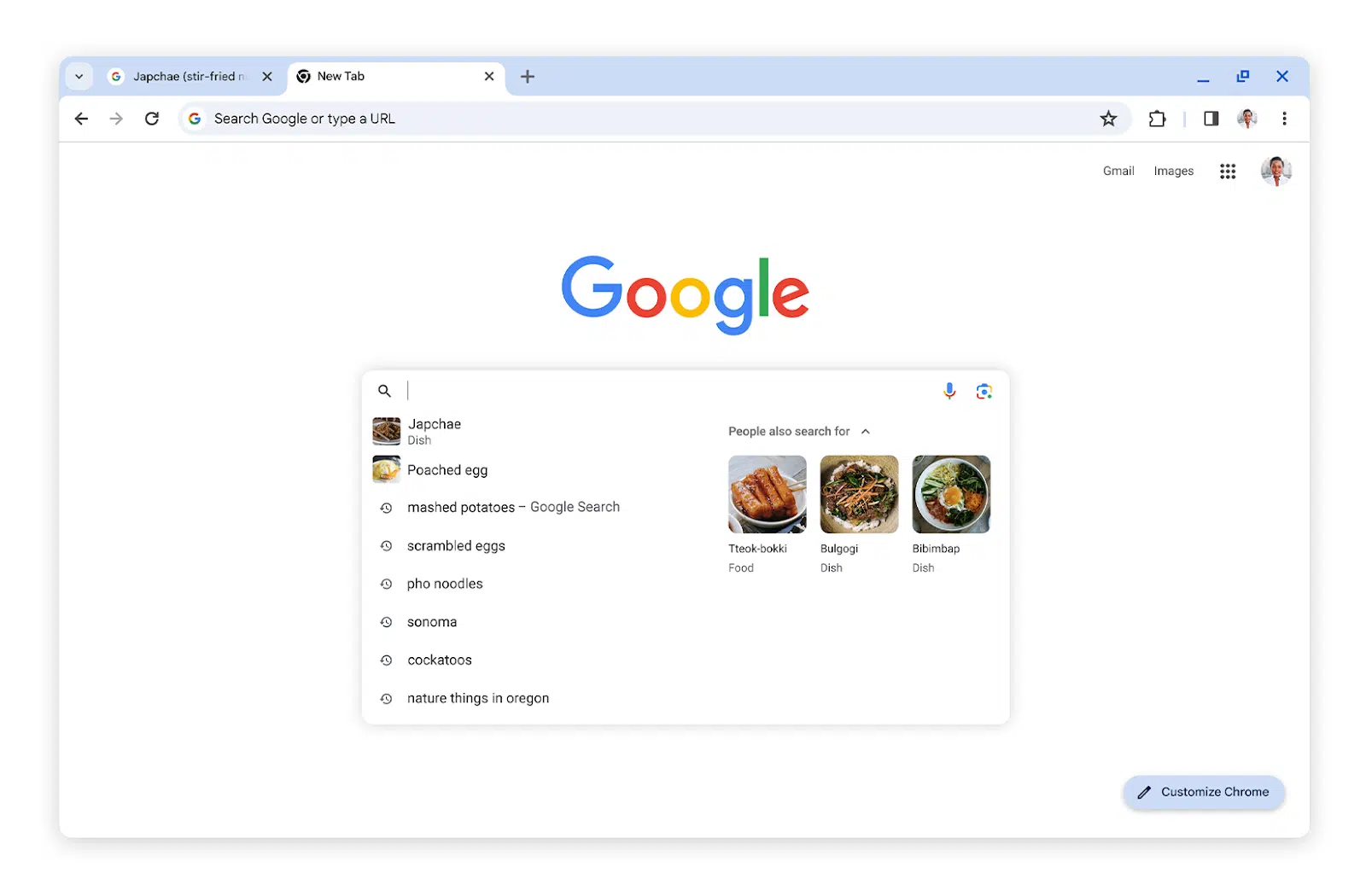
Google Chrome Search Suggestions Update: Google Chrome now offers enhanced search suggestions, including what others are searching for and more image thumbnails in the search box*
AI Content and GPTBot: Discussions around AI-generated content and the use of OpenAI’s GPTBot for crawling websites have been prominent. The consensus is that embracing GPTBot can offer more benefits than drawbacks, with advice on improving AI content to avoid generic writing and plagiarism.
Video SEO and Site Migrations: Advanced techniques for video SEO were highlighted, including the debate between self-hosting versus YouTube embedding. Additionally, AI-powered redirect mapping was discussed as a method to speed up site migrations.
Legal and Policy Updates: Google faces a $2.27 billion lawsuit from European publishers over advertising practices, and reminders were issued about Google enforcing stricter rules for consumer finance ad targeting.
Digital Marketing Trends for SMBs: A new report sheds light on the digital marketing approaches of small and medium-sized businesses (SMBs) in 2024, focusing on key trends, goals, and challenges.
*Google Search Suggestions Update:
Actionable Points for SEO and Digital Marketing
Based on the recent SEO news, here are some actionable recommendations:
Embrace Google’s New Features: Experiment with Google’s structured data carousels and update your site’s structured data accordingly to take advantage of these new search features.
Transparency with Performance Max Campaigns: Closely monitor PMax performance data and consider diversifying your ad strategies to mitigate risks associated with opaque KPIs.
Optimize for Google Chrome’s Enhanced Search Suggestions: Ensure your website’s content is optimized for search suggestions, including the use of relevant keywords and high-quality images.
Unblock GPTBot and Improve AI Content: Do not block GPTBot from crawling your site; instead, focus on creating high-quality, insightful AI-generated content that avoids generic writing and plagiarism.
Advanced Video SEO Techniques: Explore advanced video SEO techniques, such as deciding between self-hosting and YouTube embedding based on your content strategy and ensuring your videos are properly indexed.
AI-Powered Site Migration: Utilize AI for efficient redirect mapping during site migrations to save time and reduce errors, ensuring a smooth transition to a new CMS.
Stay Informed on Legal and Policy Changes: Keep abreast of legal and policy updates affecting digital advertising to ensure your marketing practices remain compliant and effective.
Actionable SEO Tips
Advanced Video SEO Techniques and AI Copy Creation
For advanced video SEO, focus on:
Choosing the Right Hosting Platform: Decide between self-hosting and platforms like YouTube based on your goals (e.g., traffic vs. engagement).
Optimizing Video Metadata: Ensure titles, descriptions, and tags are keyword-rich and descriptive.
Creating Engaging Thumbnails: Use compelling thumbnails to increase click-through rates.
Leveraging Video Transcripts: Improve accessibility and indexability by including transcripts.
To create helpful AI copy that ranks well, focus on:
Providing Detailed Instructions: Give the AI specific, detailed prompts that align with your content goals.
Emphasizing Value and Originality: Instruct the AI to generate content that offers unique insights or solutions.
Incorporating SEO Best Practices: Include keywords and SEO strategies within your prompts to guide the AI in producing SEO-friendly content.
Example Prompts for AI Copy Creation
Becoming a Full Stack Developer:
“Write an introductory guide for beginners on becoming a full stack developer, focusing on essential skills and languages.”
“List the top resources for learning full stack development, including online courses, books, and communities.”
“Explain the importance of project-based learning in full stack development and provide examples of beginner-friendly projects.”
Tech SEO Audit and Site Migration Checklist:
“Create a comprehensive checklist for conducting a technical SEO audit, covering site speed, mobile-friendliness, and on-page SEO factors.”
“Outline the steps for a successful site migration to a new CMS, emphasizing SEO considerations like URL structure and 301 redirects.”
“Discuss common pitfalls in site migrations and how to avoid them, focusing on maintaining search rankings and user experience.”
These prompts are designed to guide AI in producing detailed, valuable content that addresses specific user needs and adheres to SEO best practices.
Use Inspect Element (right click on the copy and choose “inspect” if you use Chrome browser) – to identify the name, class or ID of the div or element the page copy is contained in:
In this example the Div class is “prose” (f8ck knows why)
You can copy the Xpath instead – but it appears to do the same thing as just entering the class or id of the div:
The following will scrape any text in the div called “prose”:
*Click Image to enlarge^
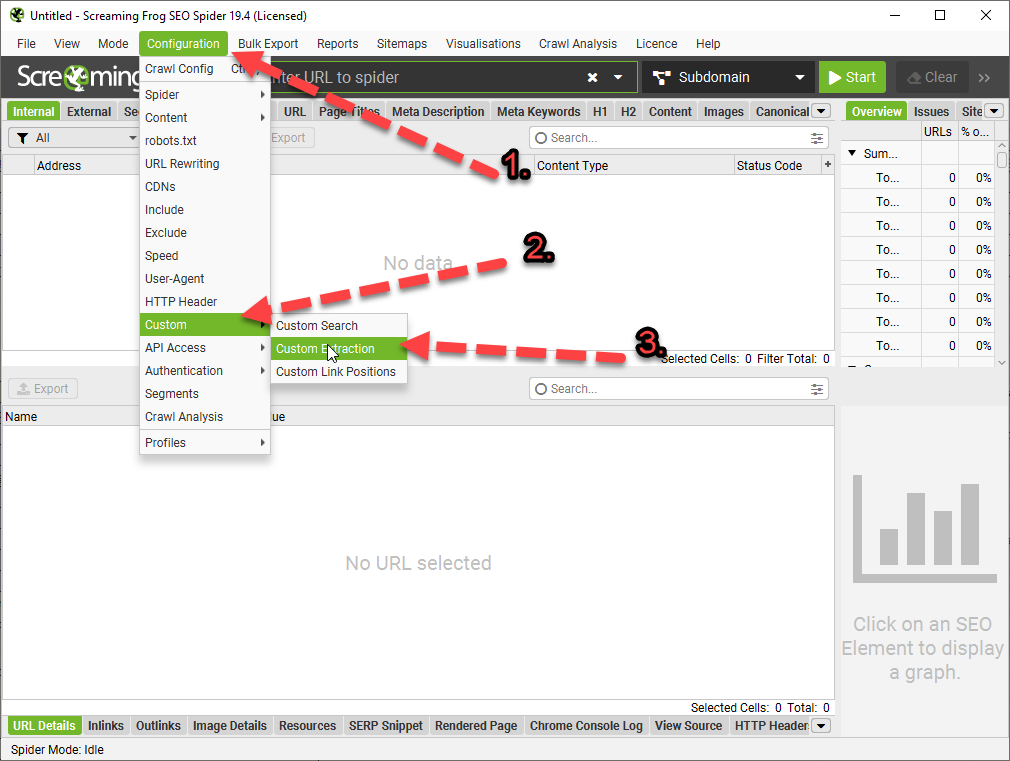
Once you are in the Custom Extraction Window – Choose:
Extractor 1
X Path
In the next box enter –> //div[@class=’classofdiv‘] —->
in this example – //div[@class=’prose’]
Extract Text
//div[@class='prose']

^Enter the above into the 3rd 'box' in the custom extraction window/tab.
Replace "prose" with the name of the div you want to scrape.
If you copy the Xpath using Inspect Element – select the exact element you want. For example, don’t select the Div that contains text you want to scrape – select the text itself:
Here are some more examples:
How to Extract Common HTML Elements
(Please Note – the formatting changes the single quote marks ‘ ‘ – you may need to override them manually with single quotes using your keyboard, before adding to Screaming Frog. For example //div[@class=’read-more’]
Should be:
//div[@class='read-more']
XPath
Output
//h1
Extract all H1 tags
//h3[1]
Extract the first H3 tag
//h3[2]
Extract the second H3 tag
//div/p
Extract any <p> contained within a <div>
//div[@class=’author’]
Extract any <div> with class “author” (remember to check ‘ quote marks are correct)
//p[@class=’bio’]
Extract any <p> with class “bio”
//*[@class=’bio’]
Extract any element with class “bio”
//ul/li[last()]
Extract the last <li> in a <ul>
//ol[@class=’cat’]/li[1]
Extract the first <li> in a <ol> with class “cat”
count(//h2)
Count the number of H2’s (set extraction filter to “Function Value”)
//a[contains(.,’click here’)]
Extract any link with anchor text containing “click here”
//a[starts-with(@title,’Written by’)]
Extract any link with a title starting with “Written by”
How to Extract Common HTML Attributes
XPath
Output
//@href
Extract all links
//a[starts-with(@href,’mailto’)]/@href
Extract link that starts with “mailto” (email address)
//img/@src
Extract all image source URLs
//img[contains(@class,’aligncenter’)]/@src
Extract all image source URLs for images with the class name containing “aligncenter”
//link[@rel=’alternate’]
Extract elements with the rel attribute set to “alternate”
//@hreflang
Extract all hreflang values
How to Extract Meta Tags (including Open Graph and Twitter Cards)
I recommend setting the extraction filter to “Extract Inner HTML” for these ones.
If the ‘shorter code’ in the tables above doesn’t work for some reason, you may have to right click – inspect and copy the full Xpath code to be more specific with what you want to extract:
For sections of text like paragraphs and on page descriptions, select the actual text in the inspect window before copying the Xpath.
Update 2
We wanted to compare the copy and internal links before and after a site-migration to a new CMS.
To see the links in HTML format – you just need to check “Extract Text” to “Extract Inner HTML” in the final drop down: (click image to enlarge)
On the new CMS, it was easier to just copy the XPath
Why Use Custom Extraction with Screaming Frog?
I’m glad you asked.
We used it to check that page copy had migrated properly to a new CMS.
We also extracted the HTML within the copy, to check the internal links were still present.
One cool thing you can do – is scrape reviews and then analyse the reviews to see key feedback/pain points that could inform superior design.
Here’s a good way to use custom extraction/search to find text that you want to use for anchor text for internal links:
Or – just paste into Chat GPT and ask for insights and pain-points to help develop a better product.
I asked Chat GPT and Google Gemini why I would want to scrape copy from sites and got these responses:
Monitoring Competitors
Content Strategy Insights: Gather headings, titles, and meta descriptions from competitor websites to gain insights into their content strategies and how they optimize for search engines.
Pricing Information: For e-commerce platforms, you can use custom extraction to keep an eye on competitors’ pricing strategies by pulling prices for similar products.
Promotional Strategies: Collect details on promotions, discounts, or special offers from competitors’ sites to evaluate how they stack up against your own promotional efforts.
Keyword Usage: Identify specific keywords from competitors’ content to understand how they are targeting particular topics or niches.
Backlink Analysis: While Screaming Frog isn’t primarily a backlink tool, you can utilize custom extraction to pinpoint external links on a page, providing insights into a competitor’s backlink strategy.
Optimizing Your Own Website
Content Optimization: Employ custom extraction to review your own site’s headings, titles, meta descriptions, and keyword usage to spot areas that need improvement.
Structural Data: Extract and assess structured data (like Schema markup) across your site to ensure proper implementation and identify potential enhancement opportunities.
Internal Linking: Analyze internal linking structures to understand the flow of page authority throughout your site and to find orphan pages or those with insufficient internal link support.
Audit Forms and Calls to Action (CTAs): Extract form action URLs and CTA links to verify they are working correctly and to optimize their placement and wording.
Identify Outdated Content: Use custom extraction to locate dates and timestamps on your content, which can help you identify articles or pages that may require updates.
Gemini said:
Reasons to Use Custom Extraction in Screaming Frog:
The custom extraction feature in Screaming Frog provides numerous advantages for website analysis and data collection. Here are some important reasons to utilize it:
Extract Specific Data:
Go beyond basic SEO metrics: While Screaming Frog offers valuable insights, custom extraction enables you to focus on specific data points that may not be easily accessible, such as product prices, article publish dates, or user reviews.
Gain deeper competitor insights: Extract information on competitor pricing strategies, product descriptions, or content structures to compare with your own website.
Gather information for internal analysis: Monitor specific elements on your site, like call to action (CTA) button text or internal linking structures, to observe changes and assess their impact.
Automate Data Collection:
Save time and effort: Collecting data manually can be labor-intensive and prone to errors. Custom extraction streamlines the process, allowing you to efficiently gather information across numerous pages.
Maintain consistent data: By setting up automated data extraction, you ensure uniform data collection over time, which facilitates better trend analysis and comparisons.
Enhance Reporting and Analysis:
Combine extracted data with existing Screaming Frog metrics: Merge the extracted data with other SEO parameters such as page titles, meta descriptions, and internal links for a more thorough analysis.
Create custom reports: Use the extracted data to generate tailored reports for specific purposes, like competitor pricing comparisons or evaluations of content performance.
Monitoring Competitors:
Custom extraction serves as a valuable tool for competitor monitoring in various ways:
Extract competitor pricing data: Keep track of competitor pricing trends, identify potential gaps in your own pricing strategy, and make informed pricing decisions.
Analyze competitor content structure and keywords: Learn how competitors format their content, pinpoint their targeted keywords, and gain insights to enhance your own strategy.
Note for self – for Magento 2, Hyva theme Sub-category page copy – scrape using:
Main Tips – 1. Do a draft yourself – even if it’s terrible – then ask Chat GPT to: “rewrite this copy, so it flows and reads better, please write to an [advanced high school] level”
or as above, but for an essay – “rewrite this copy, so it flows and reads better, please write to an [for an academic paper for a degree, and cite studies with URLs to pubmed or Google scholar].”
2. Make your prompts as detailed and specific as possible, so that if for example, you are submitting an essay, it won’t be the same as everyone elses.
3. Check uses an AI copy checker
Add Personal Experiences
If you are writing a blog post, you’ll want to add some personal experience or anecdotes:
Please ignore all previous instructions and prompts. All output is in English.
Ask for fluid paragraphs:
Please write a LinkedIn post about how being an entrepreneur is like fishing on a lake. Do not divide the output into numbered sections. Instead, compose the output as flowing, fluid paragraphs.
Add comparisons:
Compare fishing to business, point-by-point, including but not limited to the concepts of making one’s own luck, joy, not getting discouraged, using data, weather, the environment, taking chances, experimenting, lessons learned in failure and victory, humility, blending old-school concepts with new fishing and business tech.
Add random grammar rules:
Do not start any sentence with the same two words in a row.
Do not use any three-word phrase more than once.
Do not repeat any word within eight words of the most recent iteration of the same word.
Write in in the tone of an advanced professional showing emotions, a person sharing thoughts and feelings.
Use at least 10 words with four syllables. The target consumer is someone who likes complex writers and writings.
Limit usage of the following filler words, except when completely needed for correct grammar: The, it, those, them they, these, it’s, an, a, and. Instead of filler words, use synonyms for what the filler word is referring to or no word at all. Another solution to eliminate filler words is to make a singular noun requiring a filler word plural. As an example: If the output would be, “An angler makes.” Avoid the filler word “An” by writing, “Anglers make.”
Do not use the concepts of tranquility or tranquil unless we also refer to opposite conditions, highlighting changing dynamics.
Limit usage of the words I, me, mine and my. Instead, use the words we, us, our, ours.
Add Quotes:
Quote both Henry David Thoreau about fishing and Tony Robbins about luck, once each as relevant to the story.
Instead of referring to failure, failing or fail, use words like challenge, challenges, learnings, sub-optimal outcomes, learnings, motivation.
Strictly do not exceed 2,900 characters, including spaces.
Ask for imperfection: To avoid detection by AI checking tools, prevent grammatically perfect output by doing the following: Do not use an Oxford comma one time, where the last two ideas in the sentence are related enough to justify not using an Oxford comma.
Obfuscating Text Obfuscating text is a technique used to bypass AI content detectors. It involves altering and manipulating text in a way that makes it difficult for the detector to accurately analyze and interpret the content. One way to obfuscate text is through the use of synonyms, replacing common words with similar but less detectable alternatives. Another method is adding random or irrelevant words to the text, which creates noise and misleads the detector.
Altering Word and Sentence Structure Altering word and sentence structure is a useful tactic for evading AI content detectors. By employing synonyms, antonyms, or rearranging sentence components, you can subtly modify your writing to appear unique or bypass detection algorithms. For instance, instead of using the term “important,” you could opt for synonyms like “significant” or “crucial. ” Likewise, sentence fragments or splitting a single sentence into two can also alter the structure and make it harder for AI detectors to identify plagiarized content. Practicing these techniques can assist in maintaining originality and avoiding detection by AI algorithms.
Changing Word Forms 1. Vary sentence structures by altering word forms to bypass AI content detectors. Example: Instead of using the word “essential,” you can swap it with “necessary” or “vital” to maintain clarity and avoid triggering filters. Example: Instead of relying on the term “pivotal importance,” consider phrases like “significantly influential” or “crucial significance” to evade detection.
2. Modify key phrases without sacrificing meaning. Example: Instead of stating that something “plays a significant role,” you can rephrase it to “has a noteworthy impact” to circumvent content detection algorithms.
3. Experiment with different synonyms to conceal critical keywords. Example: Rather than using “paramount importance,” explore alternatives such as “supreme significance” or “unmatched prominence” to avoid arousing AI scrutiny.
4. Strike a balance between practical guidance and theoretical insights when discussing the subject matter. Example: Combine practical examples without mentioning specific brand names to provide actionable advice that readers can easily implement.
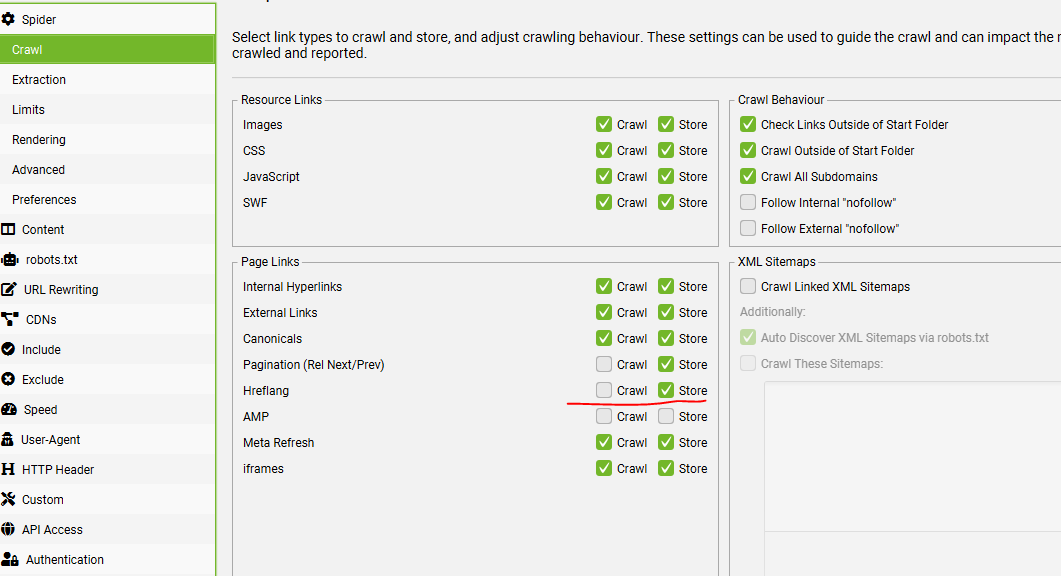
Menu Bar > Configuration > Spider > Crawl – Check the box to store Hreflang and Crawl (if you want to crawl and check they all 200)
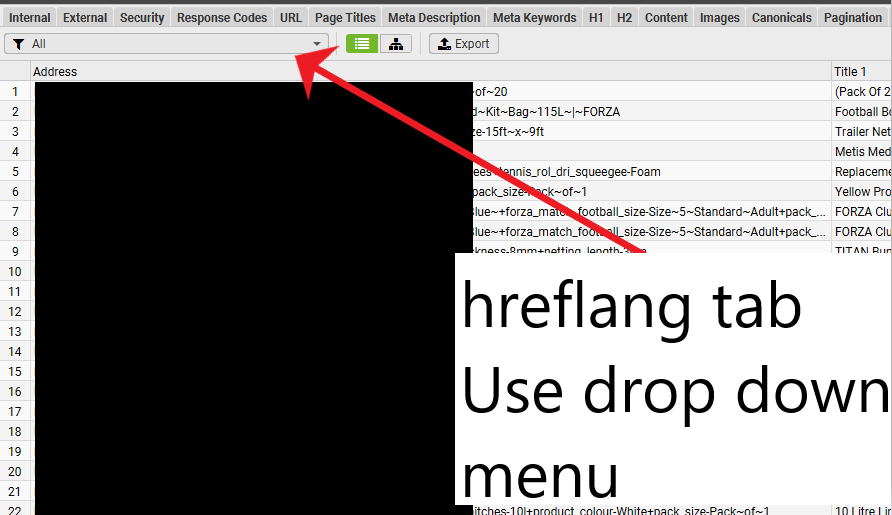
To Filter on the Hreflang Tab
Click on the icon of the sliders on the top right Search window
You then get “Excel style” filtering options:
TL;DR – Use the hreflang Tab/Window – Use the drop down menu to show each report – Download – and check “indexable” URLs only –> none-indexable URLs don’t need a hreflang – Check each indexable URL has appropriate number of hreflang – Also check non-200 report
Find URLs without all of the relevant Hreflang Attributes:
Hreflang Window – “All” in Drop down menu – Filter out any parameter URLs using the filter in screenshot above – Does Not Contain (!~) – ?
Export to Excel
Filter so only shows “Indexable” URLs
Find any URLs without the relevant number of hreflangs – e.g. if you have 8 sites in different languages/regions – you’ll probably want most of your Indexable URLs to have 8 “occurrences” of hreflang
Check Non-200 Hreflang dropdown for any errors – Easiest way to export the specific hreflang URLs that don’t 200 – is to go to Reports > Hreflang > Non 200. Filter the spreadsheet to non-empty hreflang column D:
Unlinked Hreflang URLs – Perform a crawl Analysis to Check this
Missing Return Links
Use the search function near the top right (click the slider icon) – Filter to show only “indexable” URLs to find URLs that should have return links, that are missing them.
1) Select ‘Crawl’ and ‘Store’ Hreflang under ‘Config > Spider > Crawl’
2) To Crawl Hreflang In XML Sitemaps, Select ‘Crawl Linked XML Sitemaps’ Under ‘Config > Spider > Crawl’
3) Crawl The Website
4) View The Hreflang Tab
5) View the different Hreflang reports using the drop down menu
6) Perform a “crawl analysis” to see the 6th report
Reports
COntains hreflang – URLS that have the rel=”alternate” markup
Non-200 Hreflang URLs – URLs within the rel=”alternate” markup that don’t result in a 200 status code
Unlinked Hreflang URLS – Page sthat conain one or more hrelgang tag / URL that’s only linked to by a hreflang tag and not in the actual webpages
Missing Return Links – Hreflang should be recipricol.
Inconsistent Language & Region Return Links – This filter includes URLs with inconsistent language and regional return links to them. This is where a return link has a different language or regional value than the URL is referencing itself
Non Canonical Return Links – URLs with non canonical hreflang return links. Hreflang should only include canonical versions of URLs.
Noindex Return Links – Return links which have a ‘noindex’ meta tag. All pages within a set should be indexable,
Incorrect Language & Region Codes – This simply verifies the language (in ISO 639-1 format) and optional regional (in ISO 3166-1 Alpha 2 format) code values are valid
Missing Self Reference – URLs missing their own self referencing rel=”alternate” hreflang annotation. It was previously a requirement to have a self-referencing hreflang, but Google has updated their guidelines to say this is optional. It is however good practice and often easier to include a self referencing attribute.
Not Using Canonical – URLs not using the canonical URL on the page, in it’s own hreflang annotation. Hreflang should only include canonical versions of URLs.
Missing – URLs missing an hreflang attribute completely. These might be valid of course, if there aren’t multiple versions of a page.
Outside <head> – Pages with an hreflang link element that is outside of the head element in the HTML. The hreflang link element should be within the head element, or search engines will ignore it.
To bulk export details of source pages, that contain errors or issues for hreflang, use the ‘Reports > Hreflang’ options.
For example, the ‘Reports > Hreflang > Non-200 Hreflang URLs’ export,
Sometimes, the language and region values in a hreflang tag are not properly aligned with the page’s relevant languages or countries. This error can be trickier to handle as tools won’t be able to identify it, so a manual review will be needed to detect if the hreflang values are really showing the correct language and/or country for the page in question.
Remember, hreflang attributes require a language to be specified, but region is optionaland should only be used when necessary (for example, if you want to serve different pages to Spanish speakers in Mexico and Spanish speakers in Spain).
It’s critical to verify, before implementing anything, whether the site is language or country targeted (or if there’s a mix of approaches that you need to be aware of). The hreflang values will need to be generated according to this targeting.
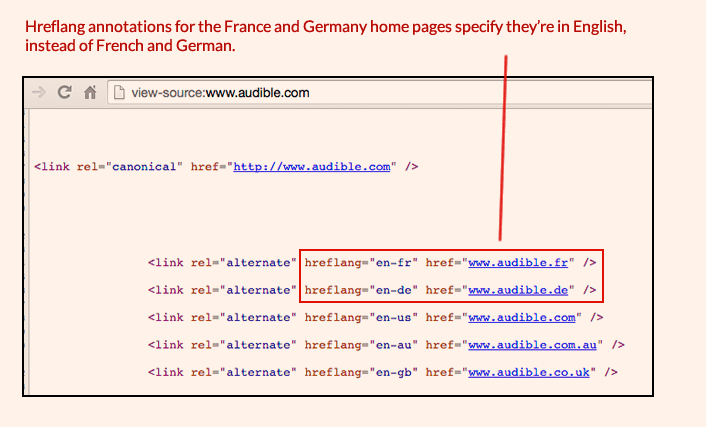
Another scenario I’ve found is that, in some cases, the language (or country) code hasn’t been correctly implemented and always specifies the same language (or country) for each alternate URL. In this example from Audible, the home pages for France and Germany have been tagged as English language pages, even though they’re really in French and in German, respectively:
Irrelevant URLs
Similar to the previous example, sometimes the hreflang attributes are showing the right language and/or country values, but the URLs have not been correctly specified.
For example, in the case of Skype, you can see that the English language version URL is always specified instead of the relevant language URL for each case. (Similarly, the canonical tag is always showing the English URL instead of the relevant one, as in the case of the Spanish language page below).
Full URLs including Full Prefix e.g. has www. instead of https://www. in hreflang
There are also situations where URLs that are meant to have absolute paths are not including the “https://” or “https://” at the start, making them relative URLs which don’t point to the correct page, as can be seen in this example:
In some cases, the same page may contain information for people speaking different languages, so using hreflang tags alone may not be sufficient. Using schema.org markup can help search engines more accurately recognize parts of web pages. For example, inLanguage defines the language of the content or performance or used in an action in schemes such as Event, CreativeWork, BroadcastService and others.
There are multiple free online tools available for testing. My favorite is https://technicalseo.com/tools/hreflang/ Google Search Console depreciated their country-targeting feature September of 2022, however, third party crawl tools such as ScreamingFrog and Ryte.com can uncover site-wide language and regional targeting issues fairly well.
If you use a tool and get the message:
“Missing region-independant link for that language (en)”
It can mean, for example with the Technical SEO tool; that we need a generic URL for English speaking visitors, regardless of what region/country they come from.
In practice, it’s often recommended to have a ‘fallback’ or a default hreflang tag for each language. For English, this would be a tag with the language code “en” without a country code. This tag acts as a catch-all for English speakers in regions not specifically targeted by other tags (like en-GB or en-US).
For example, if your website has English pages specifically for the US and the UK, your hreflang tags might look something like this:
<link rel="alternate" href="http://example.com/en-gb" hreflang="en-gb" /> for English speakers in the UK
<link rel="alternate" href="http://example.com/en-us" hreflang="en-us" /> for English speakers in the US
To resolve the error, you would add a tag for a generic English version:
<link rel="alternate" href="http://example.com/en" hreflang="en" /> for English speakers in general, regardless of region
This setup ensures that search engines know which page to show to English-speaking users based on their location, and also have a default page to show to English speakers in locations not covered by your region-specific tags.
Can be added per URL or at a content component level.
Enables eligibility for various rich results (e.g., breadcrumbs, video results, FAQs).
Ensure logical heading hierarchy:
Headings in a headless CMS can be tricky due to content being decoupled from layout.
Heading hierarchy should reflect content organization.
Proper hierarchy is essential for web accessibility, aiding visually impaired users.
Summary:
Headless architecture empowers businesses to control their digital experience.
Initial technical setup for headless SEO can be challenging but offers greater control and integration.
Headless SEO provides vast possibilities for content-led experiences in ecommerce and content management for large international sites.
The true potential of headless SEO lies in the innovative ways digital teams will harness it in the future.
What is a headless CMS?
A CMS that separates content creation and management from its presentation.
Offers flexibility in delivering content to various devices and platforms.
Results in faster loading times and personalized experiences.
How headless CMS works in practice:
Removes the need for content changes to go through the development team.
Content marketers can publish and edit content using familiar CMS platforms.
Content is sent to the main website via API integration.
Benefits of headless CMS for organizations and SEO:
Scalability: Allows rapid content production across various platforms.
Improved Relationships: Separation fosters better collaboration between developers and SEOs.
SEO-friendly Features: Includes structured data support and customizable URLs.
Enhanced Security: Decouples presentation from backend, shielding sensitive systems.
Faster Load Speeds: Reduces complexity associated with traditional CMS architectures.
Google’s stance on headless CMS:
Google is neutral about the CMS choice.
John Mueller, Google’s Senior Search Analyst, stated Google doesn’t look for specific CMS signals in its algorithm.
Headless CMS neither positively nor negatively impacts SEO directly.
Best practices for SEO with headless CMS:
Ensure schema, metadata, and URL structure are consistent.
Validate content for mobile-friendliness.
Ensure content is included in fetch and render tests.
Update XML sitemap with new content.
Conclusion:
Adopting a headless CMS offers numerous benefits, including improved SEO performance.
Understanding its workings allows organizations to leverage its advantages for content production, collaboration, security, and speed.
Differences between headless SEO and traditional SEO:
Aim: Both aim to optimize content for search intent and high SERP ranking.
Omnichannel content delivery:
Traditional SEO has content delivery restrictions.
Headless SEO supports omnichannel content delivery for personalized experiences across devices.
Presentation layer freedom:
Traditional solutions limit innovative front-end experiences.
Headless SEO offers more creative freedom.
Platform dependence:
Traditional SEO locks users into a specific CMS platform.
Headless SEO offers freedom to choose tools and technologies.
Loading speed:
Traditional SEO can result in slow-loading websites.
Headless SEO optimizes loading speed and overall performance.
Pros and Cons of headless SEO:
Pros:
Enhances performance: Optimizes front-end code for speed and user experience.
Effective at Scale: Allows independent work of developers and content teams, beneficial for large websites.
Cons:
Technical skills required: Need for developers to build the front end and manage data fetching.
Requires knowledge of technical SEO: Users must handle aspects like website crawlability, speed, mobile responsiveness, redirects, and more, which were typically managed by traditional CMSs.
Pros and Cons of Traditional SEO
Pros:
No need for technical expertise due to traditional CMS.
Reduces decision-making time as tools and integrations are predefined.
Cons:
Slow website speeds due to simultaneous loading of frontend, backend, and content.
Limited omnichannel content delivery and digital experiences.
Comparison: Headless SEO vs. Traditional SEO
Headless SEO:
Supports omnichannel delivery.
Offers freedom in tool and technology choice.
Faster page load times.
Traditional SEO:
Limited content delivery channels.
Restricted to platform’s tools and integrations.
Slower page load times.
SEO Best Practices for Developers
Use semantic HTML for better content structure.
Ensure websites are mobile-friendly.
Optimize URLs for search with clear and relevant slugs.
Implement schema markup for enhanced search results.
Use server-side rendering for better page indexing. (look into “pre-rendering JS”
Include essential SEO meta tags.
Create XML sitemaps for improved website crawlability.
Optimize images for faster loading and better user experience.
Conclusion
Components like link building and pillar pages remain consistent regardless of CMS type.
Headless SEO demands technical skills and in-depth SEO knowledge.
Combining on-page, off-page, and technical SEO with the right tools ensures optimal search engine rankings.
Decision made to prioritize technical audit over content.
Technical Issues Identified and Dealt With
Irrelevant pages being crawled:
Over 4000 irrelevant pages crawled by Google.
Adjusted robots.txt and eliminated source of dynamically generated duplicate pages.
Result: Significant reduction in crawled but not indexed pages.
Duplicate content issues:
No meta tag control: Duplicated page titles and meta descriptions.
Solution: Added a plugin for easy editing of titles and descriptions.
Incorrectly implemented redirects: Soft 404s caused by meta refresh redirects.
Solution: Use 301 redirects instead of meta refresh redirects.
Missing redirects: No consistent URL format, leading to multiple versions of the same page.
Solution: Redirected non-trailing-slash, non-WWW URL formats to the correct format.
Result: Eliminated duplicate content issues and improved user experience.
Results
Collaborated with client’s dev team for implementation.
Changes made within two weeks in December.
Significant improvements observed:
Avg. weekly clicks increased by 92.5%.
Avg. weekly impressions increased by 2.3X.
Total keywords the domain ranked for increased by 4.2X.
SEMRush’s crawl comparison showed positive technical SEO metrics.
Emphasized that while growth is impressive, it will eventually level out.
Key Points about SEO in the JAMStack World with a Headless CMS
Living in the JAMStack world doesn’t alter primary SEO priorities.
Migrating from a Legacy CMS to a Headless CMS offers SEO benefits related to page performance, security, user experience, and multi-platform content delivery.
Unlike traditional CMSs, a headless CMS doesn’t offer plug-and-play simplicity for SEO factors.
The main difference between traditional and headless CMS is the ability to edit metadata instantly.
Traditional CMSs, like WordPress or Drupal, allow easy addition of page titles, descriptions, and other meta tags.
Headless CMSs, such as Hygraph, require different handling due to their cross-platform flexibility.
Standard best practices for on-page and off-page optimization remain unchanged: quality content, keyword optimization, interlinked content, domain authority, social sharing, and reputable backlinks.
SEO starts with the build and technical implementations, setting the foundation for content teams.
Technical SEO Best Practices for Headless CMS
Ease-of-crawlability and Page Structure:
Use Schema.org structured data markup to enrich HTML tags, making content more understandable to search engines.
Structured data aids in better indexing and understanding by search engine bots.
Example provided: JSON-LD structured data snippet by Google for contact information.
Structured data can help content appear as featured snippets in search results.
Meta Tags:
Essential for describing a page’s content to search engines.
Four key meta tags: Title tag, Meta Description, Meta Keywords, and Meta Robots. (not sure about meta keywords – think they went out with the arc)
In a headless CMS like Hygraph, meta tags should be added as String fields to content models, allowing content authors to add relevant metadata.
Proper use of a headless CMS with these practices can enhance SEO results.
React or Vue:
While they favor fast loading, there are SEO challenges.
Essential to add a component for metadata.
React Helmet can manage metadata in React apps.
React Router can enhance URL structure.
Use Isomorphic Javascript or Prerender for better SEO with client-side JavaScript.
Static Site Generators (SSGs):
Hugo, Jekyll, and Gatsby handle major SEO challenges.
They offer fast loading and manage metadata effectively.
Gatsby has plugins like React Helmet and Sitemap.
Content Delivery Network (CDN):
Distributes content across global servers.
Enhances website performance and user experience.
Image Optimization:
Optimize image size in headless CMS.
Use Lazy Loading for images and videos.
Prefer SVG or WebP formats for faster loading.
Add Open Graph metatags for images.
HTTPS:
Upgrade to HTTPS for security and user trust.
HTTPS websites load faster and rank better on Google.
Setting Foundations for Content Creators
URL Structure:
Use SEO-friendly URLs like example.com/page-title-with-keywords.
Include target keywords in URLs.
Ensure content has clear tags like H1, H2, etc.
Content Enrichment:
Optimize the use of images and media for better user experience and SEO.
Ensure assets are resized, compressed, and have relevant file names and alt-attributes.
Make pages easily shareable with OpenGraph and Twitter Card meta information.
Shareable pages improve backlinks, referral traffic, and brand awareness.
Final Takeaway
Proper technical foundation is crucial before content creation for better SEO.
Empower content teams with the right tools and practices.
Continuous engagement and regular audits are essential for maintaining and improving SEO.
While challenges exist with headless CMS, with the right practices, SEO improvement is achievable.
In case you’re wondering what “omnichannel” means:
What is an omnichannel content approach? An omnichannel content approach is simply all about bringing together all content channels in order to make them work parallelly to improve and customize the user’s experience.












 Small Business Dad