Config File Explained for Non-Coder [2024]

The Magento configuration file is a critical document that contains important settings and directives for the operation of the Magento website. It acts as a site control panel where relevant information is stored and managed. As an SEO professional, even without a strong background in coding or server management, a basic understanding of this file can enable you to understand how the various technical aspects of a website work.

Here is a division of its purpose and functionality:

Stores basic settings: The Magento configuration file records key information such as database details (including data on products, customers and orders), security protocols, and caching mechanisms that affect site speed.

Regulates functionality: Directs Magento behavior by specifying preferences such as the language used, the currency displayed, and the activation status of certain features.

SEO considerations: URL structure: Some configurations affecting URL generation on a site can be managed here, which contributes to a cleaner, more optimized URL layout.

MTPuTTY Explained for Beginners (non-coders)

MTPuTTY (Multi-Tabbed PuTTY) is a tool that helps manage multiple server connections at the same time.

Here’s how it works in a simple, non-technical way:

By allowing users to open several tabs, MTPuTTY streamlines the process of connecting to various remote servers without the hassle of switching between different windows or applications. This means that you can seamlessly work on multiple projects concurrently, enhancing productivity and efficiency. Each tab operates independently, so you don’t lose your connection when navigating between tasks. Additionally, MTPuTTY provides a user-friendly interface, making it easier for newcomers to grasp the basic functionalities, while still offering advanced features for experienced users. This combination of simplicity and versatility makes MTPuTTY an invaluable tool for anyone who needs to maintain numerous server connections at once.

  1. What is PuTTY?: PuTTY is software that enables developers or server administrators to connect to a server remotely, such as accessing the back-end of a Magento website to make changes or check performance.
  2. What does MTPuTTY do?: MTPuTTY is like an upgraded version of PuTTY that allows people to open multiple server connections at once in different tabs. It’s particularly useful for someone managing several servers, because it keeps everything organized and easily accessible.
  3. How is it relevant to you?:
    • You won’t likely use it, but developers or technical SEO experts might. They use tools like this to access your website’s server and make behind-the-scenes optimizations that can impact website speed, performance, and security, all of which are important for SEO.
    • For example, if your site is running slowly, they might use MTPuTTY to connect to your server and make improvements, which could help with SEO by improving site speed.

In summary: MTPuTTY is just a tool that helps manage technical tasks on servers. While you don’t need to know how to use it, it’s helpful to understand that your team might use this tool to maintain your website’s health, which indirectly affects SEO performance.

Google Search Console – Crawl Stats Report [2024]

Google follows links and sitemaps provided in search console to crawl websites.

Pages are revisited to check if they have changed

The crawlers needs to prioriterise what and when to crawl different pages, and different domains/websites.

Successfully crawled pages are passed to the index

Google computes crawl rate of your website – according to what traffic your site can handle.

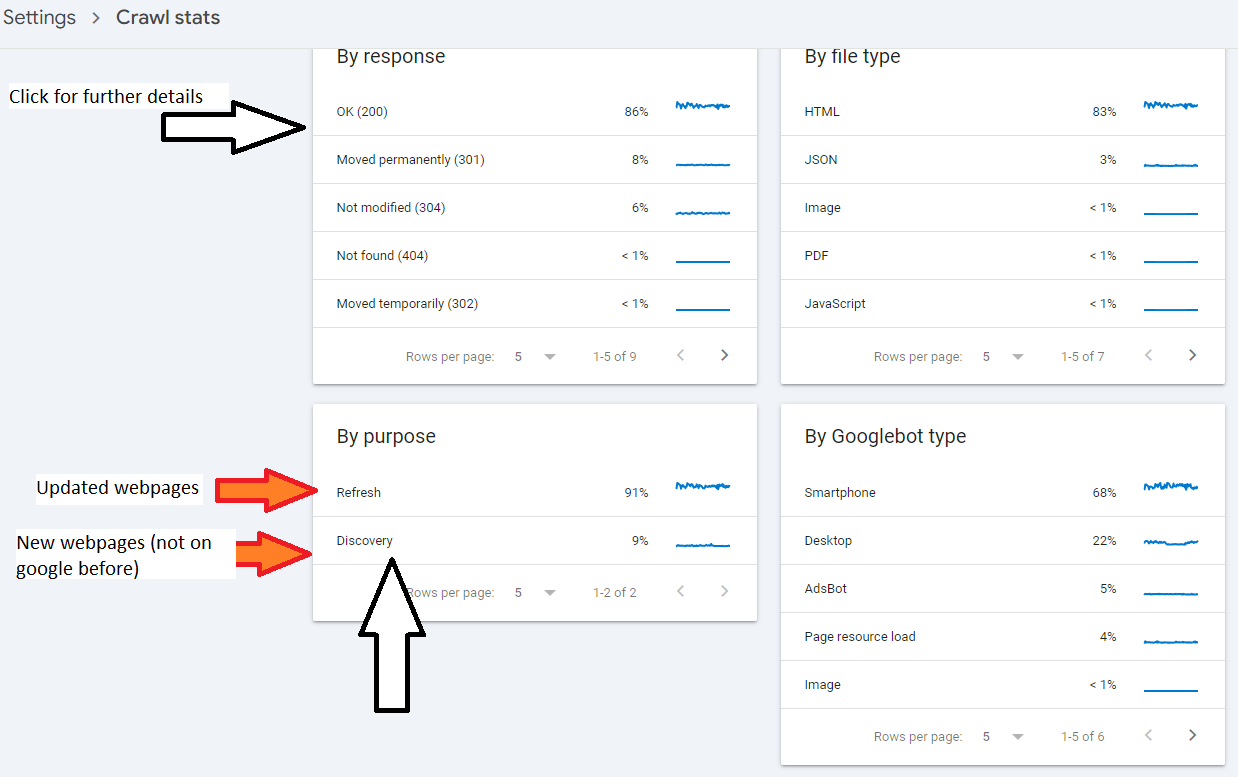
Crawl Stats Report

Provides stats about Googles crawling of your site.

Looks out for errors and drops & spikes in graphs.

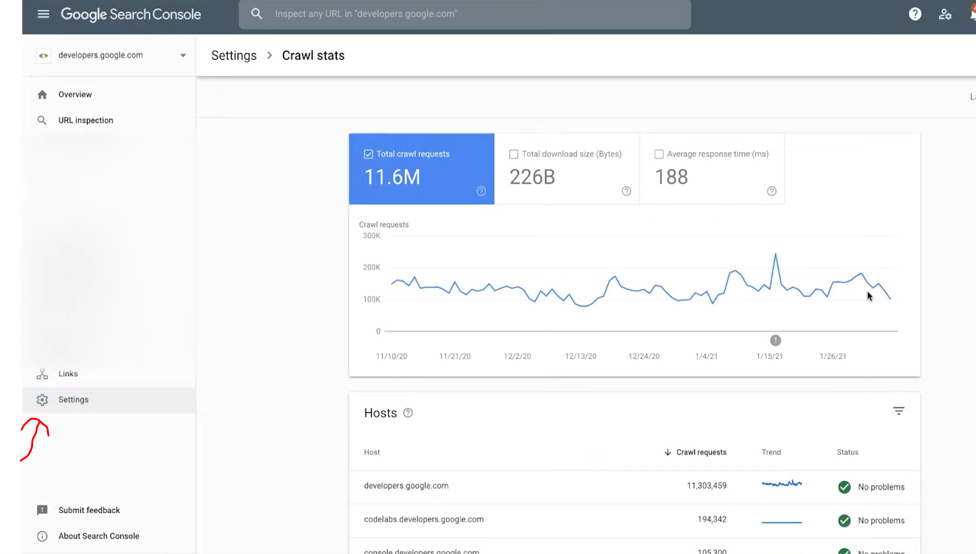
Login to Search Console and click on settings

THIS REPORT IS ONLY AVAILABLE FOR PROPERTIES AT THE DOMAIN LEVEL – that don’t include https etc in the address

Look for spikes and drops in the data

E.g. to determine if robots.txt has been updated incorrectly – if there’s a sudden drop.

That’s about it.

Oh, check your server/host is ‘working okay’ too –

Find the above report by clicking “settings” on the left hand side-bar/menu > Crawl Stats > Choose a “host” in the middle panel (usually just your homepage address) > then “Host status”.

  • It’s good to check crawl stats and average response time before and after a migration or redesign.

Average Response Time:

Under 200ms: Excellent. Site is well optimized for crawling by Google etc.

200ms-500ms: Acceptable. That’ll do pig, that’ll do.

500ms-1s: Slightly too slow, especially if your site is 1,000 pages+

Over 1 second: Too slow. You’re shit

SaleEvent Schema Example [2024]

Here’s an example for Black Friday:

It’s JSON format

{
  "@context": "http://schema.org",
  "@type": "SaleEvent",
  "name": "Black Friday Mega Sale",
  "startDate": "2024-11-29T00:00:00",
  "endDate": "2024-11-29T23:59:59",
  "eventAttendanceMode": "http://schema.org/OnlineEventAttendanceMode",
  "location": {
    "@type": "VirtualLocation",
    "url": "https://www.yourstore.com/black-friday-sale"
  },
  "offers": {
    "@type": "Offer",
    "url": "https://www.yourstore.com/black-friday-sale",
    "priceCurrency": "USD",
    "price": "199.99",
    "eligibleRegion": {
      "@type": "Place",
      "name": "United States"
    },
    "availability": "http://schema.org/InStock",
    "validFrom": "2024-11-29T00:00:00"
  },
  "organizer": {
    "@type": "Organization",
    "name": "Your Store",
    "url": "https://www.yourstore.com"
  }
}

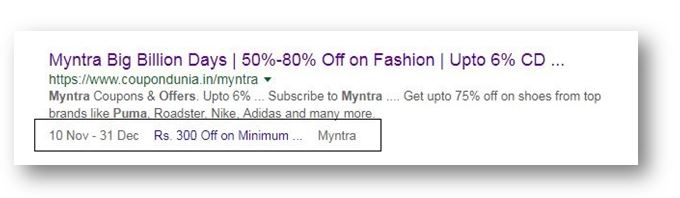
It’s listed as schema type recongised by Google, and it shows on SERPs

saleevent

Source

Business Audience Schema Example [2024]


{
  "@context": "https://schema.org",
  "@type": "WebPage",
  "mainEntity": {
    "@type": "BusinessAudience",
    "audienceType": "Consumers",
    "description": "Middle-class residents of the United Kingdom interested in purchasing t-shirts.",
    "geographicArea": {
      "@type": "AdministrativeArea",
      "name": "United Kingdom"
    },
    "hasOfferCatalog": {
      "@type": "OfferCatalog",
      "name": "T-Shirts",
      "itemListElement": [
        {
          "@type": "Offer",
          "itemOffered": {
            "@type": "Product",
            "name": "T-Shirt"
          }
        }
      ]
    },
    "additionalType": "https://schema.org/Commerce",
    "audience": {
      "@type": "Audience",
      "audienceType": "Middle-class",
      "description": "Individuals with average to above-average income levels"
    }
  }
}

Here’s business Audience schema for a B2B business:

{
  "@context": "https://schema.org",
  "@type": "BusinessAudience",
  "audienceType": "Business",
  "numberOfEmployees": {
    "@type": "QuantitativeValue",
    "minValue": 50,
    "maxValue": 500
  },
  "yearlyRevenue": {
    "@type": "QuantitativeValue",
    "minValue": 1000000,
    "maxValue": 10000000
  },
  "geographicArea": {
    "@type": "AdministrativeArea",
    "name": "United States"
  }
}

eCommerce Structured Data

E-commerce Example for Structured Data Carousels

Below are step by step instructions

You will need:

  • A “summary” or “Product Listings Page” with structured data
  • Structured data on the product pages themselves

At the time of writing, this feature is only available in EU countries.

Step 1: Choose and Implement a Summary Page

Create a summary page that lists multiple products, each linking to a detailed product page.

For example, a category page that lists “Top 5 Winter Coats.”

Step 2: Add Required Properties to the Summary Page

Add the ItemList structured data to your summary page. Here’s an example in JSON-LD format:

<html>
  <head>
    <title>Top 5 Winter Coats</title>
    <script type="application/ld+json">
      {
        "@context": "https://schema.org",
        "@type": "ItemList",
        "itemListElement": [
          {
            "@type": "ListItem",
            "position": 1,
            "item": {
              "@type": "Product",
              "name": "Puffy Coat Series by Goat Coat",
              "image": [
                "https://example.com/photos/1x1/photo.jpg",
                "https://example.com/photos/4x3/photo.jpg",
                "https://example.com/photos/16x9/photo.jpg"
              ],
              "offers": {
                "@type": "AggregateOffer",
                "lowPrice": 45.00,
                "highPrice": 60.00,
                "priceCurrency": "USD"
              },
              "aggregateRating": {
                "@type": "AggregateRating",
                "ratingValue": 4.9,
                "reviewCount": 50
              },
              "url": "https://www.example.com/puffy-coats"
            }
          },
          {
            "@type": "ListItem",
            "position": 2,
            "item": {
              "@type": "Product",
              "name": "Wool Coat Series by Best Coats Around",
              "image": [
                "https://example.com/photos/1x1/photo.jpg",
                "https://example.com/photos/4x3/photo.jpg",
                "https://example.com/photos/16x9/photo.jpg"
              ],
              "offers": {
                "@type": "AggregateOffer",
                "lowPrice": 189.00,
                "highPrice": 200.00,
                "priceCurrency": "USD"
              },
              "aggregateRating": {
                "@type": "AggregateRating",
                "ratingValue": 4.7,
                "reviewCount": 827
              },
              "url": "https://www.example.com/wool-coats"
            }
          },
          {
            "@type": "ListItem",
            "position": 3,
            "item": {
              "@type": "Product",
              "name": "Antarctic Coat by Cold Coats",
              "image": [
                "https://example.com/photos/1x1/photo.jpg",
                "https://example.com/photos/4x3/photo.jpg",
                "https://example.com/photos/16x9/photo.jpg"
              ],
              "offers": {
                "@type": "Offer",
                "price": 45.00,
                "priceCurrency": "USD"
              },
              "aggregateRating": {
                "@type": "AggregateRating",
                "ratingValue": 4.9,
                "reviewCount": 1290
              },
              "url": "https://www.example.com/antarctic-coat"
            }
          }
        ]
      }
    </script>
  </head>
  <body>
  </body>
</html>

Step 3: Validate Your Code

  1. Rich Results Test: Validate your structured data using the Rich Results Test.
  2. URL Inspection Tool: Use the URL Inspection tool in Google Search Console to ensure your page is accessible and not blocked by robots.txt or noindex tags.

Step 4: Deploy Your Page

  1. Deploy your summary page and a few detail pages.
  2. Use the URL Inspection tool to request indexing of your new pages.

Step 5: Submit a Sitemap

  1. Create a sitemap including your summary and detail pages.
  2. Submit the sitemap through Google Search Console to ensure Google knows about all your pages.

Step 6: Follow Guidelines

  1. Ensure compliance with Search Essentials.
  2. Adhere to general structured data guidelines and specific requirements for carousel rich results.

Example Detail Pages

Each product linked from the summary page should have its own detail page with structured data. For example:

<html>
  <head>
    <title>Puffy Coat Series by Goat Coat</title>
    <script type="application/ld+json">
      {
        "@context": "https://schema.org",
        "@type": "Product",
        "name": "Puffy Coat Series by Goat Coat",
        "image": [
          "https://example.com/photos/1x1/photo.jpg",
          "https://example.com/photos/4x3/photo.jpg",
          "https://example.com/photos/16x9/photo.jpg"
        ],
        "description": "A stylish and warm puffy coat perfect for winter.",
        "offers": {
          "@type": "Offer",
          "price": 45.00,
          "priceCurrency": "USD",
          "url": "https://www.example.com/puffy-coats"
        },
        "aggregateRating": {
          "@type": "AggregateRating",
          "ratingValue": 4.9,
          "reviewCount": 50
        }
      }
    </script>
  </head>
  <body>
  </body>
</html>

That should be it!


Categorising Data – By Colour – In Excel (Using an IF statement)

Had to categorise some keywords, if there’s a quicker way of doing it – please let me know

  • Paste keywords into column A
  • In column D – Paste all relevant words for a category.
    For example – I pasted all the words I could think of relating to gardening – such as “tree”, “fruit”, “garden”, “bush”, etc. – There were 18 words in total
  • In cell E2 paste the formula:
=IF(SUMPRODUCT(--ISNUMBER(SEARCH($D$1:$D$19,A2)))>0, "Contains value from range", "Does not contain value from range")
  • Now drag the formula down
  • Filter column E to “contains value for range”
  • Colour in the keywords green – or a chosen, relevant colour
excel conditional formatting with If Statement

Add another list of relevant words – for example, above I have added sports, to highlight sports netting keywords.

Drag formula down and repeat

I found a quicker way – use Chat GPT and the prompt:

“please can you group these keywords by theme or words containing – e.g. keywords containing “golf”.

Please include the search volume.

The list is set out with a keyword – then a comma, – then the search volume for the keyword, – then a second comma – before the next keyword is listed

funny polo shirts , 170 ,
funny polo shirt , 30 ,

replace “funny polo shirts” with a list of your own keywords.

Screaming Frog – How to Save & Load a Custom Crawl Coniguration

Handy if you have loads of custom extractions set up etc.

  • Saving Custom Config File:

Under the Configuration Menu – go to – Profiles>Save As

  • Importing The Custom Config File

Configuration > Profiles > Load…

SF custom Config File Import
  • Save as default

    Also worth knowing – if you use a similar setup each time you run Screaming Frog – let’s say, you exclude anything with “account” or “customer” in the URL, you can save your setup/config as default:

Which can be a nice time saver too!

I pretty much always add the following to the excludes ‘file’, so it’s easier to keep it in the default setup:

^https?://[^/]+/customer/account/.*
^https?://[^/]+/checkout/cart/.*

^.\?.

.js$

.css$

How to Improve the Relationship between SEO & Developers [Breaking Down Silos]

If you work in SEO –

Walk into the developers office/pit/den

Say the following:

“Look, it’s not my fault you were bullied in school for being a bunch of gimps, and if I get another passive-aggressive comment or tut from you bunch of pizza-munching wankers, I’ll drag each of you outside one by one and beat the fuck out of you using my own technical skillset. Now stop being finger-pointing, arrogant pricks and start communicating properly”

Job done