Scraping Reviews with Screaming Frog? [2025]

You can scrape reviews if they are :

– In Schema
– Have their own specific class of <p> tag

e.g. class=”review-tex text-base font-secondary”

Can you scrape the reviews then?

Yes, you can scrape the reviews if they are formatted in schema markup (like Review, AggregateRating, etc.) or if they belong to a specific class. Screaming Frog’s Custom Extraction feature will allow you to do this.

✅ How to Scrape Reviews in Schema or Specific HTML Classes Using Screaming Frog

1️⃣ Enable Structured Data Extraction (for Schema Reviews) If the reviews are in schema markup (JSON-LD, Microdata, or RDFa), Screaming Frog can directly extract them:

✔ Open Screaming Frog SEO Spider.

✔ Navigate to Configuration > Spider > Enable Structured Data.

✔ Start a crawl, and Screaming Frog will pull JSON-LD, Microdata, and RDFa formats.

✔ Once the crawl is finished, go to Reports > Structured Data > Review Schema to export the data.

2️⃣ Extract Reviews from a Specific Class (e.g., class=”review-text text-base font-secondary”) If the reviews are located within a specific tag that has a class, you can use Custom Extraction to get them:

✔ Open Screaming Frog and go to Configuration > Custom Extraction.

✔ Select XPath or CSS Selector based on your data structure. ✔ Use these extraction methods: 📝 Option 1: Using CSS Selector (Ideal for Class-Based Extraction) css Copy Edit p.review-text.text-base.font-secondary ✔

This will retrieve all tags that have the class review-text text-base font-secondary. 📝 Option 2: Using XPath (For More Complex Queries) xpath Copy Edit //p[contains(@class, ‘review-text text-base font-secondary’)] ✔

This will locate all elements with a class that includes “review-text text-base font-secondary”.

3️⃣ Run the Crawl and Export the Review Data

✔ Start the crawl and allow Screaming Frog to extract the reviews.

✔ After it’s done, go to Custom Extraction > Export Data.

✔ Open the resulting file in Excel or Google Sheets for further analysis. 🚀 Alternative Approach: Scraping JSON-LD Schema Reviews If the reviews are included in JSON-LD schema markup, you can extract them using: Custom Extraction (JSON-LD): xpath //script[@type=’application/ld+json’]/text()
✔ This extracts all JSON-LD data, which you can filter for reviews.
✔ Use JSON formatting tools (like jq or Python json.loads()) to clean and parse the data.

🔹 Summary: Can Screaming Frog Scrape Reviews?
✅ YES, if reviews are inside Schema Markup (JSON-LD, Microdata, RDFa).
✅ YES, if they have a specific class, using Custom Extraction.
✅ YES, if the reviews are static HTML, meaning they exist in the page source.
❌ NO, if reviews are loaded dynamically via JavaScript (use Selenium instead).

SEO News & Tips – September 2024

Actionable Points:

  1. Impact Assessment:
    • Analyze Core Update Impacts: If your site was affected, investigate potential causes such as relevance adjustments, intent shifts, or quality issues.
    • Run Delta Reports: Isolate dropped queries and landing pages using delta reports to identify the reasons for traffic decline.**
  2. Content Strategy:
    • Reassess Content Strategy: Move away from generic content aimed at search engines (SEO-first) and focus on user-first content that aligns with intent and provides real value.
    • Avoid Overloading Pages: Do not overload pages with excessive information. Make them clear and relevant to user intent.
  3. Quality Over Quantity:
    • Holistic Quality Evaluation: Improve overall site quality, including UX, ads, presentation, and sources. It’s not just about content but the experience as a whole.
    • Long-Term Quality Improvements: Use a “kitchen sink” approach—continuous, holistic improvements to demonstrate significant quality enhancement over time.
  4. Utilize User Engagement Data:
    • Measure User Engagement: Focus on engagement metrics like click-through rates (CTR), time on page, and interactions (Navboost signals) to improve rankings.
  5. Consider the Intent Shifts:
    • Study Intent Shifts: Understand changes in user intent. Ensure your content targets the appropriate search intent, whether transactional, informational, or navigational.
    • Use Natural Language Processing (NLP) Tools: Leverage NLP tools to analyze how well your content aligns with searcher intent.*
  6. RankBrain and Vector Search:
    • Optimize for RankBrain: Vector search re-ranks results based on intent. Focus on improving content relevancy through quality rater feedback and actual user interactions.
  7. Monitor Industry-Specific Trends:
    • Industry Trends: Be aware of specific industry shifts (e.g., pet insurance, tech products) and adjust your SEO strategy accordingly. Specialized retailers and informational sites are gaining over commercial giants like Amazon.
  8. Consider Site Authority:
    • Balance Domain and Brand Authority: Tom Capper’s study suggests sites with higher brand authority (BA) performed better than those relying solely on domain authority (DA). Focus on building brand recognition alongside traditional SEO efforts.
  9. Core Update Response:
    • Future-Proofing: Continue producing high-quality, intent-driven content as Google aims to reward helpful content over SEO-first strategies. Sites that improve post-HCU or core updates will continue to see gains.
  10. Action for Content Creators:
  • Engage with the Community: Marie plans to collaborate with SB Pro members to develop a system for scoring intent alignment, potentially enlisting community support to study core update effects.

Marie also encourages community engagement, suggesting that producing authentic, user-focused content will be a key driver of success in the evolving search landscape.
supplements are bad

*1. Use Natural Language Processing (NLP) Tools to Analyze Content Alignment with Searcher Intent

What is NLP?

Natural Language Processing (NLP) is a branch of artificial intelligence that focuses on the interaction between computers and humans through natural language. In the context of SEO and content creation, NLP tools help analyze and understand the nuances of language, enabling better alignment of your content with what users are searching for.

Why Align Content with Searcher Intent?

Searcher intent refers to the primary goal a user has when typing a query into a search engine. Understanding and aligning your content with this intent ensures that your pages meet the needs of your audience, leading to higher engagement, better rankings, and increased conversions.

How to Leverage NLP Tools:

  1. Identify Searcher Intent:
    • Types of Intent:
      • Informational: Users seeking information (e.g., “How to fix a leaky faucet”).
      • Navigational: Users looking to reach a specific website or page (e.g., “Facebook login”).
      • Transactional: Users intending to make a purchase or complete a transaction (e.g., “Buy iPhone 14”).
      • Commercial Investigation: Users researching products or services before making a decision (e.g., “Best DSLR cameras 2024”).
  2. Analyze Your Content:
    • Keyword Analysis:
      • Use NLP tools to analyze the keywords and phrases within your content to determine if they align with the identified searcher intent.
    • Content Structure:
      • Ensure your content is structured in a way that directly addresses the user’s query. For instance, use clear headings, bullet points, and concise paragraphs for better readability and relevance.
    • Semantic Analysis:
      • Assess the context and relationships between words to ensure your content comprehensively covers the topic.
  3. Optimize Content Based on Insights:
    • Content Gap Analysis:
      • Identify areas where your content may be lacking in addressing certain aspects of the searcher intent and enhance those sections.
    • Content Enrichment:
      • Add relevant information, multimedia elements, or interactive features to better satisfy user needs.
    • Language Refinement:
      • Adjust the tone, complexity, and style of your content to match the preferences and expectations of your target audience.

Recommended NLP Tools:

  1. Google Natural Language API:
    • Offers powerful text analysis capabilities, including sentiment analysis, entity recognition, and syntax analysis.
    • Google Cloud Natural Language
  2. IBM Watson Natural Language Understanding:
    • Provides comprehensive text analysis features such as keyword extraction, concept tagging, and emotion analysis.
    • IBM Watson NLU
  3. Ahrefs Content Gap Tool:
    • While not a pure NLP tool, it helps identify content gaps by comparing your site with competitors, which can be complemented with NLP analysis.
    • Ahrefs Content Gap
  4. Surfer SEO:
    • Integrates NLP techniques to optimize content structure and keyword usage based on top-ranking pages.
    • Surfer SEO
  5. Clearscope:
    • Uses NLP to provide keyword suggestions and content optimization recommendations to improve relevancy.
    • Clearscope

Implementation Steps:

  1. Choose the Right NLP Tool:
    • Select a tool that fits your technical expertise and specific needs. For instance, Google Natural Language API is highly customizable but may require more technical setup compared to user-friendly platforms like Surfer SEO.
  2. Conduct a Content Audit:
    • Use the chosen NLP tool to analyze your existing content. Look for metrics like keyword density, semantic relevance, and sentiment alignment with user intent.
  3. Map Content to Search Intent:
    • Categorize your pages based on the primary search intent they fulfill. Ensure each page clearly aligns with its intended user goal.
  4. Optimize and Update Content:
    • Based on the analysis, make necessary adjustments to improve alignment. This could involve rewriting sections, adding new information, or restructuring content for better clarity and relevance.
  5. Monitor and Iterate:
    • After optimization, continuously monitor your content’s performance. Use analytics to assess improvements in rankings, engagement metrics, and conversions, and iterate as needed.

*2. Run Delta Reports: Isolate Dropped Queries and Landing Pages to Identify Reasons for Traffic Decline

What are Delta Reports?

Delta reports in SEO are comparative analyses that track changes in your website’s performance metrics over specific periods. By comparing data before and after a Google core update (or any significant change), you can identify which queries and landing pages experienced fluctuations in traffic.

Why Run Delta Reports?

Running Delta reports helps you pinpoint the exact areas of your website that are affected by algorithm changes. Understanding these changes allows you to take targeted actions to recover lost traffic and optimize your site for future updates.

How to Run Delta Reports:

  1. Gather Data:
    • Time Frames:
      • Pre-Update Period: Data from a period before the core update (e.g., two weeks before).
      • Post-Update Period: Data from a period after the core update has been fully rolled out (e.g., two weeks after).
    • Metrics to Collect:
      • Organic traffic
      • Impressions
      • Click-through rates (CTR)
      • Average position
  2. Use SEO Tools:
    • Google Search Console (GSC):
      • Provides comprehensive data on search performance, including queries and landing pages.
      • Google Search Console
    • Google Analytics:
      • Offers insights into overall traffic patterns and user behavior.
      • Google Analytics
    • Third-Party SEO Tools:
      • Tools like SEMrush, Ahrefs, and Moz can provide additional data and more sophisticated reporting features.
      • SEMrush
      • Ahrefs
      • Moz
  3. Generate Comparative Reports:
    • Google Search Console Steps:
      1. Access Performance Report:
        • Navigate to Performance > Search Results.
      2. Set Date Range:
        • Select a date range that covers both pre-update and post-update periods.
      3. Export Data:
        • Export the performance data for both periods to a spreadsheet for easier comparison.
      4. Calculate Delta:
        • Use formulas to calculate the percentage change in impressions, clicks, CTR, and average position for each query and landing page.
  4. Analyze the Data:
    • Identify Drops and Gains:
      • Highlight queries and pages that saw significant drops or gains in traffic.
    • Segment the Data:
      • Break down the data by categories such as content type, topic, or user intent to identify patterns.
    • Look for Correlations:
      • Determine if there are common factors among the affected queries/pages, such as content quality, relevance, or technical issues.
  5. Identify Potential Causes:
    • Relevancy Issues:
      • Content may no longer align with the updated search intent or relevancy criteria.
    • Technical Problems:
      • Issues like slow page speed, mobile usability problems, or broken links can impact rankings.
    • Content Quality:
      • Thin content, outdated information, or lack of depth can lead to declines.
    • Competitor Improvements:
      • Competitors may have enhanced their content, earning higher rankings.
    • User Experience (UX):
      • Poor UX, intrusive ads, or difficult navigation can negatively affect rankings.
  6. Develop an Action Plan:
    • Content Optimization:
      • Revise and enhance content to better match searcher intent and improve quality.
    • Technical SEO Fixes:
      • Address any identified technical issues to improve site performance.
    • Improve UX:
      • Enhance the overall user experience to keep visitors engaged and reduce bounce rates.
    • Monitor Competitors:
      • Analyze top-performing competitors to understand what changes they made that may have contributed to their gains.
    • Continuous Monitoring:
      • Regularly update and monitor Delta reports to track the effectiveness of your optimizations and stay ahead of future updates.

Tools and Techniques for Delta Reporting:

  1. Google Search Console (GSC):
    • Export and Compare:
      • Export performance data before and after the update and use spreadsheet tools to calculate differences.
    • Filtering Options:
      • Use filters to narrow down specific queries or pages for detailed analysis.
  2. Google Analytics:
    • Custom Reports:
      • Create custom reports to compare traffic sources, user behavior, and conversion metrics across different periods.
    • Annotations:
      • Use annotations to mark the date of the core update, helping correlate changes in data with the update rollout.
  3. SEO Platforms:
    • SEMrush’s Position Tracking:
      • Track keyword rankings over time and compare pre- and post-update positions.
    • Ahrefs’ Site Explorer:
      • Analyze backlink profiles and organic search traffic changes.
    • Moz’s Rank Tracker:
      • Monitor keyword performance and identify ranking fluctuations.
  4. Spreadsheet Analysis:
    • Pivot Tables:
      • Use pivot tables to summarize and analyze large datasets effectively.
    • Visualization:
      • Create charts and graphs to visualize traffic trends and identify significant changes.

Best Practices for Delta Reporting:

  • Consistent Time Frames:
    • Ensure the comparison periods are equivalent in length and cover similar days of the week to account for any variability.
  • Account for Seasonality:
    • Be aware of seasonal trends that might affect traffic independently of the core update.
  • Focus on Significant Changes:
    • Prioritize queries and pages with substantial traffic drops or gains to address the most impactful issues first.
  • Iterative Analysis:
    • Continuously refine your analysis by incorporating additional data points or adjusting your reporting criteria as needed.

Putting It All Together: Enhancing Your SEO Strategy

By integrating NLP-based content analysis and Delta reporting, you can create a robust SEO strategy that not only aligns your content with user intent but also allows you to proactively identify and address issues arising from algorithm updates. Here’s a step-by-step approach to combining these strategies:

  1. Initial Content Audit:
    • Use NLP tools to assess the alignment of your existing content with searcher intent.
    • Identify content areas that need enhancement or restructuring.
  2. Post-Update Performance Analysis:
    • After a core update, run Delta reports to identify affected queries and pages.
    • Cross-reference these findings with your NLP analysis to understand if misalignment with search intent contributed to the declines.
  3. Optimization and Implementation:
    • Optimize affected content based on insights from both NLP analysis and Delta reports.
    • Enhance content quality, adjust for better intent alignment, and fix any technical issues identified.
  4. Continuous Monitoring and Improvement:
    • Regularly use NLP tools to keep your content aligned with evolving search intents.
    • Continuously monitor your site’s performance with Delta reports to stay ahead of any negative trends.
  5. Community Engagement and Learning:
    • Engage with SEO communities (like the Search Bar Pro Community mentioned in your summary) to share insights and learn from others’ experiences.
    • Stay updated with the latest SEO trends and algorithm changes to adapt your strategy accordingly.

Additional Resources

  • Google’s Search Quality Evaluator Guidelines:
  • Moz’s Beginner’s Guide to SEO:
  • Ahrefs’ SEO Learning Center:
    • Offers tutorials and articles on various SEO topics, including content optimization and performance analysis.
    • Ahrefs Learning Center
  • Surfer SEO’s Guides:
    • Detailed guides on using their tools for content optimization and SEO analysis.
    • Surfer SEO Guides

Implementing these strategies effectively can lead to improved search rankings, better user engagement, and sustained organic growth. By continuously aligning your content with user intent and proactively monitoring your site’s performance, you can navigate algorithm updates with greater confidence and resilience.

If you have any further questions or need assistance with specific tools or techniques, feel free to ask!

Implementing Redirects with Filezilla and MTPutty (On a sonasi server)

This is our inhouse protocol, it might differ in normal places…

Open FileZilla – connect to M2 server (magento 2, rather than our magento 1 server)

Click domains folder –

Select relevant domain

Select Rewrites

Right Click – Config folder and click View/Edit – Open in a text editor like Sublime

Add redirects in the following format:

#Note to say who did redirects on what date

rewrite ^/rwl-x-la-new-member-starter-pack.html$ /gym-equipment.html permanent;
rewrite ^/rwl-x-la-ultimate-starter-pack-intermediate.html$ /gym-equipment.html permanent;
rewrite ^/rwl-x-la-new-member-dumbbell-pack.html$ /gym-equipment.html permanent;

- Save the file

This will redirect the URL example.com/rwl-x-la-new-member-starter-pack.html to example.com/gym-equipment.html

and so on…the other 2 below will also redirect to gym-equipment.html

Open MTPUTTY

Connect to relevant server – in my case – server 3

type in “ntest” and check for any error messages

if ok – type in “nreload”

That should be it!

How to Buy a House in Italy for 1 Euro [step by step guide]

Depopulation, has some potential benefits for property investors!

Buying a house in Italy for 1 euro is a great opportunity, promoted by several towns aiming to revive declining populations and renovate old properties.

Here’s a step-by-step guide tailored for a UK resident:

Step-by-Step Instructions:

Research and Choose a Town: Several Italian towns have offered homes for 1 euro. Each town has different terms and conditions. Here are some notable ones:

  • Sambuca di Sicilia
  • Ollolai, Sardinia
  • Mussomeli, Sicily
  • Bivona, Sicily
  • Laurenzana, Basilicata

    Visit the Official Websites: Each town usually has an official website or a dedicated page for the 1 euro house initiative. Here are some URLs:

      Understand the Conditions: Each town has specific conditions that buyers must meet, such as:

      • Committing to renovate the property within a specified timeframe (usually 3 years).
      • Paying a deposit (often around €5,000), which is refunded after renovations are completed.
      • Using local contractors for the renovation work.

        Contact the Municipality: Send an email or call the municipal office to express your interest and get detailed information.

          Plan a Visit: It’s highly recommended to visit the town and view the properties. Contact the municipality to arrange a visit.

            Prepare Your Documents:

            • Passport
            • Proof of income
            • Proof of funds for renovation

              Sign the Preliminary Agreement: During your visit, if you decide to proceed, you will sign a preliminary purchase agreement (compromesso).

                Open an Italian Bank Account: You will need an Italian bank account to handle transactions and utility payments. Many banks offer services in English.

                  Hire a Local Notary (Notaio): The notary will handle the legal aspects of the purchase, ensuring the property is free from debts and encumbrances.

                    Finalize the Purchase: After the preliminary agreement, you will sign the final deed (atto di vendita) before a notary. This completes the purchase.

                      Commence Renovation: Begin renovation work as per the conditions. Ensure you adhere to local building codes and regulations.

                        1. Enjoy Your New Home: Once renovations are complete, you can enjoy your new Italian home!

                        Useful Resources:

                        This is a general guide, so make sure to get detailed information from the specific municipality you’re interested in. Good luck with your house hunt in Italy!

                        Deleting White Space from Excel Cells

                        I had to use the VBA method at the bottom to remove whitespace from a Screaming Frog custom extraction:

                        Method 1: TRIM Function

                        The TRIM function removes all spaces from text except for single spaces between words.

                        1. Suppose your text is in cell A1.
                        2. In another cell, enter the following formula:excelCopy code=TRIM(A1)

                        Method 2: CLEAN and SUBSTITUTE Functions

                        If there are non-breaking spaces (which TRIM doesn’t remove), you can use the SUBSTITUTE function to replace them with regular spaces first.

                        1. In a cell, enter the following formula:excelCopy code=SUBSTITUTE(A1, CHAR(160), " ") This replaces non-breaking spaces with regular spaces.
                        2. Then, apply the TRIM function:excelCopy code=TRIM(SUBSTITUTE(A1, CHAR(160), " "))

                        Method 3: Find and Replace

                        You can also use the Find and Replace feature to remove extra spaces:

                        1. Select the range of cells you want to clean.
                        2. Press Ctrl + H to open the Find and Replace dialog box.
                        3. In the “Find what” box, enter two spaces (press the space bar twice).
                        4. In the “Replace with” box, enter one space.
                        5. Click “Replace All.”
                        6. Repeat the process until no double spaces are found.
                        7. For leading and trailing spaces, you can remove them manually by replacing leading spaces with nothing and trailing spaces similarly.

                        Method 4: VBA Macro

                        For more advanced cleaning, you can use a VBA macro:

                        1. Press Alt + F11 to open the VBA editor.
                        2. Insert a new module by clicking Insert > Module.
                        3. Copy and paste the following code into the module:

                        Sub RemoveSpaces()
                            Dim cell As Range
                            For Each cell In Selection
                                If cell.HasFormula = False Then
                                    cell.Value = Trim(WorksheetFunction.Clean(cell.Value))
                                End If
                            Next cell
                        End Sub
                        

                        1. Close the VBA editor.
                        2. Select the range of cells you want to clean.
                        3. Press Alt + F8, select RemoveSpaces, and click Run.

                        By using these methods, you can efficiently remove unwanted whitespace from your cells in Excel.

                        How to Automate a Crawl & Populate a Report with Screaming Frog [Like DeepCrawl but 99% Cheaper]

                        Screaming Frog is the greatest SEO tool of all time. Possibly the greatest tool of all time, closely followed by the George Foreman grill.

                        There’s a free version  and if you have massive ecommerce website, with thousands of URLs, the posh paid version is well cheap too – if I remember rightly, is only about £200.

                        Absolute bargain.

                        Scheduling a Report / Crawl

                        Before you start – create a crawl config file.
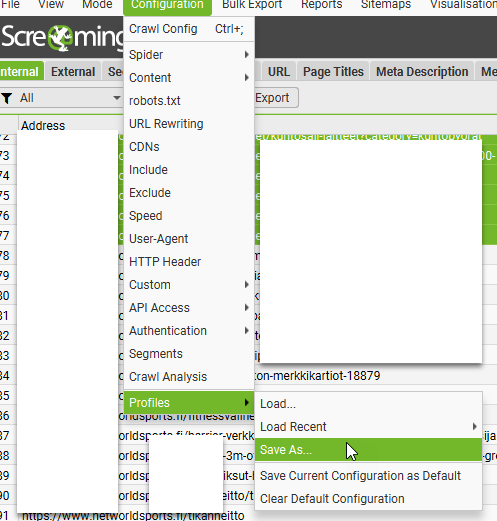
                        I usually go with default settings, plus exclude cart pages and follow redirects.

                        You’ll also need to create a Google Drive and Looker Studio Account.

                        Schedule a Screaming Frog Crawl

                        File > Scheduling:

                        click “+Add”

                        Give the scheduled crawl a name and set the time and date you want the first crawl to run

                        Also choose the frequency.

                        Note —> if you have a computer with a decent processor, that runs fine when you are crawling with Screaming Frog and you’re still able to do you work, then just set it for a date and time when you’ll be in work and on your computer.

                        However, if you have a slower computer, and running Screaming Frog at the same time as trying to do your normal work slows the computer down too much, you’ll probably want to set the crawl overnight, or at your lunchtime.

                        You can set windows computers to “wake up”, as long as they are plugged in. So that you’re able to run a crawl before or after work.

                        Although your IT department might not like it – computer running unattended with a battery etc could be in theory a fire harzard etc.

                        More on how to wake up your computer, later…

                        Back to scheduling on Screaming Frog:

                        On the start options tab, enter the URL you want to crawl and select your config file

                        I didn’t choose anything for “auth config”

                        For crawl config – upload the config file you saved earlier
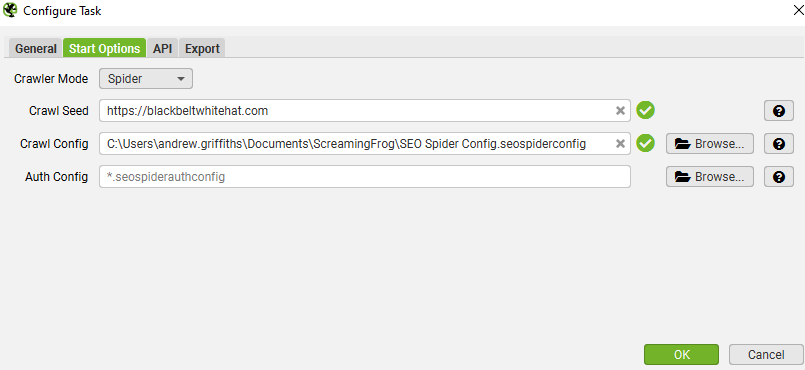
                        In the Export – choose a folder on your computer and your Google Drive account:

                        • Click the configure icon for “Export for Looker Studio” at the bottom.
                        • Click the 3 arrows to populate everything >>

                        By default, your crawl will go in a sheet in Google Drive at:
                        ‘My Drive > Screaming Frog SEO Spider > Project Name > [task_name]_custom_summary_report’.

                        When asked – choose Google Sheets as a data source:
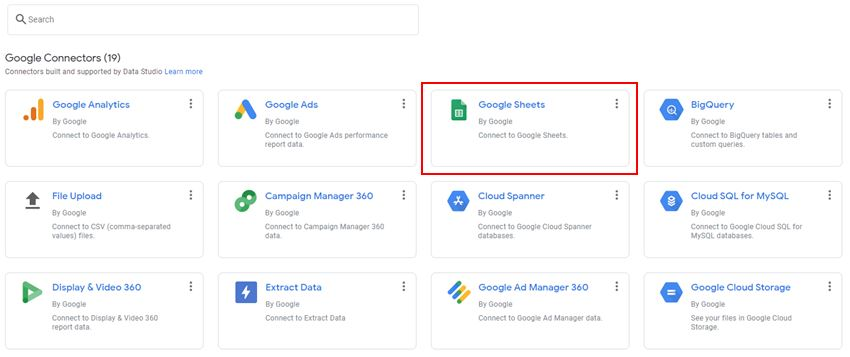
                        Ensure the ‘use first rows as headers’ option is ticked and select ‘Connect’ in the top-right.

                        • Add the Data Source to Each Table in the Report in Looker Studio

                        You can probably do this in bulk somehow, but I went to each table/graph and added the Google Sheet as the data source:

                        • When the scheduled crawl, crawls – the template should be populated
                        • Youll now have a nice looking visual report that automatically updates each week, or month, or as frequently as you like

                        Waking Up Your Computer so the Crawl Can Run

                        Screaming Frog won’t run unless your computer is on.

                        You can ‘wake up’ your computer though.

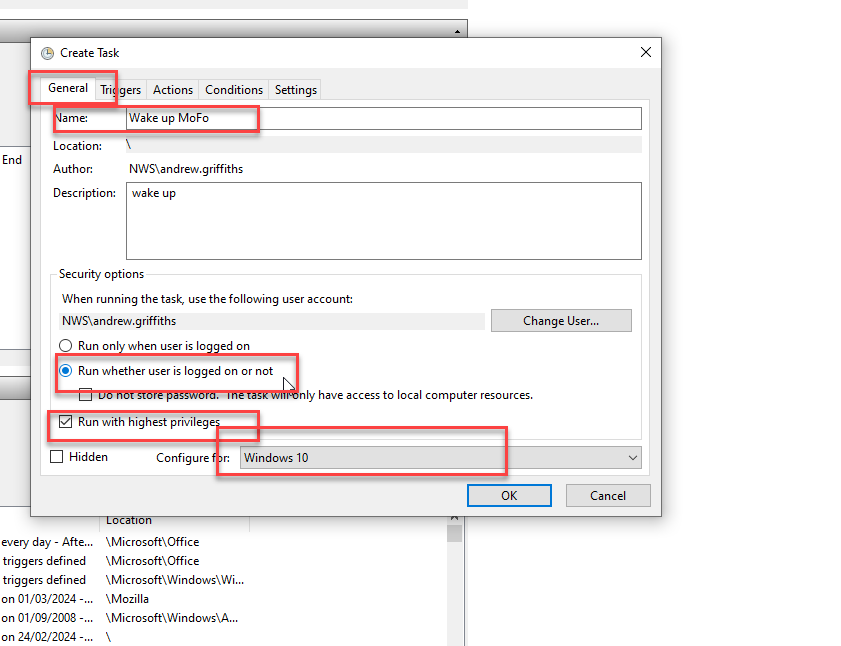
                        Search for “Task Scheduler”

                        • Create Task…

                        • Click the General Tab and use the following settings:
                        • Click on the “Actions” tab and choose a program to run. Doesn’t really matter what program, I usually choose chrome. SF should run automatically
                        • Click the “Triggers” tab and click new

                        schedule the computer to wake up at the same time and frequency that you’ve set for the screaming frog crawls.

                        Then, that should be it.

                        The best way to run automatic crawls, is to sin up to Google cloud. At the moment you get $300 worth of credits free, and each crawl on an average ecommerce sure, will cost around a dollar a go.

                        Here’s the tutorial on how to set up Screaming Frog on the cloud ☁️:

                        https://www.screamingfrog.co.uk/seo-spider/tutorials/seo-spider-cloud/

                        It’s a bit of a mission/long process, but worth it. I reckon.

                        Anyway, here is the report, in all her glory (well, 1 part of 1 page):

                        How to Make Coffee Stronger & Less Jittery [Reduces caffeine tolerance]

                        Okay so, caffeine is as necessary as oxygen to most parents.

                        **Drink coffee and consume everything else at your own risk, innit.**

                        Wait at Least 1 Hour Before Having a Coffee

                        You’re cortisol levels are high and adenesine levels are low in the morning, you can greatly reduce caffeine intake with minimal negative impact by waiting an hour after waking up, before consuming caffeine.

                        ^I robbed this concept from the Huberman Lab podcast…seems to work.

                        If youre a 3 or 4 a day type of guy, waiting an hour or two in the morning, you can usually cut back by 1 or perhaps 2 coffees per day.

                        Add These To Your Coffee ☕️

                        Make the fecker stronger by adding:

                        – 100mg agmatine – makes it more potent

                        – 100mg l theanine – makes it less jittery & last longer

                        Ideally take the agmatine 5 mins before the coffee, doesn’t make a massive difference though.

                        Agmatine is pretty potent and affects people differently.

                        There’s good research now on agmatine for depression and it had minimal side effects, usually GI upset and headaches for some at higher doses.

                        Studies on agmatine and depression used doses around 2.5g per day. Which is high.

                        Agmatine is classed as a “novel food” in the UK, so do your own research before necking ten ton of it in your next coffee.

                        Start with 100mg, people take much more but its best to find a sweet spot.

                        People use agmatine to drop caffeine intake and to reduce tolerance rather than to just make the daily coffee stronger.

                        1 coffee usually lasts me all day if I take 500mg agmatine in the morning.

                        Optimise Mitochondrial Function

                        Caffeine works by blunting the effects of adenosine. It can also increase dopamine levels slightly.

                        This isn’t the only way to get more energy. Research optimising mitochondrial function if you want to take your energy up another notch.

                        ALCAR, PQQ, coQ10, red light therapy and even methylene blue are options to fire up the powerhouses. Just do some research before jumping in, ALCAR can impact TMAO release which may or may not be bad for cardiovascular health (jury is still out), and methylene blue with red light therapy is highly effective but doctors and academics ha e different opinions on methylene blue and its long term effects.

                        Anything that reduces excessive inflammation will also help you feel better and more energised. Sounds woo woo, but look into the research on grounding and grounding mats (or just stand bare foot on the garden for 5 mins).

                        Other Stuff

                        Jumping in an ice bath with also give you a big hit of dopamine – the feel good motivational hormone – for at least a few hours.

                        getting sunlight in your eyes in the morning, and minimising light in the evening, especially blue light, is also good for optimising dopamine.

                        Light is important yo:

                        If you have chronic low energy, you could have burnout or even depression.

                        I’m not fully versed in burnout, but the way I understand it…you will normally derive energy and motivation from dopamine and feel good hormones, when you’re burnt out, you’ve depleted all your dopamine and it hasn’t been restocked – so you start relying on stress hormones to keep going.

                        Optimising dopamine levels and receptor sensitivity is pretty complex but you want to try and optimise sleep, and avoid too many dopamine peaking activities.

                        Positive intermittent reinforced is used in gambling and social media to keep people hooked – it hammers your dopamine levels. Adult / pawn films also does the same, as does coke, sugary foods and energy drinks.

                        Actionable SEO & PPC News This Week (23rd February 2024)

                        SEO and Digital Marketing News Summary – February 2024

                        1. Google Ads API Version 16 Launch: Introduces new capabilities for tracking campaign performance.
                        2. Instagram Expands Creator Marketplace: Now available in eight new markets, facilitating connections between brands and creators for ads.
                        3. Performance Max Campaigns Update: Google Ads emphasizes Performance Max with new call-to-action features, aiming to streamline campaign setups.
                        4. Google Analytics 4 Enhancements: Updates to the Advertising workspace simplify reporting for marketers, focusing on campaign tracking and behavioral insights.
                        5. Reddit and Google’s AI Content Licensing Deal: A significant move that could impact search visibility and content strategy.
                        6. Link Building Strategies for 2024: Fresh insights on effective backlinking practices to maximize website potential.
                        7. SEO Integration in Multichannel Marketing: Highlighting the importance of SEO in building brand visibility across various marketing channels.
                        8. Custom GPTs for SEO: The introduction of SEO-focused ChatGPT plugins in the GPT Store for content optimization and keyword analysis.
                        9. Pinterest Launches Cooking Series with Shoppable Experience: A novel approach to integrating content and commerce.
                        10. Local Search Trends and Tactics for 2024: Emphasizing the importance of local SEO strategies for location-based businesses.

                        1. Leverage New Google Ads Features

                        Actionable Tip: Familiarize yourself with the latest features of Google Ads API Version 16. Specifically, look into new capabilities for tracking campaign performance and efficiency improvements.

                        • Where to Find More Information: Visit the Google Ads Developer Blog for detailed release notes and guides on utilizing the new features of Version 16.

                        2. Optimize for Performance Max

                        Actionable Tip: Use the new call-to-action features in Performance Max campaigns to create more compelling and effective ads. Focus on designing ads that directly address your target audience’s needs and interests.

                        3. Simplify Your Reporting with GA4 Enhancements

                        Actionable Tip: Take advantage of GA4’s updated Advertising workspace to gain insights into your campaigns. Use the dedicated spaces for tracking and analyzing campaigns and for behavioral insights to refine your marketing strategies.

                        4. Incorporate AI Content Strategies

                        Actionable Tip: Explore how AI-generated content can enhance your content marketing efforts. Use AI for content ideation, drafting initial content outlines, and optimizing existing content for SEO.

                        • Resources: OpenAI’s GPT-3 Examples page showcases various applications of AI in content creation, providing inspiration for marketers.

                        5. Focus on Quality Backlinks

                        Actionable Tip: Prioritize acquiring backlinks from authoritative and relevant websites. Use tools like Ahrefs or Moz to identify potential backlink sources and monitor your backlink profile’s health.

                        • Example and Resources: Moz’s guide on Link Building offers strategies for earning high-quality backlinks, including guest blogging and influencer outreach.

                        More info –
                        https://moz.com/blog/link-building-okrs (OKRs are Objectives & Key Results)

                        Good tip for link building – is generate your own research with Google Surveys etc – people love to link to statistics

                        Create Linkable Assets


                        6. Harmonize SEO with Other Channels

                        Actionable Tip: Ensure your SEO strategy complements your social media, email, and PPC campaigns. For example, use insights from PPC campaigns to inform your SEO keyword strategy and vice versa.

                        • Resources: HubSpot’s Marketing Blog provides numerous articles on integrating SEO with other digital marketing channels.

                        7. Utilize SEO-focused ChatGPT Plugins

                        Actionable Tip: Explore the GPT Store for plugins specifically designed for SEO tasks, such as content optimization and keyword research. These tools can help streamline your SEO workflow and enhance content quality.

                        • Where to Find More Information: Visit the GPT Store and search for SEO-related plugins to find tools that can assist with your specific needs.

                        Some of the best Chat GPT SEO Plugins include

                        • Automated Writer by OctaneAI 
                        • Bramework SEO Booster by Bramework
                        • SEO by Elevate
                        • Outrank Article by aiseo.ai
                        • Scraper by hqdata.com
                        • SEOmator Free Keyword Research & SERP Analyzer GPT by seomator.com

                        8. Experiment with Shoppable Content

                        Actionable Tip: Create content that directly links to products or services, making it easy for readers to make a purchase. Use platforms like Instagram and Pinterest to showcase shoppable posts and stories.

                        9. Enhance Your Local SEO

                        Actionable Tip: Claim and optimize your Google My Business listing, focus on acquiring local backlinks, and encourage customers to leave positive reviews. Use local keywords in your website’s content and metadata.

                        • Resources: Google’s Manage your Business Profile page provides step-by-step instructions on optimizing your listing for better local search visibility.

                        https://www.linkedin.com/pulse/local-seo-tips-small-businesses-getting-found-locally-usnof/?trk=article-ssr-frontend-pulse_more-articles_related-content-card

                        10. Stay Informed and Adaptable

                        Actionable Tip: Regularly read industry blogs and attend webinars to stay updated on the latest SEO and digital marketing trends. Websites like Search Engine Journal, Moz Blog, and Search Engine Land are excellent resources for the latest news and insights.

                        References

                        Search Engine Land
                        Backlinko

                        Using Google Translate in Google Sheet [2024]

                        With my copy in column B, starting in cell B2, and with the language short codes “en” for the original language and “no” for Norwegian – what I want to translate the English into, in cells E1 and F1 respectively, the code I place in cell D2 is:
                        =GOOGLETRANSLATE(B2,$E$1,$F$1)

                        I can drag the formula down to translate all the English in column B.

                        That’s it really

                        🙂

                        By the way – if you have a site that’s randomly in 2 languages, or more – you can use detect language Google Sheets function

                        =DETECTLANGUAGE(“cellnumber”)

                        Product Schema Example (with review schema) 2024

                        Here’s an example:

                        <script type="application/ld+json">	
                        {
                        "@context": "http://schema.org",
                        "@type": "Product",
                        "description": "The best pads you can buy online for MMA and boxing. Made with leather, manufactured by BJJ black belts and elves.",
                        "gtin8": "sdfdfsf3w5455",
                        "name": "Boxing and MMA Pads ",
                        "image": "https://cdnfake.com/media/catalog/product/m/i/boxing-pads-solo.jpg",
                        "sku": "boxing-mini-pads-only",
                        "url": "https://www.blackbeltwhitehat.co.uk/nice-mma-target-pads-boxing-only.html"
                        "brand": "Nice MMA",
                        "offers": [
                        {
                        "@type": "Offer",
                        "itemCondition": "http://schema.org/NewCondition",
                        "price": "89.99",
                        "availability": "InStock",
                        "priceCurrency": "GBP",
                        "url": "https://www.blackbeltwhitehat.co.uk/nice-mma-target-pads-boxing-only.html"

                        }
                        ]
                        ,
                        "review": [
                        {
                        "@type": "Review",
                        "author": {
                        "@type": "Person",
                        "name": "DAVE MACDONALD"
                        },
                        "datePublished": "2017-27-07",
                        "description": "Grandson loves using these",
                        "name": "ALFFI-JAC MACDONALD",
                        "reviewRating": {
                        "@type": "Rating",
                        "bestRating": "5",
                        "ratingValue": "5", "worstRating": "1"
                        }
                        } ]
                        ,
                        "aggregateRating": {
                        "@type": "AggregateRating",
                        "ratingValue": "5",
                        "reviewCount": "1"
                        }
                        }
                        </script>

                        I use these tools to check schema

                        https://classyschema.org/Visualisation
                        https://search.google.com/test/rich-results
                        https://validator.schema.org/

                        and use – https://www.diffchecker.com/ to check an existing schema, that I know works and is validated, to another one that I’m testing.

                        Here’s another example I just found within the Google ‘documentation

                         <html>
                          <head>
                            <title>Executive Anvil</title>
                            <script type="application/ld+json">
                            {
                              "@context": "https://schema.org/",
                              "@type": "Product",
                              "name": "Executive Anvil",
                              "description": "Sleeker than ACME's Classic Anvil, the Executive Anvil is perfect for the business traveler looking for something to drop from a height.",
                              "review": {
                                "@type": "Review",
                                "reviewRating": {
                                  "@type": "Rating",
                                  "ratingValue": 4,
                                  "bestRating": 5
                                },
                                "author": {
                                  "@type": "Person",
                                  "name": "Fred Benson"
                                }
                              },
                              "aggregateRating": {
                                "@type": "AggregateRating",
                                "ratingValue": 4.4,
                                "reviewCount": 89
                              }
                            }
                            </script>
                          </head>
                          <body>
                          </body>
                        </html>

                        Enjoy!