How Google Bot Crawls JavaScript [2025]

Ever wondered how Google turns your lovingly handcrafted website into a ranking somewhere below a Reddit thread from 2013? It’s not magic, it’s just a long queue of tiny robot librarians fetching HTML, executing JavaScript, and occasionally having nervous breakdowns when they hit your React app.

This is the life cycle of a webpage inside Google’s digestive system: crawl, render, index, panic. Let’s go step by step before your sitemap starts crying.

1. Crawling: getting the raw HTML

1.1 URL discovery & crawl queue

Googlebot first has to discover your URLs. That can happen via:

  • Links from other pages
  • XML sitemaps
  • Manual submit / “Inspect URL → Request indexing” in Search Console
  • Other Google systems (e.g. feeds, previous crawls)

Discovered URLs go into a crawl queue with priority based on things like page importance and your site’s crawl budget.

1.2 robots.txt and basic checks

Before requesting the URL, Googlebot:

  1. Fetches robots.txt
  2. Checks if the URL (and key resources like JS/CSS) are allowed
  3. Applies host load limits and crawl budget rules

If the page or important JS/CSS files are blocked in robots.txt, Google:

  • Won’t crawl them
  • Won’t be able to fully render your JS content later

Practical implication: Never block /js/, /static/, /assets/, etc. in robots.txt.

1.3 Fetching the HTML (“first wave”)

Googlebot makes a normal HTTP request (like a browser without UI):

  • Gets the initial HTML (without having run JS yet)
  • Parses head tags (title, meta description, canonical, meta robots, hreflang, etc.)
  • Extracts links from the HTML and adds them to the crawl queue
  • Notes references to resources (JS, CSS, images)

At this stage, only what’s in the raw HTML is visible. If your content is 100% client-side rendered (React, Vue, etc.), Google might see almost nothing yet.

Google can sometimes do basic indexing directly from the HTML (e.g. if content is already there), but JS-heavy pages need the next phase.


2. Rendering: running your JavaScript

Google describes the JS pipeline as: Crawling → Rendering → Indexing. Rendering happens in a separate system using an evergreen version of Chromium (a headless Chrome kept relatively up-to-date) called the Web Rendering Service.

2.1 The render queue (“second wave”)

After the initial crawl:

  1. Google adds the page to a render queue.
  2. When resources allow, that queue feeds URLs into the rendering system.
  3. Until rendering happens, Google only “knows” what was in the raw HTML.

This is why people talk about “two waves of indexing” for JavaScript:

  • Wave 1: Index from HTML (if possible)
  • Wave 2: Index updated content after JS has run

Modern research suggests the process is smoother and faster than years ago, but there is still a render queue and potential delay for JS content.

2.2 How Google’s renderer behaves

When a page reaches the renderer:

  1. Google loads it in an evergreen Chromium environment (no UI).
  2. It fetches JS, CSS, and other resources (subject to robots.txt, CORS, etc.).
  3. It executes JavaScript for a limited amount of time (shorter than a user session).
  4. JS can:
    • Modify the DOM
    • Inject content
    • Fetch JSON/XHR/data and add it to the page
    • Add structured data (application/ld+json) dynamically

Important constraints (from Google’s docs & tests):

  • No user interactions: Google doesn’t click, type, or scroll like a user.
  • Time limits: Long chains of async calls may never complete before the renderer stops.
  • Resource limits: Heavily blocking scripts or endless network calls can break rendering.
  • “Noindex = no render” effect: If a page is noindex, Google generally won’t bother rendering it.

2.3 Post-render snapshot

Once JS finishes (or time runs out), Google:

  1. Takes the final DOM snapshot (what a user would see after JS).
  2. Extracts:
    • Visible text content
    • Links added by JS (e.g. SPA navigation)
    • Structured data present in the DOM
    • Meta tags if they are changed or added by JS

This rendered snapshot is what feeds into the real indexing stage.


3. Indexing: storing & scoring the rendered content

With the rendered HTML/DOM in hand, Google moves to indexing.

3.1 Understanding the content

From the rendered DOM, Google:

  • Tokenizes and stores text (words, phrases, headings).
  • Maps entities, topics, and relationships.
  • Reads links (anchor text + target URL) added by your JS navigation.
  • Parses structured data (schema.org, etc.) that JS may have injected.

This is the version of the page that can now rank for queries matching that content.

3.2 Canonicals, duplicates & signals

Indexing also handles:

  • Canonical selection (HTML tags, redirects, link signals).
  • Duplicate / near-duplicate detection, especially if JS rewrites similar pages.
  • Applying meta robots and HTTP headers from the final state after JS (for most cases).

If Google decides another URL is the canonical, your rendered JS content might be stored but not shown as the main result.

3.3 Final result: searchable document

After indexing, the document is:

  • Stored in Google’s index with:
    • Content (from rendered DOM)
    • Links
    • Structured data
    • Various quality & relevance signals
  • Ready to be retrieved and ranked when a user searches for related queries.

4. Where JavaScript sites usually break this flow

Because JS adds extra moving parts, a bunch of things can go wrong between crawl → render → index:

  1. Blocked JS/CSS in robots.txt
    Google can’t render layout or content if the files are disallowed.
  2. Content only after interaction
    If key text appears only after a click/scroll or in a modal that never opens, Google won’t see it.
  3. Too slow or broken rendering
    Heavy JS, long waterfalls, or failing XHR calls mean the DOM never contains the content when Google takes the snapshot.
  4. Infinite scroll / SPA routing without proper URLs
    If content is loaded endlessly on one URL without crawlable links or pagination (e.g. no ?page=2, no anchor links), Googlebot may only see the initial “page”.
  5. Client-side only structured data that doesn’t materialise in time
    If JS injects JSON-LD but too slowly (or fails), rich results won’t trigger.

5. How to see what Google sees (JS-specific)

To understand how your JS is being processed:

  • Use URL Inspection“View crawled page” & “Screenshot” in Search Console to see the rendered DOM.
  • Compare “HTML” vs “Rendered HTML” to spot what content only appears post-JS.
  • Use “Test live URL” if you suspect render-queue delay.
  • Check Coverage / Pages report for “Crawled – currently not indexed” patterns that often show render/index issues.

So there you have it — from lazy bots fetching half your HTML to a headless Chrome pretending to be a real user for 0.3 seconds. Somewhere in that chaos, your content might actually get indexed.

If your JavaScript site isn’t showing up, don’t blame Google just yet — try unblocking your own files and giving the crawler half a chance. Think of it as SEO mindfulness: eliminate obstacles, breathe deeply, and let the bots eat your content in peace.


Explained in simpler terms – How Googlebot Crawls Javascript –

Stage 1 – Discovery & Crawling: “Finding your page and grabbing the first copy”

1. Google finds your URL

Google finds pages from things you already know:

  • Links on other sites
  • Your internal links
  • Your XML sitemap
  • Stuff you submit in Search Console

It puts those URLs in a big to-do list (crawl queue).


2. robots.txt check

Before visiting a URL, Google checks your robots.txt file:

  • If the page or important files (JS/CSS) are blocked, Google is basically told: “Don’t look here.”
  • If they’re allowed, it moves on.

Simple rule for you:
Never block your JS/CSS folders in robots.txt.


3. Google downloads the HTML (Wave 1)

Google now requests the page, just like a browser:

  • It gets the basic HTML (before any JavaScript runs).
  • From that HTML it grabs:
    • Title, meta description, canonical, meta robots, etc.
    • Any plain text that’s already there
    • Links to other pages
    • Links to JS/CSS/images

At this point, Google has not run your JavaScript yet.

If your important content is already in the HTML (e.g. server-side rendered), Google can often index it right away from this “first wave”.


Stage 2 – Rendering: “Actually running your JavaScript”

Now Google needs to know what your page looks like after JS runs – like a real user would see it.

Because this is heavy work, Google doesn’t do it instantly for every URL.

4. Render queue (waiting line)

After the first crawl, JavaScript pages go into a render queue:

  • Think of it like: “We’ve saved the HTML. When we have time, we’ll come back and run the JS.”

So for a while, Google might only know the bare HTML version of your page.


5. Headless Chrome renders the page

When your page reaches the front of the queue, Google loads it in something like Chrome without a screen (headless browser).

This browser:

  • Downloads JS/CSS (if not blocked)
  • Executes the JS for a short amount of time
  • Lets JS:
    • Change the DOM (the page structure)
    • Insert more text
    • Add more links
    • Inject structured data (JSON-LD)

Then it takes a snapshot of the final page – the “after JS” version.

This is basically:

“What a user would see if they opened your page and waited a bit.”


6. Things that can go wrong here

This is where JS sites often break:

  • Blocked JS/CSS → Google can’t see the layout or content properly.
  • Very slow JS → content appears after Google stops waiting.
  • Content only after a click/scroll → Google doesn’t usually click buttons or scroll like a human.
  • Broken scripts / errors → content never appears at all.

Result: Google’s snapshot may miss your main content.


Stage 3 – Indexing: “Filing your page in the library”

Now Google has:

  • Version 1: HTML-only (first wave)
  • Version 2: Rendered DOM (after JS runs)

7. Understanding the rendered page

From the rendered snapshot Google:

  • Reads all the visible text
  • Sees headings and structure
  • Follows any extra links added by JS
  • Reads structured data (schema)
  • Applies canonical tags / meta robots, etc.

This updated information is used to update your page in the index (second wave).


8. Search results

When someone searches:

  1. Google looks through its index of pages (which contains that rendered version).
  2. It decides which pages are most relevant.
  3. It shows your URL in the results.
  4. When the user clicks it, they go to your live site, not to Google’s stored copy.

Quick “JS SEO” checklist for you

If you remember nothing else, remember these:

  1. Can I see my main content in the raw HTML?
    • If yes → you’re mostly safe (e.g. SSR or hybrid).
    • If no → you’re relying heavily on rendering; be extra careful.
  2. Are JS & CSS allowed in robots.txt?
    • They should be.
  3. Does important content require a click/scroll?
    • Try to have key text and links visible without interaction, or use proper URLs for loaded content.
  4. Is the page reasonably fast?
    • If it takes ages for content to appear, Google may bail before seeing it.
  5. Use Search Console’s URL Inspection → “View crawled page”
    • Compare:
      • HTML Google saw
      • Rendered HTML
    • If you don’t see your text in the rendered version → that’s a problem.

Checking product Schema On a Raspberry Pi

Goal of the mini-project

The aim here is to –

Verify that product schema (JSON-LD) is implemented correctly on example.co.uk after the migration to Adobe Commerce (Magento).
The script crawls your chosen product URLs and reports if required fields like price, brand, sku, and availability are present.


Step 1 – Open a terminal

Click the black terminal icon on the Pi desktop.


Step 2 – Check Python 3

python3 --version

You should see something like Python 3.9.2 (any 3.7+ is fine).


Step 3 – Install libraries

sudo apt update
pip3 install requests beautifulsoup4


Step 4 – Create a working folder

mkdir ~/schema_check
cd ~/schema_check


Step 5 – Create the script file

nano check_schema.py

Then paste this entire script:


import requests, json, csv, time
from bs4 import BeautifulSoup

# ---------- configuration ----------
# Put your product URLs here (you can add as many as you like)
urls = [
    "https://www.example.co.uk/example-product-1",
    "https://www.example.co.uk/example-product-2"
]

# Fields you want to confirm exist in the Product schema
required_fields = ["name", "brand", "sku", "price", "priceCurrency", "availability"]

# Optional delay between requests (seconds)
delay = 2

# ---------- functions ----------
def extract_product_schema(url):
    try:
        r = requests.get(url, timeout=15)
        soup = BeautifulSoup(r.text, "html.parser")
        for tag in soup.find_all("script", type="application/ld+json"):
            try:
                data = json.loads(tag.string)
                if isinstance(data, list):
                    for item in data:
                        if item.get("@type") == "Product":
                            return item
                elif data.get("@type") == "Product":
                    return data
            except Exception:
                continue
    except Exception as e:
        print(f"Error fetching {url}: {e}")
    return None

def check_fields(product_json):
    found = json.dumps(product_json)
    return [f for f in required_fields if f not in found]

# ---------- main ----------
results = []
for u in urls:
    print(f"Checking {u} ...")
    product = extract_product_schema(u)
    if not product:
        print(f"❌ No Product schema found: {u}")
        results.append([u, "No Product schema", ""])
    else:
        missing = check_fields(product)
        if missing:
            print(f"⚠️ Missing: {', '.join(missing)}")
            results.append([u, "Missing fields", ", ".join(missing)])
        else:
            print(f"✅ All key fields present")
            results.append([u, "All fields present", ""])
    time.sleep(delay)

# ---------- save to CSV ----------
with open("schema_results.csv", "w", newline="") as f:
    writer = csv.writer(f)
    writer.writerow(["URL", "Status", "Missing Fields"])
    writer.writerows(results)

print("\nDone! Results saved to schema_results.csv")

Save and exit:

  • Ctrl + O, Enter → save
  • Ctrl + X → exit

Step 6 – Edit your URLs

Later, open the script again (nano check_schema.py) and replace the two example links with your 10–50 product URLs.
Each URL must be inside quotes and separated by commas.


Step 7 – Run the script

python3 check_schema.py

It will:

  • Fetch each page
  • Extract the Product JSON-LD
  • Report any missing fields
  • Save a summary to schema_results.csv in the same folder

Step 8 – View the results

cat schema_results.csv

or open the file in LibreOffice Calc / Excel.

Example output:

URL,Status,Missing Fields
https://www.example.co.uk/football-goal.html,All fields present,
https://www.example.co.uk/tennis-net.html,Missing fields,priceCurrency availability
https://www.example.co.uk/baseball-bat.html,No Product schema,


Optional tweaks

  • Increase delay = 2 to 5 if you test hundreds of URLs (avoids rate limits).
  • You can import hundreds of URLs from a CSV by editing the script — ask later if you’d like that version.
  • Re-run anytime to confirm schema fixes.

Quick recap

StepActionCommand
1Open terminal(click icon)
2Check Pythonpython3 --version
3Install depspip3 install requests beautifulsoup4
4Make foldermkdir ~/schema_check && cd ~/schema_check
5Create scriptnano check_schema.py
6Edit URLsinside script
7Run itpython3 check_schema.py
8View resultscat schema_results.csv

That’s it. Job done.

You’ve now got a simple tool that checks your product schema in seconds. No fancy platforms. No monthly fees. Just a Raspberry Pi doing proper work.

Run it whenever you push changes. Catch broken schema before Google does. Keep your rich results intact.

The script sits there, ready to go. Update your URLs. Hit run. Get answers.

This is what proper validation looks like – fast, local, and under your control.

Next steps?

  • Bookmark this guide for when you migrate sites
  • Test 50 products now, then spot-check monthly
  • If you need the CSV import version, you know where I am

Your structured data matters. Now you can actually prove it’s working.

Go check your products. Then sleep better knowing your schema’s solid.

Questions? Issues? The comments are open. MOFOs

Handy – GA 4 Report for Organic Traffic

Looking at organic traffic for all our our products containing the word “hygiene” in the product name

  • Reports > Acquisition >- Traffic Acquisition
  • Add filter – Landing page + query string > contains > Hygieine > click “Apply” (bottom right)
  • Click + next to “Session Primary…” and add Landing page + query string
  • Use magnifying glass to search for “organic”
  • Use date picker to do comparison of date ranges.

ProductGroup Schema Example

Used when you have product variants, like colours and sizes.

Some helmets, call this “product variant schema”. Not sure why though.

Example:

<html>
<head>
<title>Polyester winter football top</title>
<script type="application/ld+json">
[
{
"@context": "https://schema.org",
"@type": "ProductGroup",
"@id": "#footy-top",
"name": "football shirt",
"description": "Nice football shirt for playing football",
"url": "https://www.example.com/footy-shirt",
// ... other ProductGroup-level properties
"brand": {
"@type": "Brand",
"name": "Ace Footy Kits"
},
"productGroupID": "44E01",
"variesBy": [
"https://schema.org/size",
"https://schema.org/color"
]
},
{
"@context": "https://schema.org",
"@type": "Product",
"isVariantOf": { "@id": "#footy-top" },
"name": "Small green top",
"description": "Small wool green top for the winter season",
"image": "https://www.example.com/top_small_green.jpg",
"size": "small",
"color": "green",
// ... other Product-level properties
"offers": {
"@type": "Offer",
"url": "https://www.example.com/top?size=small&color=green",
"price": 39.99,
"priceCurrency": "USD"
// ... other offer-level properties
}
},
{
"@context": "https://schema.org",
"@type": "Product",
"isVariantOf": { "@id": "#footy-top" },

"name": "Small dark blue top",
"description": "Small wool light blue top for the winter season",
"image": "https://www.example.com/top_small_lightblue.jpg",
"size": "small",
"color": "light blue",
// ... other Product-level properties
"offers": {
"@type": "Offer",
"url": "https://www.example.com/top?size=small&color=lightblue",
"price": 39.99,
"priceCurrency": "USD"
// ... other offer-level properties
}
},
{
"@context": "https://schema.org",
"@type": "Product",
"isVariantOf": { "@id": "#footy-top" },
"name": "Large light blue top",
"description": "Large wool light blue top for the winter season",
"image": "https://www.example.com/top_large_lightblue.jpg",
"size": "large",
"color": "light blue",
// ... other Product-level properties
"offers": {
"@type": "Offer",
"url": "https://www.example.com/top?size=large&color=lightblue",
"price": 49.99,
"priceCurrency": "USD"
// ... other offer-level properties
}
}
]
</script>
</head>
<body>
</body>
</html>

https://developers.google.com/search/docs/appearance/structured-data/product-variants

Here’s an example for boxing gloves –

Possible ProductGroup Schema


<script type="application/ld+json">
{
  "@context": "https://schema.org",
  "@type": "ProductGroup",
  "name": "BlackBeltWhiteHat Boxing Gloves",
  "description": "High-quality BlackBeltWhiteHat boxing gloves designed for training and sparring. Available in various sizes and colours to suit beginners and advanced boxers.",
  "image": "https://www.nicemma.com/media/catalog/product/m/e/BlackBeltWhiteHat-boxing-gloves.jpg",
  "brand": {
    "@type": "Brand",
    "name": "BlackBeltWhiteHat"
  },
  "manufacturer": {
    "@type": "Organization",
    "name": "BlackBeltWhiteHat"
  },
  "url": "https://www.nicemma.com/BlackBeltWhiteHat-boxing-gloves.html",
  "aggregateRating": {
    "@type": "AggregateRating",
    "ratingValue": "4.7",
    "reviewCount": "83",
    "bestRating": "5",
    "worstRating": "1"
  },
  "review": [
    {
      "@type": "Review",
      "author": {
        "@type": "Person",
        "name": "Sarah T."
      },
      "datePublished": "2023-09-14",
      "description": "Excellent gloves for the price! Great fit and perfect for light sparring.",
      "name": "Highly recommend!",
      "reviewRating": {
        "@type": "Rating",
        "bestRating": "5",
        "ratingValue": "5",
        "worstRating": "1"
      }
    }
  ],
  "offers": {
    "@type": "AggregateOffer",
    "lowPrice": "14.99",
    "highPrice": "29.99",
    "priceCurrency": "GBP",
    "itemCondition": "https://schema.org/NewCondition",
    "availability": "https://schema.org/InStock"
  },
  "hasMerchantReturnPolicy": {
    "@type": "MerchantReturnPolicy",
    "applicableCountry": "GB",
    "returnPolicyCategory": "https://schema.org/MerchantReturnFiniteReturnWindow",
    "merchantReturnDays": 30,
    "returnMethod": "https://schema.org/ReturnByMail",
    "returnFees": "https://schema.org/FreeReturn"
  },
  "shippingDetails": {
    "@type": "OfferShippingDetails",
    "shippingRate": {
      "@type": "MonetaryAmount",
      "value": "4.99",
      "currency": "GBP"
    },
    "shippingDestination": {
      "@type": "DefinedRegion",
      "addressCountry": "GB"
    },
    "deliveryTime": {
      "@type": "ShippingDeliveryTime",
      "handlingTime": {
        "@type": "QuantitativeValue",
        "minValue": 0,
        "maxValue": 1,
        "unitCode": "d"
      },
      "transitTime": {
        "@type": "QuantitativeValue",
        "minValue": 1,
        "maxValue": 3,
        "unitCode": "d"
      }
    }
  },
  "hasVariant": [
    {
      "@type": "Product",
      "name": "BlackBeltWhiteHat Boxing Gloves - Pink - 6oz",
      "description": "Pink BlackBeltWhiteHat Boxing Gloves, 6oz size -- ideal for young boxers or light training sessions. Offers excellent comfort and protection.",
      "image": "https://www.nicemma.com/media/catalog/product/m/e/BlackBeltWhiteHat-boxing-gloves.jpg",
      "url": "https://www.nicemma.com/BlackBeltWhiteHat-boxing-gloves.html",
      "color": "Pink",
      "size": "6oz",
      "sku": "BlackBeltWhiteHat-BG-PINK-6OZ",
      "gtin8": "12345678",
      "offers": {
        "@type": "Offer",
        "price": "14.99",
        "priceCurrency": "GBP",
        "availability": "https://schema.org/InStock",
        "itemCondition": "https://schema.org/NewCondition"
      },
      "review": {
        "@type": "Review",
        "reviewRating": {
          "@type": "Rating",
          "ratingValue": "5",
          "bestRating": "5",
          "worstRating": "1"
        },
        "author": {
          "@type": "Person",
          "name": "Sarah T."
        },
        "reviewBody": "Brilliant gloves for the price! Comfortable fit and ideal for light sparring."
      }
    },
    {
      "@type": "Product",
      "name": "BlackBeltWhiteHat Boxing Gloves - Pink - 8oz",
      "description": "Pink BlackBeltWhiteHat Boxing Gloves, 8oz size -- perfect for training and sparring, offering balanced protection and a snug fit.",
      "image": "https://www.nicemma.com/media/catalog/product/m/e/BlackBeltWhiteHat-boxing-gloves.jpg",
      "url": "https://www.nicemma.com/BlackBeltWhiteHat-boxing-gloves.html",
      "color": "Pink",
      "size": "8oz",
      "sku": "BlackBeltWhiteHat-BG-PINK-8OZ",
      "gtin8": "12345679",
      "offers": {
        "@type": "Offer",
        "price": "16.99",
        "priceCurrency": "GBP",
        "availability": "https://schema.org/InStock",
        "itemCondition": "https://schema.org/NewCondition"
      }
    },
    {
      "@type": "Product",
      "name": "BlackBeltWhiteHat Boxing Gloves - Pink - 10oz",
      "description": "Pink BlackBeltWhiteHat Boxing Gloves, 10oz size -- a versatile glove size suitable for pad work, bag work, and light sparring.",
      "image": "https://www.nicemma.com/media/catalog/product/m/e/BlackBeltWhiteHat-boxing-gloves.jpg",
      "url": "https://www.nicemma.com/BlackBeltWhiteHat-boxing-gloves.html",
      "color": "Pink",
      "size": "10oz",
      "sku": "BlackBeltWhiteHat-BG-PINK-10OZ",
      "gtin8": "12345680",
      "offers": {
        "@type": "Offer",
        "price": "18.99",
        "priceCurrency": "GBP",
        "availability": "https://schema.org/InStock",
        "itemCondition": "https://schema.org/NewCondition"
      }
    },
    {
      "@type": "Product",
      "name": "BlackBeltWhiteHat Boxing Gloves - Black - 12oz",
      "description": "Black BlackBeltWhiteHat Boxing Gloves, 12oz size -- designed for adult training and sparring, providing optimal wrist and knuckle support.",
      "image": "https://www.nicemma.com/media/catalog/product/m/e/BlackBeltWhiteHat-boxing-gloves.jpg",
      "url": "https://www.nicemma.com/BlackBeltWhiteHat-boxing-gloves.html",
      "color": "Black",
      "size": "12oz",
      "sku": "BlackBeltWhiteHat-BG-BLK-12OZ",
      "gtin8": "12345681",
      "offers": {
        "@type": "Offer",
        "price": "22.99",
        "priceCurrency": "GBP",
        "availability": "https://schema.org/InStock",
        "itemCondition": "https://schema.org/NewCondition"
      }
    },
    {
      "@type": "Product",
      "name": "BlackBeltWhiteHat Boxing Gloves - Black - 14oz",
      "description": "Black BlackBeltWhiteHat Boxing Gloves, 14oz size -- suitable for heavy bag work and sparring, offering enhanced padding for protection.",
      "image": "https://www.nicemma.com/media/catalog/product/m/e/BlackBeltWhiteHat-boxing-gloves.jpg",
      "url": "https://www.nicemma.com/BlackBeltWhiteHat-boxing-gloves.html",
      "color": "Black",
      "size": "14oz",
      "sku": "BlackBeltWhiteHat-BG-BLK-14OZ",
      "gtin8": "12345682",
      "offers": {
        "@type": "Offer",
        "price": "25.99",
        "priceCurrency": "GBP",
        "availability": "https://schema.org/InStock",
        "itemCondition": "https://schema.org/NewCondition"
      }
    },
    {
      "@type": "Product",
      "name": "BlackBeltWhiteHat Boxing Gloves - Black - 16oz",
      "description": "Black BlackBeltWhiteHat Boxing Gloves, 16oz size -- ideal for sparring sessions, providing maximum hand protection and durability.",
      "image": "https://www.nicemma.com/media/catalog/product/m/e/BlackBeltWhiteHat-boxing-gloves.jpg",
      "url": "https://www.nicemma.com/BlackBeltWhiteHat-boxing-gloves.html",
      "color": "Black",
      "size": "16oz",
      "sku": "BlackBeltWhiteHat-BG-BLK-16OZ",
      "gtin8": "12345683",
      "offers": {
        "@type": "Offer",
        "price": "29.99",
        "priceCurrency": "GBP",
        "availability": "https://schema.org/InStock",
        "itemCondition": "https://schema.org/NewCondition"
      }
    }
  ]
}
</script>


The above example, was based on this product schema:

Current product schema

<script type="application/ld+json">
{
"@context": "http://schema.org",
"@type": "Product",
"description": "Best boxing gloves for any level martial arts fighter. Thanks to the range of sizes on offer, these sparring gloves are suitable as adults or kids boxing gloves. Crafted from premium Maya hide leather material, these are long-lasting boxing training gloves. Pink or Black available.", "name": "BlackBeltWhiteHat Boxing Gloves",
"image": "https://nwscdn.com/media/catalog/product/cache/h265xw265/b/o/boxing-gloves-black_1.jpg",

"sku": "BlackBeltWhiteHat-boxing-gloves",

"url": "https://www.nicemma.com/BlackBeltWhiteHat-boxing-gloves.html",

"brand": "BlackBeltWhiteHat",

"offers": [

{

"@type": "Offer",

"itemCondition": "http://schema.org/NewCondition",

"price": "7.99",

	"availability": "InStock",

	"priceCurrency": "GBP",

	"url" :"https://www.nicemma.com/BlackBeltWhiteHat-boxing-gloves.html"

}

]

,

"review": [

{


"@type": "Review",


"author": {


"@type": "Person",


"name" : "Danny "

},


"datePublished": "2020-08-20",


"description": "These gloves are great- really comfortable and easy to handle. I have got a good amount of use out of these so far and would highly recommend these to anyone looking for a pair of both long lasting and high quality gloves!

",

"name": "Amazing All Round",
"reviewRating": {
"@type": "Rating",
"bestRating": "5",
"ratingValue": "5",
"worstRating": "1"

}


} ]

,

"aggregateRating": {

"@type": "AggregateRating",

"ratingValue": "5",

"reviewCount": "1"

}

}

</script>

Please note:

You want the full productGroup Schema on the “main product” page.

On the variant pages e.g. nicemma.com/mma-t-shirt?red-XL – You still want the ‘normal’ product schema NOT productGroup

“@type”: “Product”

With the details just for the variant.

What’s the Point of Having a Business Blog? [2025]

Last Updated – A few days ago (probably)

Having a high-quality, high-traffic blog in the same niche can significantly enhance the organic rankings of an eCommerce site for commercial terms like “buy football goals.” Here’s how:

  1. Increased Topical Authority

Search engines such as Google prioritise specific knowledge and expertise. A blog that focuses on football-related topics showcases expertise and builds authority within the niche. This can enhance the credibility of the eCommerce site as a reliable source for football equipment.

If you have 30 excellent, well written, detailed posts about football, then for an array of reasons from topical authority to social shares and backlinks, the eCommerce ‘section’ of your site will tend to rank a lot higher for commercial terms.

Top tip – include your own research and data. People love to link back to statistics. A good example with the NOW Foods 3rd party lab testing of creatine gummies – showing half of them had hardly any creatine in them.

  1. Internal Linking Opportunities

A well-organized blog provides the chance to link to your product pages (e.g., “buy football goals”) using keyword-rich anchor text. This not only drives traffic to those pages but also indicates to search engines the relevance of your product pages for specific keywords.

  1. Improved Backlink Profile

Blogs tend to attract more backlinks than product pages because they offer valuable, non-commercial content. These backlinks to your blog can transfer authority to your eCommerce site if you effectively link the blog to your product pages.

  1. Keyword Coverage

Blogs enable you to target informational keywords like “how to set up a football goal” or “best football training drills,” which may not fit well on product pages. Once users visit these blog pages, you can direct them toward related products, creating a smooth transition from information to purchase.

  1. Increased Dwell Time

High-quality content keeps users engaged on your site for longer periods. This increased dwell time signals to search engines that your site offers valuable content, which can positively influence rankings across the board, including for commercial terms.

  1. Capture Users at Different Stages of the Sales Funnel

Blogs can attract users who are in the awareness or consideration stages of their buying journey. For instance:

A post titled “5 Things to Consider When Buying Football Goals” can inform users while subtly promoting your products.

If they choose to buy, they’re already on your site and more likely to make a purchase.

  • Use exit intent pop-ups to build an email list – incentivise sign ups with discounts
  • Have a sticky banner with a special offer
  • Make the brand stand out in images and banners

Brand Awareness!

Anybody can set up a website and sell stuff, and create some ads – but you won’t get direct visitors and people searching for your brand (a HUGE SEO ranking factor) if you haven’t built your brand.

Brand bias is also huge on products – take trainers, football boots and clothes for example. A top quality blog with good content can help build your brand awareness massively.

Establishes Authority & Expertise

Marketing bellends call this “thought leadership” and other contrived BS terms to make it sound impressive. But, at the end of the day, if you read a local PT’s blog about fitness and nutrition and it’s amazing, and references meta-analysis and robust research; you’ll probably be inclined to contact him or her if you are looking for a PT in the future? Especially if they display other EAT – Expertise, Authority and Trustworthiness, like a PhD in Exercise Physiology and 20 years experience as a Navy Seal fitness instructor and 10 years as a Premier League Physiotherapy – just to give you a realistic example.

Gives You an Idea of What Your Audience Wants More of

Use search console to see what your blog posts rank for. Take note of any quasi-relevant search terms.

For example, my MMA diet plan, was ranking for Boxing Diet Plan – so I created a new page for this second search term.

In addition to expanding your offerings in terms of content and products, see which are your most popular posts, and if these posts can inspire more content or products. Especially true if the posts related to pain-points of your target audience.

How to Crawl a Sub-Folder Only in Screaming Frog [2025] – example.com/example-sub-folder/

If You’re Folder URL Resolves with a 200 with a trailing slash /

For example – to crawl mysite.com/buyers-guides/

To crawl only URLs in the /buyers-guides/ folder on mysite.com using Screaming Frog, follow these steps:

  1. Open Screaming Frog SEO Spider and enter the URL: https://www.mysite.com/buyers-guides/
  2. Go to Configuration > Spider > Crawl
  3. Under “Crawl Limits,” select “Limit Crawl Depth” and set it to 1 to crawl only the specified folder
  4. In the “Include” box, add this pattern: https://www.mysite.com/buyers-guides/.*
  5. Start the crawl by clicking the “Start” button

This configuration will ensure Screaming Frog only crawls URLs within the /buyers-guides/ folder on networldsports.co.uk, excluding other sections of the website.


If You’re Folder URL Resolves with a 200 without a trailing slash /

https://www.mysite.com/buyers-guides

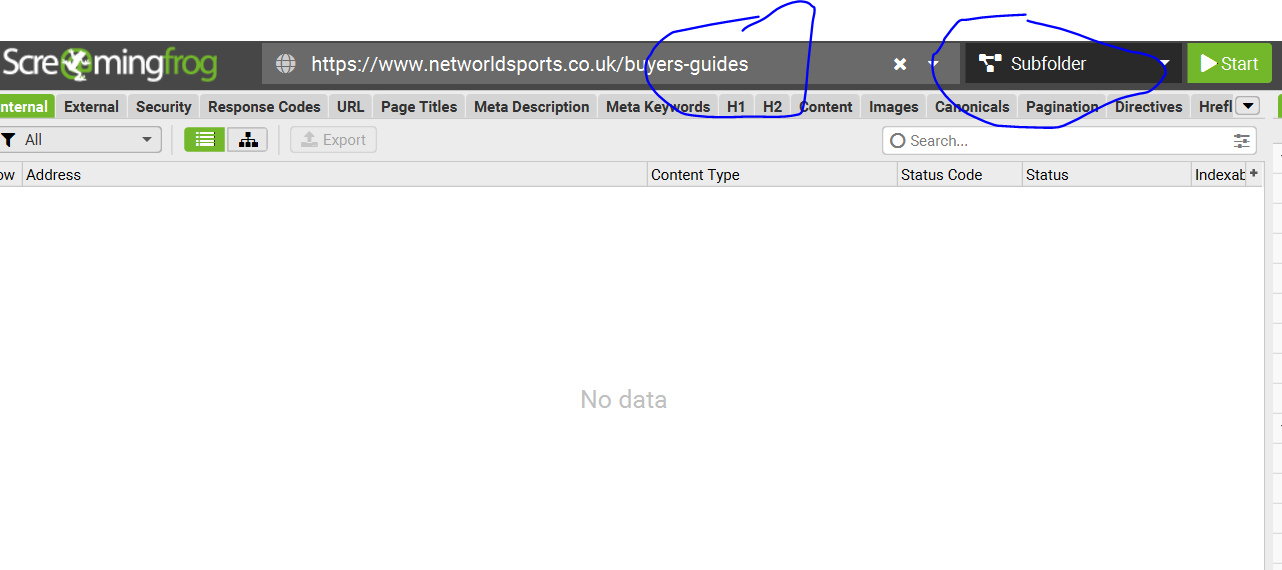
Enter the URL of the domain plus sub/folder into the main address bar on Screaming Frog.

Choose Sub-folder option to the right of the address bar:

Go to Configuration (top menu bar, to the left) >Spider > crawl > Include
– Add the sub-folder (without trailing slash) to the include section:

Click “Start”. (Button to the right of the “Subfolder” drop down).


Crawling a sub-folder – plus all internal & external links that are contained within the sub-folder pages.

The protocol above would only check the status codes of any URLs actually held within the /buyers-guides/ folder.

For example, if a football goal guide, links to the FA’s website, and 404s, the above methods would not pick this up (as the FA doesn’t have /buyers-guides/ in the homepage etc)

  1. Crawl and check all the URLs within a sub-folder e.g.

https://www.example.com/buyers-guides


2. get the status codes of any internal and external link, that point to outside the folder?


For example:


Our football goal guide –

https://www.example.com/buyers-guides/football-pitch-size-guide

Contains links that point outside of the buyers-guides folder, like to our product pages and external links to thefa.com etc.

Sub-Folder with Trailing Slash /buyers-guides/

Crawl https://www.example.com/buyers-guides/ with ‘Crawl Outside of Start Folder’ disabled, but with ‘Check Links OutSide of Start Folder’ enabled.

Sub-Folder with NO Trailing Slash /buyers-guides

Perform the crawl outlined above (using the include), get the list of https://www.example.com/buyers-guides URLs

then switch to list mode (Mode > List), go to ‘Config > Spider > Limits‘ and change the ‘Limit Crawl Depth’ from ‘0’ to ‘1” and upload and crawl the URLs

Remember to delete in include /buyers-guides from the crawl config before doing the above
i.e. Config>Spider>Include – remove anything in the box/field.

Ranking in Google’s Free Organic Product Listings & Grids [2025]

The free Shopping listings currently take the form of

  • Organic Product Grids
  • Product knowledge panels
  • Image search results
  • Shopping tab

Reports to Check for Free Shopping Listings

GA4 – Acquisition – User Acquisition > organic SHopping (Keep in mind the recent non-PDP auto-tagging changes – might need customisation in GA4)

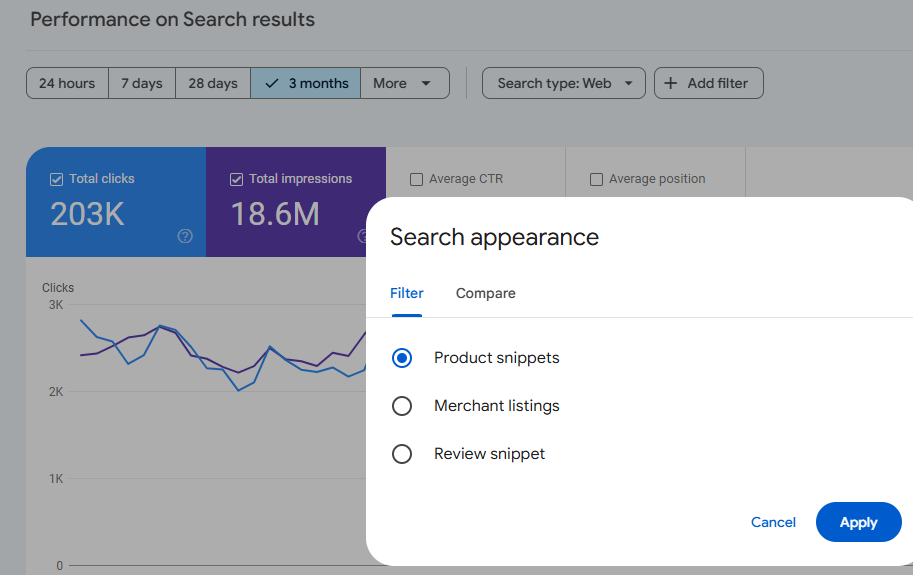
Search Console – > Performance Report > Add Filter > Merchant Listings
(There are reports for Search type: Web and Search Type: Image – just add the Search Appearance filter

Optimizing Your Product Feed

A well-optimized product feed is crucial for ranking in free Shopping listings. Focus on these key attributes:

  • Image link
  • Description
  • Brand
  • GTIN
  • MPN
  • Color
  • Size
  • Material
  • Title (highly influential for free listings and CTR)

Leveraging Merchant Features

To stand out in free shopping grids, optimise and complete the following merchant features:

  • Seller ratings (aim for 5-star reviews within the last 12 months)
  • Top quality score
  • Promotions (e.g., coupon codes)
  • Local free listings
  • “Buy Now” button
  • Payment options (PayPal, Google Pay)
  • Loyalty programs
  • Competitive pricing
  • Clear shipping and returns policies

Free Shopping Grids & Structured Data

Products with the best price tend to rank highest

Shipping policy & returns policy – can affect rankings significantly

In Search console there are warnings that show if u don’t have these set up in merchant center or in structured data.can ignore the warnings sometimes tho

Structured data – although we have seen google may unify product feeds and structured data in the near future

Influence for Free Shopping Grids & Listing – 

*Most influential* Website content →Product Feeds→ structured data. *Least influential*

Case Study: Improving Eligibility with Schema Changes

A recent case study demonstrated the impact of schema optimization:

  • Problem: Aggregate offer schema prevented merchant listing eligibility
  • Solution: Switched to ProductGroup schema
  • Result: Increased eligibility for product grids and boosted revenue

Additional Tips for Organic Google Shopping Success

  1. Optimize product titles with relevant keywords & attributes
  2. Use high-quality, unique product images – lifestyle usually best but A/B test
  3. Keep your product feed up-to-date and as accurate as possible
  4. Encourage customer reviews to improve seller ratings – might be wise to pick and choose if possible!
  5. Implement proper category mapping in your product feed
  6. Use custom labels to organize and group products effectively
  7. Optimize your landing pages – A/B test them
  8. Monitor and address any warnings in Google Search Console
  9. A/B test descriptions to improve click-through rates
  10. Regularly analyze competitor listings

Key Takeaways

  1. Use the tools – Search Console, Merchant Center, and GA4
  2. Sort out Search Console first, then monitor with GA4 and Merchant Center
  3. Implement an extensive set of product feed attributes
  4. Optimize product titles for maximum impact
  5. Highlight your unique selling propositions (price, returns, shipping, etc.) & strong selling points too
  6. Fix and address any warnings in Google Search Console
  7. Maintain consistency across your website, product feed, and structured data
  8. A/B test everything you can – if you have enough data etc!

eCommerce Product Page – SEO & UX Checklist

SEO Checklist:
Product Title Optimization
Include the main keyword naturally.
Keep titles concise but descriptive.
Meta Title and Meta Description
Write a compelling meta title (60-70 characters) with the main keyword.
Create a unique and engaging meta description (150-160 characters) with a call to action and relevant keywords.
URL Structure
Use clean and descriptive URLs with relevant keywords.
Avoid unnecessary parameters and ensure URLs are short.
Header Tags (H1, H2, H3, etc.)
Use one H1 tag for the product title.
Structure content with subheadings (H2, H3) for different sections.
High-Quality Product Descriptions
Write unique, engaging, and detailed product descriptions (300+ words).
Naturally incorporate relevant keywords.
Highlight features, benefits, and use cases.
Product Images and Alt Text
Use high-resolution, web-optimized images.
Add descriptive, keyword-rich alt text for images.
Include multiple angles or lifestyle images.
Structured Data Markup (Schema)
Implement product schema for price, availability, reviews, etc.
Use JSON-LD for structured data.
Internal Linking
Link to related products or categories.
Include “frequently bought together” and “related products” sections.
Mobile-Friendliness
Ensure the product page is fully responsive and optimized for mobile users.
Test on multiple devices.
Page Load Speed
Optimize images and use compression.
Minimize CSS, JavaScript, and HTML.
Use a content delivery network (CDN).
Canonical Tags
Implement canonical tags to prevent duplicate content issues.
Keyword Usage
Use keywords naturally in the title, description, URL, headings, and body text.
Avoid keyword stuffing.
User Reviews and Ratings
Display user-generated content like reviews and star ratings.
Use schema markup for review ratings.
Social Sharing Buttons
Provide social sharing options for easy promotion.
Breadcrumbs
Use breadcrumb navigation to enhance site structure and user experience.
UX Checklist:
Clear Call to Action (CTA)
Use prominent and persuasive “Add to Cart” or “Buy Now” buttons.
Ensure CTA buttons are highly visible.
Product Images
Include multiple images and zoom functionality.
Offer a gallery of images showing different angles and context.
Product Information
Display essential details (price, size, color, availability) prominently.
Offer accurate and up-to-date stock information.
Shipping Information
Provide clear and transparent shipping details, including delivery times and costs.
Product Variations
Offer a seamless selection process for colors, sizes, or other variations.
Use clear dropdown menus or buttons.
Customer Reviews and Ratings
Allow customers to leave reviews.
Include user-generated content for social proof.
Related Products
Display recommended, cross-sell, or upsell products.
Use “Customers Also Viewed” or “Frequently Bought Together” sections.
Return Policy Information
Clearly outline the return policy on the product page.
Trust Signals
Include security badges, accepted payment icons, and other trust symbols.
Show testimonials or guarantees if applicable.
Easy Navigation
Ensure intuitive breadcrumb trails.
Use filters and sorting options for larger catalogs.
User-Friendly Design
Use white space effectively to improve readability.
Ensure buttons and interactive elements are appropriately sized.
FAQ Section
Provide answers to common questions about the product.
Accessibility Compliance
Follow accessibility guidelines (e.g., alt text, ARIA labels).
Test for screen reader compatibility.
Wishlist or Save for Later Feature
Offer options to save the product for future reference.
Live Chat or Support Options
Provide real-time assistance through chat or customer support links.
Easy Checkout Process
Minimize steps to purchase.
Offer guest checkout and multiple payment options.
Stock Notifications
Include “Back in Stock” or “Low Stock” alerts.

Scraping JSON Schema with Screaming Frog Custom Extraction [2025]

Last updated – a few days ago (probably).

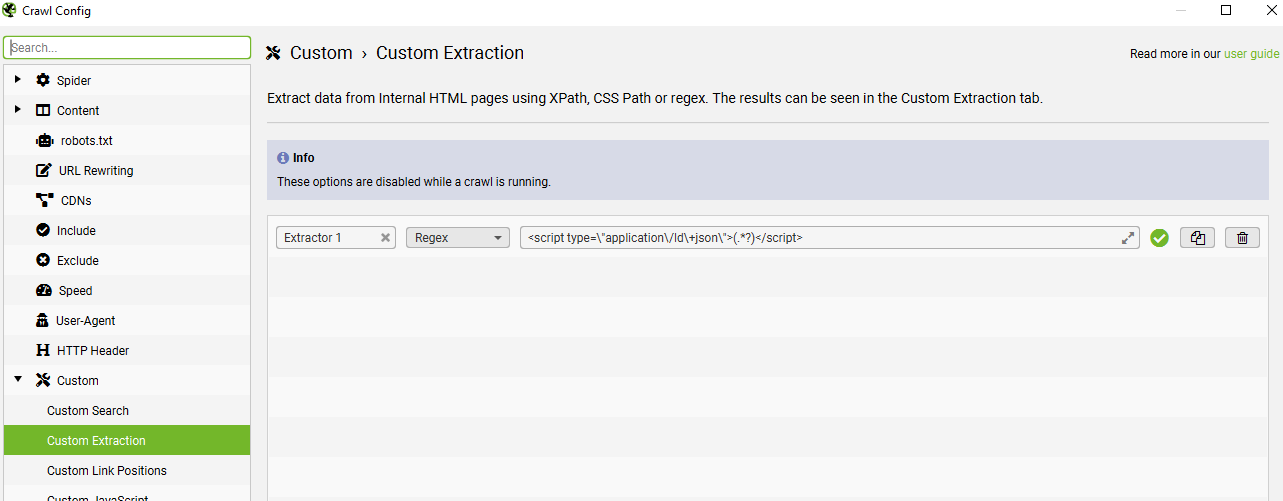
If you go to Menus – configuration > Custom > Custom Extraction

Click the +Add button on the bottom right and choose “Regex” from the drop-down menu, which is to the right of “Extractor 1” text box.

Add the code below, in the box/field to the right of “Regex”.

<script type=\"application\/ld\+json\">(.*?)</script>

I’m using the code below, to extract product schema only – I can export to excel and filter the URLs containing product schema, but don’t have the aggregaterating:

<script type=\"application\/ld\+json\">(.*?"@type":\s*"Product".*?)<\/script>

Scrape Product Schema & Identify Missing Fields
(Product Schema missing aggregateRating field in this case)

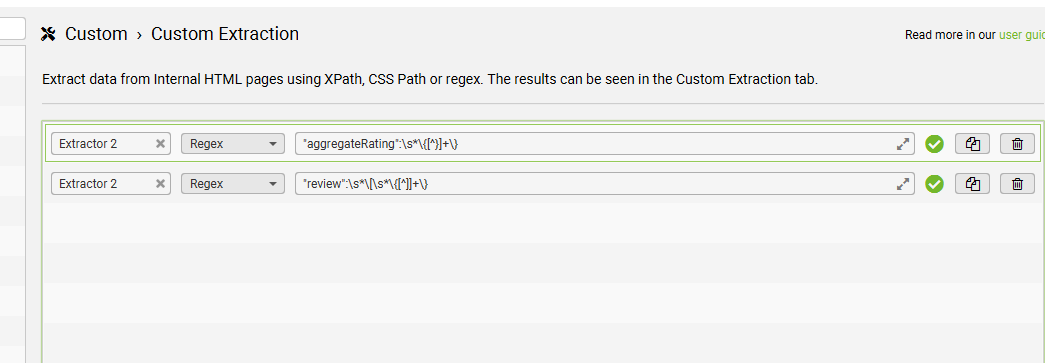
  • Turned out easier to use this regex to identify all the URLs that have aggregateRating fields:
"aggregateRating":\s*\{[^}]+\}


  • and set up a second custom extraction to check for URLs/pages with any reviews –
"review":\s*\[\s*\{[^]]+\}

If the page had review schema, but not aggregateRating – then we needed to fix them.

scrape schema screaming frog