BusinessAudience Schema Example [2024]

Hi, this schema is supposed to inform Google who you are targeting with your products and services.

In theory, this could mean that people who fit within your target audience, are more likely to see your website in the search results.

Here’s an example for an ecommerce football website, selling to parents and clubs:

<script type="application/ld+json">
{
"@context": "http://schema.org",
"@type": "Store",
"name": "Ultimate Football Gear",
"url": "https://www.ultimatefootballgear.com",
"audience": [
{
"@type": "BusinessAudience",
"audienceType": "Parents",
"geographicArea": {
"@type": "AdministrativeArea",
"name": "Nationwide"
},
"suggestedMinIncome": 30000,
"suggestedMaxIncome": 100000,
"description": "Middle-class and working-class parents looking for affordable football gear for their children."
},
{
"@type": "BusinessAudience",
"audienceType": "Sports Clubs",
"geographicArea": {
"@type": "AdministrativeArea",
"name": "Nationwide"
},
"description": "Local sports clubs seeking quality football equipment for team use."
}
],
"offers": {
"@type": "Offer",
"itemOffered": {
"@type": "Product",
"name": "Youth Football Kit",
"description": "A complete football kit for young players, perfect for training and matches.",
"category": "Sporting Goods > Team Sports > Football",
"sku": "YFK123",
"brand": {
"@type": "Brand",
"name": "Ultimate Football"
}
},
"price": "49.99",
"priceCurrency": "USD"
}
}
</script>

^As you can see above, you can combine with product/offers schema.

Here’s a normal example:

<script type="application/ld+json">
{
"@context": "http://schema.org",
"@type": "Store",
"name": "Ultimate Football Gear",
"url": "https://www.ultimatefootballgear.com",
"audience": [
{
"@type": "BusinessAudience",
"audienceType": "Parents",
"geographicArea": {
"@type": "AdministrativeArea",
"name": "Nationwide"
},
"suggestedMinIncome": 30000,
"suggestedMaxIncome": 100000,
"description": "Middle-class and working-class parents looking for affordable football gear for their children."
},
{
"@type": "BusinessAudience",
"audienceType": "Sports Clubs",
"geographicArea": {
"@type": "AdministrativeArea",
"name": "Nationwide"
},
"description": "Local sports clubs seeking quality football equipment for team use."
}
]
}
</script>
Product Schema Example (with review schema) 2024

Here’s an example:

<script type="application/ld+json">	
{
"@context": "http://schema.org",
"@type": "Product",
"description": "The best pads you can buy online for MMA and boxing. Made with leather, manufactured by BJJ black belts and elves.",
"gtin8": "sdfdfsf3w5455",
"name": "Boxing and MMA Pads ",
"image": "https://cdnfake.com/media/catalog/product/m/i/boxing-pads-solo.jpg",
"sku": "boxing-mini-pads-only",
"url": "https://www.blackbeltwhitehat.co.uk/nice-mma-target-pads-boxing-only.html"
"brand": "Nice MMA",
"offers": [
{
"@type": "Offer",
"itemCondition": "http://schema.org/NewCondition",
"price": "89.99",
"availability": "InStock",
"priceCurrency": "GBP",
"url": "https://www.blackbeltwhitehat.co.uk/nice-mma-target-pads-boxing-only.html"

}
]
,
"review": [
{
"@type": "Review",
"author": {
"@type": "Person",
"name": "DAVE MACDONALD"
},
"datePublished": "2017-27-07",
"description": "Grandson loves using these",
"name": "ALFFI-JAC MACDONALD",
"reviewRating": {
"@type": "Rating",
"bestRating": "5",
"ratingValue": "5", "worstRating": "1"
}
} ]
,
"aggregateRating": {
"@type": "AggregateRating",
"ratingValue": "5",
"reviewCount": "1"
}
}
</script>

I use these tools to check schema

https://classyschema.org/Visualisation
https://search.google.com/test/rich-results
https://validator.schema.org/

and use – https://www.diffchecker.com/ to check an existing schema, that I know works and is validated, to another one that I’m testing.

Here’s another example I just found within the Google ‘documentation

 <html>
  <head>
    <title>Executive Anvil</title>
    <script type="application/ld+json">
    {
      "@context": "https://schema.org/",
      "@type": "Product",
      "name": "Executive Anvil",
      "description": "Sleeker than ACME's Classic Anvil, the Executive Anvil is perfect for the business traveler looking for something to drop from a height.",
      "review": {
        "@type": "Review",
        "reviewRating": {
          "@type": "Rating",
          "ratingValue": 4,
          "bestRating": 5
        },
        "author": {
          "@type": "Person",
          "name": "Fred Benson"
        }
      },
      "aggregateRating": {
        "@type": "AggregateRating",
        "ratingValue": 4.4,
        "reviewCount": 89
      }
    }
    </script>
  </head>
  <body>
  </body>
</html>

Enjoy!

AboutPage Schema Example [2024]

Great for your About Pages

<script type="application/ld+json">
{

"@context": "http://schema.org",

"@type": "AboutPage",

"name": "Business Dad",

"url": "https://businessdaduk.com/",

"description": "a blog for the people by the people",

"mainEntityOfPage": {

"@type": "WebPage",

"@id": "https://businessdaduk.com/"

},

"sameAs": [

"https://twitter.com/baddadbusiness",


],

"potentialAction": {

"@type": "SearchAction",

"target": "https://businessdaduk.com/search?query={search_term_string}",

"query-input": "required name=search_term_string"

}

}
</script>

You can also add:
– An about page image URL
– Read action – instead of search
– Publisher

<script type="application/ld+json">

{
"@context": "http://schema.org",
"@type": "AboutPage",
"name": "Business Dad",
"url": "https://businessdaduk.com/",
"description": "a blog for the people by the people",
"mainEntityOfPage": {
"@type": "WebPage",
"@id": "https://businessdaduk.com/",
"image": "https://businessdaduk.com/images/about-page-image.jpg"
},
"sameAs": [
"https://twitter.com/baddadbusiness"
],
"potentialAction": {
"@type": "ReadAction",
"target": "https://businessdaduk.com/about-us"
},
"publisher": {
"@type": "Organization",
"name": "Business Dad",
"logo": {
"@type": "ImageObject",
"url": "https://businessdaduk.com/logo.jpg"
}

}
},

</script>

Tools & Checklist for Schema [2023]

I’ve put together a spreadsheet for SEO schema checks here:

https://docs.google.com/spreadsheets/d/1dDqJ9_qrTVoJOZRxieJDp9XE3Q1TCq4ixNVudVtgp2M/edit#gid=0

Use https://classyschema.org/Visualisation and import a URL – test using different URLs, especially for eCommerce websites – like homepage, about page, product page, category pages

Test also with:

https://search.google.com/test/rich-results – add any issues in column C of sheet

and

https://validator.schema.org/ – add issues in Column D

  • Put your “to do” list in columns E and F

When using validator, make sure you’re schema has all the relevant parameters.

The separate sheets on the Google Sheet linked above, has some examples for you to check against – written in JSON-LD

Finally, if the site is already live, check the schema reports in Search Console for any errors

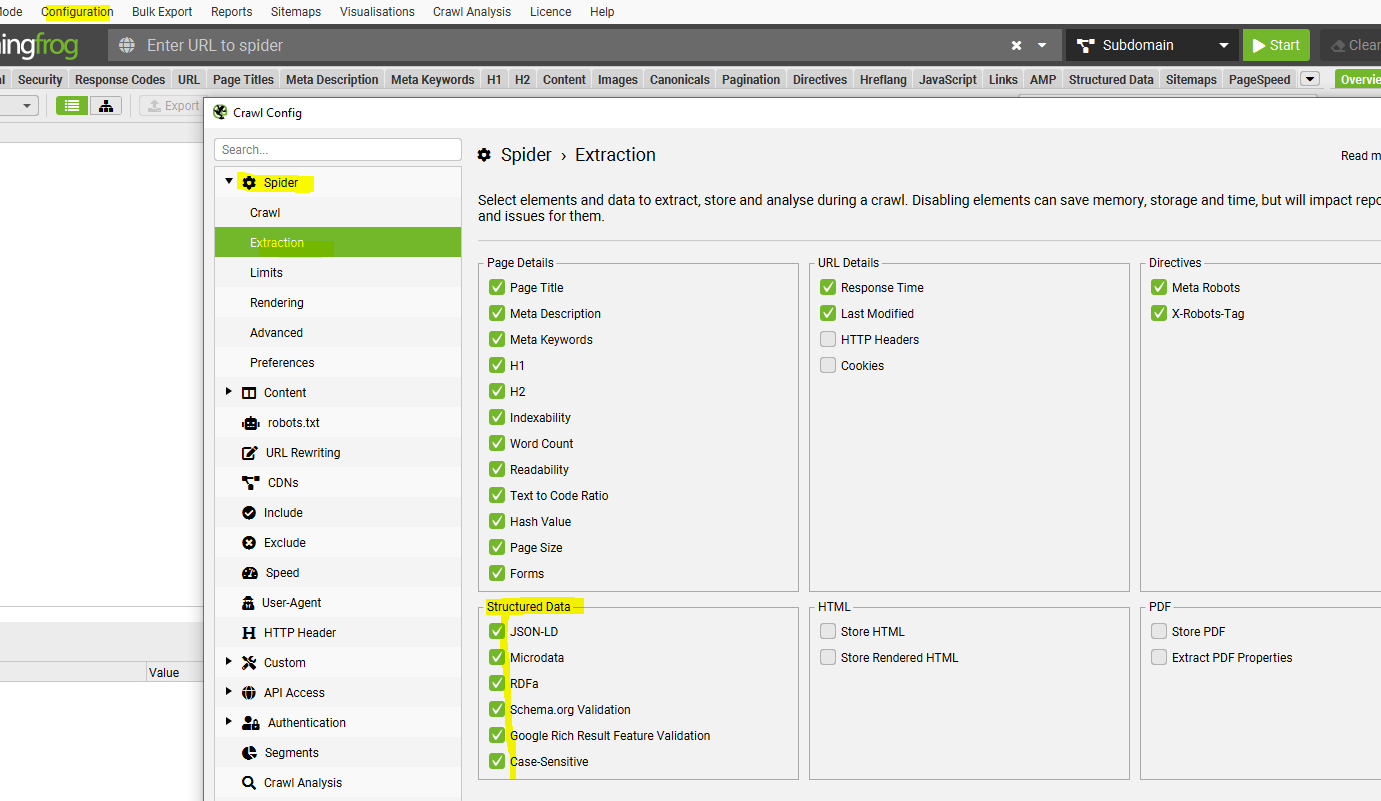
If you have Screaming Frog, I’d also recommend running a crawl –

Go to Configuration – Spider – Crawl – and tick all the “Structured Data” boxes:

crawl schema in screaming frog

Then when the crawl has run – go to Reports – Structured Data and download each report

Finally, you can also check individual pages using the Ryte Structured Data Helper for Chrome –

Check with CHrome plugin – Ryte structured data helper
https://chrome.google.com/webstore/detail/ryte-structured-data-help/ndodccbbcdpcmabmiocobdnfiaaimgnk/related