JavaScript Functions and Events (2023)

Notes taken from various websites including:

https://www.w3schools.com/js/js_whereto.asp

https://developer.mozilla.org/en-US/docs/Web/JavaScript/Guide/Functions

JavaScript Functions

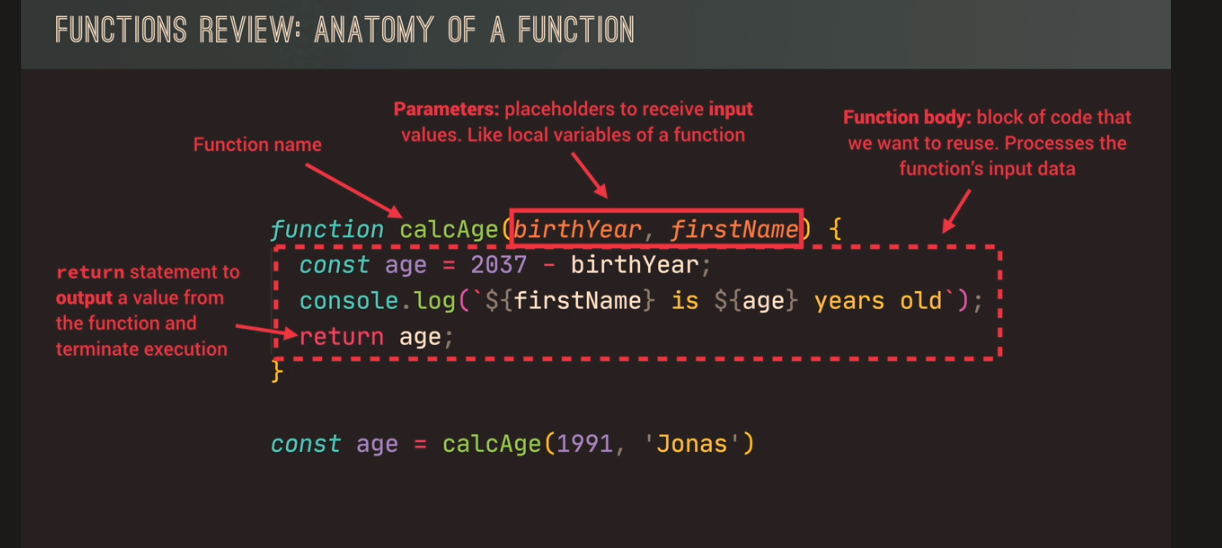
A JavaScript function is a block of JavaScript code, that can be executed when “called” for.

For example, a function can be called when an event occurs, like when the user clicks a button.

A function in JavaScript is similar to a procedure—a set of statements that performs a task or calculates a value, but for a procedure to qualify as a function, it should take some input and return an output where there is some obvious relationship between the input and the output.

Source

Function declarations
A function definition (also called a function declaration, or function statement) consists of the function keyword, followed by:

The name of the function.
A list of parameters to the function, enclosed in parentheses and separated by commas.
The JavaScript statements that define the function, enclosed in curly brackets, { /* … */ }.
For example, the following code defines a simple function named square:

function square(number) {
return number * number;
}

The function square takes one parameter, called number. The function consists of one statement that says to return the parameter of the function (that is, number) multiplied by itself. The statement return specifies the value returned by the function:

return number * number;

Parameters are essentially passed to functions by value — so if the code within the body of a function assigns a completely new value to a parameter that was passed to the function, the change is not reflected globally or in the code which called that function.

When you pass an object as a parameter, if the function changes the object’s properties, that change is visible outside the function, as shown in the following example:

function myFunc(theObject) {
theObject.make = “Toyota”;
}

const mycar = {
make: “Honda”,
model: “Accord”,
year: 1998,
};

console.log(mycar.make); // “Honda”
myFunc(mycar);
console.log(mycar.make); // “Toyota”

Differences between functions and methods (taken from Geeks for Geeks)

FunctionMethod
A JavaScript function is a block of code designed to perform a particular task.The javascript method is an object property that has a function value.
Syntax of Function is -:function functionName(parameters) {
   // Content
}
Syntax of Method is -:object = {
   methodName: function() {
       // Content
   }
};object.methodName()
A function can pass the data that is operated and may return the data. The method operates the data contained in a Class.
Data passed to a function is explicit.A method implicitly passes the object on which it was called.
A function lives on its own.A method is a function associated with an object property.
A function can be called directly by its name A method consists of a code that can be called by the name of its object and its method name using dot notation or square bracket notation.
Functions are helpful because it increases the reusability of the code.Javascript includes some in-built methods also for example -: parseInt() Method
The () Operator is used to Invoke the FunctionWe can access object method by the following the syntax -:objectName.methodName()

External JavaScript Advantages

Javascript can also be placed in the <body> of a HTML document and in external sheets with the file extension .js (not sure why I thought this was relevant, but there you go!)
Placing scripts in external files has some advantages:

It separates HTML and code
It makes HTML and JavaScript easier to read and maintain
Cached JavaScript files can speed up page loads

JavaScript Output

ref

JavaScript can interact with the DOM/webpage and display different data in several ways:

  • Wrting into an HTML element using innerHTML
  • Wirting into the HTML output using document.write()
  • Writing into an alert box, using window.alert()
  • Wiring into the browser console, using console.log()

Using InnerHTML

use the document.getElementByID(id) method.

JavaScript Events

HTML events are “things” that happen to HTML elements.

When JavaScript is used in HTML pages, JavaScript can “react” on these events.

more info at w3schools

JavaScript’s interaction with HTML is handled through events that occur when the user or the browser manipulates a page.

When the page loads, it is called an event. When the user clicks a button, that click too is an event. Other examples include events like pressing any key, closing a window, resizing a window, etc.

Developers can use these events to execute JavaScript coded responses, which cause buttons to close windows, messages to be displayed to users, data to be validated, and virtually any other type of response imaginable.

Events are a part of the Document Object Model (DOM) Level 3 and every HTML element contains a set of events which can trigger JavaScript Code.

Please go through this small tutorial for a better understanding HTML Event Reference. Here we will see a few examples to understand a relation between Event and JavaScript −

onclick Event Type

This is the most frequently used event type which occurs when a user clicks the left button of his mouse. You can put your validation, warning etc., against this event type.

Example

Try the following example.

 Live Demo

<html>
   <head>   
      <script type = "text/javascript">
         <!--
            function sayHello() {
               alert("Hello World")
            }
         //-->
      </script>      
   </head>
   
   <body>
      <p>Click the following button and see result</p>      
      <form>
         <input type = "button" onclick = "sayHello()" value = "Say Hello" />
      </form>      
   </body>
</html>

More info at Tutorialspoint (includes a massive list of event types)

The This Keyword in JavaScript (2023)

This – references the object that is executing the current function

  • If the function is part of an object, we call that function a method.

“This” will reference that object

  • if the function is a regular function

“This” will reference the global / window object

in case, like me, you’ve forgotten what an object is, Mozilla describes it as

“In JavaScript, an object is a standalone entity, with properties and type. Compare it with a cup, for example. A cup is an object, with properties. A cup has a color, a design, weight, a material it is made of, etc. The same way, JavaScript objects can have properties, which define their characteristics.”

Example of an Object – with a function/method:

const person = {
  firstName: "John",
  lastName : "Doe",
  id       : 5566,
  fullName : function() {
    return this.firstName + " " + this.lastName;
  }
};

In the example above, this refers to the person object. Because the function is in an object

Some more notes about the This Keyword, robbed from around the web:

In general, the this references the object of which the function is a property. In other words, the this references the object that is currently calling the function.

Javascript Tutorial

Suppose you have an object called counter that has a method next(). When you call the next() method, you can access the this object.

let counter = {
  count: 0,
  next: function () {
    return ++this.count;
  },
};

counter.next();

Inside the next() function, the this references the counter object. See the following method call:

counter.next();

Global context

In the global context, the this references the global object, which is the window object on the web browser or global object on Node.js.

This behavior is consistent in both strict and non-strict modes. Here’s the output on the web browser:

console.log(this === window); // trueCode language: JavaScript (javascript)

If you assign a property to this object in the global context, JavaScript will add the property to the global object as shown in the following example:

this.color= 'Red';
console.log(window.color); // 'Red'

The this keyword is a source of confusion.

If you just type and run “this”, you’ll get the window object (the top of the DOM hierarchy)

If you type “this” inside a function, the value of this is contextual and dynamic. It can change.

Mozilla JS website

In most cases, the value of this is determined by how a function is called (runtime binding). It can’t be set by assignment during execution, and it may be different each time the function is called. The bind() method can set the value of a function’s this regardless of how it’s called, and arrow functions don’t provide their own this binding (it retains the this value of the enclosing lexical context).

In non–strict mode, this is always a reference to an object. In strict mode, it can be any value. For more information on how the value is determined, see the description below.

Description

The value of this depends on in which context it appears: function, class, or global.

Function context

Inside a function, the value of this depends on how the function is called. Think about this as a hidden parameter of a function — just like the parameters declared in the function definition, this is a binding that the language creates for you when the function body is evaluated.

For a typical function, the value of this is the object that the function is accessed on. In other words, if the function call is in the form obj.f(), then this refers to obj. For example:

function getThis() {
  return this;
}

const obj1 = { name: "obj1" };
const obj2 = { name: "obj2" };

obj1.getThis = getThis;
obj2.getThis = getThis;

console.log(obj1.getThis()); // { name: 'obj1', getThis: [Function: getThis] }
console.log(obj2.getThis()); // { name: 'obj2', getThis: [Function: getThis] }

More info and better description of this keyword on the Mozilla website here

Arrow Functions vs Regular Functions in JavaScript (2023)

JavaScript has 2 types of functions.

Normal/regular functions

Arrow functions

Arrow functions are simpler and shorter.

A normal JS function, with arguments (stuff in brackets), which returns something:

function multiply(num1, num2) {
  const result = num1 * num2
  return result
}

The same function, as an arrow function is:

const multiply = (num1, num2) => {
  const result = num1 * num2
  return result
}

If the only statement, is the return statement, then the arrow function can be even shorter:

const multiply = (num1, num2) => num1 * num2

Reference

Freecodecamp


You can define functions in JavaScript by using the “function” keyword.

// Function declaration
function greet(who) {
  return `Hello, ${who}!`;
}

The second way to define a function, is to use the arrow function syntax:

const greet = (who) => {
return Hello, ${who}!;
}


Reference

dmitripavlutin.com


  1. you can omit the return statement and curly braces in arrow function, when its a one line function

2. When the function has only 1 argument, the round bracket is optional.

Scope and the Scope Chain in JavaScript

Scoping – where do variables live? – Where can we access a certain variable?

Notes from JS Udemy Course

JS is a high level, object oriented multi paradigm programming language

Lexical scoping – scoping is controlled by placement of functions and blocks in the code

Scope is the space or environment in which a certain variable is declared.

There are 3 main types of scope for variables:

Global scope

Function scope

Block scope

The Scope of a variable, is the region of our code where a certain variable can be accessed.

Scope Chain in JavaScript

I asked Chat GPT “what is scope chain in JavaScript?”

A scope chain in JavaScript refers to the hierarchical order of scopes, with each scope having access to its own variables and those of its parent scopes.

This hierarchy is established based on where functions and blocks are physically located within the code (lexical scoping).

When a variable is referenced in JavaScript, the engine looks for the variable in the current scope.

If it doesn’t find it there, it moves up the chain to the parent scope. This process continues all the way up to the global scope if necessary. If the variable isn’t found in the global scope, a ReferenceError is thrown.

Here’s a simple example to demonstrate the concept:

let globalVar = "global"; // global scope

function outer() {
    let outerVar = "outer"; // outer function scope

    function inner() {
        let innerVar = "inner"; // inner function scope

        console.log(innerVar); // "inner", found in inner scope
        console.log(outerVar); // "outer", not found in inner scope but found in outer scope
        console.log(globalVar); // "global", not found in inner or outer scopes but found in global scope
    }

    inner();
}

outer();


In the above example, the inner function’s scope chain includes the inner scope, the outer scope, and the global scope. The outer function’s scope chain includes the outer scope and the global scope. The global scope is at the top of every scope chain.

The scope chain is fundamental to understanding variable lookup and closure behavior in JavaScript.

Hoisting in JavaScript

I asked chatgpt to explain hoisting to me:

In JavaScript, hoisting is a behavior in which variable and function declarations are moved to the top of their containing scope during the compile phase, before the code has been executed. This means you can use a variable or function before it’s been declared in the code.

However, it’s crucial to note that while the declarations (not initializations) are hoisted, the assignments are not. This is why a variable declared and initialized after it’s used will return undefined.

Here’s an example of hoisting with variables:

javascriptCopy codeconsole.log(myVar); // Output: undefined

var myVar = 5;

console.log(myVar); // Output: 5

In this example, the declaration (var myVar) is hoisted to the top of the scope, but the assignment (myVar = 5) is not. That’s why the first console.log outputs undefined, and the second outputs 5.

Now, let’s see an example with functions:

console.log(myFunction()); // Output: This is hoisted!

function myFunction() {
  return "This is hoisted!";
}

Here, the entire function declaration (including the body) is hoisted, so you can call the function before it's declared in the code.

However, if we use function expressions and try to call it before it's defined, it will return undefined because only declarations are hoisted, not initializations:


console.log(myFunction); // Output: undefined

var myFunction = function() {
  return "This is not hoisted!";
}

In JavaScript ES6, let and const were introduced, which have different scoping rules from var. While var is function-scoped, let and const are block-scoped. However, they too are hoisted, but due to a mechanism known as the Temporal Dead Zone (TDZ), you cannot access them before declaration.


console.log(myVar); // Output: undefined
console.log(myLet); // ReferenceError: Cannot access 'myLet' before initialization

var myVar = 5;
let myLet = 10;

In this code, trying to log myLet before it's declared results in a ReferenceError, while myVar is undefined due to the hoisting and the difference in behavior between var and let/const.

Then I asked Bard:

JavaScript hoisting is a concept that refers to the fact that variable declarations are moved to the top of their scope before the code is executed. This means that you can access a variable even if it is declared after the line of code where you first try to use it.

For example, the following code will print “Hello World!” even though the message variable is declared after the line where it is first used:

JavaScript

console.log("Hello World!");
var message = "Hello World!";

This is because the JavaScript engine will hoist the variable declaration to the top of the scope, before the code is executed. This means that the variable will be defined and accessible even though it is declared after the line where it is first used.

It is important to note that hoisting does not affect the value of the variable. In the example above, the value of the message variable will still be “Hello World!” even though it is declared after the line where it is first used.

Hoisting can be a useful concept to understand, but it can also lead to errors if you are not careful. For example, the following code will throw an error because the message variable is not defined when it is first used:

JavaScript

var message = "Hello World!";
console.log(message);

This is because the message variable is not defined until after the line where it is first used. To avoid this error, you should always declare variables before you use them.

Here are some tips for avoiding errors when using hoisting:

  • Always declare variables before you use them.
  • Use the const keyword to declare constant variables.
  • Use the let keyword to declare local variables.
  • Use the strict mode to prevent errors from being thrown when variables are not declared.

I hope this explanation of JavaScript hoisting was helpful. Please let me know if you have any other questions.

While Loops in JavaScript

A while loop is more versatile than a for loop.

A while loop just needs a condition to keep running.

Creating a while loop

  • Add a condition.

for example

while ((rep<=10)

Run the look while the “rep” value is less than or equal to 10

  • Add the staring condition:

let rep = 1;

  • add the code to be executed:

console.log(‘lifting weights repetition ${rep}

  • Add the counter:

rep++;

let rep=1;
while (rep <=10) {
console.log('lifting weights repetition ${rep});
rep++;
}


While Loop doesn’t need a counter

Random variable – throwing a dice until we throw a 6

We don’t know how many times the dice has to be thrown, so we don’t need a counter

let dice = Math.trunc(Math.random() x 6) + 1;
console.log(dice);

while (dice !==6) {
console.log('Your rolled a ${dice}');
}


while (dice !==6) is the condition – roll the dice whilst the condition is not equal to 6

JavaScript – the for Loop [2023] for beginners/dummies/SEO-helmets

A for loop, is a loop that will loop through (go through) the elements in an array or the properties of an Object.

You can use it to update arrays, count the number of elements etc

Loops can execute a block of code several times.

With arrays, it’s common(ish) to run the same code over with a different value.

Image source

screenshot source

For Loops tend to be used with arrays (I think!)

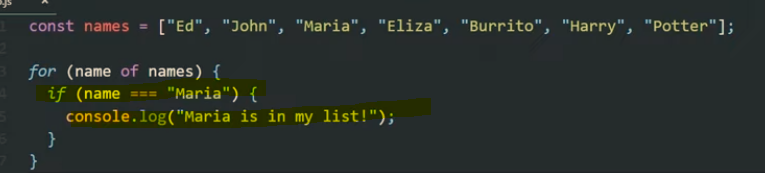
The code below the array in the screenshot below, starting with “for”, loops through the variable called “names” above it.
Once it loops through it create “name” and then “console.log(name);” will get it to print on the console.log screen

  • console.log just provides a way of testing and outputting stuff using web developer tools, inspect element etc.

The code below, will do the same as above, but this time it will add “Hello there” before each of the names:

You can also add if conditions. For example, in the code below, the loop will check if “Maria” is in the list, and if so, will print out “Maria is in my list”

You can get the loop to stop once it finds “Maria” by using the “break” keyword.

The above code will print “Ed, John and then Maria and “Maria is in my list”. It will then stop and it won’t print all the names up to “Potter”.

As well as using the for loop with arrays, you can also use it with a single variable like “age”, and add an incremented – for example “age++”

The code shown below will print out and loop 10 times. starting at 0, and then 1, 2 etc. until finally the condition age <10 is no longer met

When the age is 10, it will stop.

A web dev example

Get all the links on a page, and return the number of the links on the page.

When the loop gets to the 6th link, it is no longer less than links.length, and so the loop stops:

(you can click the image to see a lager version, the important code is :

for (i = 0; i < links.length; i++)

To print out the final link, change “<links.length” to “<= links.length” – meaning “less than or equal to links.length”

for (i = 0; i <= links.length; i++)

For In Loops

For in loops, are the same as for loops except they are shorter to write but less flexible.

For Loop Example with an Array

Work out the age of people, given an array with their year of birth in it.

start with the array and then a new array, which will hold the ages:

const years = [1991, 2007, 1969, 2020]
const ages = [];

for(let I = 0; I <years.length; i++) {

ages.push (2023 – years [i] );

}

console.log(ages);

the “ages.push” code, will psh the results into the ages array

Continue & Break Statements

Continue is to exit the current iteration and move to the next one

Break will exit completely.

You can use with an if statement

continue loop statement

If the type of the current element, is not a string, then continue.

This will skip any elements/values that are not strings. Continue will exit the current iteration and not print to the console.log

Using break, will terminate the loop completely.

break loop statement

What are objects in Javascript? [2023]

Notes taken from the Udemy Course – the Complete JavaScript Course which you can enroll on here.

I’ve also robbed some screenshots from other sites, but linked to them in the “source”.

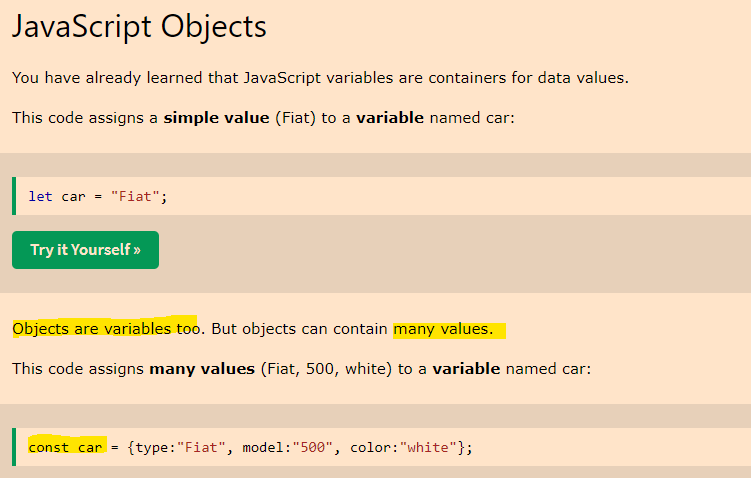
  • An object is a collection of properties
  • A property is an association between a name (key) and a value
  • A property’s value can be a function (but then it’s called a “method” for some reason)

Source

Objects provide a way to group values together in an organised fashion.

Objects can store lots of different types of data.

Objects can contain variables, functions or both.Variables found in objects are properties, while functions are methods.

In objects we define key-value pairs. The key is also called the “property name”.

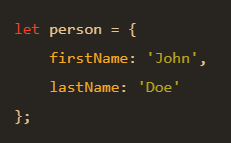
Objects are normally declared within culry braces:

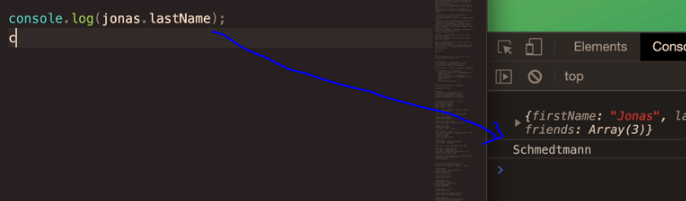
firstName is a “key” and the “value” is “Jonas”.

The name and the value, create a “key value pair”.

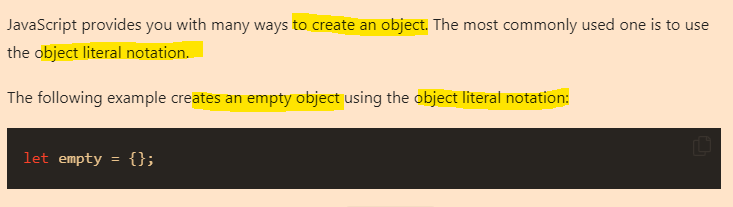
There are many ways of creating objects in JavaScript.

Using curly braces is called the “object literal syntax” because you’re writing down the literal object.

The order you write down objects doesn’t matter, unlike in arrays.

How do we get data from an object?

Dot Notation

Screenshot source

The first way to access data in an object is to use “dot notation”:

Dot notation is the most popular method to access the properties of an object.

let obj = {
  boxer: 'jab',
  muayThai: 'kick'
};
let strike = obj.boxer;
console.log(strike);
// jab

The dot notation in the example above is – let strike = obj.boxer;

Specify the name of the object, then add a dot, followed by the property name.

The syntax is objectName.propertyName;

Source

Bracket Notation

let obj = {
  boxer: 'jab',
  muaythai: 'kick'
};
let strike = obj['boxer'];
console.log(strike);
// jab

You can read a much better article about dot and bracket notation – here –> codeburst.io or here —> plainenglish.io

How do you create objects?

It is a common practice to declare objects with the const keyword.

There are two methods by which you can create an object: an object literal and the object constructor. 

Source

let’s create an object named myCup and give it properties named color, volume, and weight as follows:

let myCup = new Object();
myCup.color = "transparent";
myCup.volume = 1;
myCup.weight = 0.5;

We can write the same object in a shorter notation. Comma-delimited list of  pairs of property names and associated values, enclosed in curly braces:

let myCup = {
 color: "transparent",
 volume: 1,
 weight: 0.5
}


Above, we declare a variable in the same way with: let myCup equals and then curly brace.

source

If you are making multiple objects, it’s best to use the object constructor.

You can use a constructor to create a new object by calling the constructor with the new keyword. The new keyword will create an instance of an object and bind the this keyword to the new object.

The this keyword is a reference to the object itself.

function Fighter(name, age, nationality) { 
    this.name = name; 
    this.age = age; 
    this.nationality = nationality; 
    this.bio = function () { 
        console.log(`My name is ${this.name}. I'm ${this.age} years old. I'm from ${this.nationality}`) 
    } 
};

const oladele = new Profile("Izzy", 29, "Nigeria" );
console.log(oladele.bio()); //My name is Izzy. I'm 29 years old. I'm from Nigeria

More info about constructors at Freecodecamp.org

Here’s another example, using the this keyword from w3schools

<script>
// Constructor function for Person objects
function Person(first, last, age, eye) {
  this.firstName = first;
  this.lastName = last;
  this.age = age;
  this.eyeColor = eye;
}

// Create a Person object
const myFather = new Person("John", "Doe", 50, "blue");

// Display age
document.getElementById("demo").innerHTML =
"My father is " + myFather.age + "."; 
</script>

The above code gives the output “my father is 50”. (which is printed to the paragraph with the id of “demo”)

Adding a method to an object

We can add a method simply by adding another property that is a function. This function will be able to read the values of the object and work with them.

We will add an example that will print out the color of the table.

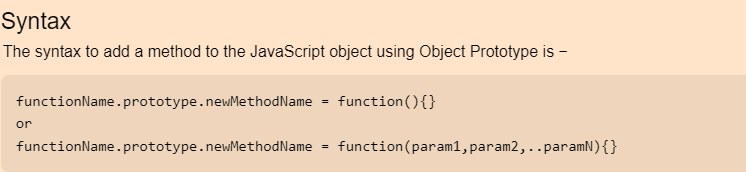
myTable.whatIsMyColor = function() {
 console.log("My color is: " + this.color);
};

source

source

Adding a new property to an object

In JavaScript you can add a property to an object after it has been created.

The following statement adds the age property to the fighter object and assigns 22 to it:

fighter.age = 22;


Deleting a property of an object

Simply use the delete operator

delete fighter.age;

Checking if a property exists

To check if a property exists in an object, you use the in operator:

propertyName in objectName

The in operator returns true if the propertyName exists in the objectName.

The following example creates an employee object and uses the in operator to check if the ssn and employeeId properties exist in the object:

let employee = {
    firstName: 'Peter',
    lastName: 'Doe',
    employeeId: 1
};

console.log('ssn' in employee);
console.log('employeeId' in employee);Code language: JavaScript (javascript)

Output:

false
true

Source

Javascript Arrays for Beginners (2023)

Arrays hold values.

An array is an ordered list of values.

Arrays are 0-based, in that the first value is 0, not 1 in terms of its position.

A JavaScript array has the following characteristics:

  1. First, an array can hold values of mixed types. For example, you can have an array that stores elements with the types number, string, boolean, and null.
  2. Second, the size of an array is dynamic and auto-growing. In other words, you don’t need to specify the array size up front.

source

W3schools describes an array as a “special variable, which can hold more than one value”.

An array can hold many values under a single name, and you can access the values by referring to an index number.

arrays w3schools

source

Creating & Fetching JavaScript arrays

JavaScript provides you with two ways to create an array. 

It is a common practice to declare arrays with the const keyword.

Image source

You can also use the following code to create a new array:

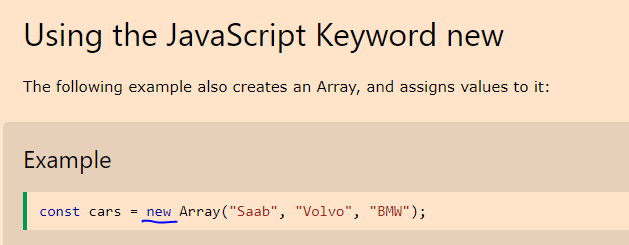
let values = new Array();

or

let values = [item1,item2,...]

Once you’ve created your array, you can print the values to the console.log with the code:

console.log(values);


With “values” being the name of the array.

You can call “values.length” to get the length of the array

console.log(values.length);

Again, in the above code “values” is the name of the array.

You can define and name an array, and then “push” values into it later:

The above code will add a single value of 5 to the array named “values”.

console.log(values[1]); will print the second value – 7

console.log(values[0]); will print the first value – 5

In summary – to create an array, it’s generally best to use the “const” keyword, or the “new” keyword.

Adding & Changing Stuff Within Arrays

Below, the array name is used,and the variable number to update, the first variable.

You can try it yourself on the w3 schools website.

Accessing Arrays

You access an array element by referring to the index number:

accessing arrays

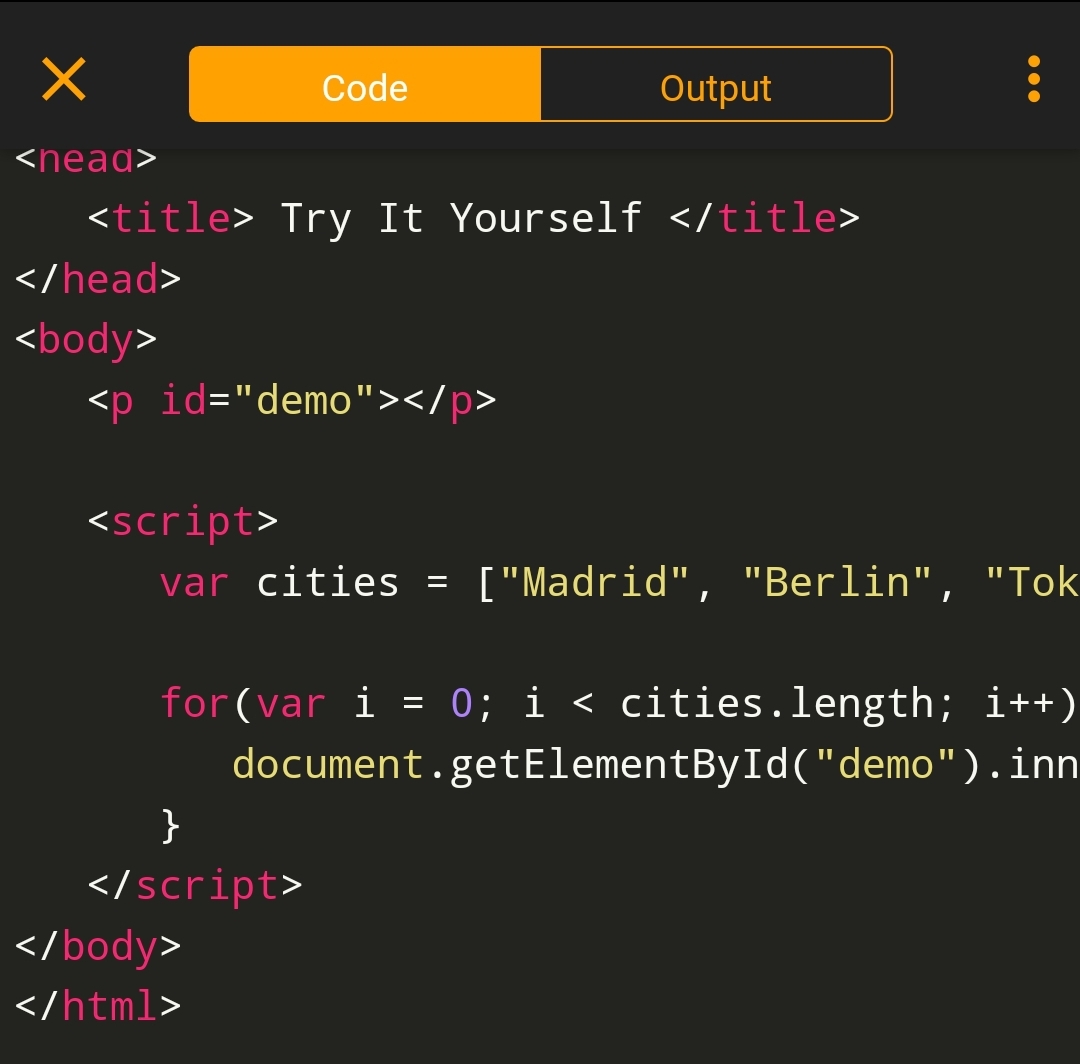
You can also loop through arrays

Javascript Functions for Beginners

A function is a piece of code, that can be reused.

It’s similar to a variable but doesn’t hold a value like a variable does. So it’s not that much like a variable, but kind of is.

Screenshots are from the brilliant Javascript Course on Udemy here

The code on lines 16 and 17 shown in the image above, creates the function. It is named “logger”.

the shorter code logger(); is used to/for “invoke”, “running”, or “calling” the function.

Function Declerations Vs Expressions

Function Declerations

When you create a function with a name, then it is a function decleration.

Function statements, declare a function. A declared function can be used later when it is “invoked” or “called”.

Function declerations must start with “function”.

For example:

function mma() {

return 8;

}

The functioned mma is declared. to invoke it use the code mma();

You can call function declerations, above the code that creates it.

Function Expressions (good article here)

A JavaScript function can also be defined using an expression.

A function expression can be stored in a variable:

Image source

Function expressions are invoked to avoid polluting the global scope. Instead of your program being aware of many different functions, when you keep them anonymous, they are used and forgotten immediately.

To summarize, function declarations are utilized when you desire to establish a function in the global scope that can be accessed anywhere in your code. On the other hand, function expressions are employed to confine the accessibility of the function, reduce the weight of the global scope, and maintain a neat syntax.

JavaScript Arrow Function

Arrow functions have shorter syntax

They are best suited to non-method functions

source

Functions Calling Other Functions

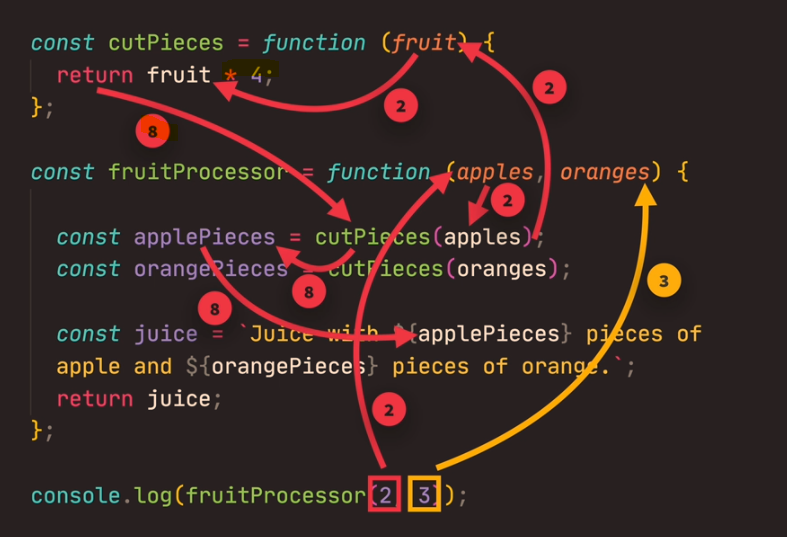
An example, might be a function that cuts up fruit pieces, and then sends the result to a function that blends it into a smoothie.

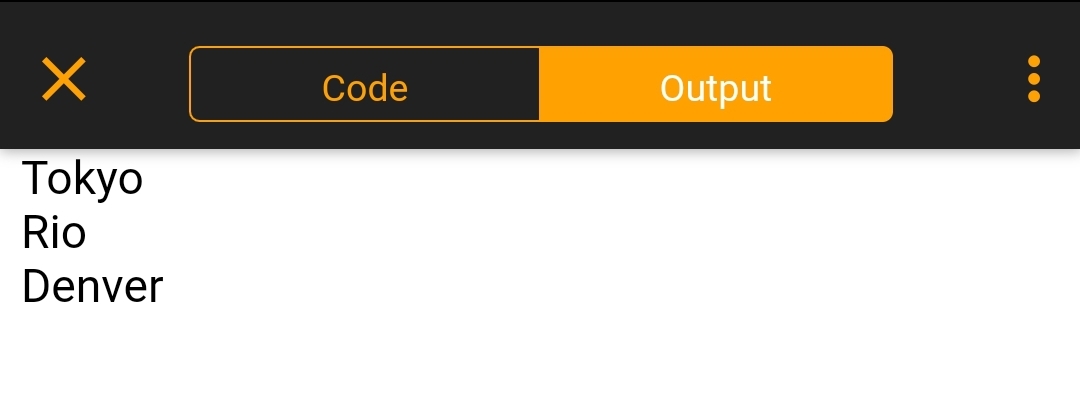
The start function used above, will print out “I am first bo! 222222!!!”

Functions Summary

A function is like a procedure. It has tasks and calculates a value.

A function requires input and must return an output.

Functions need to be defined with the word “function” and brackets ()

Brackets can also be called paranthesies, and the input is sometimes called “arguments” or “parameters”.

Image source

Image Source

Javascript Fundamentals for Beginners [2023]

Notes taken from The Complete JavaScript Course 2023 on Udemy and from across the web.

Variables in Javascript

Variables are used to store values.

Variables can be thought of like a box in the ‘real world’.

A box can hold items and can be labelled so we know what is in it.

If we create a variable and label it “firstName”

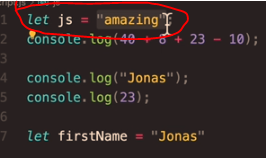
let firstName = "Jonas"

Now if we “call” or publish “firstName” we will get a value of “Jonas”

This can be extremely useful. For example, if you were to use “firstName” in hundreds of places on a website, you can just change the variable value, and in theory, all the ‘firstNames’ will update with one change in the code.

Naming Conventions for Variables

Camel case

Camel case involves having no spaces between words and leaving the first letter lowercase.

for example – firstNamePerson is written in camel case.

I guess the capital letter looks a bit like a camel’s hump.

This isn’t a hard rule, but general practice.

Hard rules for Variable Names

Variable names can’t start with a number – e.g. 3years = 3; – would result in an error because of the number “3” in the name

Symbols are generally a bad idea in variable names. You can only use letters, numbers, underscores or dollar sign.

You can’t use reserved JS keywords. e.g. “new” is a reserved keyword, as is “function” and “name”.

Don’t use all uppercase letters for variable name either. Unless it is a “constant” that never changes, such as the value of PI

Let

You declare variables with “let”, you can update the variable later, without using “let”.

Constant – used to declare variables that don’t change e.g. date of birth

Strings and Template Literals

Good tutorial here.

Template literals make it easier to build strings.

Template Literals allow you to create:

  • Multiline strings – strings (text) that spans several lines
  • String Formatting – you can change part of the string for values of variables – This is called “String Interpolation”
  • HTML Escaping – making it okay to include in HTML of a webpage

let str = `Template literal here`;

Multiline strings

In older versions of Javascript, to create a new line, or a multi-line string, you had to include the newline code

\n

The template literals allow you to define multiline strings more easily because you need to add a new line in the string wherever you want:

let p =
`This text
can
span multiple lines`;

Type Conversion and Coercion

Type coercion, type conversion, typecasting, and type juggling: all different names that refer to the process of converting one data type into another. This process is present in almost every programming language and is an important concept in computer science.

source

What is Type Conversion?

Type conversion can be :

implicit – done automatically by the code already in place

explicit – done more manually by the developer

What is Type Coercion?

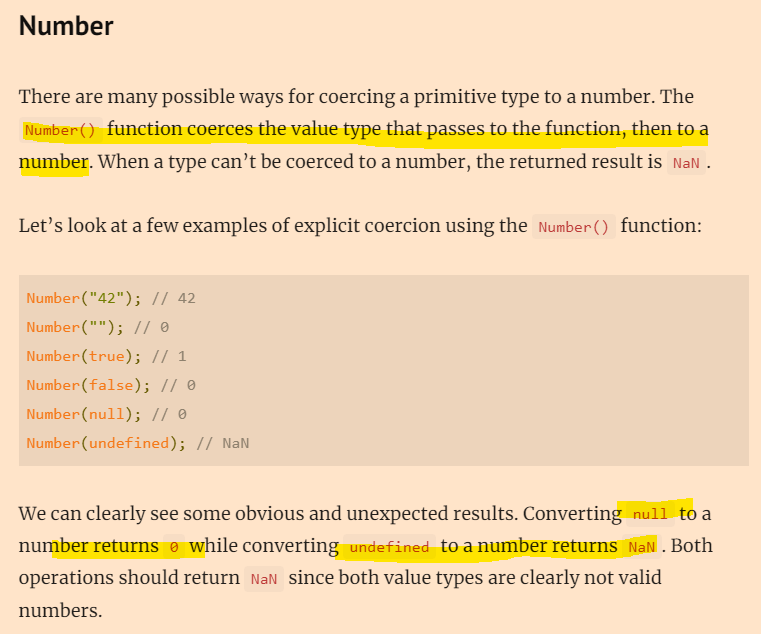
Explicit coercion happens when we want to coerce the value type to a specific type. Most of the time, explicit coercion in JavaScript happens using built-in functions such as String()Number(), and Boolean().

When we try to create operations in JavaScript using different value types, JavaScript coerces the value types for us implicitly.

This is one of the reasons why developers tend to avoid implicit coercion in JavaScript. Most of the time we get unexpected results from the operation if we don’t know exactly how JavaScript coerces the value types.

When coercion is done automatically, it can cause some weird outcomes and issues

image source

Truthy and Falsy Values in Javascript (Boolean thing)

Values are considered either truthy (evaluate to true) or falsy (evaluate to false) depending on how they are evaluated in a Boolean context.

In JS there are 6 incidences that result in, or are considered “Falsyies”

  • The primitive value undefined
  • The primitive value null
  • The empty string (''"")
  • The global property NaN
  • A number or BigInt representing 0 (0-00.0-0.00n)
  • The keyword false

All other values are considered “truthys”

When a value is truthy in Javascript, it does not means that the value is equal to true but it means that the value coerces to true when evaluated in a boolean context.

https://www.hackinbits.com/articles/js/truthy-and-falsy-values-in-javascript
truthyOrFalsy(undefined); // Falsy Value 
truthyOrFalsy(NaN);       // Falsy Value
truthyOrFalsy(null)       // Falsy Value
truthyOrFalsy("");        // Falsy Value
truthyOrFalsy(false)      // Falsy Value
truthyOrFalsy(0);         // Falsy Value
truthyOrFalsy(-0);        // Falsy Value
truthyOrFalsy(0n);        // Falsy Value


Equality Operators == and ===

JavaScript ‘==’ operator: In Javascript, the ‘==’ operator is also known as the loose equality operator which is mainly used to compare two values on both sides and then return true or false. This operator checks equality only after converting both the values to a common type i.e type coercion.

The operator using “two equals signs”, “==” is a “loose equality operator”. It will try and convert (using “coercion”) the values and then compare them.

JavaScript ‘==’ operator: In Javascript, the ‘==’ operator is also known as the loose equality operator which is mainly used to compare two values on both sides and then return true or false. This operator checks equality only after converting both the values to a common type i.e type coercion.

https://www.geeksforgeeks.org/javascript-vs-comparison-operator/

Genearlly, or loosely speaking, “==” just checks the values.

The ‘===’ operator, is the “strict operator” and checks the value and the data-type are the same.

JavaScript ‘===’ operator: Also known as strict equality operator, it compares both the value and the type which is why the name “strict equality”.

Boolean Logic

Boolean Logic is a form of algebra that is centered around three simple words known as Boolean Operators: “Or,” “And,” and “Not.” These Boolean operators are the logical conjunctions between your keywords in a search to help broaden or narrow its scope.

https://www.lotame.com/what-is-boolean-logic/

Boolean logic dictates that all values are either true or false.

Boolean data is a type of “Primitive Data Types” in Javascript. You can think of boolean values, a bit like a switch that turns on or off.

Boolean uses operators such as “AND” and “OR”.

For the result to be true in the example shown above, both A and B in the example, need to be true.

With the “OR” operator, we just need A or B to be true, for the result to be “TRUE”.

NOT operators invert the logical operators.

Returns false if its single operand can be converted to true; otherwise, returns true.

https://developer.mozilla.org/en-US/docs/Web/JavaScript/Reference/Operators/Logical_NOT#:~:text=The%20logical%20NOT%20(%20!%20),true%20%3B%20otherwise%2C%20returns%20true%20.

Logical Operators

Image source

The Switch Statement

A quick, or easier way of doing a complicated “if else” statement.

Screenshots from Udemy Course – The Complete JavaScript Course 2023: From Zero to Expert!

The switch statement can be used so that you can perform different actions, when one of a range of conditions is met.

If the condition – e.g. “Monday” in the screenshot above, is met, then the code associated with Monday, will be executed.

If there is no match at all, then the default code, shown at the bottom left of the screenshot above, will be executed.

You can also use the if/else statement as an alternative to the switch statement

If Else alternative to Switch Statement

Statements & Expressions

An expression is a piece of code that produces a value. e.g. 3 + 4 is an expression, because it creates a value.

Numbers themselves are expressions.

Booleans, which produce “true or false” is an expression

A statement, does not produce a value.

The Conditional (Ternary) Operator

The conditional operator, allows us to write something similar to an “If Else Statement”, but all in one line.

Use a question mark ? after the condition is declared, and that write the code we want executed if condition is true.

The “else” block, or the equivalent of an else block, goes after a colon :

Strict Mode in Javascript

To activate “strict mode”, right at the top of your script, you have to type:

"use strict";

As you would expect,

"use strict"; Defines that JavaScript code should be executed in “strict mode”.

Strict mode, helps developers identify mistakes and bugs in the code.

Strict mode doesn’t allow you to do certain (incorrect) things and in other instances, it will visibly show you that you’ve created an error.

For example, if you spell a variable incorrectly,