JavaScript – Primitives Vs Objects

Notes about primitives and objects data types in JavaScript

I’ve got a bit fed up of the Udemy course I’m doing on JavaScript and the videos, so I’m taking notes from different websites and I’ll do a summary at the end.

edureka.co

Primitive Data Types

Primitive data types are number, string, boolean, NULL, Infinity and symbol. Non-primitive data types is the object. The JavaScript arrays and functions are also objects. For more check out this web developer course online.

flaviocopes

Follow Flavio on Twitter

What is the main difference between primitive types and objects in JavaScript?

First, let’s define what are primitive types.

Primitive types in JavaScript are

  • strings
  • numbers (Number and BigInt)
  • booleans (true or false)
  • undefined
  • Symbol values

null is a special primitive type. If you run typeof null you’ll get 'object' back, but it’s actually a primitive type.

Everything that is not a primitive type is an object.

Functions are objects, too. We can set properties and method on functions. typeof will return 'function' but the Function constructor derives from the Object constructor.

The big differences between primitive types and objects are

  • primitive types are immutable, objects only have an immutable reference, but their value can change over time
  • primitive types are passed by value. Objects are passed by reference
  • primitive types are copied by value. Objects are copied by reference
  • primitive types are compared by value. Objects are compared by reference

dev.to

Javascript Types

There are eight data types in Javascript:

  1. string
  2. number
  3. bigint
  4. boolean
  5. undefined
  6. null
  7. symbol
  8. Object

The first 7 of them are commonly called Primitive Types and everything else are Object Types.

Primitive Types

They can only store a single data, have no methods and are immutable. (An immutable value is one whose content cannot be changed without creating an entirely new value. In JavaScript, primitive values are immutable — once a primitive value is created, it cannot be changed, although the variable that holds it may be reassigned another value).

That’s another interesting point! Primitive Types have no methods but, except for null and undefined, they all have object equivalents that wrap the primitive values then we’re able to use methods.

For string primitive there is String object, for number primitive there is Number, and so there are BooleanBigInt and Symbol.

Javascript automatically converts the primitives to their corresponding objects when a method is to be invoked. Javascript wraps the primitive and call the method.

Object Types

Differently from the primitives, Objects can store collections of data, their properties, and are mutable.

Differences between types

1. Assigning to a variable and copying value

The difference in the way the values are stored in variables is what makes people usually call Object Types as Reference Types.

Primitive Types

When we assign a primitive type to a variable, we can think of that variable as containing that primitive value.

let car = "tesla"
let year = 2021

// Variable - Value
// car      - "tesla"
// year     - 2021

So when we assign this variable to another variable, we are copying that value to the new variable. Thus, primitive types are “copied by value”.

let car = "tesla"
let newCar = car

// Variable - Value
// car      - "tesla"
// newCar   - "tesla"

Since we copied the primitive values directly, both variables are separate and if we change one we don’t affect the other.

let car = "tesla"
let newCar = car

car = "audi"

// Variable - Value
// car      - "audi"
// newCar   - "tesla"

Object Types

With Object Types things are different. When we assign an object to a variable, the variable is given a reference to that value. This reference stores the address to the location of that value in memory(techically more than that but let’s simplify). So the variable doesn’t has the value itself.

Let’s imagine the variable, the value it stores, the address in memory and the object in the coming snippets:

let cars = ["tesla"]

// Variable - Value                 - Address - Object
// cars      - <#001> (The reference) - #001    - ["tesla"]

This way, when we assign this variable to another one we are giving it the reference for the object and not copying the object itself like it happens with the primitive value. Thus, objects types are “copied by reference”.

let cars = ["tesla"]
let newCars = cars

// Variable  - Value                 - Address - Object
// cars      - <#001> (The reference) - #001    - ["tesla"]
// newCars   - <#001> (The reference stores the same address)

cars = ["tesla", "audi"]

// Variable  - Value                 - Address - Object
// cars      - <#001> (The reference) - #001    - ["tesla", "audi"]
// newCars   - <#001> (The reference stores the same address)

console.log(cars) // ["tesla", "audi"]
console.log(newCars) // ["tesla", "audi"]

Both of them have references to the same array object. So when we modify the object from one of the variables the other will also have this change.

  • Primitives are ummutable
  • You can’t alter the original primitive, instead it will return a new primitive value
  • Primitives, also have an object counterpart
  • When used with some methods, primitive values get wrapped into an object – once it’s finished, it turns back to a primitive value
  • It does this, because objects can have properties

  • The new keyword creates a blank object, it links the blank object to the parent

JavaScript – What is the DOM & DOM Manipulation? [2023]

The Document Object Model – is a structured representation of an HTML document.

You can use the DOM to “connect” HTML to CSS and JS.

The DOM is often said to have a tree structure or a hierarchy like a family with children and parents

Image source

Selecting & Manipulating Elements with JavaScript

You can use “document” to ‘enter’ the document – as in the top level of the HTML document as shown in the tree diagram above.

  • use “querySelector” to select a specific element in the DOM.

For example document.querySelector(‘.message’).textContent

Will select the text content of the element with the class of “message”

Once you have selected the content, use the equals sign = to update it.

document.querySelector(‘.message’).textContent = ‘Correct Number!’

The ‘code’ on the line above, will change the text-content found in the element .message to “Correct Number!”

“textContent” will only work if the element is something like a paragraph, that holds content.

If you have a value input field, like on a form or something similar, you may have to use .value instead of .textContent

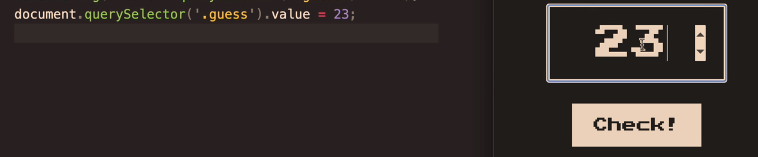
document.querySelector(‘.guess’).value = 23;

The code on the left, adds “23” as the input value to the form/input field on the right^

Screenshot from The Complete JavaScript Course

Handling Click Events

In this example, the button has a class of “check”

document.querySelector(‘.check’) – will select the button with the class of “check”

Then we need to use the addEventListener() method. The addEventListener method, basically looks out for events such as button clicks.

Image Source

Event Listener ^looks out for events such as button clicks.

We can add the event we want to look out for, in this example a click:

addEventListener(‘click’)

  • Now we need to tell the event listener what to do what it observers a click

addEventListener(‘click’ function () {
console.log(document.querySelector(‘.guess’).value);});

The code in bold, will take the value from the element called “guess” and print it to the “console.log”.

Screenshot from The Complete JavaScript Course

The code above prints 9 to the console.log

the element with the class of “guess” is the form input field containing the number 9:

Adding “Game Logic”

The aim of game in the screenshot above – guess the secret number

We need to randomly create a number and then tell the user when the number they guess is too high, too low or correct.

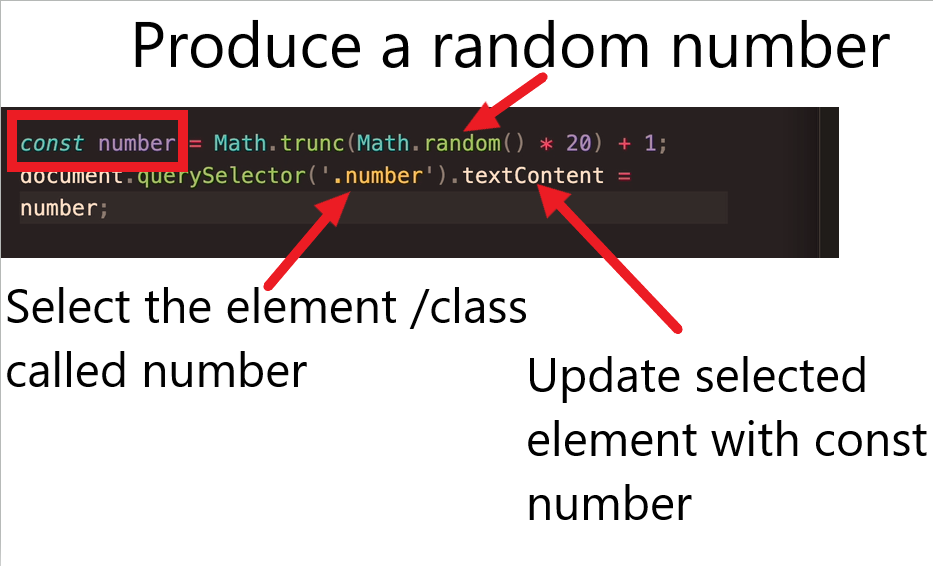
  • Producing the secret number

const number = (Math.truncMath.random()*20)

Math.random gives a number between 0 and 1

Match.trunc rounds up or down the number to the nearest whole number.

Multiplting the random number by 20 makes the number, well, larger

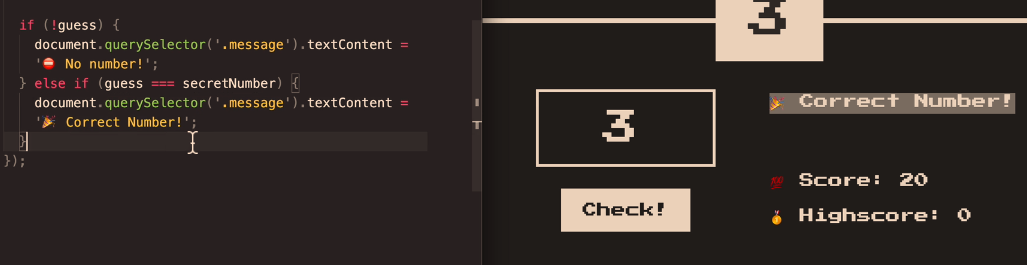
  • Checking the User Input Vs the Secret Number

if (!guess) {

document.querySelector(‘.message’).textContent = ‘No Number’;}

else if (guess === secretNumber) {

document.querySelector(‘.message‘).textContent = ‘Correct Number!’;

}

The code above will print “No number” if a number isn’t entered into the relevant form field.

if the number entered (the guess), is equal to the secretNumber – then the code will print “Correct Number!” – to the element with the class of “message“.

What if the guess is greater than the Secret Number?

else if (guess > secretNumber) {

document.querSelector(‘.message’).textContent=’Too high!’

and if it’s too low:

else if (guess < secretNumber) {

document.querSelector(‘.message’).textContent=’Too low!’

So all the code together will look like:

Adding a Score to The Game

The score will start at 20 and decrease for every wrong guess.

So, if the user guesses too low, reduce the score by 1

We also need to add a variable for the original/starting score, after the secretNumber is declared (or the code to create the secretNumber anyway)

Declare the score with:

let score = 20;

The score is part of the “application state”. The score is available in the code and not just in the DOM

Game Over

To tell the player when they’ve lost the game, we need to add a condition related to the score variable:

if (score > 1) {

https://www.udemy.com/course/the-complete-javascript-course/learn/lecture/22648419#learning-tools

Manipulating CSS When Player Wins- Change Background Colour

First select the whole <body> element

document.querySelector(‘body’).style.backgroundColor = ‘#60347’;

Implementing a High Score ‘Box’

Just like the regular, current score, we need to store the high-score in a variable.

use the code

let highscore = 0;

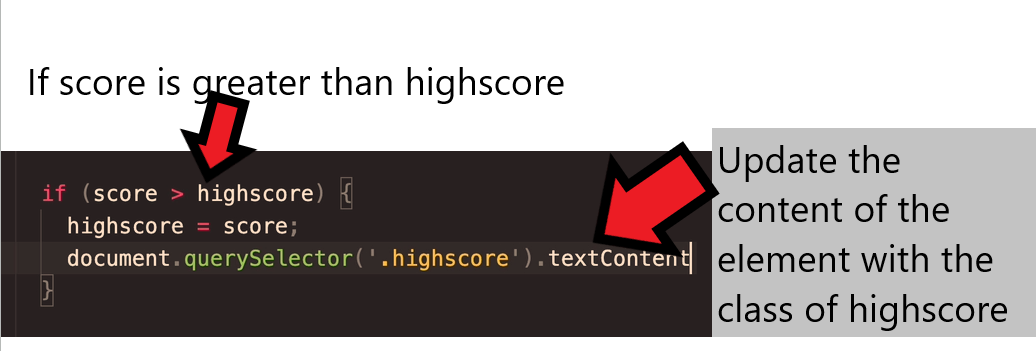
We need to check if the current score is greater than the existing game’s score

if (score > highscore) {

highscore = score;

}

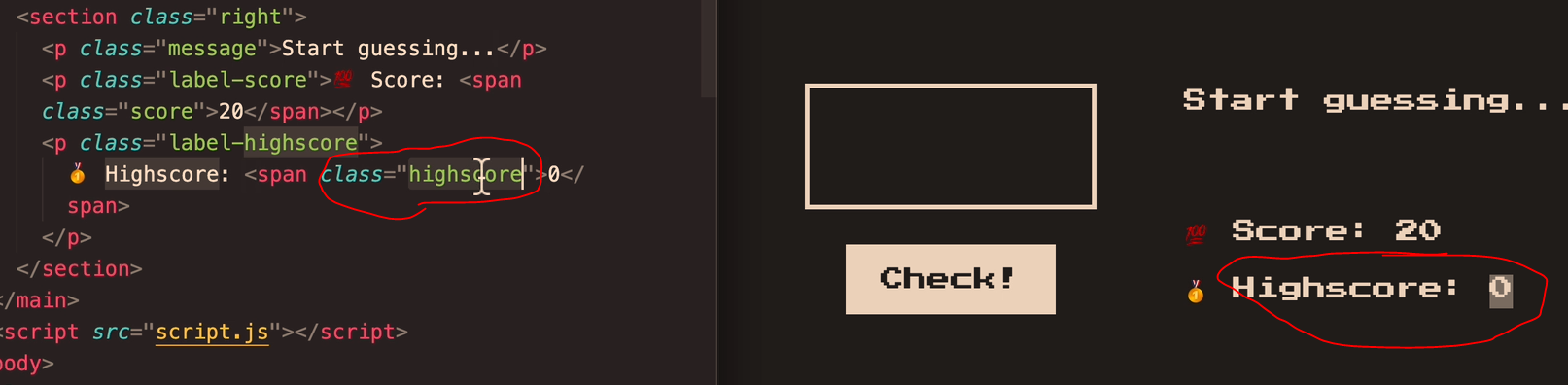
Assuming the “HighScore” Box has already been made – we need to check what the class is.

In the this case, the class = “highscore”

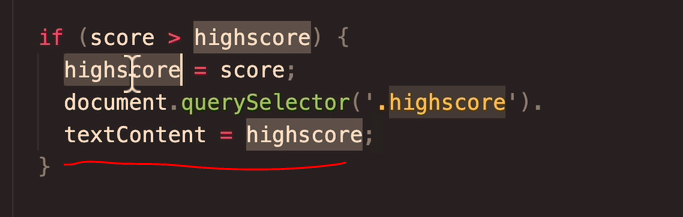
Now we need a way to update the highscore, when the current score is greater.

document.querySelector(‘.highscore’).

textContent = highscore;

https://www.udemy.com/course/the-complete-javascript-course/learn/lecture/22648427#learning-tools

Getting Rid of Duplicate Code (DRY Principle)

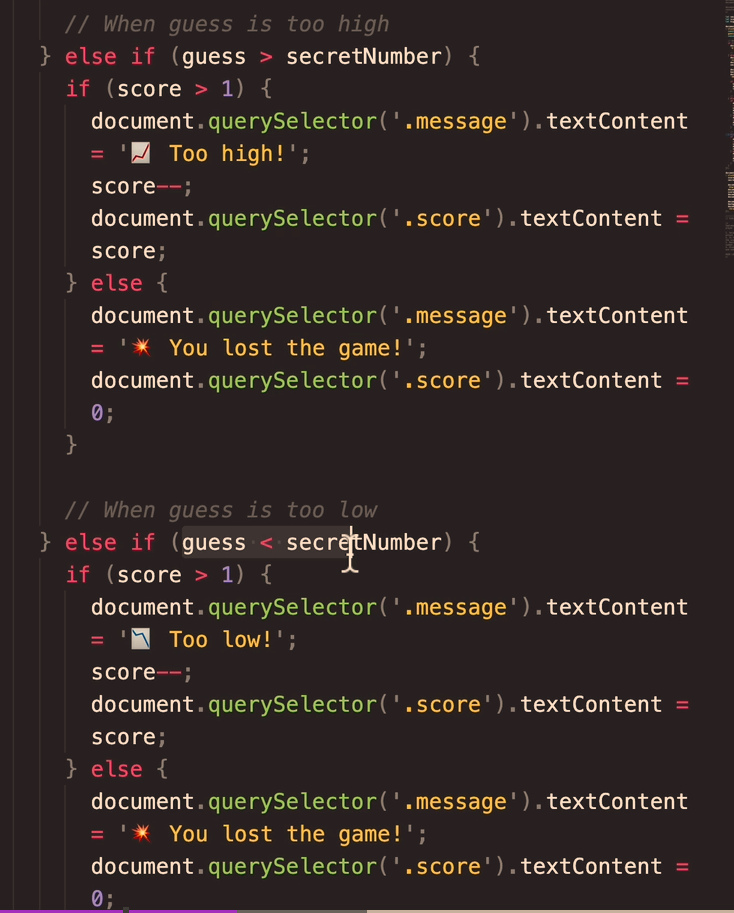
The code if the guess is too high, or if the guess is too low code is pretty much duplicate code

Remember

Dont Repeat Yourself DRY

There’s no problem starting out with repeated code, and then refactor the code once it’s all working

  • ID duplicate or close-duplicate code
  • Refactor the facker

Change the code above, to a “when guess is wrong” code block.

Use a ternary operator