
Hello, I’m having another go at learning code. I’m an SEO Executive but have been coding quite a few of our SEO-related pages in my day job.
Plan is to do courses on Udemy, then create a blog post about them and do an example. I’ll probably have to do the example on Codepen as I can’t embed code in the free WP blog.
CSS selectors, are used in CSS style sheets to determine what styles to apply to what HTML elements.
In Line CSS (bit chavvy)
e.g. <H1 style = "margin-bottom 0px;"
CSS in Script Tags
- You can add it, somewhere on the HTML doc within <style> </style> tags
<html>
<head>
<style>
  h1 {color:red;}
  p {color:blue;}
</style>
</head>
CSS in an external Style Sheet
Usually the best solution, is to create a separate Style Sheet
To do this you need a line of code (or markup) linking the HTML doc to the CSS sheet.
For example, if you save and name your stylesheet as styles.css:
<!DOCTYPE html>
<html>
<head>
  <link rel="stylesheet" href="styles.css">
</head>
Best practice is to put all your styles in a separate stylesheet. Dunno why, just go with it for now.
If you put your CSS in script tags, or in a stylesheet, you’ll need to use Bo selectors.
- Imagine you’re a parent.
- HTML elements are your kids
- The CSS style sheet are the instructions you’re giving to the baby-sitter on how to look after your kids.
Great analogy, I know.
You can be an overprotective, bit of a bellend of a parent and use inline CSS to give you micro-management and control over your kids, but you generally don’t want to do that.
Types of CSS Selectors
ID & Class selectors are the most commonly used. Class selectors for sure. But I’ve listed class selectors second, just to be annoying.
ID selectors
-
- Id selectors use a hashtag, like Twitter but it’s not full of political wankers and Chinese bots – #
- Use these selectors sparingly, class selectors usually work better/are preferred.
- If you run the codepen below, hopefully you’ll see that I’ve selected only the first ID, and made it blue
-
- ID selectors are specific and therefore override more general selectors
Class Selectors
- The most commonly used type of selector
- very versatile
- Well supported in most browsers – probably all browsers except for like IE 6
- You can add multiple classes to an HTML element, so you can style it multiple ways with a class selector
- If you run the pen below, you should see the first class coloured pink
Tag Selectors
- HTML tags like <h1> and <p> can be targeted directly with tag selectors
- Tag selectors are sometimes used to unset styles that browsers set by default
- Tag selectors are not so popular. Stick with class selectors if possible.
- Just type the name of the tag e.g. H2 and then open curly brackets, add style and close brackets
Attribute Selectors
- The value within your HTML tags is called an attribute
- You can target them directly with CSS attribute selectors
Positional Selectors
– Decent type of selector when trying to style individual elements of a list or div
– To style the second item on a list – prefix the CSS with “li”:
li:nth-child(2)
Here’s a cool CSS Cheat Sheet / infographic
CSS Cheat Sheet

For a much better tutorial about CSS selectors visit – https://css-tricks.com/how-css-selectors-work/
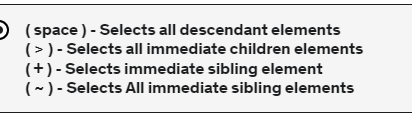
Here are some more selectors from the quiz on the CSS Bootcamp course on Udemy
 Small Business Dad