
Notes taken from The Complete JavaScript Course 2023: From Zero to Expert! course on Udemy.
Why would you use a for loop?
I asked Chat GPT this very question, and got this answer:
In JavaScript, a “for” loop is a control flow statement that allows you to execute a block of code a certain number of times. The “for” loop includes initialization, a condition, and incrementation/decrementation.
Here are some reasons and scenarios for using a “for” loop:
- Iterating over arrays: You might use a “for” loop when you need to iterate over an array of elements. Each loop iteration corresponds to one element in the array, so you can do something with each individual item.
Example:let arr = [1, 2, 3, 4, 5]; for (let i = 0; i < arr.length; i++) { console.log(arr[i]); // prints each element of the array } - Repetitive tasks: You would use a “for” loop when you need to perform a task a certain number of times. The “for” loop is a straightforward way to repeat a task.
Example:for (let i = 0; i < 10; i++) { console.log(i); // prints numbers 0 to 9 } - Traversing strings: Similar to arrays, you can use a “for” loop to traverse each character in a string.
Example:let str = "Hello, World!"; for (let i = 0; i < str.length; i++) { console.log(str[i]); // prints each character in the string } - Nested loops: You can use “for” loops inside other “for” loops when dealing with multi-dimensional data, such as a matrix or 2D array.
Example:let matrix = [[1, 2, 3], [4, 5, 6], [7, 8, 9]]; for (let i = 0; i < matrix.length; i++) { for (let j = 0; j < matrix[i].length; j++) { console.log(matrix[i][j]);// prints each element in the matrix } }
Please note that while “for” loops are a classic control flow mechanism, there are other methods in JavaScript for similar use-cases, especially for arrays. This includes methods like Array.prototype.forEach, Array.prototype.map, Array.prototype.filter, and others, which might provide cleaner and more readable code in some scenarios. However, understanding the workings of a “for” loop is fundamental for programming in JavaScript and many other languages.
What are for loops?
Loops, by default, start at the beginning of an array, and work forwards, from variable/element 0 to element 10 – if an array has 10 elements.
Loops can also start at the end, say element 10 and work back to the first element.
for (let i = arrayname.length - 1; i>=0; i--)
In the code above.
The counter called “i” will keep running along as the variable/element is greater than or equal to 0 (the variable number, as in it’s order starting from 0)
Every time the loop runs, instead of adding 1 to “i”, subtract 1.
To print the current element to the console.log, the code should be:
for (let i = arrayname.length - 1; i>=0; i--) {
console.log(jonas[i]);
}

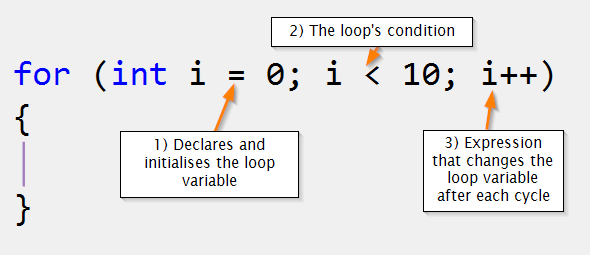
This image from kodify.net explains the parts of a standard for loop quite nicely
Loop inside a Loop

Loops within loops, are sometimes called “nested loops”.

With a nested loop, the outer loop executes first, and the inner loop executes each time the outer loop executes.

If condition 1 is true, then condition 2 will execute.
For a much better explanation, please visit the educba.com website here.
Oh, one more thing that might be useful, I asked Chat GPT to explain for loops like I’m 10 years old:
“Imagine you have a big box of Lego blocks, and you want to look at each block one by one. You would start from the first block, then move to the second, then the third, and so on, until you’ve seen all the blocks. A “for” loop in JavaScript is like doing that – it’s a way for your computer to look at or do something with each item in a list, one at a time, from start to finish.
Here’s a real-life example:
Let’s say you’re on a website that shows all the movies currently playing in theaters. When the website wants to show you all the movie names, it might have a list (in programming, we call this an array) of all those movies. But how does it get from a list of movies to showing each one on your screen? It can use a “for” loop!
In the code of the website, it might look something like this:
let movies = ["Toy Story 4", "The Lion King", "Frozen 2", "Star Wars: The Rise of Skywalker"]; // This is the list of movies.

for (let i = 0; i < movies.length; i++) {
  console.log(movies[i]); // This will show each movie name, one after the other.
}
In this example, i is like a pointer that starts at the beginning of the list (0) and moves one step forward each time the loop runs (i++). The loop keeps going as long as i is less than the length of the list (i < movies.length). And in each loop, movies[i] is how we access each movie name.
This “for” loop helps the website to go through every movie in the list and do something with it – like showing it on your screen!”




 Small Business Dad