
A for loop, is a loop that will loop through (go through) the elements in an array or the properties of an Object.
You can use it to update arrays, count the number of elements etc
Loops can execute a block of code several times.
With arrays, it’s common(ish) to run the same code over with a different value.


For Loops tend to be used with arrays (I think!)
The code below the array in the screenshot below, starting with “for”, loops through the variable called “names” above it.
Once it loops through it create “name” and then “console.log(name);” will get it to print on the console.log screen

- console.log just provides a way of testing and outputting stuff using web developer tools, inspect element etc.
The code below, will do the same as above, but this time it will add “Hello there” before each of the names:

You can also add if conditions. For example, in the code below, the loop will check if “Maria” is in the list, and if so, will print out “Maria is in my list”
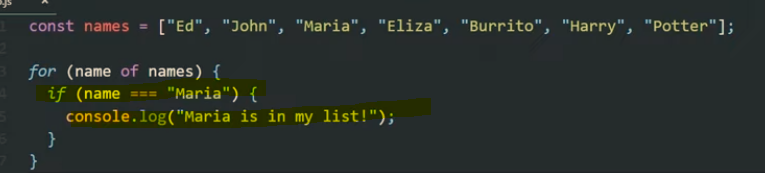
You can get the loop to stop once it finds “Maria” by using the “break” keyword.

The above code will print “Ed, John and then Maria and “Maria is in my list”. It will then stop and it won’t print all the names up to “Potter”.
As well as using the for loop with arrays, you can also use it with a single variable like “age”, and add an incremented – for example “age++”
The code shown below will print out and loop 10 times. starting at 0, and then 1, 2 etc. until finally the condition age <10 is no longer met

When the age is 10, it will stop.
A web dev example
Get all the links on a page, and return the number of the links on the page.

When the loop gets to the 6th link, it is no longer less than links.length, and so the loop stops:
(you can click the image to see a lager version, the important code is :
for (i = 0; i < links.length; i++)
To print out the final link, change “<links.length” to “<= links.length” – meaning “less than or equal to links.length”
for (i = 0; i <= links.length; i++)
For In Loops
For in loops, are the same as for loops except they are shorter to write but less flexible.

For Loop Example with an Array
Work out the age of people, given an array with their year of birth in it.
start with the array and then a new array, which will hold the ages:
const years = [1991, 2007, 1969, 2020]
const ages = [];
for(let I = 0; I <years.length; i++) {
ages.push (2023 – years [i] );
}
console.log(ages);
the “ages.push” code, will psh the results into the ages array
Continue & Break Statements
Continue is to exit the current iteration and move to the next one
Break will exit completely.
You can use with an if statement

If the type of the current element, is not a string, then continue.
This will skip any elements/values that are not strings. Continue will exit the current iteration and not print to the console.log
Using break, will terminate the loop completely.




 Small Business Dad