
Go to configuration (top menu bar)
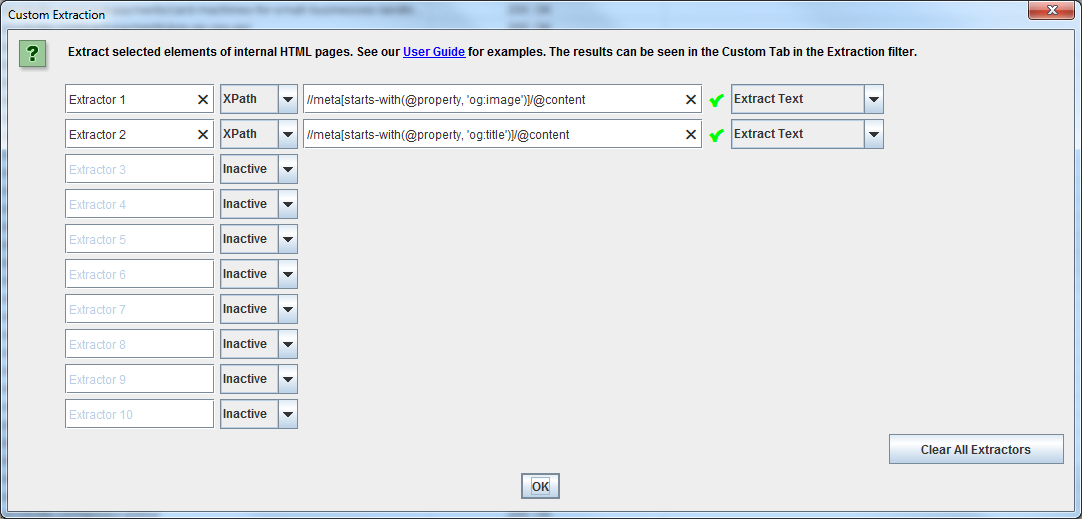
Go to Custom –> Extraction
Choose XPath from the drop down menu
Then to scrape og:image URLs add the code:
//meta[starts-with(@property, 'og:image')]/@content
//meta[starts-with(@property, ‘og:title’)]/@content
(Please note – be careful copy and pasting the code above, sometimes the ‘ quote marks get changed to curly format, which will prevent the extraction from working).
To see your results go to:
“Custom” tab
Then scroll right to see “Extractor 1” and “Extractor 2”
If the column is empty, it should mean that there is nothing declared for that og specification
It’s also a good idea to generate all the schema reports.
In the menu at the top of Screaming Frog go to “Configuration > Spider > Extraction ‘tab’ > Structured data ‘box’ >tick all the check boxes, or the ones that correspond to your schema or open graph data format.
 Small Business Dad