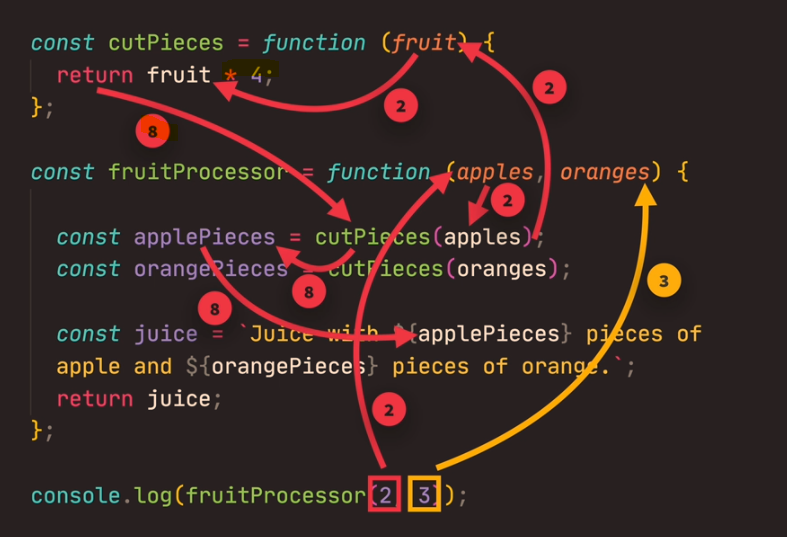
Function expressions are invoked to avoid polluting the global scope. Instead of your program being aware of many different functions, when you keep them anonymous, they are used and forgotten immediately.
To summarize, function declarations are utilized when you desire to establish a function in the global scope that can be accessed anywhere in your code. On the other hand, function expressions are employed to confine the accessibility of the function, reduce the weight of the global scope, and maintain a neat syntax.
Variables can be thought of like a box in the ‘real world’.
A box can hold items and can be labelled so we know what is in it.
If we create a variable and label it “firstName”
let firstName = "Jonas"
Now if we “call” or publish “firstName” we will get a value of “Jonas”
This can be extremely useful. For example, if you were to use “firstName” in hundreds of places on a website, you can just change the variable value, and in theory, all the ‘firstNames’ will update with one change in the code.
Naming Conventions for Variables
Camel case
Camel case involves having no spaces between words and leaving the first letter lowercase.
for example – firstNamePerson is written in camel case.
I guess the capital letter looks a bit like a camel’s hump.
This isn’t a hard rule, but general practice.
Hard rules for Variable Names
Variable names can’t start with a number – e.g. 3years = 3; – would result in an error because of the number “3” in the name
Symbols are generally a bad idea in variable names. You can only use letters, numbers, underscores or dollar sign.
You can’t use reserved JS keywords. e.g. “new” is a reserved keyword, as is “function” and “name”.
Don’t use all uppercase letters for variable name either. Unless it is a “constant” that never changes, such as the value of PI
Let
You declare variables with “let”, you can update the variable later, without using “let”.
Constant – used to declare variables that don’t change e.g. date of birth
Template literals make it easier to build strings.
Template Literals allow you to create:
Multiline strings – strings (text) that spans several lines
String Formatting – you can change part of the string for values of variables – This is called “String Interpolation”
HTML Escaping – making it okay to include in HTML of a webpage
let str = `Template literal here`;
Multiline strings
In older versions of Javascript, to create a new line, or a multi-line string, you had to include the newline code
\n
The template literals allow you to define multiline strings more easily because you need to add a new line in the string wherever you want:
let p =
`This text
can
span multiple lines`;
Type Conversion and Coercion
Type coercion, type conversion, typecasting, and type juggling: all different names that refer to the process of converting one data type into another. This process is present in almost every programming language and is an important concept in computer science.
implicit – done automatically by the code already in place
explicit – done more manually by the developer
What is Type Coercion?
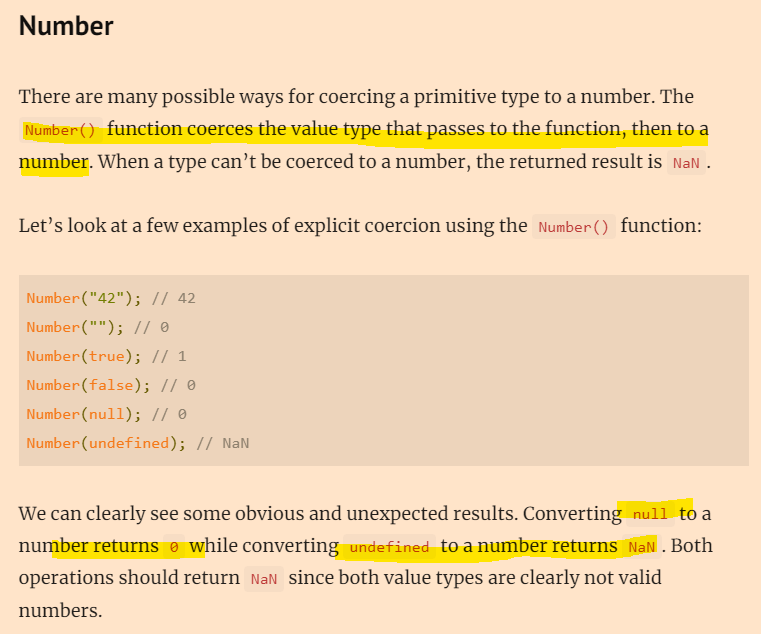
Explicit coercion happens when we want to coerce the value type to a specific type. Most of the time, explicit coercion in JavaScript happens using built-in functions such as String(), Number(), and Boolean().
When we try to create operations in JavaScript using different value types, JavaScript coerces the value types for us implicitly.
This is one of the reasons why developers tend to avoid implicit coercion in JavaScript. Most of the time we get unexpected results from the operation if we don’t know exactly how JavaScript coerces the value types.
When coercion is done automatically, it can cause some weird outcomes and issues
Truthy and Falsy Values in Javascript (Boolean thing)
Values are considered either truthy (evaluate to true) or falsy (evaluate to false) depending on how they are evaluated in a Boolean context.
In JS there are 6 incidences that result in, or are considered “Falsyies”
The primitive value undefined
The primitive value null
The empty string ('', "")
The global property NaN
A number or BigInt representing 0 (0, -0, 0.0, -0.0, 0n)
The keyword false
All other values are considered “truthys”
When a value is truthy in Javascript, it does not means that the value is equal to true but it means that the value coerces to true when evaluated in a boolean context.
truthyOrFalsy(undefined); // Falsy Value
truthyOrFalsy(NaN);       // Falsy Value
truthyOrFalsy(null)       // Falsy Value
truthyOrFalsy("");        // Falsy Value
truthyOrFalsy(false)      // Falsy Value
truthyOrFalsy(0);         // Falsy Value
truthyOrFalsy(-0);        // Falsy Value
truthyOrFalsy(0n);        // Falsy Value
Equality Operators == and ===
JavaScript ‘==’ operator: In Javascript, the ‘==’ operator is also known as the loose equality operator which is mainly used to compare two values on both sides and then return true or false. This operator checks equality only after converting both the values to a common type i.e type coercion.
The operator using “two equals signs”, “==” is a “loose equality operator”. It will try and convert (using “coercion”) the values and then compare them.
JavaScript ‘==’ operator: In Javascript, the ‘==’ operator is also known as the loose equality operator which is mainly used to compare two values on both sides and then return true or false. This operator checks equality only after converting both the values to a common type i.e type coercion.
Genearlly, or loosely speaking, “==” just checks the values.
The ‘===’ operator, is the “strict operator” and checks the value and the data-type are the same.
JavaScript ‘===’ operator: Also known as strict equality operator, it compares both the value and the type which is why the name “strict equality”.
Boolean Logic
Boolean Logic is a form of algebra that is centered around three simple words known as Boolean Operators: “Or,” “And,” and “Not.” These Boolean operators are the logical conjunctions between your keywords in a search to help broaden or narrow its scope.









 Small Business Dad