How to Crawl a Sub-Folder Only in Screaming Frog [2025] – example.com/example-sub-folder/

If You’re Folder URL Resolves with a 200 with a trailing slash /

For example – to crawl mysite.com/buyers-guides/

To crawl only URLs in the /buyers-guides/ folder on mysite.com using Screaming Frog, follow these steps:

  1. Open Screaming Frog SEO Spider and enter the URL: https://www.mysite.com/buyers-guides/
  2. Go to Configuration > Spider > Crawl
  3. Under “Crawl Limits,” select “Limit Crawl Depth” and set it to 1 to crawl only the specified folder
  4. In the “Include” box, add this pattern: https://www.mysite.com/buyers-guides/.*
  5. Start the crawl by clicking the “Start” button

This configuration will ensure Screaming Frog only crawls URLs within the /buyers-guides/ folder on networldsports.co.uk, excluding other sections of the website.


If You’re Folder URL Resolves with a 200 without a trailing slash /

https://www.mysite.com/buyers-guides

Enter the URL of the domain plus sub/folder into the main address bar on Screaming Frog.

Choose Sub-folder option to the right of the address bar:
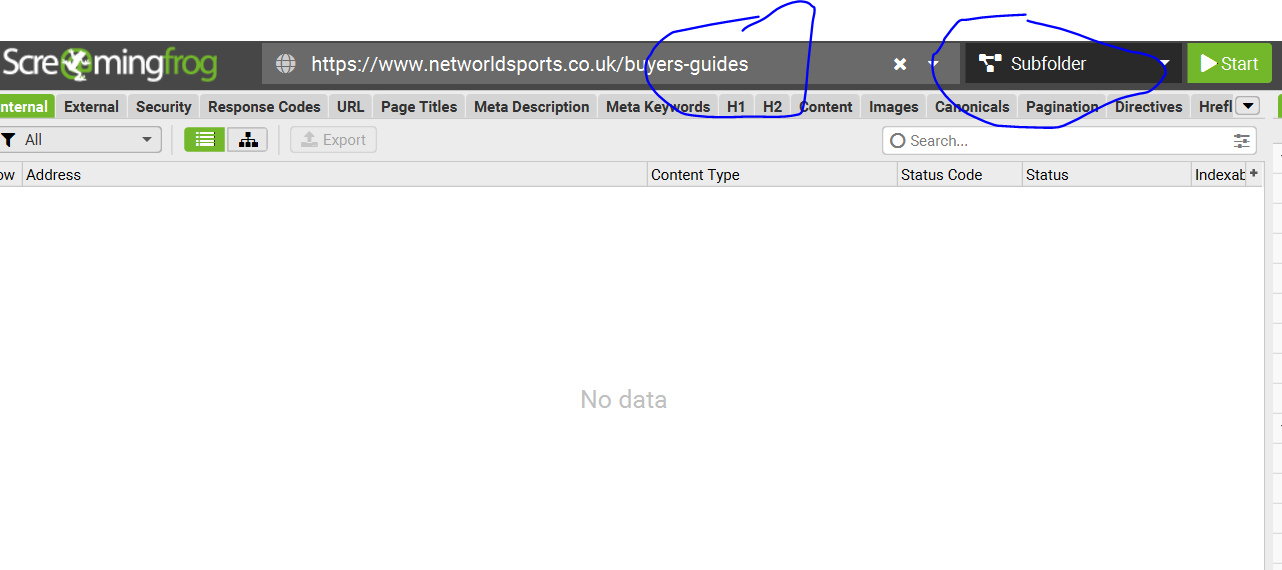
Go to Configuration (top menu bar, to the left) >Spider > crawl > Include
– Add the sub-folder (without trailing slash) to the include section:

Click “Start”. (Button to the right of the “Subfolder” drop down).


Crawling a sub-folder – plus all internal & external links that are contained within the sub-folder pages.

The protocol above would only check the status codes of any URLs actually held within the /buyers-guides/ folder.

For example, if a football goal guide, links to the FA’s website, and 404s, the above methods would not pick this up (as the FA doesn’t have /buyers-guides/ in the homepage etc)

  1. Crawl and check all the URLs within a sub-folder e.g.

https://www.example.com/buyers-guides


2. get the status codes of any internal and external link, that point to outside the folder?


For example:


Our football goal guide –

https://www.example.com/buyers-guides/football-pitch-size-guide

Contains links that point outside of the buyers-guides folder, like to our product pages and external links to thefa.com etc.

Sub-Folder with Trailing Slash /buyers-guides/

Crawl https://www.example.com/buyers-guides/ with ‘Crawl Outside of Start Folder’ disabled, but with ‘Check Links OutSide of Start Folder’ enabled.

Sub-Folder with NO Trailing Slash /buyers-guides

Perform the crawl outlined above (using the include), get the list of https://www.example.com/buyers-guides URLs

then switch to list mode (Mode > List), go to ‘Config > Spider > Limits‘ and change the ‘Limit Crawl Depth’ from ‘0’ to ‘1” and upload and crawl the URLs

Remember to delete in include /buyers-guides from the crawl config before doing the above
i.e. Config>Spider>Include – remove anything in the box/field.
Ranking in Google’s Free Organic Product Listings & Grids [2025]

The free Shopping listings currently take the form of

  • Organic Product Grids
  • Product knowledge panels
  • Image search results
  • Shopping tab

Reports to Check for Free Shopping Listings

GA4 – Acquisition – User Acquisition > organic SHopping (Keep in mind the recent non-PDP auto-tagging changes – might need customisation in GA4)

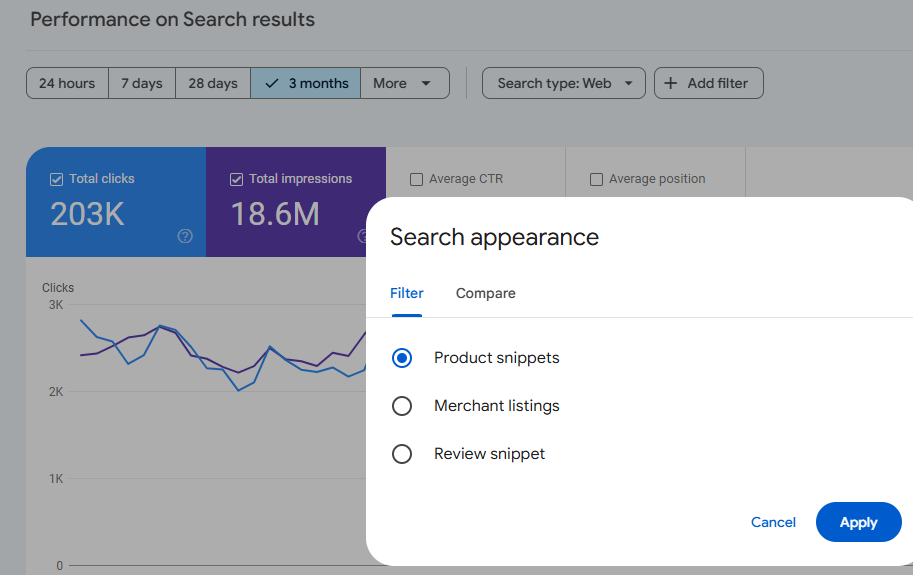
Search Console – > Performance Report > Add Filter > Merchant Listings
(There are reports for Search type: Web and Search Type: Image – just add the Search Appearance filter

Optimizing Your Product Feed

A well-optimized product feed is crucial for ranking in free Shopping listings. Focus on these key attributes:

  • Image link
  • Description
  • Brand
  • GTIN
  • MPN
  • Color
  • Size
  • Material
  • Title (highly influential for free listings and CTR)

Leveraging Merchant Features

To stand out in free shopping grids, optimise and complete the following merchant features:

  • Seller ratings (aim for 5-star reviews within the last 12 months)
  • Top quality score
  • Promotions (e.g., coupon codes)
  • Local free listings
  • “Buy Now” button
  • Payment options (PayPal, Google Pay)
  • Loyalty programs
  • Competitive pricing
  • Clear shipping and returns policies

Free Shopping Grids & Structured Data

Products with the best price tend to rank highest

Shipping policy & returns policy – can affect rankings significantly

In Search console there are warnings that show if u don’t have these set up in merchant center or in structured data.can ignore the warnings sometimes tho

Structured data – although we have seen google may unify product feeds and structured data in the near future

Influence for Free Shopping Grids & Listing – 

*Most influential* Website content →Product Feeds→ structured data. *Least influential*

Case Study: Improving Eligibility with Schema Changes

A recent case study demonstrated the impact of schema optimization:

  • Problem: Aggregate offer schema prevented merchant listing eligibility
  • Solution: Switched to ProductGroup schema
  • Result: Increased eligibility for product grids and boosted revenue

Additional Tips for Organic Google Shopping Success

  1. Optimize product titles with relevant keywords & attributes
  2. Use high-quality, unique product images – lifestyle usually best but A/B test
  3. Keep your product feed up-to-date and as accurate as possible
  4. Encourage customer reviews to improve seller ratings – might be wise to pick and choose if possible!
  5. Implement proper category mapping in your product feed
  6. Use custom labels to organize and group products effectively
  7. Optimize your landing pages – A/B test them
  8. Monitor and address any warnings in Google Search Console
  9. A/B test descriptions to improve click-through rates
  10. Regularly analyze competitor listings

Key Takeaways

  1. Use the tools – Search Console, Merchant Center, and GA4
  2. Sort out Search Console first, then monitor with GA4 and Merchant Center
  3. Implement an extensive set of product feed attributes
  4. Optimize product titles for maximum impact
  5. Highlight your unique selling propositions (price, returns, shipping, etc.) & strong selling points too
  6. Fix and address any warnings in Google Search Console
  7. Maintain consistency across your website, product feed, and structured data
  8. A/B test everything you can – if you have enough data etc!