
If you go to Menus – configuration > Custom > Custom Extraction
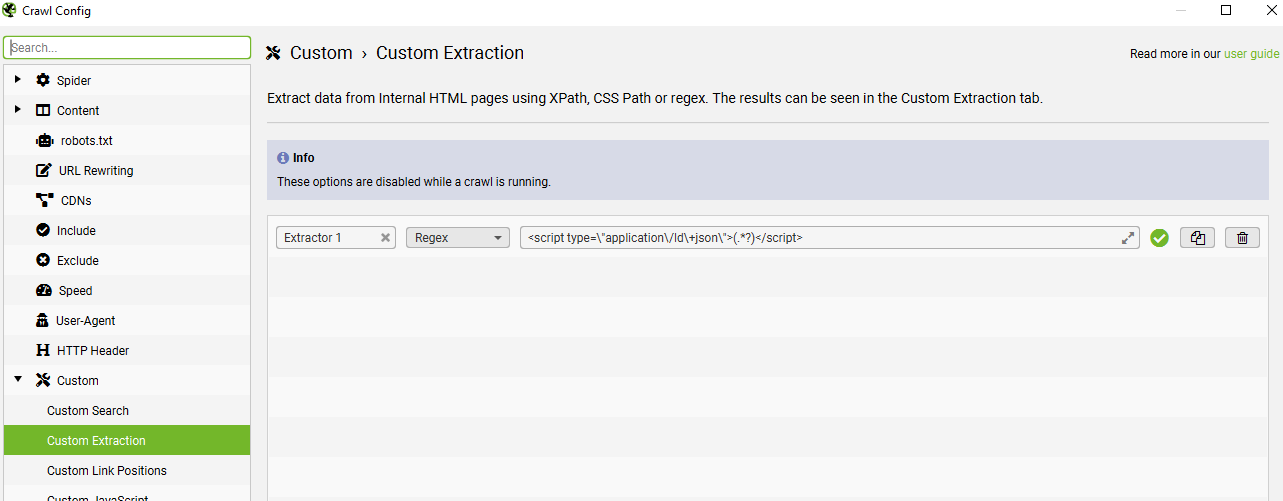
Click the +Add button on the bottom right and choose “Regex” from the drop-down menu, which is to the right of “Extractor 1” text box.
Add the code below, in the box/field to the right of “Regex”.
<script type=\"application\/ld\+json\">(.*?)</script>
I’m using the code below, to extract product schema only – I can export to excel and filter the URLs containing product schema, but don’t have the aggregaterating:
<script type=\"application\/ld\+json\">(.*?"@type":\s*"Product".*?)<\/script>Scrape Product Schema & Identify Missing Fields
(Product Schema missing aggregateRating field in this case)
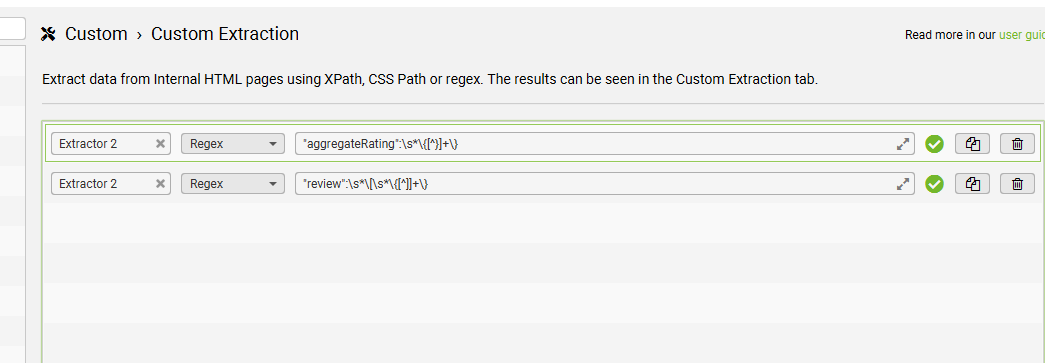
- Turned out easier to use this regex to identify all the URLs that have aggregateRating fields:
"aggregateRating":\s*\{[^}]+\}
- and set up a second custom extraction to check for URLs/pages with any reviews –
"review":\s*\[\s*\{[^]]+\}
If the page had review schema, but not aggregateRating – then we needed to fix them.
 Small Business Dad