
I’ve put together a spreadsheet for SEO schema checks here:
https://docs.google.com/spreadsheets/d/1dDqJ9_qrTVoJOZRxieJDp9XE3Q1TCq4ixNVudVtgp2M/edit#gid=0
Use https://classyschema.org/Visualisation and import a URL – test using different URLs, especially for eCommerce websites – like homepage, about page, product page, category pages
Test also with:
https://search.google.com/test/rich-results – add any issues in column C of sheet
and
https://validator.schema.org/ – add issues in Column D
- Put your “to do” list in columns E and F
When using validator, make sure you’re schema has all the relevant parameters.
The separate sheets on the Google Sheet linked above, has some examples for you to check against – written in JSON-LD
Finally, if the site is already live, check the schema reports in Search Console for any errors
If you have Screaming Frog, I’d also recommend running a crawl –
Go to Configuration – Spider – Crawl – and tick all the “Structured Data” boxes:
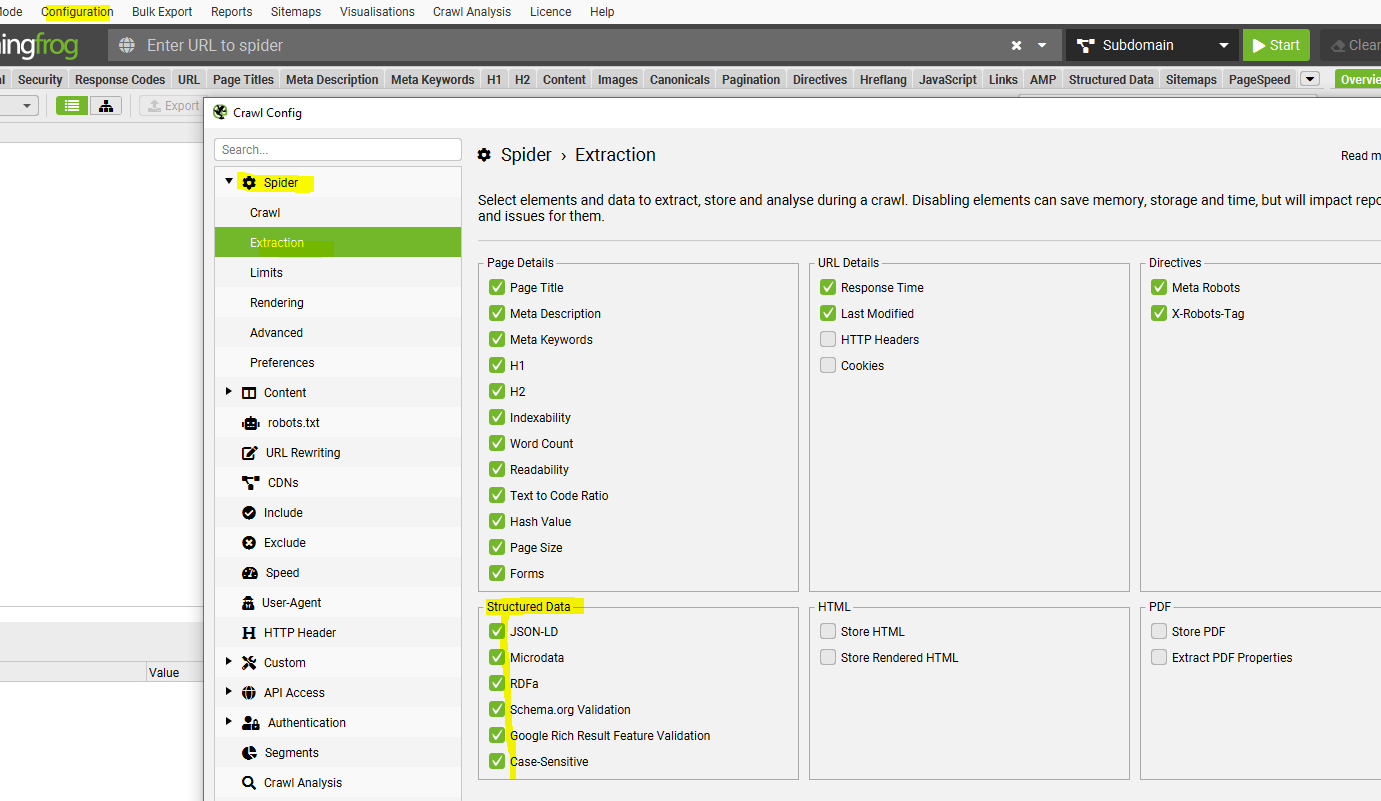
Then when the crawl has run – go to Reports – Structured Data and download each report
Finally, you can also check individual pages using the Ryte Structured Data Helper for Chrome –
| Check with CHrome plugin – Ryte structured data helper |
| https://chrome.google.com/webstore/detail/ryte-structured-data-help/ndodccbbcdpcmabmiocobdnfiaaimgnk/related |
 Small Business Dad