
- Summary
To associate name and other elements with the URL, it appears best to use ItemList in the schema markup, below is an example of SiteNavigationElement schema:
Without “position” for ItemList:
script type="application/ld+json">
{"@context":"http://schema.org",
"@type":"ItemList",
"itemListElement":
[
{
@type: "SiteNavigationElement",
name: MMA Equipment",
url:"https://www.blackbeltwhitehat.com/mma"
},
{
"@type": "SiteNavigationElement",
"name": "Cricket Equipment",
"url": "https://www.blackbeltwhitehat.com/cricket"
},
{
@type: "SiteNavigationElement",
name: "Tennis Equipment",
url:"https://www.blackbeltwhitehat.com/tennis"
},
{
@type: "SiteNavigationElement",
name: "Golf Equipment",
url:"https://www.blackbeltwhitehat.com//golf"
},
{
@type: "SiteNavigationElement",
name: "Rugby Equipment",
url:"https://www.blackbeltwhitehat.com/"
},
{
@type: "SiteNavigationElement",
name: "Gym Equipment",
url:"https://www.blackbeltwhitehat.com//gym-equipment"
}
]
}}
</script>- Put the SChema in the <head> or <body> tags.
- Just replace the name and the URL if you want to use the code above.
SiteNavigationSchema – seems like a good idea for most websites to use this schema.
SiteNavigationElement Schema Example 2
Whilst the above schema code validates in all the tests – you’ll ideally want the position “element” in the schema too:
<script type="application/ld+json">
{
 "@context":"https://schema.org",
 "@type":"ItemList",
 "itemListElement":[
 {
 "@type":"ListItem",
 "position":1,
 "url":"https://example.com/dave/mma-guy"
 },
 {
 "@type":"ListItem",
 "position":2,
 "url":"https://example.com/dave/cheeky-exec"
 },
 {
 "@type":"ListItem",
 "position":3,
 "url":"https://example.com/dave/ppc-seo"
 }
 ]
}
</script>
It is in schema format so directly informs Google of page locations and what they’re about.
You can put it separately from the main navigation markup, in either the <head> or the <body> when using the recommended JSON format. Which effectively gives Googlebot an additional number of links to crawl or at least acknowledged with some additional data describing what the links are about.
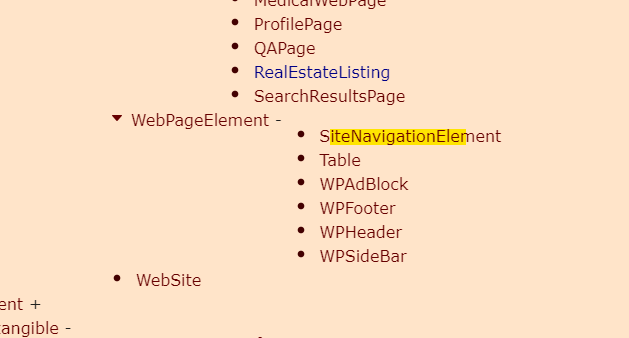
There are some old posts saying Navigation Schema is not approved by Google, but it now appears to be on the list of approved schema – screenshotted below “SiteNavigationElement”:
https://schema.org/docs/full.html
SiteNavigationElement Schema Generator
Chat GPT can do it, but you have to give it the example above or it lays it all out weird.
This is the prompt that I used:
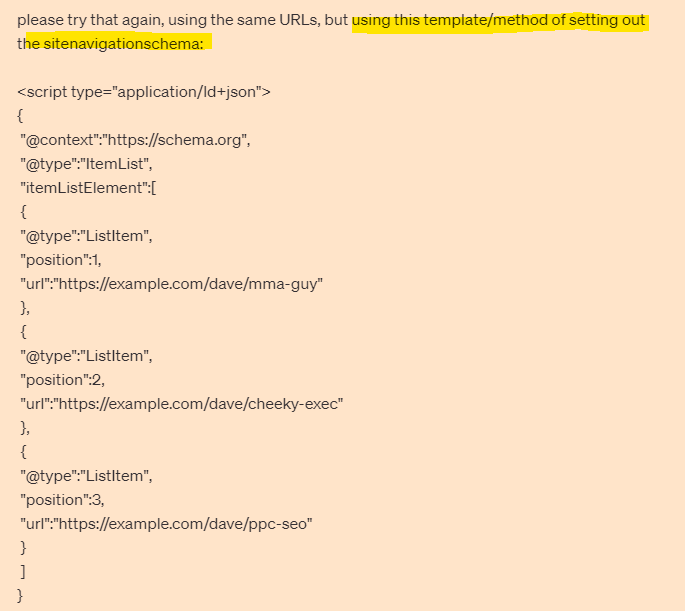
and the result:
<script type="application/ld+json">
{
  "@context":"https://schema.org",
  "@type":"ItemList",
  "itemListElement":[
    {
      "@type":"ListItem",
      "position":1,
      "url":"https://www.bikes.co.uk/"
    },
    {
      "@type":"ListItem",
      "position":2,
      "url":"https://www.bikes.co.uk/electric-mountain-bikes"
    },
    {
      "@type":"ListItem",
      "position":3,
      "url":"https://www.bikes.co.uk/infusion-grey-electric-bike"
    },
    {
      "@type":"ListItem",
      "position":4,
      "url":"https://www.bikes.co.uk/hybrid-electric-bikes"
    },
    {
      "@type":"ListItem",
      "position":5,
      "url":"https://www.bikes.co.uk/electric-bikes-under-1000"
    },
    {
      "@type":"ListItem",
      "position":6,
      "url":"https://www.bikes.co.uk/swift-electric-heritage-step-through-ebike-dark-grey"
    },
    {
      "@type":"ListItem",
      "position":7,
      "url":"https://www.bikes.co.uk/electric-bike-batteries"
    },
    {
      "@type":"ListItem",
      "position":8,
      "url":"https://www.bikes.co.uk/careers"
    },
    {
      "@type":"ListItem",
      "position":9,
      "url":"https://www.bikes.co.uk/electric-bikes-under-400"
    },
    {
      "@type":"ListItem",
      "position":10,
      "url":"https://www.bikes.co.uk/ebikes-patriot-grey-orange"
    },
    {
      "@type":"ListItem",
      "position":11,
      "url":"https://www.bikes.co.uk/privacy-policy-cookie-restriction-mode"
    },
    {
      "@type":"ListItem",
      "position":12,
      "url":"https://www.bikes.co.uk/hardtail-electric-mountain-bikes"
    },
    {
      "@type":"ListItem",
      "position":13,
      "url":"https://www.bikes.co.uk/returns-policy"
    },
    {
      "@type":"ListItem",
      "position":14,
      "url":"https://www.bikes.co.uk/contact"
    },
    {
      "@type":"ListItem",
      "position":15,
      "url":"https://www.bikes.co.uk/warranty"
    },
    {
      "@type":"ListItem",
      "position":16,
      "url":"https://www.bikes.co.uk/folding-electric-bikes"
    },
    {
      "@type":"ListItem",
      "position":17,
      "url":"https://www.bikes.co.uk/electric-bike-accessories"
    },
    {
      "@type":"ListItem",
      "position":18,
      "url":"https://www.bikes.co.uk/step-through-electric-bikes"
    },
    {
      "@type":"ListItem",
      "position":19,
      "url":"https://www.bikes.co.uk/swifty-liberte-folding-electric-bike-pink"
    },
    {
      "@type":"ListItem",
      "position":20,
      "url":"https://www.bikes.co.uk/electric-hybrid-bikes"
    },
    {
      "@type":"ListItem",
      "position":21,
      "url":"https://www.bikes.co.uk/klarna-finance-info"
    },
    {
      "@type":"ListItem",
      "position":22,
      "url":"https://www.bikes.co.uk/faqs"
    },
    {
      "@type":"ListItem",
      "position":23,
      "url":"https://www.bikes.co.uk/customer-reviews"
    },
    {
      "@type":"ListItem",
      "position":24,
      "url":"https://www.bikes.co.uk/womens-electric-bikes"
    },
    {
      "@type":"ListItem",
      "position":25,
      "url":"https://www.bikes.co.uk/delivery"
    }
  ]
}
</script>
From what I’ve read and from the example I’ve been sent during my ‘research’, it appears you can have the schema code, completely separate to the main HTML navigation code – so effectively adds an additional incidence of HTML links (which is good).
Implementing Navigation Schema
If using JSON – put the schema code in <head> or <body> of HTML page
The schema can be placed on all of the site’s pages.

 Small Business Dad
Should we add sitenavigation schema code only if our webpage is having navigation menu?
LikeLike
well, I don’t think it is a replacement for a nav menu
LikeLike